


If you’re here, chances are Contractor+ isn’t quite cutting it anymore. Maybe it’s the $29/user pricing that hits differently when your team grows. Maybe it’s realizing that “comprehensive” features don’t mean much when half of them are still in beta.
Or maybe you’re just tired of clicking through five screens to schedule one job.
You’re not alone. According to the 2025 State of Field Service Report, 88% of organizations improved asset uptime by 6-15% after implementing new field service solutions, proving that switching to the right platform delivers real, measurable results.
The field service software landscape has transformed dramatically since Contractor+ launched in 2020.
Today’s leading platforms use conversational AI to schedule jobs in seconds, not minutes. They offer pricing structures that make sense as you grow.
Most importantly, they ship features that actually work from day one.
We’ve analyzed the 10 best alternatives to Contractor+. This is a genuine listicle that covers a clear comparison of real pricing, actual features, and honest pros and cons. Whether you’re a solo contractor or managing a 10-person crew, one of these platforms will fit your business better than what you’re currently using.
Why Contractors Are Dropping Contractor+
Despite strong ratings and comprehensive features, Contractor+ creates friction points that drive contractors elsewhere. The main issues:
- Per-user pricing that scales poorly: At $29/user monthly, a five-person team pays $145/month before realizing features like live map remain in beta testing.
- Overwhelming complexity: The extensive feature set impresses on paper but creates unnecessary confusion for businesses needing simple scheduling and invoicing.
- Limited integrations: QuickBooks sync is mostly one-way; invoices flow out, but only clients and templates sync back, creating data reconciliation headaches.
- Beta features at premium prices: Live Map, purchase orders, and advanced GPS tracking stay “coming soon” while competitors ship production-ready AI automation.
How do we actually compile this list?
We analyzed thousands of verified user reviews across G2 and Capterra, compared features through real workflow testing, and evaluated customer support response times. This ranking reflects actual contractor experiences with these platforms in 2026, not marketing promises.
Quick Comparison: Top Contractor+ Alternatives at a Glance
Here’s how the top 10 alternatives stack up against Contractor+ across key features that actually matter for field service businesses:
| Platform | Best For | Automation | Mobile App Availability | Customer Support |
| Contractor+ | Solopreneurs needing free tools | Limited – manual workflows | iOS & Android (basic) | Email support, slower response times |
| FieldCamp | AI-powered simplicity & scalability | Advanced AI – conversational interface, intelligent scheduling | iOS & Android | 24/7 live chat, dedicated onboarding, quick response time |
| Jobber | Growing service teams (5-15 users) | Moderate – automated follow-ups, review requests | iOS & Android | Email & chat support, business hours only |
| Housecall Pro | All-around value for established businesses | Good – automated marketing, review generation | iOS & Android | Phone & chat during business hours, variable response times |
| Zoho FSM | Businesses already in the Zoho ecosystem | Good – workflow automation within the Zoho suite | iOS & Android | Email & chat support, tiered by plan |
| SimPRO | Project-based commercial contractors | Moderate – customizable workflows | iOS & Android | Email & phone support, dedicated account manager on higher tiers |
| Service Fusion | Multi-trade contractors need flexibility | Moderate – automated invoicing, scheduling | iOS & Android | Phone & email support during business hours |
| Procore | Large construction projects & GCs | Good – construction workflows, RFI automation | iOS & Android | Tiered support, dedicated success manager for enterprise |
| Connecteam | Mobile-first team management on budget | Good – shift scheduling, time tracking automation | iOS & Android | Email & chat support, limited phone support |
| Houzz Pro | Residential remodeling & design-build | Basic – client communication automation | iOS & Android | Email support, community forums |
| Sage 100 Contractor | Established construction companies with accounting needs | Moderate – accounting automation, job costing | Limited mobile functionality (primarily desktop) | Phone & email support, implementation consulting available |
Key Takeaways from the Comparison:
- FieldCamp leads in AI automation with conversational interfaces that no competitor matches, plus exceptional 24/7 customer support with dedicated specialists
- Contractor+ offers a free tier but lags in automation and has a slower support response compared to premium alternatives
- Jobber and Housecall Pro provide solid middle-ground options with good integrations but limited AI capabilities
- SimPRO and Procore suit enterprise needs but come with complexity and higher costs
- Zoho FSM only makes sense if you’re already invested in the Zoho ecosystem
- Service Fusion and Connecteam offer budget-friendly options with decent features
- Houzz Pro is niche-specific for design-build contractors
- Sage 100 Contractor is desktop-heavy and best for accounting-focused construction companies
1- FieldCamp – Best Field Service Automation
FieldCamp built its platform around conversational AI from day one. Type or speak “Schedule HVAC maintenance for the Johnson residence tomorrow with our closest tech” on the AI command centre, and it handles technician matching, route optimization, customer updates, and invoicing automatically.
This is general contractor software designed for 2026, with production-ready features without any beta labels, with straight delivery.
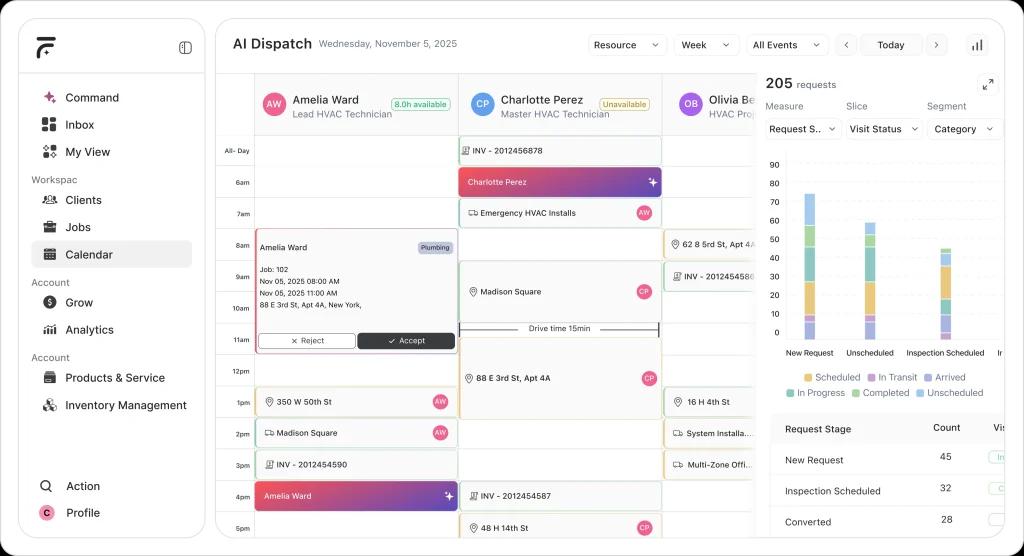
The platform handles complete workflow automation: scheduling, dispatch, invoicing, payments, customer communications, and team coordination through natural language.
Real-time GPS tracking shows crew locations with accurate arrival predictions. Predictive analytics learn your business patterns, peak seasons, pricing trends, job types, and proactively suggests optimizations. Mobile apps maintain full functionality offline with instant sync.
Integration with QuickBooks and payment processors keeps data flowing seamlessly. Implementation takes hours, not weeks, with AI-assisted setup and data migration.
How Tree Rangers Hit $1M and Became Sellable?
Ronnie Pinnell’s Florida-based tree service hit $1M annual revenue, but couldn’t sell, nine years of paper invoices meant no verifiable books. After implementing FieldCamp, the AI receptionist handled calls while crews worked 40 feet up trees, automated workflows eliminated manual coordination, and conversational business intelligence answered questions like “What’s my profit margin on this job?” within months. The business transformed from “worth nothing because it was all cash” to a documented, data-driven operation with sellable enterprise value.
Core capabilities of FieldCamp:
- Conversational AI: Manage operations through natural language
- Automated Dispatch: Auto-assigns jobs by skills, location, and traffic using an AI dispatcher
- Automated Invoicing: Generates invoices with smart pricing
- Real-Time Tracking: See crew locations with arrival predictions
- Predictive Analytics: Identifies patterns and suggests optimizations
- Seamless Integrations: QuickBooks and payment processors sync automatically
Ideal use case: Field service businesses with 25-55 employees drowning in dispatch work, companies wanting software that scales with growth instead of penalizing it, and operations ready for complete workflow automation.
| Pros | Cons |
| Intelligent AI automation eliminates manual scheduling work Pricing scales with your business instead of punishing growth An online booking widget that lets customers get quotes and schedule instantly | Custom pricing requires a demo call (but ensures you only pay for what you actually need) |
Frequently Asked Questions
What is a field-based service?
Field service generally means services provided outside a company’s office or grounds. So the technicians or workers are sent to off-site locations to perform their tasks, which commonly involve work such as sales, repairs, installs, customer support, or inspections.
Why is field service management important?
To run a successful field service business, it is essential to have good field service management. Because good management helps in improving efficiency, customer experience, and remote data collection. So when this is integrated with your company’s operational structure, you can access information quickly, streamline operations and attain many more benefits.
What is field service management software (FSM)?
To run a successful field service business, it is essential to have good field service management. Because good management helps in improving efficiency, customer experience, and remote data collection. So when this is integrated with your company’s operational structure, you can access information quickly, streamline operations and attain many more benefits.
What are the common features of field service management software?
Some common field management software features include:
Document management
Work order management
Inventory management
Dispatching
Job scheduling
Reporting and analytics
Fleet tracking
Calendar management
Lead management
Offline reporting
How can field services be improved?
Managing field service operations in a business can pose a challenge because of various factors. But you can take some measures to improve it and make your customers happy.
Some practical ways to improve field services are:
Give the sales team more information about the field operations
Collect and analyze data
Increase communication and collaboration
Optimize the overall operation
Schedule preventative maintenance
Identify patterns for forecasting