

You know that sinking feeling when you realize you’ve spent more time this week doing paperwork than actually painting? Welcome to the club nobody wants to join.
The smartest painting contractors have already cracked the code: stop managing chaos, start automating.
While you’re juggling estimate requests, crew schedules, and overdue invoices, your competitors are using painting contractor software to handle the busywork automatically.
According to industry research, contractors using specialized painting contractor software complete more jobs with the same team, because they’re painting, not pushing paper.
Ready to reclaim your time and sanity?
Let’s explore how painting contractor software transforms scattered operations into streamlined profit machines.
What is Painting Contractor Software?
Painting contractor software is specialized business management software designed specifically for painting companies to digitize and automate their entire workflow. From that first phone call to the final invoice, it streamlines every step of your business operations.
Think of it as your all-in-one digital headquarters where scheduling, estimating, project tracking, and payments live together in perfect harmony.
At its core, this field service management software eliminates the noise of running a painting business the old-fashioned way. Without paperwork, double-booked crews, or forgotten follow-ups. Instead, you get one integrated system that handles every business operation aspect of your painting business, whether you’re a solo painter working weekends or managing multiple commercial crews across the city.
This painting business software definition encompasses several key aspects:
- Centralized Operations: All business data in one accessible location
- Automated Workflows: Reduce manual tasks and paperwork
- Real-time Updates: Information syncs across all devices instantly
- Professional Tools: Creates polished estimates, invoices, and reports
- Mobile Access: Works from office computers or smartphones in the field
Whether you’re a solo painter or managing commercial crews, this software becomes your digital command center. It replaces scattered tools and manual processes with one streamlined contractor management solution.
Now that you understand the basics, let’s explore what makes software an important pillar for any painting business.
Key Features of the Painting Contractor Software
Modern software for painters includes several essential modules that work together seamlessly:
1. Estimating and quoting tools:
The estimating module forms the foundation of most painting contractor software. These tools transform the quoting process from guesswork to precision:
| Features | What it does | Benefit |
|---|---|---|
| Template Library | Pre-built estimate formats | Create quotes faster |
| Materials Calculator | Auto-calculates paint & supplies | Reduce waste and improve margins |
| Labor Tracking | Estimate crew hours needed | Accurate project timelines |
| Photo Integration | Add images to quotes | Win more jobs with visual quotes |
| E-signature | Instant approval capability | Close deals faster |
When creating estimates, having the right pricing strategy is crucial. Learn how much to charge for
painting services to ensure profitable quotes every time.
2. Project management features:
Project management functionality keeps every job on track from start to finish.
How does painting contractor software help?
- Crew calendars: See who’s working where at a glance
- Progress tracking: Monitor each project phase in real-time
- Task checklists: Ensure nothing gets missed
- Visual scheduling boards: Drag-and-drop job assignments
- Photo documentation: Before, during, and after shots
- Weather integration: Plan around conditions for exterior work
These features prevent double-booking, optimize crew utilization, and keep everyone informed through automated notifications about schedule changes and updates.
3. Financial management
Financial tools within painting business software handle the money side of operations efficiently:
Invoice generation
- Automatically creates invoices from completed jobs
- Includes company branding and payment terms
- Sends reminders for overdue accounts
For those just starting or preferring traditional methods, you can also use a painting invoice template as a stepping stone before transitioning to automated software.
Payment processing
- Accepts credit cards, checks, and digital payments
- Tracks partial payments and deposits
- Provides payment history for each client
Financial reporting
- Profit/loss by job or period
- Cash flow projections
- Expense tracking and categorization
4. CRM
Customer Relationship Management (CRM) features help build lasting client relationships. This contractor management solution maintains:
- Complete contact information and communication history
- Job history with notes and preferences
- Lead tracking through your sales pipeline
- Automated follow-up reminders
- Marketing campaign management
- Referral source tracking
Did you know? FieldCamp’s AI-powered CRM acts as a complete command center for painting contractors. You can instantly access full customer histories, service preferences, and job documentation in one centralized location. Instead of hunting through scattered files or trying to remember client details, you can simply ask or type questions like “What’s the paint color preference for the Johnson house?” or “When was our last job with ABC Property Management?” and get immediate answers. This command center approach means your entire team, from office staff to field crews, can access complete conversation histories, past job photos, and custom client notes from any device, ensuring every customer interaction is informed and professional.
5. Analytics and reporting
Data-driven insights help you make smarter business decisions. Modern painting contractor software provides comprehensive reporting tools that transform raw data into actionable intelligence:
- Performance dashboards: Real-time overview of key metrics like revenue, job
completion rates, and crew productivity - Profitability analysis: Track profit margins by job type, crew, or customer to
identify your most lucrative work - Time tracking reports: See actual vs. estimated hours to improve future quotes and
identify efficiency gaps - Sales pipeline analytics: Monitor lead conversion rates and identify bottlenecks in
your sales process - Custom report builder: Create specific reports for tax preparation, business
planning, or investor meetings
Did you know? FieldCamp’s customizable dashboard lets painting contractors create personalized analytics. By pinning multiple chart widgets to track job progress, crew efficiency, and more, you can filter data by specific time frames to analyze the highest-value exterior painting jobs and plan your crew scheduling accordingly.
6. Inventory management
Keep track of paints, supplies, and equipment across all jobs and storage locations. Smart inventory software prevents costly delays and reduces waste:
- Stock level monitoring: Real-time visibility of paint colors, brushes, rollers, and
supplies across the warehouse and trucks - Automatic reorder alerts: Get notified when supplies run low, with suggested
reorder quantities based on upcoming jobs - Job material allocation: Reserve specific paints and materials for scheduled jobs
to avoid double-booking supplies - Waste tracking: Monitor leftover materials to reduce waste and improve job costing
accuracy
Every Hour Lost to Disorganization Is Revenue Walking Away
Stop letting operational chaos steal your profits. FieldCamp brings order to your scheduling, invoicing, and crew management in one powerful platform.
Benefits of Using Painting Contractor Software
Painting contractor software delivers measurable advantages that transform how painting companies operate:
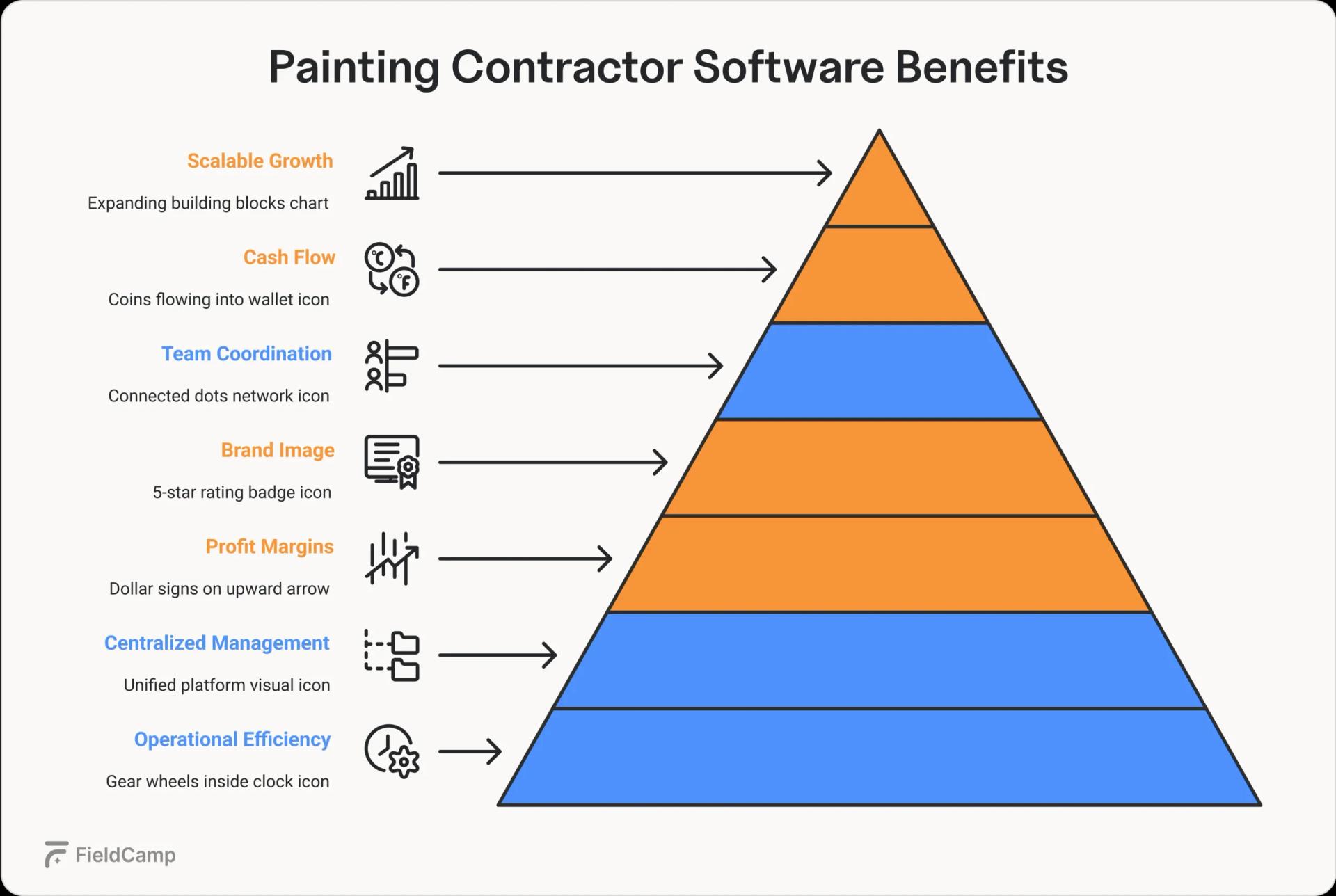
- Increased operational efficiency: Automated scheduling, estimating, and invoicing
eliminate hours of manual work each week, enabling teams to complete more jobs and focus on quality
craftsmanship - Centralized business management: All customer data, job details, and financial
information live in one accessible platform, eliminating lost paperwork and reducing costly mistakes - Improved profit margins: Accurate job costing tools and real-time expense tracking
help identify your most profitable services and optimize pricing strategies - Professional brand image: Deliver polished digital estimates, branded invoices, and
timely communications that set you apart from competitors still using handwritten quotes - Better team coordination: Real-time updates keep office staff and field crews
synchronized, reducing miscommunication and ensuring smooth project execution - Faster cash flow: Automated payment reminders and integrated payment processing
significantly reduce the time between job completion and payment collection - Scalable growth: Systems that grow with your business make it possible to expand
from solo operations to multiple crews without operational chaos
These core advantages represent just the beginning of what modern painting contractor software can do for your business. From AI-powered automation that works around the clock to advanced reporting that reveals hidden profit opportunities, the complete transformation goes far deeper than these foundational benefits.
Discover the full spectrum of game-changing features and real contractor success stories in our comprehensive guide to painting contractor software benefits.
Types of Painting Contractor Software
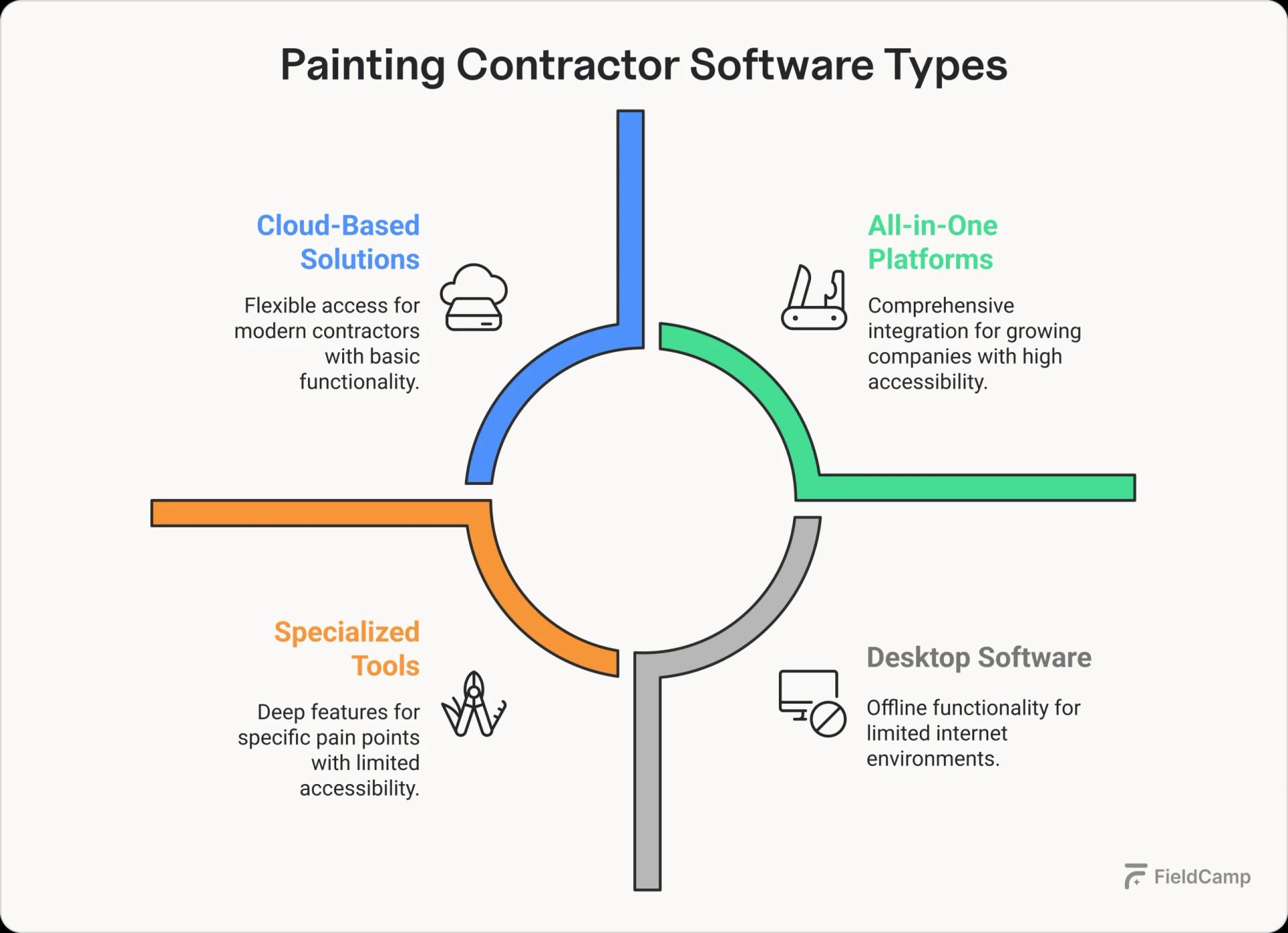
When exploring field service software options, you’ll encounter different approaches to solving the same business challenges. Understanding these distinctions helps you choose the right fit for your painting company’s specific needs and growth stage:
| Software type | Best for | Key features |
|---|---|---|
| All-in-One Platforms | Growing companies want everything integrated | • Single login for all features • Unified data across modules • Consistent user experience • One vendor relationship |
| Specialized Tools | Contractors with specific pain points | • Deep functionality in one area • Often more affordable initially • Requires multiple subscriptions • Common Integration challenges |
| Cloud-Based Solutions | Modern businesses prioritize flexibility | • Access from anywhere • Automatic updates • No IT maintenance • Monthly subscription model |
| Desktop Software | Traditional setups with limited internet | • One-time purchase option • Works offline • Data stored locally • Limited remote access |
| Mobile-First Platforms | Field-heavy operations | • Designed for touchscreens • Offline functionality • GPS and camera integration • Simplified interfaces |
| Desktop-First Systems | Office-heavy operations | • Complex estimating tools • Detailed reporting • Keyboard optimization • Multiple monitor support |
Now you know the different types available, but who exactly benefits from using painting contractor software?
Solo painters vs. small crews vs. larger painting companies
Solo Painters:
Streamline home painting projects with basic scheduling and invoicing tools, saving 5-10 hours weekly on admin tasks while managing house painter scheduling efficiently.
Small Crews (2-10 painters):
Focus on residential job tracking with coordination features for client proposals, residential work, ensuring smooth job assignments and team communication.
Larger Companies (10+ painters):
Require enterprise client management with advanced permissions, multi-crew scheduling capabilities, and comprehensive project reporting for large-scale job management.
Residential vs. commercial contractors
Residential:
Handle home painting projects with quick estimates, homeowner-friendly payments, and streamlined residential job tracking from initial client proposals residential through project completion.
Commercial:
Manage industrial painting management with complex bidding processes, large project workflows, commercial job scheduling, AIA billing integration, and detailed RFIs for enterprise-level operations.
Interior vs. exterior specialists
Interior:
Room-by-room estimates with color management systems for residential job tracking.
Exterior:
Weather tracking integration for commercial job scheduling and seasonal planning across large-scale job management operations.
Speaking of different business types, you’re probably wondering about the investment required for painting contractor software.
Explore our detailed breakdown of painting contractor software types to discover which solution aligns perfectly with your company’s size and growth ambitions.
Average cost of painting contractor software
Software for painters typically follows this pricing structure:
| Company size | Monthly cost | Monthly cost |
|---|---|---|
| Solo Painter | $29-$49 | Basic scheduling, estimates, invoicing |
| Small Crew | $99-$149 | Plus job management, basic reporting |
| Growing Company | $149-$199/user | Full features, integrations, support |
| Enterprise | Custom pricing | Advanced customization, dedicated support |
Most providers offer free trials to test their field service software overview and ensure it fits your workflow before committing.
Conclusion
Understanding what painting contractor software is the first step toward modernizing your painting business. Whether you’re a solo painter tired of paperwork or a growing company ready to scale, the right software transforms daily chaos into organized workflows. With options ranging from simple scheduling tools to comprehensive business management platforms, there’s a solution that fits your needs and budget.
The key is choosing software that grows with your business. Start with the features you need today, knowing you can expand as your painting company evolves.
Top 5 Benefits of Using Painting Contractor Software
The painting contractors market is expected to reach $243.41 billion by 2027, yet most contractors remain trapped in operational quicksand. Bidding blindly, scheduling manually, and hemorrhaging profits through inefficiencies they can’t even measure.
Why? Because while demand soars and labor shortages persist, the majority of contractors haven’t embraced the digital tools that could transform their operations.
Meanwhile, a growing segment of data-driven contractors is quietly dominating their markets using painting contractor software to unlock insights, automate workflows, and scale strategically.
The gap between digital adopters and traditional operators widens daily. Here’s what separates tomorrow’s market leaders from those who’ll struggle to survive.
Before diving into the benefits, let’s clarify what painting contractor software is and why it matters.
Painting contractor software is a digital platform that centralizes your entire business operations, from initial estimates and scheduling to project management and final invoicing, into one streamlined system.
Benefits of Using Painting Contractor Software
Let’s explore the transformative benefits that make this investment essential for contractors serious about efficiency, profitability, and sustainable growth.
1. Operational efficiency
Painting contractor software transforms chaotic daily operations into streamlined workflows through specific automation features:
Job Scheduling & dispatch:
Remember the morning scramble of figuring out who goes where? That’s history. Modern scheduling features eliminate the chaos of whiteboards and sticky notes by providing a clear, drag-and-drop calendar view of all your jobs and crews. You can instantly see who’s available, what equipment they have, and which projects are nearby.
When that downtown commercial project comes in, you simply drop it onto the crew schedule, and the system shows they’re finishing up just three blocks away and have the necessary equipment on their truck. No more calling five different crew leaders to figure out availability.

The AI-powered routing even suggests the most efficient job order to minimize drive time, but the real magic is simply having everything visible in one place.
Real-time project tracking:
Gone are the days of playing telephone to get project updates. Your crews simply tap their progress in the mobile app: “prep complete,” “first coat done,” “final walkthrough,” and you’re watching it happen in real-time from anywhere.
Better yet, clients get automatic updates too.
Contractors can benefit from this feature by saving them two hours daily of “just checking in” calls. The GPS tracking also means that customer calls asking when her crew will arrive, you can share “they’re 12 minutes away” without a doubt.
Smart inventory management:
Here’s where things get intelligent. The software tracks exactly what materials each job consumes, building a clear picture of your usage patterns. You’ll always know that exterior jobs average 15 gallons while interiors use 8, helping you quote accurately and order appropriately.
When inventory dips below your set minimums, you get instant alerts with pre-filled purchase orders.
The AI component learns your seasonal patterns over time, suggesting you stock up before your busy summer season, even without the predictive features. Simply knowing what you have and what you need transforms inventory management from guesswork to precision.
2. Financial Impact
The financial benefits of painting contractor software extend beyond simple cost savings. It fundamentally changes how you understand and control your business finances.
Key financial improvements:
| Metric | Impact | How it works |
|---|---|---|
| Job Costing Accuracy | Track actual vs. estimated costs in real-time | Mobile time tracking captures exact hours worked (no more “rounding up” by crews). Material scanning logs precise paint usage. Example: You quoted 16 hours for a bedroom repaint, but tracking shows it took 22 hours—now you know to adjust future quotes. |
| Cash Flow Acceleration | Get paid 2-3 weeks faster | Send invoices instantly upon job completion with photos of finished work. Automated payment reminders go out at 7, 14, and 21 days. Clients can pay via credit card with one click, putting money in your account within 48 hours instead of waiting 30+ days for checks. |
| Estimate Win Rate | Close 20-30% more bids | Professional estimates with photos, material options, and payment plans outsell handwritten quotes. The software shows which estimate templates convert best, so you can replicate winning formulas. Track why you lose bids to adjust pricing strategically. |
| Overhead Reduction | Cut administrative costs by 40% | Eliminate 15+ hours weekly of data entry, phone tag, and paperwork. One office manager can handle what previously required two people. Less pay for overtime and more time for invoicing or job costing. |
| Material Cost Control | Reduce waste by 15-25% | Track exactly how much paint each painter uses per square foot. Identify who’s overspraying or not calculating correctly. Bulk ordering insights show you’re paying $32/gallon buying weekly when monthly orders would cost $27/gallon. |
| Profit Margin Visibility | Know your margins on every job | Dashboard shows real-time profitability: Labor costs + materials + overhead = true job cost. Discover that small residential jobs yield 15% margins while commercial repaints deliver 40% then adjust your marketing focus accordingly. |
Example: Martinez Painting discovered their “quick touch-up” service was losing $50 per job once true drive time was factored in. They raised the minimum charge from $200 to $350, lost only 10% of those jobs, and turned a money-loser into a profitable service.
Meanwhile, their commercial repaint margins were higher than expected, so they shifted marketing focus and increased revenue by 35% in six months..
3. Customer Experience
Modern painting contractor software transforms customer interactions from frustrating to seamless through specific touchpoint improvements:
Professional first impressions:
Create estimates on-site using tablet apps that pull from your preset pricing catalog. Include photos of problem areas, material options with visuals, and detailed scope breakdowns.
Customers receive a branded PDF estimate via email before you leave their driveway, not a handwritten quote on carbon paper days later.
Proactive communication:
Automated SMS notifications keep clients informed without you lifting a finger:
- “Hi [Client name], your painting crew will arrive tomorrow between 8-10 AM.”
- “Day 2 update: Primer complete, paint application begins tomorrow.”
- “Your project is complete! Please click here to view photos and approve the work.”

Transparent project management:
Customers access a portal showing their project timeline, progress photos, and any change orders. When they ask to add crown molding mid-project, they approve the additional cost digitally, eliminating payment disputes later.
Simplified payment options:
Accept credit cards, ACH transfers, or financing options directly through the platform. Customers pay with one click from their invoice email, and funds hit your account in 1-2 days without chasing checks for weeks.
4. Business Growth
Painting contractor software provides the data and scalability needed to grow strategically rather than chaotically:
Data-driven decision making:
Built-in analytics reveal game-changing insights, such as:
- Which zip codes generate your highest-margin jobs
- What percentage of estimates convert (and why others don’t)
- Which crew completes jobs fastest without sacrificing quality
- Peak booking seasons to plan marketing campaigns around
- Most profitable services to promote vs. those to phase out
Scalability without complexity:
Add crews, expand territories, or launch new services without proportional administrative burden:
- New employees are onboarded through the app with training videos and digital paperwork
- Multi-location scheduling works identically whether you have 2 crews or 20
- Standardized processes ensure consistent quality across all teams
- Performance dashboards help identify top performers to promote to crew leaders
Marketing integration:
The software feeds your growth by:
- Automatically requesting reviews after job completion (boosting your Google rating)
- Tracking lead sources to show which marketing channels deliver ROI
- Creating before/after galleries for social media content
- Generating customer lists for targeted email campaigns
Example: A solo contractor using painting software added three crews in 18 months without hiring office staff, growing from $300K to $1.2M annual revenue while maintaining 30% profit margins.
See how contractors of every size, from solo operations to large crews, are benefiting from who need painting contractor software guide.
5. Time-Saving Benefits
Here’s how painting contractor software reclaims your time:
- Estimates: Cut from 2 hours to 15 minutes using templates, preset pricing, and photo integration
- Daily scheduling: Reduce 90 minutes of morning calls to 5 minutes of drag-and-drop adjustments
- Invoice creation: Batch process 50 invoices in 10 minutes vs. 3 hours manually
- Payroll prep: Export time tracking data directly to payroll, save 6-8 hours weekly
- Supply ordering: One-click reorders based on preset minimums, save 3 hours weekly
- Customer updates: Automated progress texts eliminate 20-30 daily “status check” calls
- Job costing: Real-time profitability reports replace 5 hours of weekend spreadsheet work
- Lead follow-up: Automated email sequences nurture prospects without your involvement
The Bottom Line: Most contractors save 15+ hours per week on administrative tasks. That’s two full days you can spend selling more jobs, managing projects better, or finally taking weekends off.
Conclusion
The benefits of painting contractor software extend far beyond simple digitization of paper processes. By embracing these comprehensive platforms, painting contractors can reduce admin errors, dramatically improve efficiency, and increase profitability in ways that manual systems simply cannot match.
From streamlining operations to enhancing customer satisfaction, the advantages touch every aspect of the business.
Painting contractor software is no longer a nice-to-have; it’s an essential tool for contractors serious about growing their business and staying ahead of the competition. The question isn’t whether to adopt this technology, but how quickly you can implement it to start reaping these transformative benefits.
Plan. Paint. Prosper.
Organize your jobs, track your crews, and accelerate payments with FieldCamp – the smart way to run your painting contractor business.
Who Should Use Painting Contractor Software? Explained
Every painting contractor knows that feeling – you start the day planning to paint, but somehow end up buried in hours of paperwork, estimates, crew schedules, and chasing payments. The business side can consume more time than the actual craft.
It’s the reality that nobody talks about at trade school. Yet, recent industry research shows that contractors who embrace digital tools are completing significantly more projects while working fewer administrative hours.
This guide is designed to help you understand that you don’t have to choose between being a great painter and running an efficient business. Painting contractor software bridges that gap, handling the administrative side so you can focus on what you do best.
Just smooth operations that let you sleep better at night.
Bookmark this guide that will help you determine if it’s time to digitize your operations and streamline your workflow.
Why Painting Contractor Software Matters?
Think about last week: How many times did you lose track of which crew was where? How many estimates sat in your truck because you forgot to follow up? These aren’t just minor inconveniences – they’re profit leaks that represent common pain points for painting companies.
Modern painting contractor software solutions plug these leaks by automating the details that drain your time and energy. Real-time updates replace paperwork. Accurate pricing replaces guesswork. Automated payment tracking replaces endless phone calls.

Understanding who needs painting contractor software starts with recognizing which category your business falls into.
Solo Painters & Independent Contractors
Solo painters often believe they’re too small to benefit from painting software, but this couldn’t be further from the truth.
Independent contractors face unique challenges that make them ideal businesses for painting software.
Managing everything single-handedly means juggling customer communications, scheduling, estimating, invoicing, and actual painting work. Without proper systems, important details slip through the cracks. A forgotten follow-up or misplaced estimate can mean lost business.
Key benefits for solo painters:
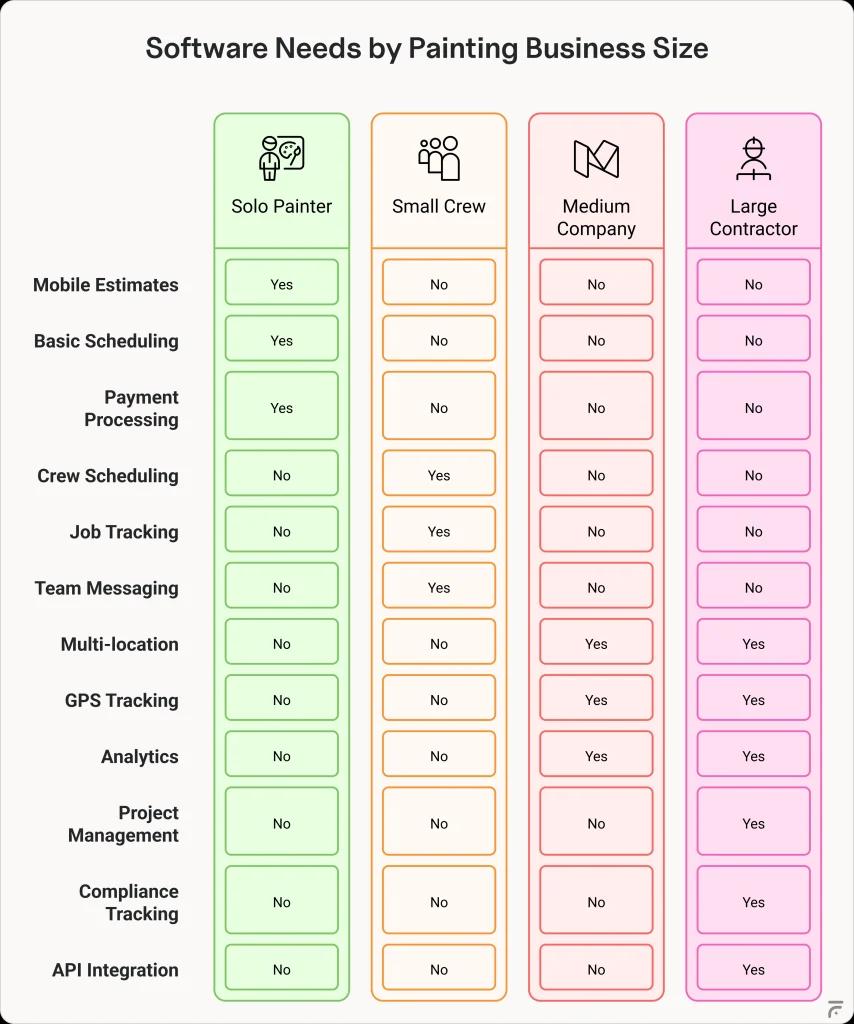
- Professional estimates on-site – Create polished quotes from your phone in minutes
- Simple scheduling – See your week at a glance, avoid double-bookings
- Instant invoicing – Get paid faster with mobile payment processing
- Time tracking – Know exactly how profitable each job is
- Customer database – Never lose contact info or job history again
Small Painting Crews (2-10 employees)
If you’re running a crew of 2-10 painters, you’ve probably hit that frustrating middle ground where sticky notes and whiteboards just don’t cut it anymore. Small painting crews represent the sweet spot for painting contractor software adoption.
With multiple painters working different jobs, visibility becomes your biggest challenge. You need to know who’s where, what’s running late, and whether the right materials made it to the job site. Weather delays and customer changes can turn your perfectly planned week into chaos.
Essential features for small crews:
- Crew scheduling boards – Drag-and-drop assignments, see all jobs at once
- Real-time job updates – Photos, progress notes, and issues from the field
- Materials tracking – Know what’s needed and what’s been used
- Labor cost visibility – Track actual hours vs. estimated for each job
- Team communication – Built-in messaging replaces endless phone calls
Medium-Sized Painting Companies (10-50 employees)
Once you hit 10+ employees, you’re playing a different game entirely. The systems that worked when you knew every job personally start breaking down fast.
Multiple crews, mixed residential and commercial work, and bigger budgets mean you need real tools – not just better spreadsheets.
At this size, you’re dealing with cash flow complexity, project margins that can make or break your quarter, and the constant juggle of keeping crews productive without overcommitting. Software for companies this size needs to handle both the field operations and the business intelligence side.
Core requirements at this scale:
- Multi-location management – Coordinate offices and warehouses
- Advanced reporting – Profitability by job type, crew, or customer
- Inventory management – Automatic reorder points, vendor integration
- GPS tracking – Real-time crew locations and route optimization
- Accounting integration – Seamless sync with QuickBooks or similar
- Customer portals – Let clients track progress and approve changes
Never Wonder “Where’s My Crew?” Again
FieldCamp’s drag-and-drop crew boards show you everything: who’s where, what’s needed, and how every job’s progressing.
Large Painting Contractors (50+ employees)
At 50+ employees, inefficiency becomes both inconvenient and costly. You’re managing multiple locations, complex commercial projects, and enough moving parts that one missed detail can cost thousands.
These organizations need systems that can handle serious complexity while maintaining consistency.
Large contractors typically work with GCs, architects, and other trades on multi-phase projects. The coordination alone requires dedicated tools – shared portals, automated reporting, and change order tracking that keep everyone on the same page.
Advanced capabilities required:
- Project management suite – Gantt charts, critical path tracking
- Document control – Version management for specs and drawings
- Safety management – Training records, incident tracking, compliance
- Subcontractor management – Onboarding, insurance tracking, and payments
- Business intelligence – Custom dashboards for executives
- API integration – Connect with existing enterprise systems
Specialized Painting Businesses
Different painting specializations have unique software requirements based on their operational models and customer bases:
Commercial vs. residential contractors
| Aspect | Residential painting management software | Commercial painting contractor software |
|---|---|---|
Typical Quote Process | Room-by-room walkthrough, same-day pricing | Detailed takeoffs, multi-phase estimates |
| Payment Terms | 50% down, balance on completion | Progress billing, 30-90 day terms |
| Compliance Tracking | Basic insurance verification | Bonding, safety certs, prevailing wage |
| Decision Makers | Homeowner (1-2 people) | Property managers, multiple stakeholders |
| Schedule Flexibility | “Can we move to next week?” | Hard deadlines with liquidated damages |
| Crew Size | Small teams (2-4 painters) | 10+ painters, specialized roles |
Interior vs. exterior specialists
Interior specialists need software focusing on color consultation tools, detailed room measurements, and furniture protection documentation. They often work year-round with consistent scheduling needs.
Exterior specialists require weather integration for scheduling, equipment tracking for lifts and scaffolding, and seasonal workforce management tools. Their software must handle the feast-or-famine nature of weather-dependent work.
Industrial and specialty coating contractors
Industrial painters face unique challenges requiring specialized software features: strict specification tracking for coating systems, environmental condition monitoring and documentation, safety protocol management and training records, and equipment calibration tracking.
These contractors often work in regulated environments where documentation is critical. Software must maintain detailed records of surface preparation, application conditions, and quality control testing.
Making the Right Choice
The bottom line: if you’re spending more time on paperwork than painting, or if simple scheduling decisions are keeping you up at night, it’s time to seriously consider software. Start with your biggest headache – whether that’s estimates, scheduling, or payments – and find software that solves that first. You can always add features as you grow.
Remember, the best painting contractor software isn’t the one with the most features – it’s the one that gets used by you and your team. Pick something that matches where your business is today, with room to grow into where you want to be tomorrow.
Ready to Plug Those Profit Leaks?
Whether you’re a solo painter or managing crews, FieldCamp’s painting contractor software is built for your exact needs. Join thousands of contractors who’ve already made the switch from chaos to control.
How Painting Contractor Software Works: A Simple Breakdown
If you’re managing painting jobs with sticky notes, spreadsheets, and constant phone calls, there’s a better way. Many contractors are discovering how painting contractor software works and finding it simpler than expected.
This guide walks you through the software workflow for contractors, avoiding overwhelming feature lists and technical knowledge. Consider it your reference for understanding how digital tools fit into painting business operations.
We’ll follow one painting job from initial customer call to final payment, showing you exactly how process automation handles repetitive paperwork, coordinates your crew, and how digital project tracking keeps you updated on every project.
We bet by the end, you’ll see why painting contractors are making the switch and how the process works.
Let’s start with what happens when a customer calls…
Real impact: According to BusyBusy, painting contractors who use mobile time tracking save thousands of dollars annually by eliminating paper timecard errors and obtaining accurate job measurements.
1. Software Workflow for Contractors
Understanding how painting contractor software works starts with seeing the complete workflow. Everything connects in one system:
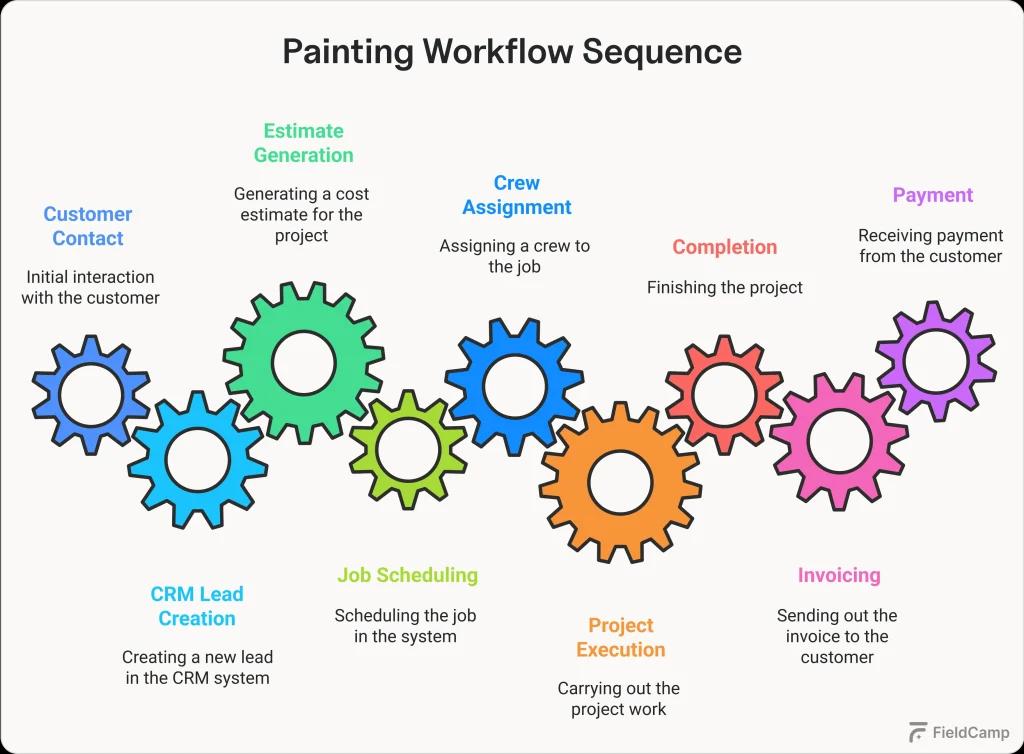
Let’s break down each step to see exactly how the software workflow for contractors transforms your daily operations.
1.1 Lead to estimate process
When a customer reaches out, their information flows directly into the CRM system. Whether they call, email, or fill out a website form, a lead profile is created instantly with all their details—name, address, project needs, and any special requests like “paint before June wedding.”
| Smart command feature: With advanced painting software like FieldCamp, you can simply speak or type naturally: “New lead Sarah Johnson, Victorian on Main Street, exterior paint before June wedding.” The AI-powered command center understands and creates the complete lead profile automatically without filling forms, manual entry. Just natural conversation converted into organized data. |
The CRM tags each lead’s source (Google ad, referral, yard sign) so you know what marketing works. It also checks for previous interactions, pulling up past estimates or completed jobs for returning customers.
| Visual advantage: With FieldCamp’s unified dashboard, you see your entire business at a glance, all estimates pending approval, quotes sent this week, invoices awaiting payment, and completed jobs. One screen shows your total revenue pipeline, from “$45K in pending estimates” to “$28K in unpaid invoices.” You get to see the whole picture of your finances as your business operates without clicking through multiple screens or running reports. |
Creating estimates becomes instant. Customer information populates automatically, you add square footage and specifications, and the system calculates everything based on your historical data.
Not sure about pricing? Check our guide on how much to charge for painting services to ensure your estimates are competitive yet profitable.
A professional PDF estimate is generated in minutes and emailed directly to the customer with options for upgrades.
The CRM tracks when customers open estimates and triggers follow-ups automatically—gentle reminders at three days, then seven days. When approved, the estimate converts to an active job instantly.
1.2 Job scheduling and assignment
The approved job appears in your scheduling dashboard with all details intact.
Visual calendars show crew availability: Jim’s crew in blue finishing Tuesday morning, Sarah’s team in green wrapping up Monday afternoon.
Drag the job to an open slot, and the system verifies everything: crew skills match the job, drive time allows arrival, and weather looks good for exterior work.
One placement triggers notifications to everyone: the crew gets job details, customer gets confirmation.
| Next-level AI scheduling: FieldCamp takes this even further with AI-powered scheduling. Once you input that Jim excels at Victorian exteriors and Sarah specializes in commercial interiors, the AI automatically matches incoming jobs to the perfect crew. It analyzes skill requirements, crew availability, job location, and even traffic patterns to suggest optimal schedules. Instead of you playing calendar Tetris, the AI presents the best options, saving your hours. |
Beyond smart scheduling, the real power comes from automated communication that keeps everyone informed without manual effort.
| Workflow builder technology: Modern painting software includes workflow builders that let you create custom automations using simple trigger-condition-action logic. Set it up once: “When job is scheduled → If customer wants updates → Send confirmation text.” But here’s what makes it even easier: FieldCamp offers pre-built workflow templates specifically for painters. The real-time customer service updates template handles all the common notifications painters need, from scheduling confirmations to completion alerts. Just activate the template, and your customer communication runs on autopilot. |
When reality hits, jobs run long – the system adapts. It shifts schedules, notifies affected parties, and keeps everything flowing without manual coordination.
1.3 Project execution workflow
Morning reminders hit crew phones with job details and navigation. Opening the mobile app shows everything: color selections, special instructions, customer preferences, and photos from the estimate.
Crews clock in with GPS verification, updating job status to “In Progress.” They document existing conditions with photos that automatically attach to the job record. Throughout the day, they update task progress, request materials, and communicate with the office, all through the app.
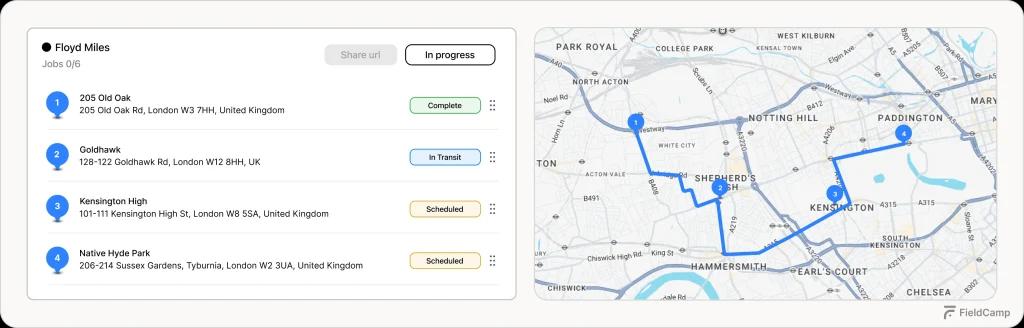
When unexpected issues arise, like discovering rot during prep, crews photograph damage and create change orders instantly. The office prices it, sends it for customer approval, and work continues without delays. All documentation stays permanently attached to the job record.
1.4 Completion and invoicing cycle
Finishing touches complete, crews capture final photos showcasing the transformation. Customers do walkthroughs and sign off digitally.
That signature triggers automatic invoice generation with all job details:
- Original estimate
- Change orders
- Hours worked
- Materials used
- Previous payments
The invoice includes before/after photos and is sent immediately with a payment link.
Customers pay online, the system processes payment, updates accounting, and marks the job complete. Post-completion messages thank customers and request reviews automatically.
Need a professional invoice template to get started? Download our free painting invoice template designed specifically for contractors.
The software analyzes job data: comparing estimated versus actual hours and materials to improve future estimates. Months later, it sends maintenance reminders to generate repeat business.
2. Process Automation
Process automation eliminates repetitive tasks throughout your business, from scheduling to payments.
2.1 Scheduling automation systems
The software learns from every completed job. It knows exterior work takes longer in humidity, certain crews excel at specific job types, and some neighborhoods typically add extras mid-project. This intelligence helps schedule new jobs more accurately.
Weather integration monitors forecasts and suggests rescheduling before rain hits.
The system optimizes routes to minimize drive time and balances workload across crews automatically.
2.2 Invoicing and payment automation
Invoices trigger payment reminders on smart schedules; friendly at first, firmer for overdue accounts. The system processes online payments, matches them to invoices, and updates your books instantly.
Recurring invoices for maintenance contracts are generated automatically.
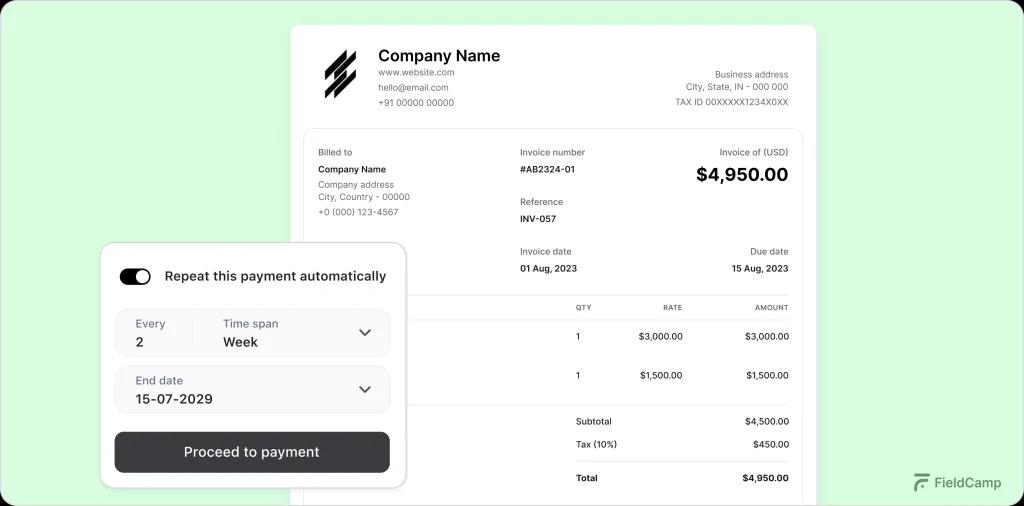
Payment patterns reveal which customers pay quickly versus slowly, helping you manage cash flow better.
2.3 Estimate generation automation
The system remembers every estimate created. It knows typical square footage for different home styles, actual paint consumption rates, and real labor hours for various projects.
New estimates use this data for incredible accuracy.
Pricing adjusts dynamically for material costs, seasonal demand, and geographic location. The system flags if your estimate seems unusual compared to similar past jobs.
2.4 Communication automation workflows
Automated messages flow throughout the customer journey: immediate responses to inquiries, estimate follow-ups, project updates with photos, completion thank-yous, and review requests.
Each message is timed perfectly based on project events.
Internal communications work similarly—crew assignments, supply needs, quality issues all route to the right people automatically.
Curious How It All Works Together?
See FieldCamp handle a real painting job from customer call to final payment. Get answers to your specific workflow questions.
3. Field Worker Management
Field worker management keeps your crews connected and productive through powerful mobile tools.
3.1 Mobile app functionality
The mobile app provides everything crews need: daily schedules, job details, customer information, and project specifications. It works offline in basements or rural areas, syncing when connection returns.
Crews access complete job histories, see previous work at properties, and understand customer preferences for personalized service.
3.2 Real-time communication systems
All messages are attached to specific jobs. Questions about trim color link to the right project with full context.
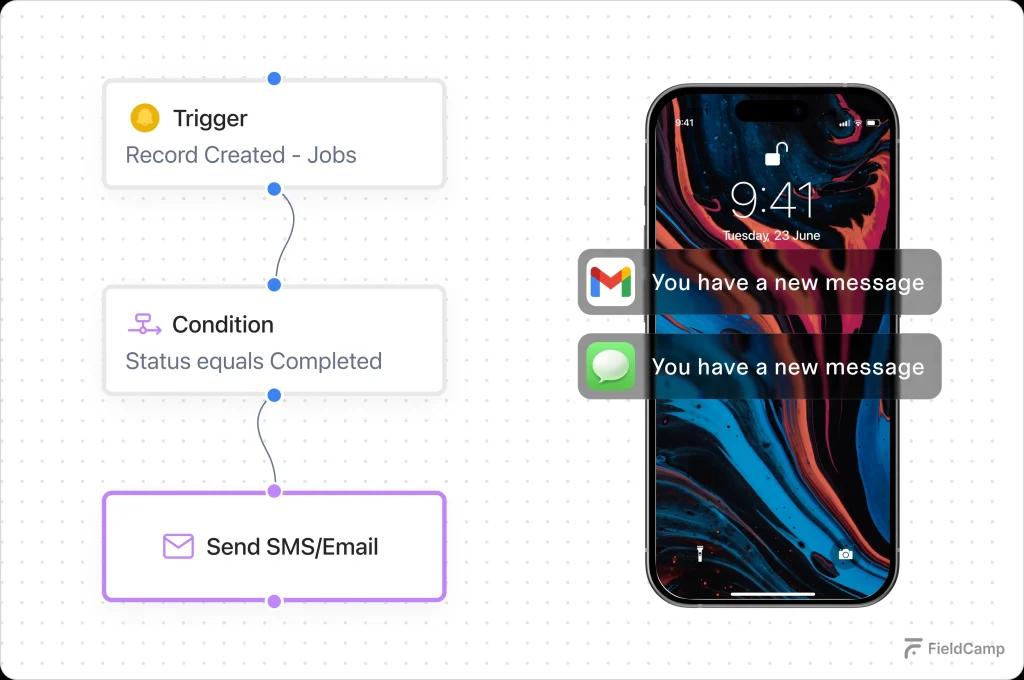
Smart routing sends urgent issues to management, material requests to purchasing, and updates to relevant parties.
3.3 Time Tracking and GPS Monitoring
GPS-verified clock-in/out creates accurate time records and eliminates disputes. The system tracks arrival times, break periods, and job duration automatically.
Location data reveals operational insights; inefficient routes, time at suppliers, and arrival accuracy, driving continuous improvement.
3.4 Task assignment and reporting tools
Jobs break down into specific tasks assigned to workers. Progress updates automatically as tasks complete. Daily reports are generated from actual activity, showing work completed, hours logged, materials used, and any issues.
4. Digital Project Tracking
Digital project tracking provides complete visibility across all operations from one dashboard.
4.1 Project dashboard and status monitoring
Color-coded indicators show every job’s status instantly. Green means on-track, yellow means needs attention, and red means requires action. Click any project for complete details, timelines, and communication history.
Intelligent alerts flag developing issues: projects behind schedule, material shortages, weather threats, letting you manage by exception.
4.2 Photo documentation systems
Every photo is organized automatically by project, phase, and timestamp. GPS tags and timestamps provide indisputable documentation. Photos integrate into invoices, marketing materials, and insurance claims instantly.
This visual record protects against disputes and proves work quality at every stage.
4.3 Material and inventory tracking
Real-time tracking shows inventory levels as crews use materials.
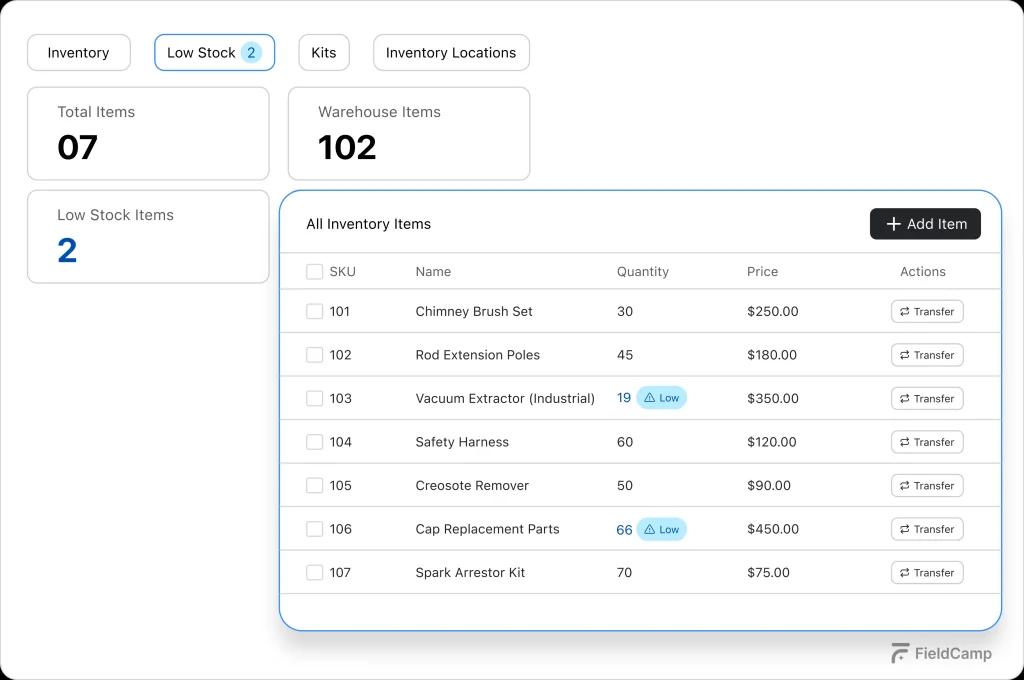
Low stock triggers reorder alerts. Actual usage compared to estimates reveals true job profitability and improves future pricing.
4.4 Timeline and milestone management
Visual timelines show project phases and dependencies. Milestone completion triggers automatic actions—progress invoices, quality checks, phase transitions. This keeps complex projects flowing smoothly.
5. Making the Transition
Most contractors start by digitizing their biggest pain point: estimates, scheduling, or invoicing. Success comes from gradual expansion, letting teams master basics before adding features.
Ready to explore your options? Our comprehensive guide to painting contractor apps compares the top solutions to help you choose the right fit for your business.
Data migration happens smoothly with modern software, importing customer lists, past estimates, and job histories. Team buy-in grows as people see real-time savings and efficiency gains.
The key is starting where it hurts most and expanding from there. Within months, your entire operation runs digitally with less effort than your current manual processes.
Conclusion
Now you understand how painting contractor software works, from customer contact through payment and beyond. The software workflow for contractors connects everything in one system, where each action triggers the next automatically.
Process automation eliminates repetitive tasks, field worker management keeps crews connected, and digital project tracking provides complete visibility.
The CRM stores everything, making your complete business history instantly accessible.
The contractors making the switch aren’t more technical than you; they just took the first step. They’re now running more efficient operations, winning more bids, and growing without growing headaches.
Your painting business deserves these advantages. Now that you understand how the software works, you’re ready to find the right fit for your operation.
The future is digital, and it’s simpler than you think.
Built for Painters, Proven by Painters
FieldCamp has built what contractors need. That’s why painting contractors stick with us. No fluff, no complexity, just software that works.