

Responding to Bonterra’s Discontinuation: Strategies for a Smooth Transition
The recent announcement of Bonterra’s discontinuation has left many non-profit organizations and government-funded projects in a state of urgency and distress. With Bonterra set to cease operations by April 1, 2025, agencies relying on this platform face significant challenges in maintaining operations and ensuring data integrity.
As a government-funded victim services agency, your mission is to provide critical support to individuals in crisis, such as those affected by domestic violence, sexual assault, or tragic events. Discontinuing a core system like Bonterra can disrupt these essential services, potentially impacting over 2,500 clients annually.
For many organizations, the clock is ticking. The transition from Bonterra must be carefully managed to avoid data loss, operational disruptions, and compliance issues. The urgency to migrate to a new CRM system cannot be overstated, as delays could result in missed reporting deadlines and compromised service delivery.
In this blog, we will guide you through the essential strategies for a smooth CRM migration from Bonterra to monday.com, a more reliable CRM platform. By understanding the specific needs of non-profits and government-funded projects, we will outline a detailed plan to ensure your organization can continue operating effectively and fulfilling its mission.
Need Assistance in Navigating This Transition Smoothly?
Understanding the Impact of Bonterra’s Discontinuation
Bonterra’s discontinuation poses significant challenges for non-profit organizations and government-funded projects. This unexpected shift demands immediate attention to avoid severe repercussions on daily operations and compliance requirements. Here, we delve into the specific impacts and necessary considerations to ensure your organization remains resilient.
Operational Disruptions
Bonterra has been integral to managing client data, case records, and service delivery for many non-profits. The discontinuation threatens to disrupt these critical functions, potentially causing delays in service provision and gaps in client support. Agencies like victim services, which handle sensitive and urgent cases, cannot afford such disruptions. Maintaining continuity in your operations is crucial to prevent lapses in service delivery that could adversely affect your clients.
Data Integrity and Security
A sudden transition can jeopardize the integrity and security of your data. With Bonterra’s shutdown, the risk of data loss or corruption increases, especially if the migration process is rushed or unplanned. Given the sensitive nature of the information handled by non-profits—such as client identities, case details, and funding allocations—securing your data during the transition is paramount. It’s vital to implement robust data backup and migration strategies to safeguard this information.
Compliance with Government Mandates
Non-profits and government-funded projects must adhere to stringent reporting and compliance requirements. Bonterra’s discontinuation adds a layer of complexity to meeting these mandates. Quarterly reports that track client demographics, services provided, and funding distributions must continue without interruption. Failure to comply could result in penalties or loss of funding. Ensuring that your new CRM platform can seamlessly handle these reporting requirements is essential for maintaining compliance.
Strategic Reassessment
The end of Bonterra offers an opportunity for strategic reassessment of your CRM needs. Evaluate what worked well with Bonterra and what didn’t. Identify gaps that need addressing and look for CRM solutions that offer enhanced functionality, better user experiences, and improved integration capabilities. This reassessment will help you choose a CRM that not only replaces Bonterra but also elevates your organization’s operational efficiency.
For a detailed consultation on evaluating your CRM needs and ensuring compliance, you can consult our monday.com experts and get the right advice.
Assessing Your Current CRM Needs
In the wake of Bonterra’s discontinuation, it’s crucial to conduct a thorough assessment of your current CRM needs. This evaluation will not only help you identify the gaps left by Bonterra but also guide you in selecting a new CRM platform that aligns perfectly with your organization’s unique requirements.
Identifying Key Features

Start by listing the core features your organization relies on. These might include:
- Client Management: Tracking client interactions, case histories, and service delivery.
- Reporting: Generating detailed reports for government compliance and internal use.
- Automation: Streamlining repetitive tasks to free up staff time.
- Integration: Connecting with other tools and platforms such as email systems, financial software, and online forms.
Assessing these features will help you understand what your new CRM must offer. For instance, if detailed reporting and data visualization are critical, ensure the new CRM can handle complex data analytics and real-time dashboards.
Understanding User Needs
Different user groups within your organization will have varying needs. Conduct interviews or surveys with your staff to gather insights on their daily interactions with the current CRM. Key questions to consider:
- What tasks do they find most time-consuming?
- Are there any features they frequently use that should be prioritized in the new CRM?
- What improvements or new functionalities would make their work more efficient?
Understanding these user needs will help customize the new CRM to improve productivity and user satisfaction.
Evaluating Integration Capabilities
A robust CRM should integrate seamlessly with your existing tools and systems. Consider the following:
- Financial Software: Ensure compatibility with your accounting systems like QuickBooks.
- Communication Tools: Look for integrations with email platforms and messaging apps.
- Online Forms: Assess the ease of integrating with web forms for client intake and surveys.
Integrations are key to creating a cohesive system where data flows smoothly between platforms, reducing manual entry and potential errors.
Budget Considerations
Budget is always a critical factor. While assessing your needs, also consider the costs associated with different CRM solutions. Look at:
- Subscription Fees: Compare the pricing models of various CRMs.
- Implementation Costs: Factor in the expenses for migrating data, configuring the new system, and training staff.
- Ongoing Support: Budget for continuous support and potential future customizations.
Investing in a CRM that fits your budget while meeting all operational requirements will ensure long-term sustainability.
Security and Compliance
With sensitive client data at stake, security cannot be compromised. Ensure that the new CRM offers robust security features such as:
- Data Encryption: Both at rest and in transit.
- Access Controls: Role-based access to restrict data visibility.
- Compliance: Adherence to relevant data protection regulations and government mandates.
A secure CRM will protect your organization from data breaches and ensure compliance with legal requirements. Therefore, it is essential to choose the right CRM for your needs. To get assistance from professional consultants, contact our consultants for your monday.com customization services.
Evaluating Alternative CRM Platforms
With Bonterra’s discontinuation, non-profits and government-funded projects must carefully evaluate alternative CRM platforms to ensure a seamless transition. Selecting the right CRM is critical to maintaining service delivery, compliance, and operational efficiency. Here’s how to navigate this crucial decision-making process.
Exploring Leading CRM Options
When considering a new CRM, it’s important to look at platforms renowned for their robust features and adaptability to non-profit needs. Here are a few top contenders:
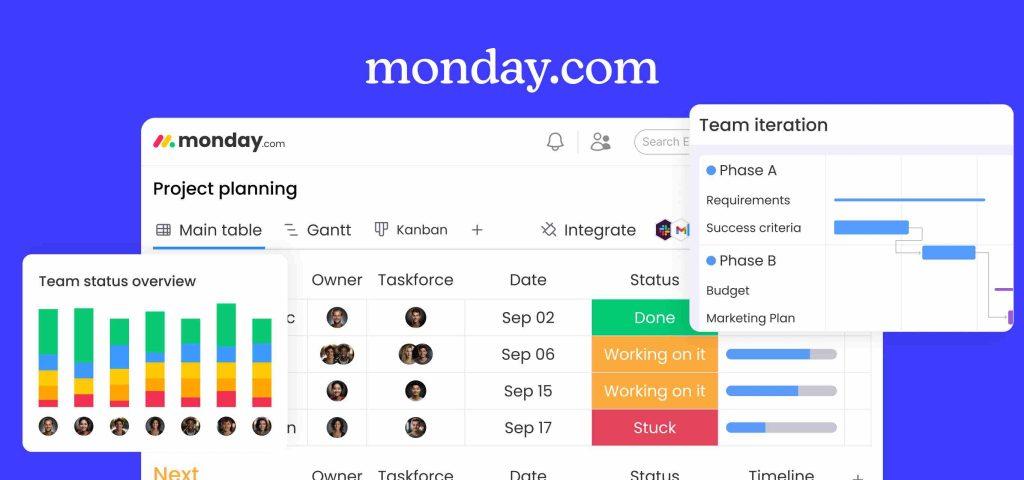
- monday.com: Known for its flexibility and user-friendly interface, monday.com offers extensive customization options that can be tailored to non-profit workflows. Its ability to automate tasks, manage projects, and generate real-time reports makes it an excellent choice.
- Salesforce Nonprofit Success Pack (NPSP): Salesforce’s NPSP is designed specifically for non-profits. It offers powerful tools for donor, fundraising, and program management. Its extensive ecosystem and third-party integrations provide a comprehensive solution.
- Zoho CRM: Zoho CRM provides a cost-effective solution with features such as workflow automation, analytics, and multichannel communication. It is suitable for non-profits looking for a balance between functionality and affordability.
- HubSpot CRM: HubSpot CRM offers a free tier with essential features like contact management, email tracking, and marketing automation. It’s ideal for smaller non-profits or those just starting with CRM systems.
- Microsoft Dynamics 365: This platform caters to complex needs with advanced analytics, AI-driven insights, and seamless integration with Microsoft products. It’s well-suited for larger organizations requiring extensive customization and scalability.
Comparative Analysis
Choosing the right CRM involves comparing these platforms based on several key criteria:
- Feature Set: Identify which features are essential for your operations. For example, monday.com excels in task management and customization, while Salesforce NPSP offers robust donor management tools.
- Cost: Evaluate each CRM’s pricing model, considering initial implementation costs and ongoing subscription fees. Zoho CRM often stands out for its affordability.
- Ease of Use: Consider the platform’s user-friendliness. HubSpot CRM is known for its intuitive interface, which can reduce training time and improve user adoption.
- Integration Capabilities: Ensure the CRM integrates with your existing tools. Microsoft Dynamics 365, for example, offers seamless integration with other Microsoft products, which could be beneficial if your organization already uses them.
Security and Compliance
Security is paramount, especially when handling sensitive client data. Look for CRMs that offer:
- Data Encryption: Both at rest and in transit.
- Role-Based Access Controls: Restricting data access based on user roles.
- Compliance Features: Adherence to regulations such as GDPR, HIPAA, or local government mandates.
For instance, Salesforce NPSP provides extensive security features and compliance certifications, making it a reliable choice for organizations with stringent data protection needs.
Customization and Support
The ability to customize the CRM to fit your specific needs is crucial. Platforms like monday.com and Microsoft Dynamics 365 offer extensive customization options. Additionally, consider the level of support provided:
- Training Resources: Access to tutorials, webinars, and customer support.
- Community and Peer Support: Active user communities can be invaluable for troubleshooting and best practices.
Case Study: Successful Transition
To illustrate the impact of a well-executed CRM transition, consider this scenario: A government-funded victim services agency transitioned from Bonterra to monday.com. They needed a CRM to manage over 2,500 clients annually, track government-mandated reports, and streamline staff workflows.
By customizing monday.com, they created a robust client management system, automated reporting, and improved overall efficiency, ensuring compliance and continuity of services. As one staff member noted, “The functionality [with Bonterra] never got to where we needed it to be. With monday.com, we’ve not only met but exceeded our operational requirements.”
Contact us for professional customization and monday.com implementation services for a detailed consultation on selecting and transitioning to a new CRM.
Planning Your CRM Migration
Once you’ve selected a new CRM platform, the next critical step is planning the migration process. A well-structured migration plan ensures a seamless transition, minimizing disruptions and maintaining data integrity. Here’s a comprehensive guide to help you navigate this phase.
Creating a Project Timeline
Developing a detailed project timeline is essential for a smooth migration. Break down the process into manageable phases, each with clear milestones and deadlines. Here’s a suggested timeline:
| Phase | Duration | Key Activities |
| Preparation | 2-4 weeks | Data backup, team assembly, stakeholder alignment |
| Data Migration | 3-6 weeks | Data extraction, cleaning, and import |
| Configuration | 4-6 weeks | Customizing CRM features, setting up integrations |
| Testing | 2-4 weeks | System testing, bug fixes, user feedback |
| Training & Launch | 4-8 weeks | Staff training, system go-live, post-launch support |
Assigning Roles and Responsibilities
Clearly defining roles and responsibilities is crucial for accountability and efficiency. Here’s a typical team setup for a CRM migration project:
- Project Manager: Oversees the migration process, meeting timelines and budgets.
- Data Migration Specialist: Handles data extraction, cleaning, and import into the new CRM.
- CRM Administrator: Configures the new CRM system according to organizational needs.
- IT Support: Provides technical assistance and resolves any issues during the migration.
- Training Coordinator: Develops and delivers training programs for staff.
Setting Clear Objectives and Milestones
Establish specific objectives and milestones to measure progress. Examples include:
- Data Backup Completion: Ensuring all data from Bonterra is securely backed up.
- Data Integrity Check: Verifying that all data has been accurately transferred.
- System Configuration: Customizing the new CRM to match your workflows.
- User Acceptance Testing (UAT): Conducting thorough testing to ensure the system meets user needs.
Involving Key Stakeholders
Engage key stakeholders early and often. Their buy-in and feedback are critical to the success of the migration. This includes:
- Management: To approve budgets and timelines.
- End-Users: To provide insights on daily workflows and system usability.
- IT Department: To ensure technical feasibility and support.
Data Backup and Preparation
Before initiating the migration, ensure all data is backed up securely. This includes:
- Client Records: Personal details, case histories, and service logs.
- Financial Data: Transactions, funding allocations, and grant information.
- Reports and Analytics: Historical data and compliance reports.
Developing a Communication Plan
A clear communication plan ensures that all stakeholders are informed about the migration progress. Key components include:
- Regular Updates: Weekly or bi-weekly progress reports.
- Feedback Mechanisms: Channels for stakeholders to provide feedback or raise concerns.
- Training Sessions: Scheduled training to ensure all users are comfortable with the new system.
For best practices on data migration, refer to this Salesforce data migration guide.
Ensuring Data Security and Compliance
Security and compliance should be top priorities. Implement measures such as:
- Data Encryption: Ensure all data is encrypted during transfer and at rest.
- Access Controls: Implement role-based access to sensitive data.
- Compliance Checks: Verify that the new CRM adheres to all relevant regulations, such as GDPR or HIPAA.
Executing the Migration Process
With a solid plan, the next step is executing the CRM migration. This phase involves moving your data, configuring the new system, testing its functionality, and training your team. Here’s a detailed guide to ensure a seamless migration process.
Data Migration: Ensuring Accuracy and Completeness
The accuracy of your data is paramount during migration. Follow these steps to ensure a smooth data transfer:
- Data Extraction
- Extract all relevant data from Bonterra, including client records, financial transactions, and historical reports.
- Ensure the data is in a standardized format that is compatible with the new CRM.
- Data Cleaning
- Remove duplicates and correct any inconsistencies.
- Validate the data to ensure all necessary fields are populated correctly.
- Data Import
- Import the cleaned data into the new CRM.
- Use automated tools where possible to reduce errors.
- Data Verification
- Conduct a thorough review to ensure all data has been transferred accurately.
- Cross-check key metrics to confirm data integrity.
| Metric | Bonterra | New CRM |
| Total Client Records | 2500 | 2500 |
| Financial Transactions | $1.2M | $1.2M |
| Historical Reports | 120 | 120 |
For a comprehensive guide on data migration best practices, refer to HubSpot’s data migration checklist.
System Configuration: Customizing Your New CRM
Configuring the new CRM to match your organization’s workflows is crucial for operational efficiency. Key steps include:
- Customization
- Tailor the CRM’s fields, forms, and dashboards to align with your processes.
- Set up automated workflows to streamline tasks and improve productivity.
- Integration
- Integrate the CRM with tools like email platforms, financial software, and online forms.
- Ensure seamless data flow between systems to avoid duplication and manual entry.
- Access Controls
- Implement role-based access to secure sensitive data.
- Define user permissions to ensure staff only access relevant information.
Testing: Validating System Functionality
Before going live, thoroughly test the new CRM to ensure it meets your requirements:
- Unit Testing
- Test individual components to ensure they function correctly.
- Validate each feature, such as data entry forms, reporting tools, and automated workflows.
- Integration Testing
- Check the integration points with other systems to ensure smooth data flow.
- Confirm that data updates in one system are accurately reflected in the CRM.
- User Acceptance Testing (UAT)
- Involve end-users in testing the system to gather feedback.
- Address any issues or gaps identified during UAT.
| Testing Phase | Key Activities | Duration |
| Unit Testing | Validate individual features and functions | 1-2 weeks |
| Integration Testing | Ensure seamless integration with other systems | 1-2 weeks |
| User Acceptance Testing | Gather feedback from end-users, address issues | 2-3 weeks |
For detailed testing methodologies, refer to Salesforce’s UAT guide.
Training and Support: Ensuring Smooth Adoption
Effective training and ongoing support are vital for successful CRM adoption:
- Training Programs
- Develop comprehensive training sessions tailored to different user groups.
- Provide hands-on workshops, online tutorials, and training manuals.
- Ongoing Support
- Establish a support system for troubleshooting and assistance.
- Schedule regular check-ins to address any emerging issues.
Monitoring and Optimization
Post-launch, continuously monitor the system’s performance and optimize where necessary:
- Performance Monitoring
- Track key performance indicators (KPIs) to assess system effectiveness.
- Use CRM analytics to identify areas for improvement.
- Optimization
- Make iterative improvements based on user feedback and performance data.
- Update workflows and integrations to enhance efficiency.
Famous Quote: “Change is the end result of all true learning.” – Leo Buscaglia
Training and Support for a Smooth Transition
A successful CRM migration hinges on effective training and robust support. Ensuring that your team is well-versed in using the new system and has access to ongoing support is crucial for maximizing the benefits of your new CRM. This section will guide you through developing comprehensive training programs and establishing a reliable support system.
Developing Effective Training Programs
Training is key to user adoption and operational efficiency. Here are some steps to create a successful training program:
- Tailor Training to User Groups
- Administrators: Focus on system configuration, user management, and advanced features.
- End-Users: Emphasize daily tasks, data entry, and basic navigation.
- Management: Highlight reporting capabilities and dashboard customization.
- Utilize Diverse Training Methods
- Hands-On Workshops: Conduct interactive sessions to help users practice real-life scenarios.
- Online Tutorials: Provide video tutorials and webinars for remote learning.
- Training Manuals: Create comprehensive guides that users can refer to anytime.
Watch this comprehensive tutorial on monday.com for non-profits to get a head start on training.
Establishing a Robust Support System
A reliable support system ensures users can resolve issues quickly and keep operations running smoothly. Key components include:
- Dedicated Support Channels
- Help Desk: Set up a dedicated help desk for quick issue resolution.
- Live Chat: Offer real-time support for immediate assistance.
- Email Support: Provide an email address for detailed inquiries and follow-ups.
- Regular Check-Ins
- Schedule periodic reviews to gather user feedback and address any ongoing issues.
- Conduct quarterly health checks to ensure the system is performing optimally.
Learn more about effective CRM support with this video on CRM best practices.
Do’s and Don’ts for Training and Support
To ensure a smooth transition, follow these do’s and don’ts:
Do’s:
- Do Involve Key Stakeholders: Engage leaders and managers in training to ensure buy-in and support.
- Do Offer Flexible Training Options: Provide multiple training formats for different learning styles.
- Do Create a Feedback Loop: Encourage users to share their experiences and suggestions for improvement.
Don’ts:
- Don’t Overwhelm Users: Break down training into manageable sessions to avoid information overload.
- Don’t Neglect Follow-Up Training: As users become more familiar with the system, offer refresher courses and advanced training.
- Don’t Ignore User Feedback: Act on feedback to continuously improve the training and support experience.
Quote: “Training is not a one-time event; it’s a continuous journey of improvement.” – Unknown
Monitoring and Optimizing Training Programs
Continuous improvement is key to effective training. Here’s how to monitor and optimize your training programs:
- Track Training Metrics
- Participation Rates: Monitor attendance and engagement levels in training sessions.
- User Proficiency: Assess user competency through quizzes and practical tests.
- Gather Feedback
- Conduct surveys to gather user feedback on training effectiveness.
- Use the feedback to refine and improve future training sessions.
- Update Training Materials
- Regularly update training manuals and online tutorials to reflect system changes or updates.
- Incorporate user feedback to address common pain points and improve clarity.
Check out this video on continuous improvement in training programs to enhance your strategy.
Monitoring and Optimization Post-Migration
After successfully migrating to a new CRM, the work doesn’t stop there. Continuous monitoring and optimization are essential to ensure the system functions efficiently and meets your evolving needs. This section will guide you through effective strategies for ongoing monitoring and optimization.
Continuous Performance Monitoring
Regularly monitoring your CRM’s performance is critical for identifying areas of improvement and ensuring smooth operation. Here’s how to do it effectively:
- Track Key Performance Indicators (KPIs)
- User Adoption Rates: Measure how many staff members use the CRM and how often.
- Data Accuracy: Regularly check for data consistency and integrity.
- Task Completion Rates: Monitor the efficiency of task assignments and completions.
- Conduct Regular System Audits
- Perform quarterly audits to assess the system’s performance and compliance with operational goals.
- Review security protocols to ensure data protection measures are up-to-date.
- Gather User Feedback
- Create feedback forms or conduct surveys to collect user insights on the CRM’s functionality and ease of use.
- Use Reddit and Quora to gather broader community feedback and best practices.
Internal Link: For detailed monitoring and optimization strategies, explore TaskRhino.ca’s support services.
Optimizing CRM Features
Optimization ensures that your CRM evolves with your organization’s needs. Key optimization strategies include:
- Refining Automated Workflows
- Review and adjust automated workflows to improve efficiency and reduce manual intervention.
- Ensure that workflows align with current operational processes and goals.
- Enhancing Data Management
- Implement data cleanup routines to maintain high data quality.
- Use advanced analytics to gain deeper insights and drive data-driven decisions.
- Customizing Dashboards and Reports
- Tailor dashboards to provide relevant metrics and insights for different user roles.
- Regularly update reports to reflect the latest organizational needs and compliance requirements.
Regular Training and Skill Development
Continuous training ensures that staff are proficient with the CRM and can leverage its full potential. Strategies for ongoing training include:
- Periodic Training Sessions
- Schedule regular training sessions to cover new features and advanced functionalities.
- Offer refresher courses to reinforce key skills and best practices.
- Access to Online Resources
- Provide access to online tutorials, webinars, and help articles.
- Encourage staff to participate in CRM communities like Reddit’s CRM forum or Quora discussions.
- Certification Programs
- Encourage staff to pursue CRM certification programs to enhance their skills and knowledge.
- Recognize and reward certified staff to motivate others.
Do’s and Don’ts for Post-Migration Optimization
To maximize the benefits of your new CRM, follow these do’s and don’ts:
Do’s:
- Do Conduct Regular Check-Ins: Schedule periodic reviews to ensure the system meets your evolving needs.
- Do Encourage User Feedback: Actively seek and act on feedback to continuously improve the system.
- Do Keep Data Clean: Regularly update and clean your data to maintain its accuracy and usability.
Don’ts:
- Don’t Ignore Training Needs: Provide ongoing training to keep staff updated on new features and best practices.
- Don’t Neglect System Updates: Regularly update the CRM to benefit from the latest features and security enhancements.
- Don’t Overcomplicate Processes: Keep workflows and processes simple to ensure ease of use and efficiency.
Quote: “The only way to do great work is to love what you do.” – Steve Jobs
Leveraging Community Support
Engage with CRM communities to stay updated on best practices and new trends. Participating in discussions on platforms like Reddit and Quora can provide valuable insights and support:
- Reddit CRM Community: Explore discussions and ask questions to learn from other CRM users.
- Quora CRM Discussions: Join conversations about CRM tools and strategies to gain new perspectives.
Conclusion
Transitioning from Bonterra to a new CRM system is critical for non-profit organizations and government-funded projects. This process requires careful planning, thorough evaluation, and continuous support to ensure success. Here’s a recap of the key strategies discussed in this guide:
- Understanding the Impact of Bonterra’s Discontinuation
- Assessing Your Current CRM Needs
- Evaluating Alternative CRM Platforms
- Planning Your CRM Migration
- Executing the Migration Process
- Training and Support for a Smooth Transition
- Monitoring and Optimization Post-Migration
By following these strategies, your organization can ensure a smooth and successful transition to a new CRM platform, enhancing operational efficiency and service delivery. Now is the time to take decisive action and secure the future of your data and operations.
Don’t Navigate This Complex Transition Alone!

Editor's Choice
Step-by-Step Guide to Migrating from Bonterra to monday.com for Non-Profits

monday.com Vs. Jira: A Comparative Study of the Best Project Management Tools
monday.com vs. Asana: A Detailed Comparison of Leading Project Management Tools