
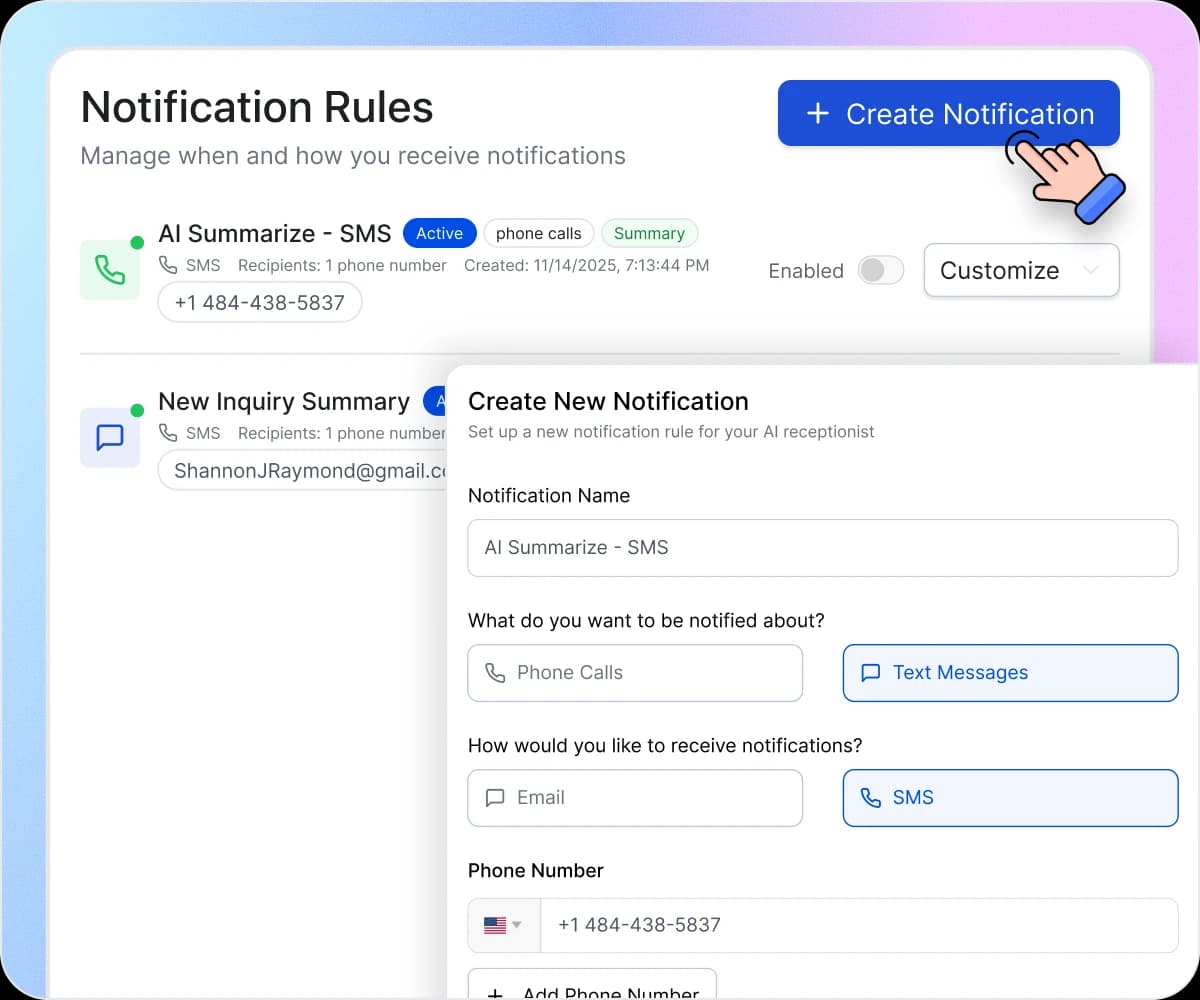
How Notifications Work in 3 Steps
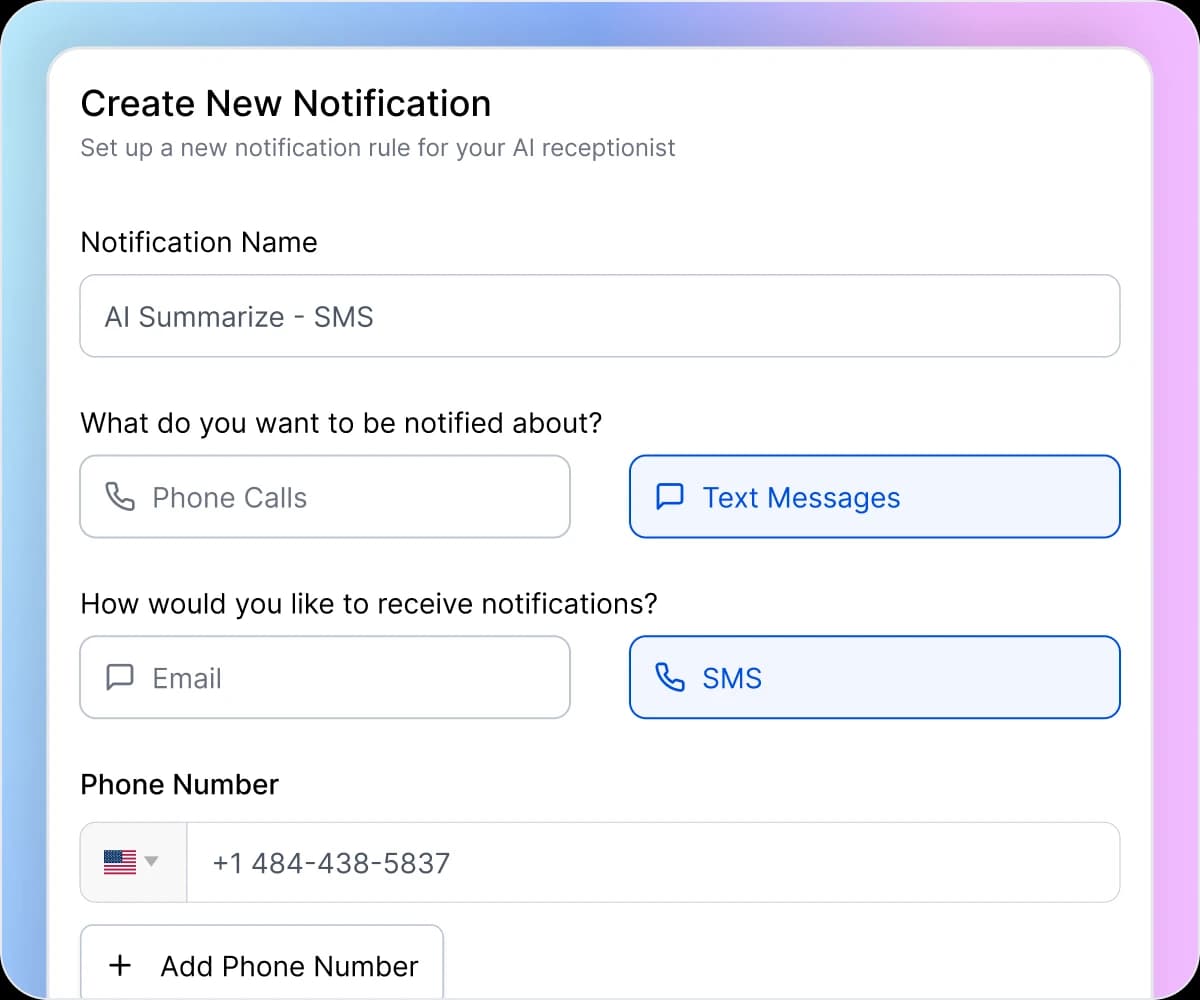
Click Create Notification and name your rule (like “Urgent Call Alerts” or “Daily Lead Summary”). Choose whether you want alerts for Phone Calls or Text Messages, then select your delivery preference: Email for detailed summaries you can review later, or SMS for instant mobile alerts that reach you anywhere.
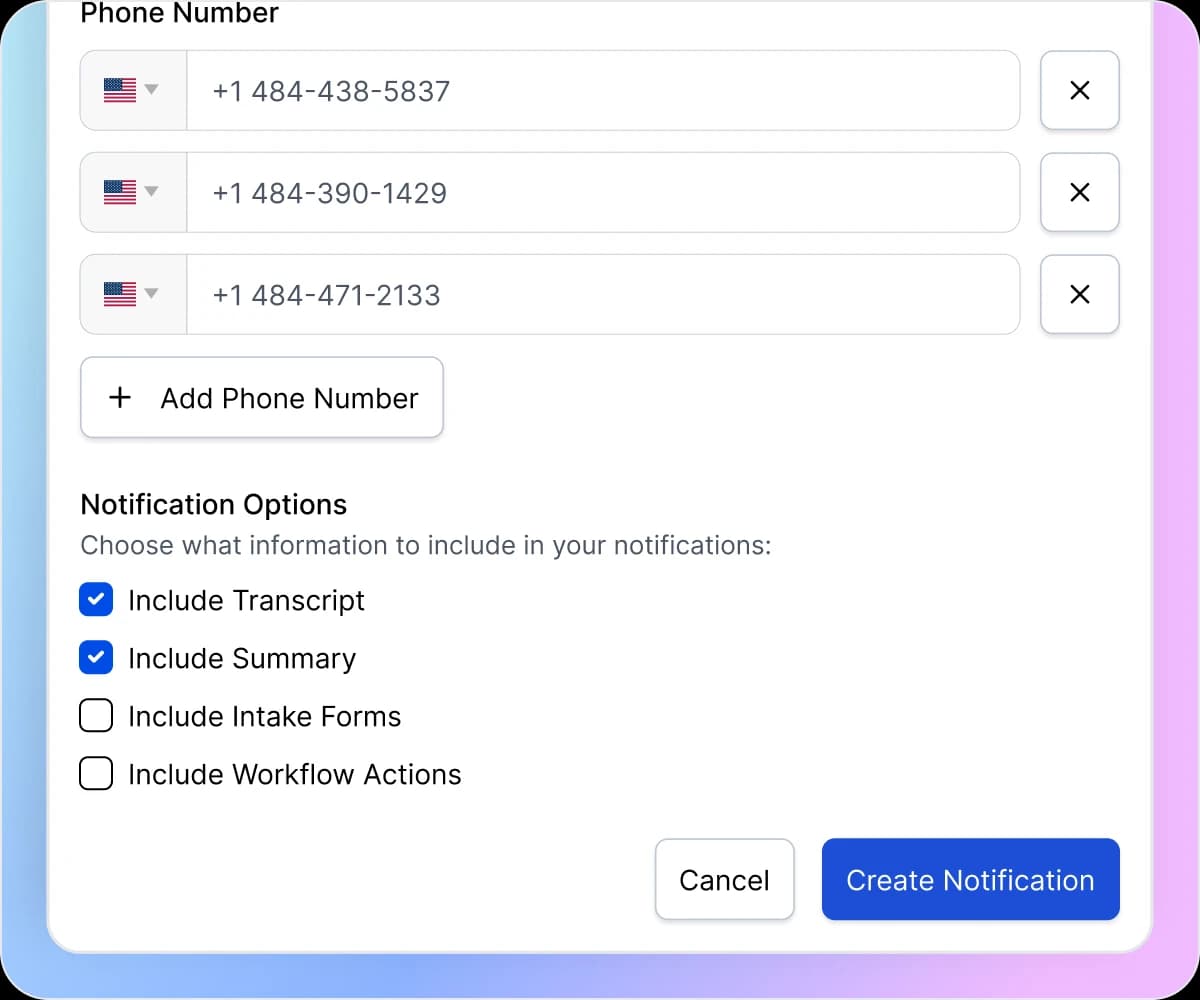
Enter phone numbers for SMS notifications or email addresses for email delivery. Add multiple recipients to ensure the right team members stay informed. Select what information to include in each alert: AI-generated summaries, full call transcripts, completed intake forms, or workflow actions taken during the call.
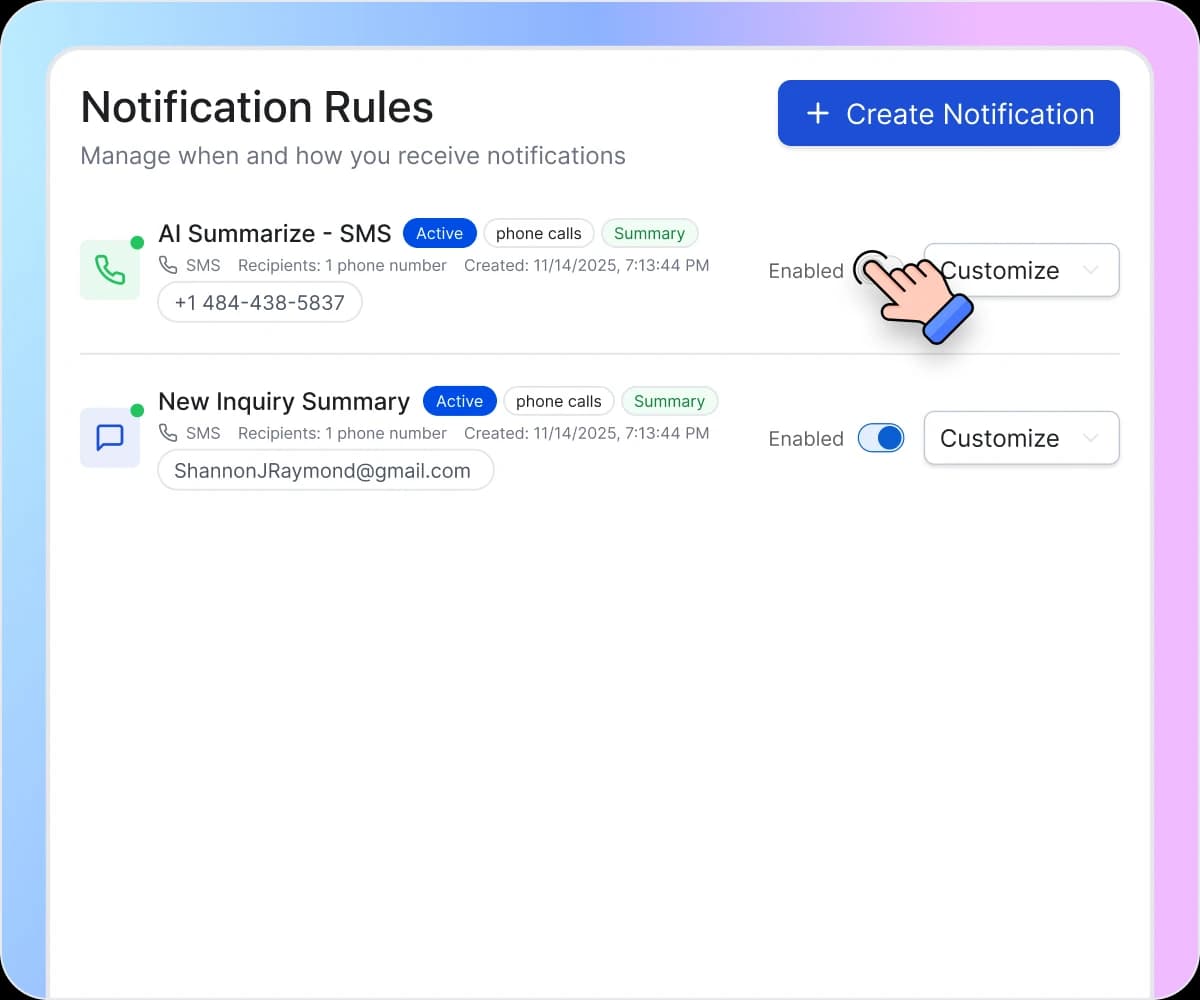
Activate your notification rule with one toggle switch. The blue enabled indicator confirms your rule is running. Edit settings anytime, temporarily disable notifications without deleting your configuration, or create multiple rules with different triggers and recipients to send information to different team members.
How Notifications Eliminate Missed Opportunities

Know About Every Call Within Minutes
Your AI receptionist takes a call from a hot lead at 2 PM. You don’t check your dashboard until 6 PM. By then, the prospect has moved on to a competitor who responded faster. Welco sends notifications the moment interactions happen—SMS alerts hit your phone instantly, email summaries arrive in real time. You respond while the lead is still warm instead of discovering opportunities after they’ve gone cold.

Stop Missing Urgent Requests in the Noise
Not every call deserves the same attention. A routine scheduling request is different from an emergency service call or a high-value prospect. Welco lets you create multiple notification rules with different triggers and recipients. Route urgent alerts to your phone via SMS while routine updates go to email. The right information reaches the right people through the right channel.

End the Guessing Game About What Happened
Did anyone call while I was out?” “What did that customer want?” “Was there anything urgent?” Without notifications, you’re asking questions instead of getting answers. Welco’s AI Summarize feature sends concise call summaries directly to your phone or inbox. You know exactly what happened, what the caller needed, and what action is required—without logging into a dashboard or asking your team.
What Businesses Say About Welco
I’m on job sites all day and can’t monitor my phone constantly. Before Welco, I’d miss calls and not discover them until I returned to the office—sometimes 6 hours later. Now I get SMS summaries within two minutes of every call—who called, what they needed, whether it’s urgent. I’ve responded to service calls within 10 minutes—prospects are shocked by the speed, and that responsiveness wins jobs before competitors even answer their phones.

Mike Johnson
Owner, Johnson Electrical Services
Our spa receives 50+ calls daily. I don’t need to listen to every call recording or read every transcript immediately. We set up notification rules that send SMS alerts to my phone and email summaries to our front desk manager. Now when calls come in, I get a quick notification with the AI summary. I can quickly scan who called and what they needed, then decide if it requires immediate attention or can wait. The notifications keep me informed without interrupting my day constantly.

Sarah Miller
General Manager,Serenity Day Spa
We have three partners who each handle different case types. Before notification rules, every call inquiry went to our general inbox, and we’d manually assign them (wasting time and sometimes missing hot leads entirely). Now we set up separate notification rules: personal injury calls alert one partner via SMS, family law notifications go to another, and estate planning reaches the third. Each specialist gets notified about their relevant calls immediately instead of waiting for manual assignment. We’ve cut intake response time by 70% while eliminating manual triage entirely.

Tom Wilson
Office Administrator, Bradley & Associates Law
Welco Integrates Seamlessly with Your Business Tools
Notifications work alongside all Welco features—call management, intake forms, conversational SMS, and calendar integrations. Get alerted when appointments are booked, forms are completed, or specific conversation triggers occur. Connect with your existing workflow without adding complexity.
Industries That We Serve

Emergency calls come in throughout the day while you’re on job sites. Set up SMS notifications so you get alerted immediately when calls come in. Check the AI summary on your phone to see if it’s an emergency service call or a routine inquiry. Respond to urgent situations fast without having to check your dashboard between jobs.

Spring and summer bring high call volume when you’re already busy with existing jobs. Set up email notifications for your office manager and SMS alerts for yourself. You stay informed about new inquiries without interrupting work, and your team can follow up on quote requests while you’re in the field.

Emergency lockout calls happen at all hours. SMS notifications alert you the moment a call comes in, whether it’s 2 AM or 2 PM. Read the summary, see what the caller needs, and respond immediately. Fast response wins the job before customers call the next locksmith on their list.

Get notified via SMS when calls come in so you can quickly check if it’s an emergency situation or a routine service request. Email notifications go to your scheduling team for booking follow-ups. Everyone stays informed without constantly monitoring the dashboard.

Stranded drivers call whoever responds first. SMS notifications ensure your dispatch team knows immediately when calls come in. Check the summary to see the location and issue, then send the nearest driver. Speed matters when customers are stuck on the roadside.

New patient calls and existing patient appointment changes all generate notifications. Set up SMS alerts to your front desk so they can follow up quickly with new inquiries. Email summaries go to your scheduling coordinator for routine appointment management. Everyone gets the information they need through their preferred channel.
Your Business Doesn’t Stop When You Step Away
Stay connected to every customer interaction without being chained to your phone system. Welco’s notifications deliver the information you need, when you need it, through the channel that works best for you.
Frequently Asked Questions About Notifications
Which Welco plans include notifications?
Email notifications are included in all plans starting at Starter ($39/month). SMS notifications are available on Professional ($99/month), Business ($149/month), and Enterprise plans. All plans support unlimited notification rules—only the delivery method varies by plan tier.