
5 Best Email-to-SMS Platforms for Small Businesses in 2026 (Tested & Compared)

Small businesses send thousands of messages every week — appointment reminders, delivery updates, team alerts, customer follow-ups. But here’s the problem: most SMS platforms are built for enterprises or marketing teams, not small business operations.
- Too expensive per message for small volumes
- Complicated dashboards that require training
- No email integration — forcing teams to learn new tools
- Poor deliverability on basic plans
If you’ve been searching for a simple, reliable way to send business texts directly from your email inbox, this guide is for you. We tested the top 5 email-to-SMS platforms available in 2026 and compared them on what matters most to small businesses.
What Small Businesses Need From an Email-to-SMS Platform
Before diving into the comparison, let’s establish the criteria that actually matter for small business texting:
- Email-native workflow: Send texts directly from Gmail, Outlook, or any email client — no new software to install or learn.
- Affordable pricing: Plans that make sense for businesses sending 500–2,500 messages per month, not 50,000.
- High deliverability: Messages must actually arrive. Silent failures are unacceptable when customers are waiting.
- 10DLC compliance: Required for U.S. business texting. Without it, your messages get filtered or blocked.
- Team access: Multiple staff members should be able to text from the same business number without sharing a phone.
- Two-way messaging: Customers should be able to reply, and those replies should land in your inbox.
- Quick setup: Small teams can’t spend days configuring a new system. Setup should take minutes, not weeks.
Side-by-Side Comparison of Top 5 Platforms
| Feature | TextBolt | ClickSend | TXTImpact | Salesmsg | SimpleTexting |
| Email-to-SMS | ✅ | ✅ | ✅ | ❌ | ❌ |
| 10DLC Compliant | ✅ | ✅ | ✅ | ✅ | ✅ |
| Team Access | ✅ | ✅ | ✅ | ✅ | ✅ |
| Two-Way via Email | ✅ | Limited | Limited | ❌ | ❌ |
| No New Software | ✅ | Plugin needed | ❌ | ❌ | ❌ |
| Setup Time | 30 min | 1–2 hours | 1 hour | 1–2 hours | 30–60 min |
Let’s take a detailed look at each platform and what makes them stand out — or fall short.
The 5 Best Email-to-SMS Platforms for Small Businesses
1. TextBolt — Best Overall for Small Business Email-to-SMS
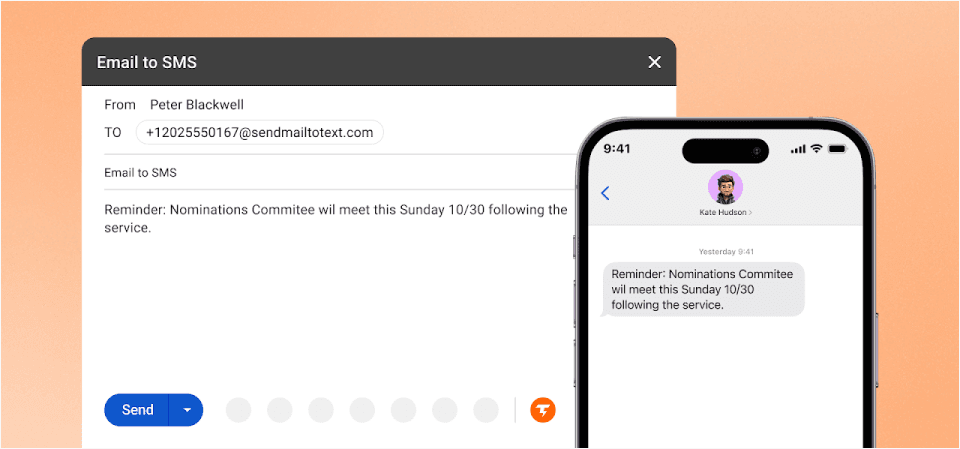
TextBolt was purpose-built for businesses that want to send and receive SMS directly from their email inbox. There’s no new app to learn, no complicated dashboard to navigate — just compose an email, and it becomes a text message.
With up to 98% delivery rates through verified 10DLC business routes, TextBolt eliminates the silent failures that plague carrier gateways and free texting tools.
Why TextBolt Wins for Small Businesses
- True email-native workflow: Send texts from Gmail, Outlook, or any email client. No plugins, no portals.
- 30-minute setup: Get up and running in under an hour with guided onboarding.
- Team-friendly: Multiple users can text from the same business number with full message history and audit trail.
- Built-in compliance: 10DLC registration, automatic opt-out handling, and TCPA compliance included.
- Two-way conversations: Customer replies come directly to your email inbox as threaded conversations.
- Message logging: Every text is tracked — who sent it, when, and to whom — for full accountability.
- 7-day free trial: Test everything before you commit.
TextBolt Pricing
| Plan | Monthly Price | Message Credits | Best For |
| Basic | $29/month | 500 credits | Solo practitioners, consultants |
| Standard | $49/month | 1,000 credits | Growing businesses, clinics |
| Professional | $99/month | 2,500 credits | Busy practices, multi-locations |
| Enterprise | Custom | 5,000+ credits | Large organizations |
Client Testimonial
We switched from carrier gateways to TextBolt and haven’t missed a single appointment reminder since. Setup took less than an hour. Sarah K. — Dental Office Manager, Austin TX
Verdict
TextBolt is the most straightforward and reliable email-to-SMS solution for small businesses. It combines the simplicity of email with professional-grade SMS delivery, making it ideal for teams that need to communicate quickly without learning new tools. While some competing platforms offer MMS and file attachments, TextBolt deliberately focuses on SMS — and there are good reasons why not supporting SMS attachments is actually better for your business.
Start Texting From Your Inbox Today
Send professional SMS from Gmail or Outlook — no new software, up to 98% delivery, and full 10DLC compliance included.
2. ClickSend — Best for Multi-Channel Messaging
ClickSend offers an email-to-SMS gateway alongside other channels like fax, voice, and postal mail. For businesses that need more than just texting, it’s a versatile multi-channel communication hub.
Key Strengths
- Email-to-SMS gateway: Send texts by emailing a special address format
- Multi-channel support: SMS, MMS, voice, fax, and postal mail from one platform
- Pay-as-you-go pricing with no monthly commitment
- API access for developers who want custom integrations
Limitations for Small Businesses
- No true threaded conversation management in email — replies require dashboard access
- Multi-user collaboration features are limited compared to TextBolt
- 10DLC registration and compliance setup must be managed manually
- Per-message pricing can add up quickly for regular business use
Best for: Businesses needing multi-channel communication beyond just SMS.
3. TXTImpact — Best for Budget-Conscious SMBs
TXTImpact provides basic email-to-SMS functionality with straightforward pricing. It’s designed for small businesses that need simple texting capabilities without enterprise-level complexity.
Key Strengths
- Direct SMS sending from email clients (Gmail, Outlook)
- Simple setup with minimal technical knowledge required
- Bulk SMS capability for notifications and alerts
- Affordable entry-level pricing
Limitations for Small Businesses
- Lacks advanced team inbox features and multi-user access controls
- Limited compliance automation — 10DLC and opt-out handling are basic
- Message logs and audit trails are minimal
- Less reliable delivery compared to dedicated business SMS routes
Best for: Very small businesses with basic texting needs and tight budgets.
4. Salesmsg — Best for Sales-Driven Teams
Salesmsg is a CRM-integrated texting platform built primarily for sales teams. It shines when paired with HubSpot, Salesforce, or other CRM systems for lead follow-up and outbound sales messaging.
Key Strengths
- Deep CRM integrations (HubSpot, Salesforce, ActiveCampaign)
- Built-in conversation management with shared inbox
- Automated text sequences and follow-ups
- Modern, intuitive dashboard interface
Limitations for Small Businesses
- No email-to-SMS capability — requires using the Salesmsg platform or CRM
- Pricing scales with users, making it expensive for larger teams
- Designed for sales workflows, not general operational messaging
- Not ideal for appointment reminders, alerts, or team coordination
Best for: Sales teams that live inside their CRM and need text follow-ups.
5. SimpleTexting — Best for SMS Marketing Campaigns
SimpleTexting is a marketing-focused SMS platform built for promotional campaigns, drip sequences, and subscriber management. It’s great for businesses running text-based marketing but not designed for day-to-day operational messaging.
Key Strengths
- Powerful marketing automation with drip campaigns and scheduling
- Keyword-based opt-in for building subscriber lists
- Analytics dashboard with click tracking and conversion metrics
- Integrations with Zapier, Mailchimp, and other marketing tools
Limitations for Small Businesses
- No email-to-SMS — all messaging happens through the SimpleTexting dashboard
- Designed for marketing blasts, not individual or operational texts
- Overkill for businesses that just need simple appointment reminders or alerts
- Higher learning curve for teams not familiar with marketing platforms
Best for: Businesses focused on SMS marketing campaigns and subscriber engagement.
How to Choose the Right Platform for Your Business
With so many options available, choosing the right SMS platform comes down to how your team actually works day to day:
- If your team lives in email → TextBolt is the clear winner. No new tools, no training, just send and receive texts from your inbox.
- If you need multi-channel communication → ClickSend gives you SMS, voice, fax, and more from one platform.
- If budget is your top priority → TXTImpact offers basic email-to-SMS at an affordable price point.
- If you’re a sales-driven team → Salesmsg integrates deeply with your CRM for lead follow-up workflows.
- If you need SMS marketing → SimpleTexting is built for campaigns, subscriber management, and promotions.
For most small businesses that need reliable, compliant texting without the complexity, TextBolt delivers the best combination of simplicity, deliverability, and value.
Final Thoughts
The days of unreliable carrier gateways and complicated SMS platforms are over. Small businesses deserve a texting solution that works the way they already communicate — through email.
TextBolt combines the familiarity of your inbox with professional-grade SMS delivery, giving your team the tools to communicate faster, more reliably, and in full compliance — all without learning a single new system.
Ready to upgrade your business texting? Start your free 7-day trial and see the difference reliable email-to-SMS makes.
Frequently Asked Questions
What is email-to-SMS and how does it work?
Email-to-SMS lets you send text messages by composing a regular email. You address the email to a special format (like phonenumber@sendemailtotext.com), and the platform converts it into an SMS delivered to the recipient’s phone.
Do I need to install any software to use TextBolt?
No. TextBolt works directly from your existing email client — Gmail, Outlook, or any other provider. There’s nothing to download or install.
What is 10DLC and why does it matter?
10DLC (10-Digit Long Code) is a carrier-approved system for business text messaging in the U.S. Without 10DLC registration, your messages are more likely to be filtered or blocked by carriers. TextBolt handles this registration automatically.
Can multiple team members send texts from the same number?
Yes. TextBolt supports multi-user access with full message history and audit trails. Every team member can send and receive texts from your shared business number.
How much does email-to-SMS cost for a small business?
TextBolt plans start at $29/month for 500 message credits. Most small businesses find the Standard plan ($49/month for 1,000 credits) covers their needs. All plans include a 7-day free trial.
Can customers reply to my text messages?
Absolutely. TextBolt supports full two-way messaging. When a customer replies to your SMS, the response is delivered directly to your email inbox as a threaded conversation.