
How to Text From Gmail: Send SMS From Gmail
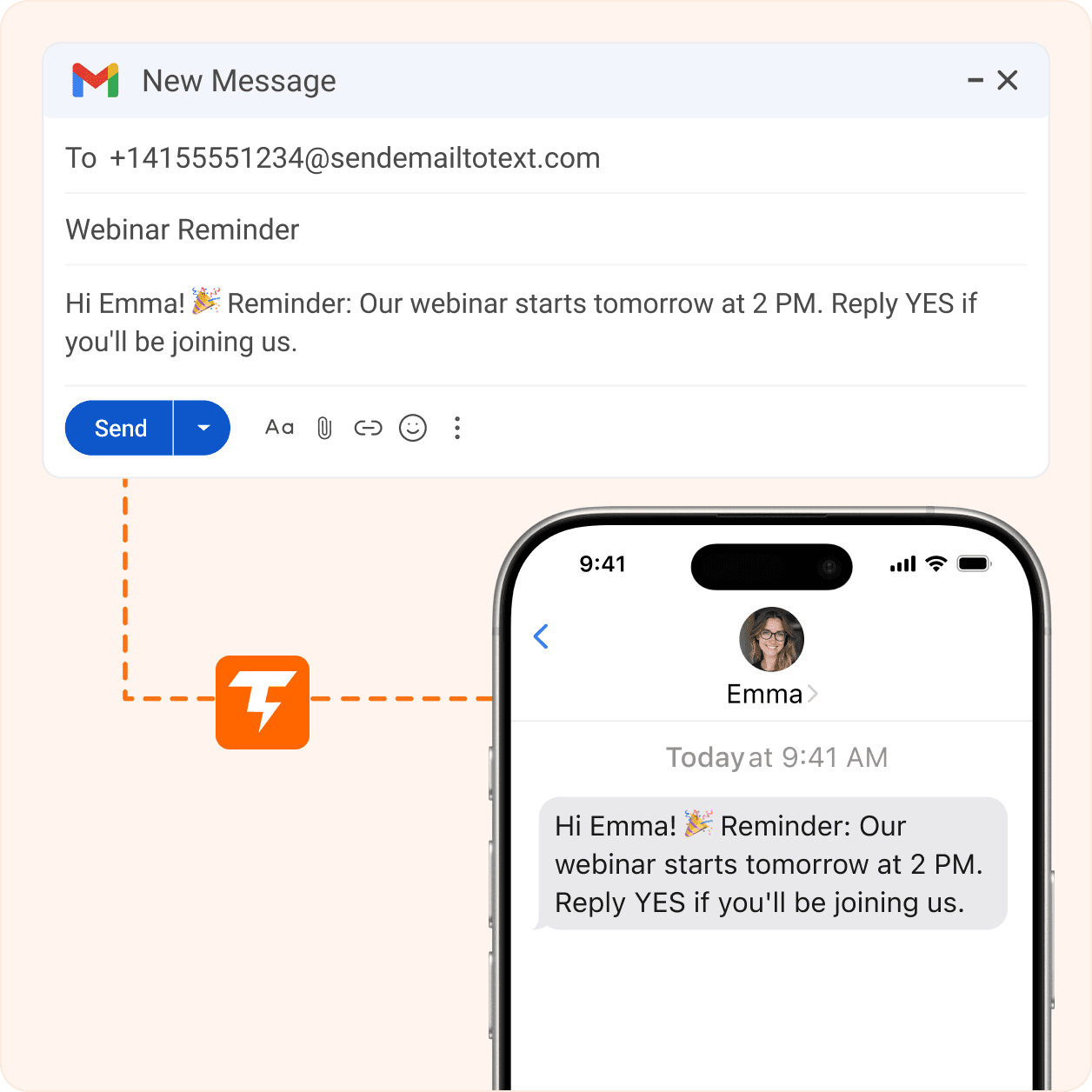
To text a phone from Gmail, click Compose, put the number in the To field at a text address, type your message, and hit Send. The reliable way is TextBolt: email +1XXXXXXXXXX@sendemailtotext.com and it arrives as a real SMS on any carrier.
The old free carrier gateways (like @vtext.com) are shutting down and are not 10DLC-registered, so they are not safe for business.
-
 Works directly from your Gmail inbox
-
Works with your 10DLC business number
-
Replies thread back to the admin’s inbox


How Do I Text From Gmail?
You text from Gmail by sending an email to a phone number at a special text address. The email is turned into a real SMS. There are two ways to do this.
The Free Carrier-Gateway Method (Works Today, but Closing Down)
- Open Gmail and click Compose.
- In the To field, type the 10-digit number, then
@, then the carrier’s gateway domain — for example1234567890@vtext.comfor Verizon. - Type your message in the body and click Send.
- Keep the message under 160 characters so it arrives as one text.
- Replies may come back into your Gmail inbox.
Important: Free carrier gateways are being retired and are not 10DLC-registered, so they are not compliant for business. If your gateway already stopped working, use the guide for AT&T email-to-text, Verizon vText, or T-Mobile email-to-text.
The Reliable, Compliant Method With TextBolt (Recommended)
- Open Gmail and click Compose.
- In the To field, enter the number at the TextBolt address:
+1[number]@sendemailtotext.com. - Leave the subject blank, type your message, and click Send.
- It goes out as a real text on any carrier — no carrier lookup needed.
- Replies route back into your Gmail inbox, so the conversation lives in Gmail.
No install needed to send your first text. To sync contacts and manage a team, add TextBolt from the Google Workspace Marketplace listing.
What Is a Gmail SMS Gateway (Email-to-Text)?
An email-to-SMS gateway is a way to send a text by emailing a phone number at a special domain, where a carrier or a texting service turns the email into a text.
The old free version used each carrier’s own domain (like @vtext.com), but those are shutting down and are not 10DLC-registered. TextBolt is a single address — +1[number]@sendemailtotext.com — that works across all carriers and is built for compliant business texting. You can use the same address from Gmail, Outlook, or any email app.
Which Carriers Still Support Email-to-Text, and Is It Safe for Business?
Here are the common addresses, their status, and the one option that keeps working everywhere. Replace number with the 10-digit phone number.
| Method / address | Works on | SMS | MMS | Status |
|---|---|---|---|---|
+1[number]@sendemailtotext.com (TextBolt) | Every carrier, no lookup | Yes | No (SMS only) | Recommended. Built for 10DLC compliance. |
number@txt.att.net (AT&T) | AT&T only | Yes | number@mms.att.net | Ended June 17, 2025. Migrate from AT&T |
number@vtext.com (Verizon) | Verizon only | Yes | number@vzwpix.com | Discontinued, full shutdown by March 31, 2027 — migrate from Verizon |
number@tmomail.net (T-Mobile) | T-Mobile only | Yes | number@tmomail.net | Retiring / unreliable — migrate from T-Mobile |
number@mycricket.com (Cricket) | Cricket only | Yes | number@mms.mycricket.com | Carrier gateway, may be restricted |
number@msg.fi.google.com (Google Fi) | Google Fi only | Yes | number@msg.fi.google.com | Carrier gateway, may be restricted |
Only the TextBolt row is safe for business: it works on every carrier and is 10DLC-registered. The carrier rows are shown for reference, and most are shutting down. If you run alerts through a system like WIN-911, see the WIN-911 migration guide.
155-character note: A standard SMS is 155 characters. Keep each message under that so it stays one text instead of being split into several.
Why Are the Free Carrier Gateways Going Away?
U.S. carriers are closing their free email-to-text gateways because of spam and new rules for business texting. Since these gateways were never registered or verified, carriers now block, filter, or silently drop messages sent through them. AT&T finished its shutdown in June 2025; Verizon and T-Mobile are following. The replacement is a registered service like TextBolt that meets the carriers’ rules. See the migration guides for AT&T, Verizon, and T-Mobile.
Message to 5551234567@txt.att.net
Bounce: Address no longer active. Gateway discontinued June 2025.
Message to 5559876543@vtext.com
Bounce: Delivery failed. Service permanently discontinued.
Message to 5551234567@sms.textbolt.com
Delivered successfully via 10DLC-compliant route.
Reply received from 555-987-6543
Two-way reply delivered to your email inbox.
Full Feature Comparison
Why the Migration Is Worth It, at a Glance
The bounce message above is only the most visible problem. Even when carrier gateways worked, they never offered team access, delivery tracking, two-way replies, or 10DLC compliance. Now that they’ve been discontinued, businesses need a professional replacement that delivers all of it. The table below shows exactly what you get when you move from a free carrier gateway to TextBolt’s email to SMS service.
| Feature | Carrier Gateways | TextBolt |
|---|---|---|
| Service Status | Discontinued | Active |
| Delivery Rate | Unreliable (no tracking) | Up to 98%* |
| 10DLC Compliance | Not supported | Included |
| Two-Way Messaging | Limited / None | Full support |
| Team Access | Not available | Up to 10 users |
| Message Tracking | None | Full dashboard |
| Cost | Free (now defunct) | From $29/mo |
Where Can I Use TextBolt, and Who Is It For?
Send from any device that has Gmail — desktop, laptop, phone, or tablet — same experience everywhere. It is built for teams that live in email.
Small Businesses
Front-desk teams send texts straight from the inbox they already use.
Law Firms
Send client updates and reminders with a record kept in email.
Banks and Finance
Account alerts and confirmations sent reliably from your email.
Healthcare Clinics
Appointment and follow-up texts from your existing clinic email.
IT Departments
Route system and on-call alerts to phones straight from email.
All Industry Solutions
Browse every industry page to find your exact use case.
Why TextBolt for Gmail Texting
Superior delivery rates, enterprise compliance, and zero learning curve
Works on Every Device
Desktop, mobile, or tablet — same experience everywhere.
Native Gmail experience
Send texts the way you send email — no new software to learn.
10DLC Compliant
Your business texting is registered and compliant from day one.
Fast Setup
Add TextBolt to Gmail and start sending in minutes.
Google Contacts sync
Reach individuals or groups using the contacts you already have.
Conversation History in Gmail
Every text is saved in your inbox to search and reference.
Popular Use Cases
Businesses across industries use TextBolt’s email to text service every day
Appointment Reminders
Healthcare, dental, and service businesses reduce no-shows by sending SMS reminders from their email workflow.
IT System Alerts
Trigger SMS notifications from server monitoring, CRM, or ticketing systems via email.
Customer Notifications
Order updates, shipping alerts, service confirmations, and payment reminders sent as texts from your existing email.
Internal Team Updates
Staff scheduling changes and shift notifications reach everyone instantly via SMS.
School Notifications
Parent alerts, closure announcements, and schedule changes delivered as text messages from school email systems.
Healthcare Messaging
Patient communications, follow-up reminders, and care coordination from your existing healthcare email platform.
Your Team Already Knows How to Send Email
Skip the new dashboard. Start texting from your inbox in under 30 minutes.

CUSTOMER REVIEWS
What Our Clients Say
Join thousands of satisfied businesses using TextBolt
On Google Workspace Marketplace, with
 263K+ installs

Our team sends hundreds of texts per week from Gmail. TextBolt made it seamless no training needed, everyone just sends emails like they always have.

Operations Lead
Manufacturing
We notify 2,000+ parents about closures and events. TextBolt lets our front office staff send bulk texts without any new tools — just their school email.

School Administrator
High Schools
The reply-to-email feature is a game-changer. Patients text back confirmations and we see them right in our inbox. No app switching, no missed replies.

Practice Manager
Horizon Medical Group
Frequently Asked Questions
Can I send a text through Gmail?
Yes. You email a phone number at a text address and it is delivered as an SMS. The reliable way is to send to +1[number]@sendemailtotext.com with TextBolt, which works on every carrier and is 10DLC-compliant.
Can I send a text through Gmail for free?
The old free carrier-gateway method exists, but it is shutting down and is not 10DLC-compliant for business. For reliable, compliant texting from Gmail, send to +1[number]@sendemailtotext.comwith TextBolt.
Can I text someone using Gmail?
Yes. Compose an email, put the person’s number at a text address such as +1[number]@sendemailtotext.com in the To field, type your message, and send. It arrives on their phone as a normal text.
Does Gmail send text messages on its own?
No. Gmail sends email. To turn an email into a text you need a text address — either a carrier gateway (closing down) or a service like TextBolt at +1[number]@sendemailtotext.com.
How do I send a text from Gmail to a cell phone?
Click Compose, enter the cell number at +1[number]@sendemailtotext.com in the To field, type your message, and hit Send. TextBolt delivers it as an SMS to any carrier.
What is an email-to-SMS gateway?
It is a way to send a text by emailing a phone number at a special domain that converts the email into a text message. Free carrier gateways are closing; TextBolt is a single address that works on every carrier — +1[number]@sendemailtotext.com.
What is a Gmail SMS gateway?
It is the text address you put in the To field so Gmail can send an SMS. Carrier versions like @vtext.com are being retired; the reliable one is +1[number]@sendemailtotext.com.
Does vtext still work?
Verizon’s @vtext.com email-to-text gateway is being discontinued, with a full shutdown by March 31, 2027. It is already unreliable and is not 10DLC-compliant. Use TextBolt instead — +1[number]@sendemailtotext.com. Migrate from Verizon.
Did Verizon discontinue vText?
Yes. Verizon began phasing out @vtext.com and @vzwpix.com in late 2024, with a full shutdown expected by March 31, 2027. Switch to a 10DLC-ready service.
Why is AT&T discontinuing email-to-text?
AT&T permanently ended its @txt.att.net and @mms.att.net gateways on June 17, 2025, in line with new compliance rules for business texting. To keep texting from email, switch to a 10DLC-ready service. Migrate from AT&T.
Are email-to-SMS gateways going away?
Most free carrier gateways are being retired. AT&T ended its gateway in June 2025; Verizon and T-Mobile are following. A registered service like TextBolt is the lasting replacement and is built for 10DLC compliance.
Will I receive replies if my phone is turned off?
Yes. With TextBolt the conversation lives in Gmail, so replies arrive in your inbox no matter what your own phone is doing.
Can I text from my computer without my phone?
Yes. TextBolt sends from Gmail in your browser, so you can text from a computer without your phone nearby. Just compose to +1[number]@sendemailtotext.com and send.
Is there a character limit when texting from Gmail?
A standard SMS is 155 characters. Keep each message under that so it stays a single text. Longer messages may be split into several texts.
Do I need to install software to text from Gmail?
No. To send your first text you just send an email. To sync contacts and manage a team, you can add TextBolt from the Google Workspace Marketplace.
What is the difference between SMS and MMS?
SMS is plain text, limited to about 160 characters. MMS can carry pictures and longer content. TextBolt supports both from the same @sendemailtotext.com address.
Why am I getting text messages from a Gmail account?
Someone is using an email-to-text service to send you an SMS from their inbox. The text shows it came through an email-to-SMS gateway. You can reply and it goes back to their inbox.
Can I use the same setup with Outlook or Apple Mail?
Yes. The TextBolt address works from any email app. See Outlook to text or send the same way from Apple Mail.
Ready to Replace Your Carrier Gateway?
Join 3000+ businesses using TextBolt for reliable email to SMS delivery