
Send Text from Apple Mail: A Business Number for Mac and iPhone
Send compliant business SMS from any Apple Mail surface (Mac, iPhone, iPad, iCloud webmail, even a headless Mac Mini or iMac running launchd or cron) through a verified A2P 10DLC business number. Replies thread back to your Apple Mail inbox. Built for businesses sending at real volume, not for texting a friend from your personal cell.
-
 Send text from Apple Mail on Mac, iPhone, and iPad
-
A 10DLC business number, separate from your personal cell
-
Replies thread back to your Apple Mail inbox


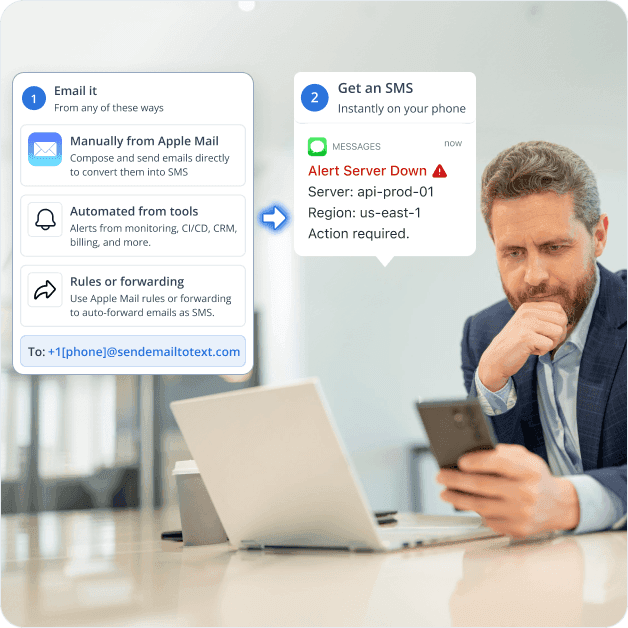
Adding Compliant Text on Top of Your Apple Mail Workflow
Apple Mail is an email client, not an SMS sender, and the carrier gateways that used to fill the gap are shut down. US carriers now require all business SMS to route through registered 10DLC senders, and non-compliant traffic is throttled or blocked. TextBolt sits on top of Apple Mail and handles 10DLC registration on your behalf. Here are six challenges teams face when they need SMS from Apple Mail.

Apple Mail Has No Built-In SMS Sender
Apple Mail handles email reliably across Mac, iPhone, and iPad, but it is an email client, not a text-messaging app. There is no built-in way to convert an Apple Mail message into an SMS, and Apple Community threads asking “send text from email on iPhone” hit the gap with no native answer.

Carrier Email-to-SMS Gateways Have Shut Down
AT&T retired txt.att.net in June 2025. T-Mobile took tmomail.net offline in December 2024. Verizon’s vtext.com is reportedly at a 30-40% failure rate today and shuts down by March 2027. Anyone who pasted [phone]@vtext.com into Apple Mail has broken alerts plus exposure to per-message surcharges, silent drops.

iPhone Messages Mixes Business and Personal Number
Sending business SMS from the iPhone Messages app uses the staff member’s personal cell number. The recipient sees a personal number, replies arrive on the personal phone, and there is no shared inbox for the team. Real estate agents, consultants, and small business owners juggling iPhone SMS for client work hit this every day.

Apple-Stack SMS Has No 10DLC Compliance or Audit Trail
iMessage is Apple-ID chat, not SMS. The Messages app and Mac Continuity both ride a personal carrier number, exactly the personal-volume pattern A2P 10DLC was built to stop. Messages for Business is inbound-only branded chat. None provide 10DLC sender registration, consent records, or audit trails, so compliance leads in healthcare and finance cannot document SMS sent from staff iPhones.

Mac-to-Phone Texting Requires iPhone Forwarding
Sending SMS from a Mac requires Text Message Forwarding from a paired iPhone, which routes business texts through the staff member’s personal cellular line. The setup is fragile across macOS and iOS updates, mixes personal and business SMS, and does not let multiple team members share one business number.

Apple Messages for Business Doesn’t Send Outbound SMS
Apple Messages for Business is the official Apple solution, but it is an inbound, customer-initiated channel that requires DUNS registration, a Messaging Service Provider partner, and Business Register approval. It is not built for outbound appointment reminders, lead notifications, or staff alerts, the workflows most small businesses actually need.
How TextBolt Adds SMS to Apple Mail
TextBolt is your registered 10DLC sender that pairs with Apple Mail. We handle campaign approvals, business number provisioning, and carrier brand-vetting on your behalf. Compose or auto-forward from Apple Mail to a TextBolt address, and the SMS routes under your verified business identity. Works on Mac, iPhone, iPad, and iCloud webmail. No new app, no iPhone Messages mixing. Approved accounts typically activate within 1 to 2 business days.

Send SMS from Apple Mail Instantly
Compose an email in Apple Mail on Mac, iPhone, or iPad. Address it to +1[phonenumber]@sendemailtotext.com, hit send. The recipient’s phone gets an SMS in seconds from your toll-free business number. Same workflow on every Apple Mail surface.

10DLC-Compliant Business Number
TextBolt registers your sender identity with The Campaign Registry during onboarding. SMS routes through carrier-approved 10DLC infrastructure, not retired email gateways and not your personal cell. Up to 98% delivery rate, professional toll-free number, no spam-folder filtering on the recipient side.

Two-Way Replies to Your Apple Mail Inbox
When the recipient texts back, the reply lands as an email in your Apple Mail inbox, threaded with the original message. The whole real estate team, front desk, dispatch crew, or sales team sees the response and can reply by sending another email. No webhook to maintain.

Multi-User Access Across Mac, iPhone, and iPad
Standard plan and Professional plan include multi-user access for up to 10 team members on one shared account. Agents, practitioners, technicians, and consultants on Mac, iPhone, or iPad all send SMS from Apple Mail using the same business number, with no per-seat fees.

Complete Audit Trail per Message
Each SMS is logged with timestamp, sender, recipient phone, delivery status, and reply thread. Export logs for compliance documentation, dispute resolution, or finance audit. The full history sits in your TextBolt account, ready for the legal or compliance team. (Note: TextBolt is not HIPAA compliant.)

No New App, No iMessage Mixing, No Code
TextBolt is email-based. There is no iPhone app to install, no Mac app to download, no iMessage account to mix with personal contacts, no Twilio webhook to wire up. If your team can send an Apple Mail message, your team can send an SMS. The gateway address is the integration.
Performance Metrics

Up to 98%
SMS Delivery Rate

Two-Way
SMS Replies to Your Inbox

Carrier-Grade
Routes & Infrastructure

Up to 10
Team Members on Shared Account
Set Up Apple Mail SMS in About 30 Minutes
Hands-on setup takes around 30 minutes. TextBolt handles 10DLC business verification with The Campaign Registry on your behalf in parallel; carrier approval typically takes 1-3 business days. No iPhone app, no Mac app, no developer.
Sign Up for TextBolt
Create your TextBolt account using your business email. Account creation takes about 2 minutes. The account is web-based, so it works the same whether you log in from a Mac, iPhone, or iPad browser.
Choose a Toll-Free Business Number
Pick a dedicated toll-free number for outbound SMS. The number stays yours and is the sender ID on every SMS the team sends from Apple Mail, separate from any staff member’s personal cell.
TextBolt Handles 10DLC Business Verification
Provide your business details during onboarding. TextBolt handles 10DLC business and campaign registration with The Campaign Registry on your behalf. Carrier approval typically takes 1-3 business days; the rest of the setup runs in parallel.
Send Your First SMS from Apple Mail
Open Apple Mail on Mac, iPhone, or iPad. New message, address it to +15551234567@sendemailtotext.com with the recipient’s actual phone number, write your message, hit send. The SMS arrives in seconds.
Wire Up Automated Senders (Optional)
If your scheduling tool, CRM, or billing system already emails you, point those senders at the TextBolt gateway. Reminders from Calendly, Acuity, or SimplePractice, lead alerts from HubSpot or Salesforce, payment failures from Stripe, all become SMS automatically.
Invite Up to 10 Team Members
Add coworkers to the shared TextBolt account. Each person sends from Apple Mail on their own Mac, iPhone, or iPad using the same business number. Replies arrive in the Apple Mail inbox of whoever sent the original SMS.
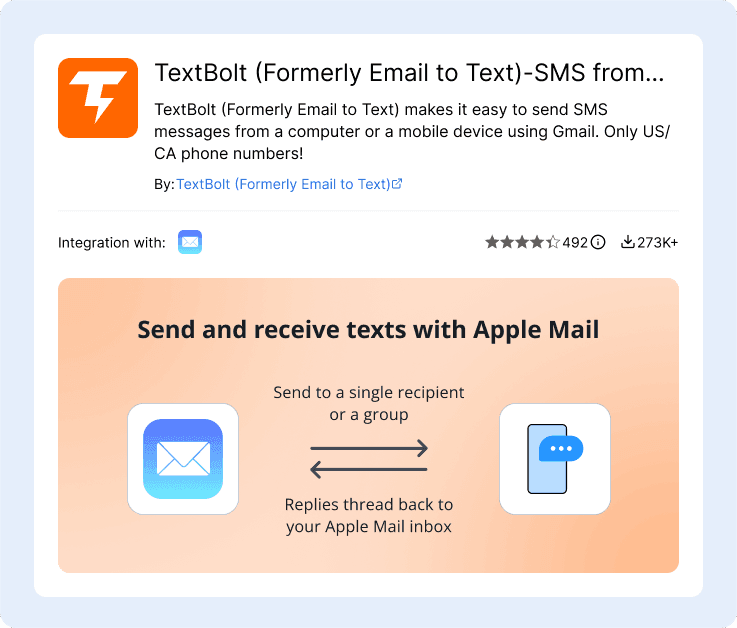
Ready to Send Your First Text From Apple Mail?
Compliant business SMS from Mac, iPhone, or iPad. No new app, no developer.

Three Ways to Send SMS from Apple Mail
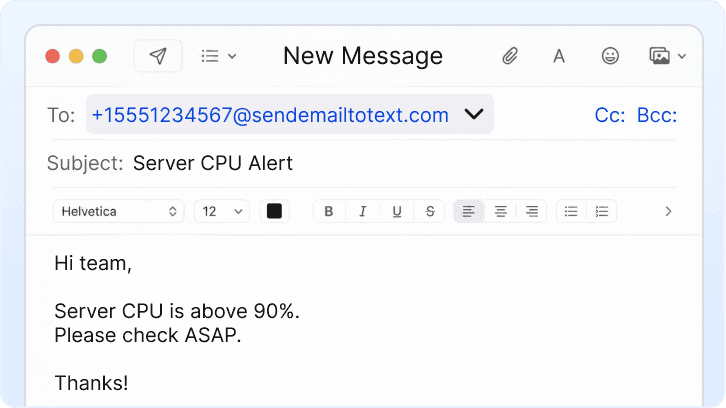
Manual Compose from Apple Mail
Open Apple Mail on Mac, iPhone, or iPad. Tap or click New Message, address to +1[phone]@sendemailtotext.com, type your message, hit send. The body of the email becomes the SMS body. Subject is optional and prepended if filled. Replies thread back to your Apple Mail inbox.
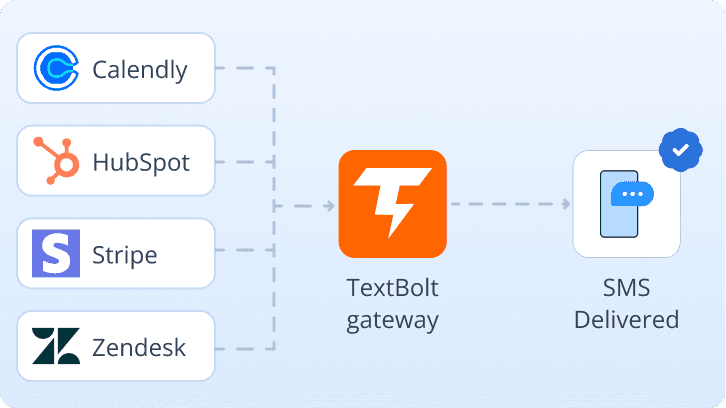
Automated from a System Already Emailing You
Tools that already email your Apple Mail inbox (Calendly, Acuity, SimplePractice, Mindbody for scheduling; HubSpot, Salesforce, Pipedrive for CRM; Stripe, Shopify for payments; Zendesk, Freshdesk for tickets) can email the TextBolt gateway directly instead. Each notification email becomes an SMS automatically. No webhook, no integration code.
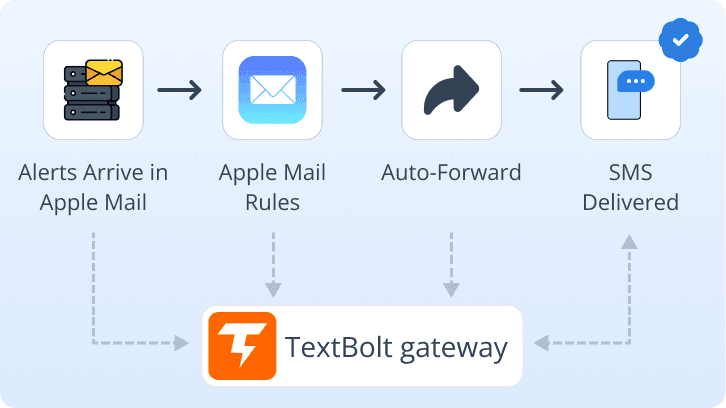
Apple Mail Rules Forwarding (Sender, Subject, or Keyword)
Add a Mail rule or iCloud forwarding filter that matches a sender or keyword and forwards to +1[phone]@sendemailtotext.com. The match arrives as SMS in seconds. macOS rules need Mail.app open; iCloud and server-side rules fire even when your Mac is asleep. Headless Macs send via launchd, cron, AppleScript, or sendmail. Shortcuts can trigger TextBolt from Focus mode, Siri, or Home automation. Useful for targeted alerts, legacy software, and locked-down monitoring tools.
Apple Mail Workflows That Send SMS Through TextBolt
Common Apple Mail workflows where SMS replaces personal-iPhone texting, per-seat apps, or dead carrier gateways. Each links an Apple Mail inbox to an SMS-receiving phone in seconds. The under-appreciated half is when a Mac is the sender: a Mac Mini in a broadcast rack, an iMac running overnight renders, or a headless Mac server emailing alerts that become SMS through TextBolt automatically.
Real Estate Agents and Property Managers
Send showing confirmations, listing updates, and offer status to clients from Apple Mail without burning a personal cell number on the listing card. Wire up your CRM (HubSpot, Pipedrive, Follow Up Boss) at the TextBolt gateway, or compose by hand from iPad Mail between showings (save the TextBolt address as a contact for one-tap from iPhone or iPad Mail). Replies thread back to Apple Mail, where a brokerage compliance officer can audit any agent’s customer texts on demand under a 10DLC campaign registered as real-estate transactional messaging.
Solopreneurs and Small Business Owners
Run the workday from Apple Mail across Mac and iPhone, with a real business number for client texts instead of your personal cell. Compose manually or wire up your billing tool (Stripe, Shopify) and CRM (HubSpot, Pipedrive) to email the TextBolt gateway for automated alerts.
Healthcare, Dental, and Mental Health Practices
Configure Calendly, Acuity, SimplePractice, Mindbody, Dentrix, or CentralReach to email appointment reminders directly to the TextBolt gateway. Multi-location practices route per-patient by storing the TextBolt-addressed phone in the EMR’s preferred-contact field; an Apple Mail rule on each reception Mac (or an iCloud server-side rule for always-on) auto-forwards to that address. One multi-location dental practice saw no-show rates drop 38% after switching from carrier gateways. Patients confirm by reply text and the response lands in the practice’s shared Apple Mail inbox; audit trails available for internal documentation.
Independent Consultants and Creative Agencies
Send project status, invoice reminders, and meeting confirmations from Apple Mail on Mac without exposing a personal iPhone number to clients. Wire up your project tool (Jira, Asana, Trello via Zapier) or billing tool (Stripe, FreshBooks) to email the TextBolt gateway for automated alerts.
Field Service Technicians and Dispatch
Dispatchers send job assignments from Apple Mail on Mac directly to technicians’ phones. Configure ServiceTitan, Housecall Pro, or Jobber to email job updates to the TextBolt gateway. Technicians reply by text to confirm arrival, and replies land in the dispatcher’s Apple Mail thread. For property management, the same pattern routes alarm-panel alerts: an office Mac runs Apple Mail rules that send a Mountain Avenue panel alert to the supervisor on call for that street and a Westchester Drive alert to a different supervisor, all from one Mac, multiple rules, multiple TextBolt destinations.
Sales Reps in Apple-Centric SMBs
Configure HubSpot, Salesforce, or Pipedrive new-lead alerts to email the TextBolt gateway. The rep gets SMS within seconds on their iPhone, replies before the lead cools, and the conversation logs back into the CRM email thread. No per-seat sales-SMS platform required.

Built for Compliance and Security

10DLC Compliant

Carrier Approved

Complete Audit Trail
Apple Mail SMS Options: Carrier Gateways, iPhone
Messages, or TextBolt
Different paths, different trade-offs. Carrier gateways are dying. iPhone Messages triggers A2P throttling at volume. Mac Continuity needs an awake iPhone. iMessage is Apple-only. TextBolt is the only path with a verified 10DLC sender, replies in Apple Mail, and one identity across every surface including headless Macs.
Carrier Email-to-SMS Gateways
Free, but ending
The historical workaround: address an Apple Mail message to [phone]@vtext.com or @txt.att.net. AT&T and T-Mobile are gone, Verizon’s vtext.com is at a 30-40% failure rate today and ends in 2027. No compliance, unreliable replies, silent bounces.
-
 AT&T txt.att.netretired June 2025
-
T-Mobile tmomail.net offline since Dec 2024
-
Verizon vtext.com ends 2027
-
No 10DLC, no audit trail
-
Replies often dropped
Recommended
TextBolt
Flat monthly plan, no per-node license (Standard plan)
Email-to-SMS gateway built for Apple Mail across Mac, iPhone, and iPad. Send to +1[phonenumber]@sendemailtotext.com from any Apple Mail surface and the email becomes an SMS from your business number. Replies thread back into Apple Mail.
-
 Up to 98% delivery rate
-
Verified A2P 10DLC-compliant business sender, brand-vetted with US carriers
-
Multi-user access: up to 10 team members
-
Two-way replies threaded back into your Apple Mail inbox
-
Complete audit trail per message
-
No new app, no iMessage mixing, no code
iPhone Messages or Per-Seat App
Mixed personal/business or per-user fees
iPhone Messages on a personal cell mixes personal and business and has no audit trail. Worse, automated or higher-volume business sending from a personal number triggers A2P throttling (1 to 3 messages per minute) and then carrier blocking, the exact pattern A2P 10DLC was built to stop. Business-phone apps (Grasshopper, OpenPhone) add a separate number but require a new app per device and charge per user.
-
iPhone Messages uses personal cell number
-
No 10DLC business sender ID on personal SMS
-
Per-seat business-phone apps add monthly cost per user
-
Yet another app to install on Mac and iPhone
-
Audit trail varies; rarely exportable
CUSTOMER REVIEWS
How Teams Use TextBolt with Apple Mail
Three ways customers route SMS through Apple Mail with TextBolt: separating client texts from a personal iPhone number, replacing dead carrier gateways, and sharing one business number across the team’s Macs and iPhones.

On Google Workspace Marketplace, with
 263K+ installs

I was sending listing updates and showing confirmations from my personal iPhone number for years. Clients started saving my cell, calling on weekends, the works. TextBolt let me move all that to a real business number and keep composing from iPhone Mail like I always did.

Real Estate Agent
Independent Brokerage
Our front desk used carrier gateways for appointment reminders for years. When AT&T shut down their gateway, half our reminders stopped going out. We pointed our scheduler at TextBolt’s address and reminders worked the next day, with replies threading right back into our shared Apple Mail inbox.

Owner
Family Dental Practice
My consulting team is six people across three time zones, all on Macs and iPhones. We didn’t want a new SMS app on every device or per-seat fees. TextBolt gave us one shared business number we could all text from, using the email client we already had open all day.

Founder
Independent Consulting Studio
Why Apple Mail Users Choose TextBolt
The numbers that matter when adding SMS to an Apple Mail workflow on Mac, iPhone, and iPad.
Up to 98%
SMS Delivery Rate
30 min
End-to-End Setup
Up to 10
Team Members (Standard Plan)
4.4★
Workspace Marketplace (483+ reviews)
Frequently Asked Questions
Can Apple Mail send text messages on its own?
No. Apple Mail is an email client across Mac, iPhone, and iPad; it has no built-in SMS sender. To send SMS from Apple Mail, the inbox needs a connection to an email-to-SMS gateway like TextBolt. Address an email to +1[phone]@sendemailtotext.com and the message arrives as an SMS from your business number.
What replaced carrier email-to-SMS gateways for Apple Mail users?
Many businesses pasted carrier gateways (vtext.com, txt.att.net, tmomail.net) into Apple Mail’s To: field as a workaround. Those gateways have shut down: AT&T’s txt.att.net retired June 2025, T-Mobile’s tmomail.net went offline December 2024, and Verizon’s vtext.com is at a 30-40% failure rate today and shuts down by March 2027. TextBolt is the direct replacement: same email-driven mental model, but messages route through a registered 10DLC business number with up to 98% delivery rate and complete audit trails.
How do I send SMS from Apple Mail without using my personal iPhone number?
Sign up for TextBolt and complete onboarding (TextBolt handles 10DLC business verification with The Campaign Registry on your behalf; carrier approval typically takes 1-3 business days). Once your number is approved, address any Apple Mail message to +1[phone]@sendemailtotext.com. The email becomes an SMS sent from your dedicated business toll-free number, not your personal cell. Replies come back to your Apple Mail inbox, not your personal phone.
Is sending SMS from Apple Mail with TextBolt 10DLC compliant?
Yes. TextBolt registers your sender identity with The Campaign Registry as part of onboarding, submits your campaign brief (sample messages, opt-in language, opt-out flow) to the carriers on your behalf, and carries the trust score from carrier brand-vetting that determines your throughput allowance. SMS sent from Apple Mail through TextBolt routes through carrier-approved 10DLC infrastructure, satisfies FCC business SMS requirements, and avoids the spam-folder filtering that hit unregistered carrier-gateway traffic. TextBolt is not HIPAA compliant; healthcare prospects with PHI requirements should contact sales for Enterprise options.
Do replies to SMS sent from Apple Mail come back to my inbox?
Yes. When the recipient replies to a TextBolt-sent SMS, the reply arrives as an email in the Apple Mail inbox of whoever sent the original message, threaded with the outgoing message when possible. Replies route reliably regardless of carrier, unlike the old gateway flows where some carriers used do-not-reply addresses or dropped replies entirely. No webhook required.
Can my whole team send SMS from their Mac or iPhone?
Yes. Standard plan and Professional plan include multi-user access for up to 10 team members on a shared TextBolt account. Each person sends from Apple Mail on their own Mac, iPhone, or iPad using the same business number. There are no per-user fees inside the 10-seat cap. Enterprise plans support custom team sizes for larger organizations.
Does this work with Mac, iPhone, and iPad?
Yes. One TextBolt account, one verified 10DLC business number, every Apple Mail surface. macOS Mail (Sequoia, Sonoma, Ventura) is the primary sender with full local rules. iPadOS and iOS Mail send and receive replies; rule setup is server-side only (iCloud, Gmail, or Outlook web). iCloud.com webmail covers borrowed or non-Apple machines. Apple Watch Mail is triage-only. The highest-value automation surface is a headless Mac Mini or iMac server sending via mail, sendmail, launchd, cron, or AppleScript, no GUI required. The recipient phone gets the same SMS regardless of surface. Works with iCloud Mail, Gmail-via-IMAP, Microsoft 365-via-Exchange, or any custom-domain IMAP/SMTP account.
How is TextBolt different from iPhone Messages or Apple Messages for Business?
iPhone Messages is built for personal SMS and iMessage from your own cellular number; using it for client work mixes business and personal communication, has no shared team inbox, and provides no 10DLC business sender ID or audit trail. Apple Messages for Business is an inbound, customer-initiated channel that requires DUNS registration and a Messaging Service Provider partner; it is not built for outbound appointment reminders, lead alerts, or staff notifications. TextBolt covers the outbound business SMS workflow that neither product handles, using the Apple Mail surface your team already lives in.
How much does it cost to send SMS from Apple Mail with TextBolt?
Basic plans include 500 SMS credits and a single user. TextBolt’s Standard plan includes 1,000 credits with multi-user access for up to 10 team members on a shared account. The Professional plan includes 2,500 credits with the same 10-user shared access. Enterprise plans cover 5,000+ credits with custom team sizes. A one-time setup fee applies for the toll-free business number, and annual plans include a discount. Visit TextBolt pricing page for more details.
How long does it take to set up Apple Mail to SMS with TextBolt?
About 30 minutes of hands-on configuration: account creation and toll-free business number selection. TextBolt handles 10DLC business verification with The Campaign Registry on your behalf in parallel; carrier approval typically takes 1-2 business days. Once your number is approved, your team can send their first SMS from Apple Mail in seconds. No iPhone app, no Mac app, no developer.
What is the difference between iPhone Mail notifications and SMS via TextBolt?
Native iPhone and Mac Mail notifications alert you on your own device when an email arrives in Apple Mail, as long as the Mail app is configured and the relevant inbox is signed in. Customize Notifications for VIPs or specific accounts works well if the only person who needs the alert is you. TextBolt sends an actual SMS to any 10-digit US or Canadian mobile number, including customers, patients, technicians, dispatchers, or on-call engineers who do not have access to your Apple Mail account. Use iPhone Mail notifications when you are the only recipient. Use TextBolt when the message needs to reach someone outside your inbox, when a 10DLC-compliant business number is required, or when replies need to thread back into a shared Apple Mail account.
What is 10DLC and why does it matter for Apple Mail business SMS?
Since 2023, US carriers require every Application-to-Person SMS (any text sent by software, automation, a CRM, monitoring tool, or templated business content) to route through a registered A2P 10DLC business sender. Compliance requires Campaign Registry registration (EIN, business address, verified contact), carrier-approved use case (sample messages, opt-in, opt-out), a provisioned 10DLC number, and a trust score that sets your throughput. Non-compliant volume is throttled to 1 to 3 messages per minute, then blocked, surcharged, and exposed to STIR/SHAKEN traceback complaints that stick to the sending number. TextBolt is the registered sender, holds the campaign approvals, and provisions the verified number on your behalf; Apple Mail just composes or auto-forwards to a TextBolt address. Approved accounts typically activate within 1 to 2 business days.
Do I need my iPhone nearby for Continuity SMS to work with TextBolt?
No. TextBolt does not use Continuity, Text Message Forwarding, or iMessage relay. It does not need your iPhone’s cellular connection or proximity to anything. The TextBolt address is an email destination; Apple Mail simply sends an email to it, and TextBolt delivers the SMS through verified 10DLC carrier routes. Your iPhone can be off, in another country, or non-existent. A headless Mac Mini in a server rack with no iPhone in the building works the same way as a MacBook on your desk.
Add SMS to Apple Mail Across Mac, iPhone, and iPad
Send compliant business SMS from any Apple Mail surface in about 30 minutes. Multi-user access, two-way replies in Apple Mail, audit-ready logs.