
Send Text Alerts Directly from Microsoft Outlook
Turn any Outlook email into an instant text/SMS with TextBolt. Replace the retired Outlook Mobile Service in minutes.
-
 Send text from Outlook instantly
-
Works with your 10DLC business number
-
Replies thread back to your Outlook inbox


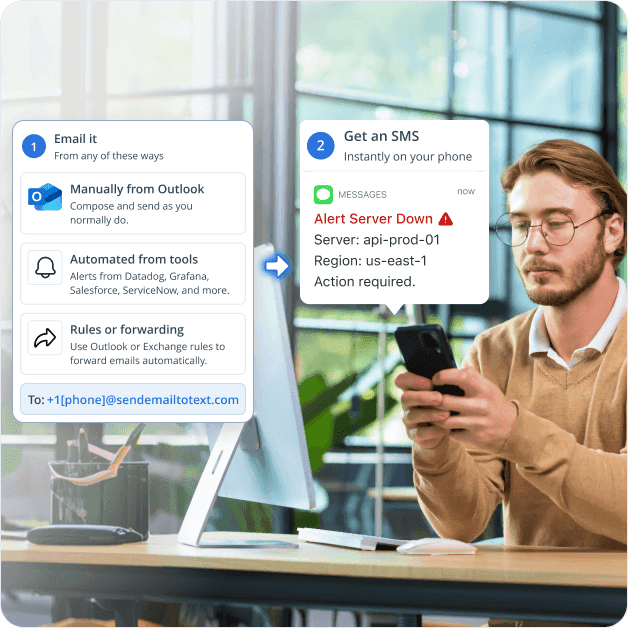
Adding Compliant Text on Top of Your Outlook Workflow
Outlook Mobile Service is retired and the carrier gateways (vtext.com, txt.att.net, tmomail.net) have shut down. TextBolt slots in on top of Outlook and turns any email into a 10DLC-compliant SMS. Six challenges IT admins, on-call engineers, sales reps, and dispatchers hit when they need SMS from Outlook.

Outlook Mobile Service Was Retired by Microsoft
Outlook used to convert emails to SMS through the legacy Outlook Mobile Service. Microsoft retired that feature, and Microsoft 365 Q&A threads like “Sending SMS messages through email no longer working” capture the resulting gap. Outlook desktop, Outlook on the web, and the Outlook mobile app handle email reliably, just without a built-in SMS sender. TextBolt slots in on top of any of those Outlook surfaces, so the email you already send becomes a 10DLC-compliant SMS.

Carrier Email-to-SMS Gateways Have Shut Down
The old Outlook email to text workaround relied on carrier gateways. AT&T retired txt.att.net in June 2025. T-Mobile took tmomail.net offline in December 2024. Verizon’s vtext.com shutdown completes by March 31, 2027. Any business that pasted [phone]@vtext.com into the Outlook To: field has broken alerts and notifications today. Carriers killed these free gateways to fight spam and meet 10DLC rules, leaving Outlook users with silent message failures and no replacement path back to recipients.

Carrier Gateways Were Never Built for Business Outlook Use
Even when gateways worked, Outlook users had to know each recipient’s carrier (different domain per carrier), accept a 155 character cap, and watch messages arrive from an unknown number recipients ignored. Batch sending was impractical because every recipient needed a different gateway address. Carriers aggressively filtered links and shortened URLs, and silent bounce-backs left senders unaware of failures.

SMS from Outlook Has No 10DLC Compliance or Audit Trail
The FCC requires US business SMS to be registered through The Campaign Registry. Carrier gateways from Outlook offer no sender authentication, no consent record, no timestamped delivery log, and no exportable audit trail aligned with Exchange retention policies. Compliance officers running eDiscovery, finance audit, or healthcare documentation lose SMS as a logged channel.

Replies Disappear Instead of Returning to Outlook
Microsoft Q&A threads like “i cannot send SMS or MMS messages from Outlook” highlight broken inbound replies. Carrier gateways routed replies inconsistently. Some carriers used do-not-reply addresses, some dropped replies silently, and some bounced unrelated. A lead replying to a sales rep, a customer replying to a finance analyst, or a technician replying “ETA 20” to a dispatcher had no reliable path back to the original sender’s Outlook inbox.

Power Automate Plus Twilio Is Developer-Heavy and Per-Seat
The Microsoft-recommended SMS path is a Power Automate flow that calls the Twilio connector. It requires Power Automate Premium licensing, a Twilio account with API keys, and a webhook setup for inbound replies (the Twilio connector has no listener trigger). Add Twilio per-seat licensing and audit logs scattered across Power Automate, Twilio, and individual Microsoft 365 mailboxes.
How TextBolt Adds SMS to Outlook
TextBolt adds SMS for Outlook by connecting it to a registered 10DLC business number, so any email you compose becomes an SMS. Microsoft 365 stays where it is; SMS capability gets added on top, with no Power Automate Premium and no Twilio account required.

Send SMS from Outlook Instantly
Send a text from an Outlook email the easy way: compose in Outlook desktop, Outlook on the web, or the Outlook mobile app, address it to +1[phone]@sendemailtotext.com, and hit send.

10DLC-Compliant Business Number
TextBolt registers your sender identity with The Campaign Registry during onboarding. SMS routes through carrier-approved 10DLC infrastructure, not retired email gateways. Up to 98% delivery rate, professional toll-free number.

Two-Way Replies to Your Outlook Inbox
When the recipient texts back, the reply lands as an email in your Outlook inbox, threaded with the original message. The whole front desk, on-call rotation, dispatch team, or sales team sees the response and can reply by sending another email.

Multi-User Access for Microsoft 365 Teams
Standard plan and Professional plan include multi-user access for up to 10 team members on one shared account. IT admins, on-call engineers, sales reps, finance analysts, and dispatchers in your Microsoft 365 tenant all send SMS from Outlook using the same business number, with no per-seat fees.

Complete Audit Trail per Message
Each SMS is logged with timestamp, sender, recipient phone, delivery status, and reply thread. Export logs for Exchange-aligned compliance documentation, eDiscovery, dispute resolution, or finance audit. Full history sits in your TextBolt account, ready for the legal or compliance team.

No Power Automate, No Twilio, No Code
TextBolt is email-based. There is no Power Automate flow to build, no Twilio account to bill, no integration code to maintain, and no webhook endpoint to monitor. If your Microsoft 365 team can send an Outlook email, your team can send an SMS. Same for any system that already emails Outlook.
Performance Metrics

Up to 98%
SMS Delivery Rate

Two-Way
SMS Replies to Your Inbox

Carrier-Grade
Routes & Infrastructure

Up to 10
Team Members on Shared Account
Set Up Outlook SMS in About 30 Minutes
Hands-on setup takes around 30 minutes. TextBolt handles 10DLC business verification with The Campaign Registry on your behalf in parallel. No Power Automate flow, no developer, no IT-admin training session
Sign Up for TextBolt
Create your TextBolt account using your Microsoft 365 work email. Account creation takes about 2 minutes. The account ties to your domain so you can add coworkers later.
Choose a Toll-Free Business Number
Pick a dedicated toll-free number for outbound SMS. The number stays yours and is the sender ID on every SMS the team sends from Outlook.
TextBolt Handles 10DLC Business Verification
Provide your legal business name, EIN, website, and SMS use case during onboarding. The FCC requires every US business sender to register with The Campaign Registry, and TextBolt files this on your behalf. Verification typically clears in 24-48 hours. Once approved, your toll-free number is enabled for compliant business SMS from Outlook.
Send Your First SMS from Outlook
Open Outlook desktop, web, or mobile. New email, address it to +15551234567@sendemailtotext.com with the recipient’s actual phone number, write your message, hit send. The SMS arrives in seconds.
Wire Up Automated Senders (Optional)
If your Microsoft 365 environment already emails alerts, point those senders at the TextBolt gateway. Alerts from Azure Monitor, Datadog, Salesforce, Dynamics 365, ServiceNow, or any system that sends email become SMS automatically.
Invite Up to 10 Microsoft 365 Team Members
Add coworkers from your tenant to the shared TextBolt account. Each person sends from Outlook using the same business number. Replies arrive in the Outlook inbox of whoever sent the original SMS.
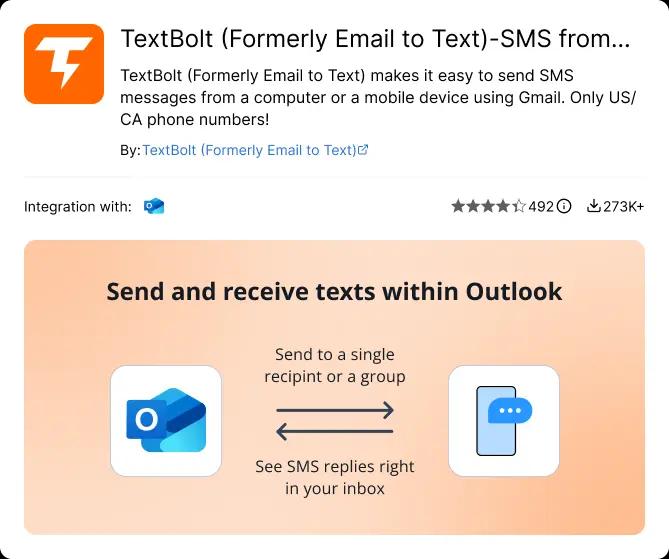
Ready to Send Your First Text From Outlook?
Compliant business SMS from your inbox. No Power Automate, no Twilio, no developer.

Three Ways to Send SMS from Outlook
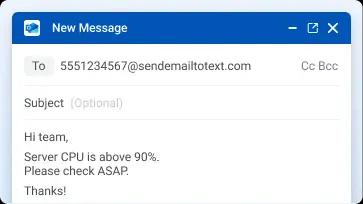
Manual Compose from Outlook (Most Common)
Open Outlook desktop, Outlook on the web, or the Outlook mobile app. Click New Mail, address to +1[phone]@sendemailtotext.com, type your message, hit send. The body of the email becomes the SMS body. Subject line is optional and prepended if filled. Replies thread back to your Outlook inbox.
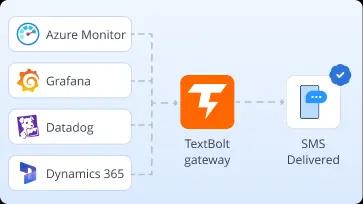
Automated from a System Already Emailing Outlook
Tools that already email your Microsoft 365 inbox (Azure Monitor, Datadog, Grafana, Salesforce, Dynamics 365, ServiceNow, Stripe, Zendesk) can email the TextBolt gateway directly instead. Each notification email becomes an SMS automatically. No Power Automate flow, no Twilio webhook, no integration code.
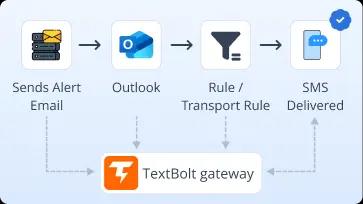
Outlook Rules or Exchange Transport Rules Forwarding
For systems you cannot reconfigure, set up an Outlook rule or Exchange Online transport rule to auto-forward matching emails to +1[phone]@sendemailtotext.com. Critical alerts that already arrive in Outlook get converted to SMS without touching the source system. Useful for vendor-locked monitoring tools, locked-down ERPs, and legacy line-of-business apps.
Microsoft 365 Teams That Send SMS from Outlook
Six common Microsoft 365 workflows where Outlook-to-SMS replaces a Power Automate flow, a per-seat Twilio license, or a dead carrier gateway. Each links an Outlook inbox to an SMS-receiving phone in seconds.
IT and DevOps Teams
Configure Azure Monitor, Datadog, Grafana, Nagios, or ServiceNow to send alert emails directly to the TextBolt gateway address (alongside your Outlook inbox if you want a record). On-call SREs and infrastructure engineers get SMS the moment a server, deployment, or incident alert fires. No PagerDuty seat, no Power Automate flow.
Healthcare and Service Front Desks
Practices running Outlook for front-desk email send appointment reminders directly to patient phones. Or wire your scheduling tool (Acuity, Calendly, SimplePractice, Mindbody) at the TextBolt gateway. Patients confirm by reply text and the response lands in the shared Outlook inbox.
Sales and Lead Notification Teams
Configure Dynamics 365, Salesforce, HubSpot, or Pipedrive new-lead alerts to email the TextBolt gateway directly (in addition to your Outlook inbox). The sales rep gets SMS within seconds, replies before the lead cools, and the conversation logs back into the CRM email thread.
Finance, Billing, and E-Commerce Operations
Configure Stripe, Chargebee, Dynamics 365 Finance, or Shopify to send payment failures, fraud flags, or order-status alerts directly to the TextBolt gateway (instead of, or alongside, your Outlook inbox). The finance or operations team gets SMS the moment something needs attention. No CPaaS subscription required.
Customer Support and SLA Escalation
Configure Zendesk, Freshdesk, Dynamics 365 Customer Service, or Jira Service Management to send high-priority ticket alerts directly to the TextBolt gateway. The on-call support lead gets SMS for SLA-breach risk, VIP customer escalations, or after-hours tickets, and the ticket alert still lands in Outlook for later review.
Field Service and Dispatch
Dispatchers send job assignments from Outlook directly to technicians’ phones. Dynamics 365 Field Service, ServiceTitan, Housecall Pro, or Jobber email-based dispatch routes through TextBolt to SMS. Technicians reply by text to confirm arrival, and replies land in the dispatcher’s Outlook thread.

Built for Compliance and Security

10DLC Compliant

Carrier Approved

Complete Audit Trail
Outlook SMS Options: Carrier Gateways, Power Automate
Plus Twilio, or TextBolt
Three common paths for adding SMS to Outlook, three different mental models. Carrier gateways are dead or dying. Power Automate plus Twilio is a developer integration. TextBolt is a gateway your existing Microsoft 365 stack already knows how to email, so there is no Outlook SMS plugin to install.
Carrier Email-to-SMS Gateways
Free, but ending
The historical workaround: address an Outlook email to [phone]@vtext.com or @txt.att.net. AT&T and T-Mobile have shut down, Verizon completes its shutdown by March 2027, and the remaining gateways have low reliability for business use. No 10DLC compliance, no audit trail, silent bounces, and replies routed inconsistently or dropped.
-
 AT&T txt.att.netretired June 2025
-
T-Mobile tmomail.net offline
-
Verizon vtext.com ends 2027
-
No 10DLC, no audit trail
-
Replies often dropped
Recommended
TextBolt
Flat monthly plan, no per-node license (Standard plan)
Email-to-SMS gateway built for Outlook and Microsoft 365 teams. Send from any Outlook surface to +1[phonenumber]@sendemailtotext.com and the email becomes an SMS from your business number. Replies thread back into Outlook.
-
 Up to 98% delivery rate
-
10DLC-compliant business number
-
Multi-user access: up to 10 team members
-
Two-way replies in Outlook inbox
-
Complete audit trail per message
-
30-minute setup, no code
Power Automate Plus Twilio, or Per-Seat Outlook Plugins
Premium licensing, per-message billing, or $20-$50 per user per month
Build a Power Automate flow that calls the Twilio connector on Outlook email triggers, or pay per seat for an Outlook toolbar plugin like CompleteSMS or YakChat. Both paths add SMS to Outlook, but each requires either developer effort and a Twilio account or a per-user license, plus a separate inbox or dashboard for replies outside the shared Outlook thread.
-
Power Automate Premium licensing
-
Twilio API keys and webhook
-
Inbound replies need separate flow or plugin dashboard
-
Per-message Twilio billing or per-user plugin fee
-
Audit logs scattered across tools
CUSTOMER REVIEWS
How Teams Use TextBolt with Outlook
Three ways customers route SMS through Outlook with TextBolt: replacing the retired Outlook Mobile Service, skipping Power Automate flows, and giving Microsoft 365 teams a compliant SMS path.

On Google Workspace Marketplace, with
 263K+ installs

When Microsoft killed Outlook Mobile Service, we tried carrier gateways for a year. Half the texts never arrived. Switching to TextBolt’s email-based gateway gave our IT team back the workflow we’d been missing since the Outlook feature shut down.

IT Admin
Construction Company
I had a Power Automate flow stitching Outlook emails to a Twilio webhook. It broke every other Microsoft 365 update. TextBolt was a one-line address change that made the flow obsolete. The on-call rotation just emails the gateway now.

On-Call Engineer
Manufacturing IT
Our dispatchers were copying customer phone numbers into personal phones to send job updates. TextBolt gave us one Outlook address to text, one shared business number to send from, and an audit trail my compliance lead could finally export.

Dispatch Manager
Field Service Company
Why Microsoft 365 Teams Choose TextBolt
The numbers that matter when adding SMS to an Outlook or Microsoft 365 workflow.
Up to 98%
SMS Delivery Rate
30 min
End-to-End Setup
Up to 10
Team Members (Standard Plan)
4.4★
Workspace Marketplace (483+ reviews)
Frequently Asked Questions
Can Outlook send text messages on its own?
No. Microsoft retired Outlook Mobile Service, the legacy feature that converted Outlook emails to SMS. Modern Outlook desktop, Outlook on the web, and the Outlook mobile app have no built-in SMS sender. To send SMS from Outlook, the inbox needs a connection to an email-to-SMS gateway like TextBolt. Address an email to +1[phone]@sendemailtotext.com and the message arrives as an SMS from your business number.
What replaced Outlook Mobile Service for sending SMS?
After Microsoft retired Outlook Mobile Service, businesses used carrier email-to-SMS gateways (vtext.com, txt.att.net, tmomail.net) as a workaround. Those gateways have now shut down too: AT&T’s txt.att.net retired June 2025, T-Mobile’s tmomail.net went offline December 2024, and Verizon’s vtext.com shutdown completes by March 2027. TextBolt is the direct replacement: same email-driven mental model, but messages route through a registered 10DLC business number with up to 98% delivery rate and complete audit trails.
How do I send SMS from Outlook without Power Automate or Twilio?
Sign up for TextBolt and complete onboarding (TextBolt handles 10DLC business verification with The Campaign Registry on your behalf). Once your number is approved, address any Outlook message to +1[phone]@sendemailtotext.com. The email becomes an SMS. There is no Power Automate flow to build, no Twilio account to bill, no integration code to maintain, and no webhook endpoint to monitor. If your team can send an Outlook email, your team can send an SMS.
Is sending SMS from Outlook with TextBolt 10DLC compliant?
Yes. TextBolt registers your sender identity with The Campaign Registry as part of onboarding so SMS sent from Outlook through TextBolt routes through carrier-approved 10DLC infrastructure. This satisfies FCC business SMS requirements and avoids the spam-folder filtering that hit unregistered carrier-gateway traffic.
Do replies to SMS sent from Outlook come back to my Outlook inbox?
Yes. When the recipient replies to a TextBolt-sent SMS, the reply arrives as an email in the Outlook inbox of whoever sent the original message, threaded with the outgoing message when possible. Replies route reliably regardless of carrier, unlike the old gateway flows where some carriers used do-not-reply addresses or dropped replies entirely. No Power Automate webhook required.
Can my whole Microsoft 365 team send SMS from Outlook?
Yes. Standard plan and Professional plan include multi-user access for up to 10 team members on a shared TextBolt account. IT admins, on-call engineers, sales reps, finance analysts, and dispatchers in your Microsoft 365 tenant all send SMS from their own Outlook using the same business number. There are no per-user fees inside the 10-seat cap. Enterprise plans support custom team sizes for larger organizations.
Does this work with Outlook desktop, Outlook on the web, and Outlook mobile?
Yes. The TextBolt gateway address works from any Outlook surface: Outlook desktop (Windows or Mac), Outlook on the web, and the Outlook mobile app. The same applies to Outlook accounts inside Microsoft 365 commercial, education, and government tenants, as well as Outlook.com personal accounts. The recipient phone gets the same SMS regardless of which Outlook surface sent it.
How is TextBolt different from Power Automate plus Twilio?
Power Automate plus Twilio is a build-it-yourself integration. You need Power Automate Premium licensing, a Twilio account with API keys, a separate webhook flow for inbound replies (the Twilio connector has no listener trigger), and per-seat Twilio licensing for the team. TextBolt is a gateway, not a developer platform. Your Microsoft 365 stack emails the gateway and the email becomes an SMS. Replies come back to Outlook automatically. No flow to maintain, no integration code, no licensing stack to assemble.
How much does it cost to send SMS from Outlook with TextBolt?
Basic plans include 500 SMS credits and a single user. TextBolt’s Standard plan includes 1,000 credits with multi-user access for up to 10 team members on a shared account. The Professional plan includes 2,500 credits with the same 10-user shared access. Enterprise plans cover 5,000+ credits with custom team sizes. A toll-free business number is available. Annual plans include a 20% discount. Visit TextBolt pricing page for more details.
How long does it take to set up Outlook-to-SMS with TextBolt?
About 30 minutes of hands-on configuration: account creation and toll-free business number selection, plus 24-48 hours for 10DLC business verification before your number goes live. You provide your legal business name, EIN, website, and SMS use case during onboarding, and TextBolt files the registration with The Campaign Registry on your behalf, since the FCC requires every US business SMS sender to be registered. Once carriers approve your number, your team can send their first SMS from Outlook in seconds. No Power Automate flow to author, no IT-admin training session.
How Is TextBolt Different from Outlook SMS Add-Ins Like CompleteSMS or YakChat?
Outlook add-ins like CompleteSMS and YakChat install as a toolbar button inside each user’s Outlook and bill per seat, typically $20 to $50 per user per month. Replies usually live in the plugin’s own dashboard, not the Outlook inbox. TextBolt is a gateway that any system that can email Outlook can email +1[phone]@sendemailtotext.com, so SMS is sent from any Outlook surface, any Microsoft 365 mailbox, or any automation that already emails the inbox, all from one shared 10DLC-compliant business number. Standard plan and Professional plan cover up to 10 team members on the shared account with no per-seat fees, and recipient replies thread back to the Outlook inbox of whoever sent the original SMS.
Does Outlook have a texting app?
No. Outlook does not include a built-in texting app, and the Outlook mobile app sends email, not SMS. Microsoft retired Outlook Mobile Service, the old feature that turned emails into texts, so there is no native SMS button in Outlook desktop, Outlook on the web, or the Outlook mobile app. Some third-party Outlook add-ins add a texting panel inside the inbox, but they require a plugin install and a per-seat subscription. TextBolt skips the separate app: you text straight from the Outlook you already use by addressing an email to +1[phone]@sendemailtotext.com, and it sends as an SMS from your 10DLC business number. Replies thread back to your Outlook inbox.
Can I use Outlook Lite to send SMS?
Yes, on Android. Microsoft’s Outlook Lite app has an SMS tab that sends and receives texts using your phone’s own SMS, so it is consumer and mobile-only, with no business number, no shared team access, and no audit trail. It is not available on Outlook desktop or Outlook on the web. For business texting across every Outlook surface, with a 10DLC business number, two-way replies in the inbox, multi-user access for up to 10 team members, and a complete audit trail, TextBolt sends the SMS from the Outlook you already use.
Add SMS to Outlook Without Leaving Microsoft 365
Send compliant business SMS from any Outlook surface in about 30 minutes. Multi-user access, two-way replies in Outlook, audit-ready logs.