
Small Business
Text Messaging Service for Small Business
Customers miss your emails. They don’t miss texts. TextBolt is a text messaging service platform that lets you send professional business texts straight from Gmail or Outlook. No new software to learn, no app to install, no technical setup. If you can send an email, you can text your customers.
Up to 98%
Delivery Rate
10DLC Compliant
Included
30-min
Setup
What Is a Text Messaging Service for Small Business?
A text messaging service for small business is a communication tool that helps businesses send SMS messages to customers, staff, and vendors. Businesses use these services to share appointment reminders, order updates, invoice notices, booking confirmations, and other time-sensitive information directly to mobile phones.
Unlike email or phone calls, text messages provide a fast and direct way to reach your customers. With TextBolt, businesses can send SMS directly from Gmail or Outlook using an email-to-SMS gateway, allowing staff to communicate through the email workflow they already use instead of learning a separate texting platform.

Challenges Solved With Email-to-SMS for Small
Business
Small businesses lose time and revenue from missed appointments, unanswered calls, and delayed updates. Texting services for small businesses help teams send customer messages faster, reduce follow-ups, and manage conversations directly from Gmail or Outlook.
-
Customers miss email reminders, leading to costly no-shows and scheduling disruptions.
-
Staff spend hours making follow-up calls that often end in voicemail instead.
-
Legacy carrier shutdowns impact outdated messaging routes and delivery reliability.
-
Using personal phones for business blurs boundaries and appears less professional.
-
Traditional texting platforms get expensive with user fees and long contracts.
-
Complicated SMS platforms require technical setup, training, and ongoing IT support.
-
Customer replies get scattered across apps, causing missed conversations and delayed responses.
-
Send text reminders from email to help customers confirm appointments before visits.
-
Send customer updates by text in seconds without calling or leaving voicemails.
-
Single 10DLC-registered gateway across all U.S. carriers.
-
Use a dedicated business number that keeps work and personal communication separate.
-
Affordable plans include messages with no per-user fees or long-term contracts.
-
Start texting from Gmail or Outlook with simple setup and minimal training required.
-
Receive replies in your inbox and continue two-way conversations from your email as usual.
Why Small Business Owners Choose TextBolt
TextBolt was built for businesses that need professional texting without the complexity or cost of enterprise platforms. Everything runs through the email you already use.
Works With Gmail and Outlook
No new software, no dashboard to learn. You send a text the same way you send an email. Small businesses that add texting without new software get their team using it the same day.
Professional Business Number
Customers see a business number, not your personal cell. It builds trust and keeps your private number out of customer hands. Your personal phone stays completely separate from work.
Shared Team Number
You and your staff all text from the same business number, each from your own email. Customers see one consistent number and you can track who sent what from your team.
Your messages are sent through a verified business number, so carriers don’t flag them as spam. Messages actually arrive in your customer’s inbox instead of getting filtered out.
Small Business Pricing
Basic Plan Starts with 500 messages included. No per-user fees, no per-message charges, no annual contracts. Your plan grows with your business, scale up only when you need to.
Customers reply to your text and the message lands in your email inbox. You reply from email, they get a text. Real back-and-forth conversations without picking up the phone or switching apps.
Stop Losing Customers to Missed Messages
Your customers check their phone dozens of times a day. They check email when they remember to. TextBolt puts your message where they’ll actually see it.

How to Set Up TextBolt for Your Small Business
Get started with TextBolt without hardware or complex setup. Keep using Gmail, Outlook, Apple Mail, Thunderbird, Microsoft 365 OWA, or your existing email client to add SMS communication for customers, staff, and vendors.
Step 1 – Create Your TextBolt Account
Sign up for TextBolt and complete your business profile. Your account will be ready to send SMS messages through your existing email workflow.
Step 2 — Compose Your Text Message
Open your email client and create a new message just like a regular email. Add appointment reminders, order updates, invoice notices, or booking details.
Step 3 — Enter the Recipient’s Mobile Number
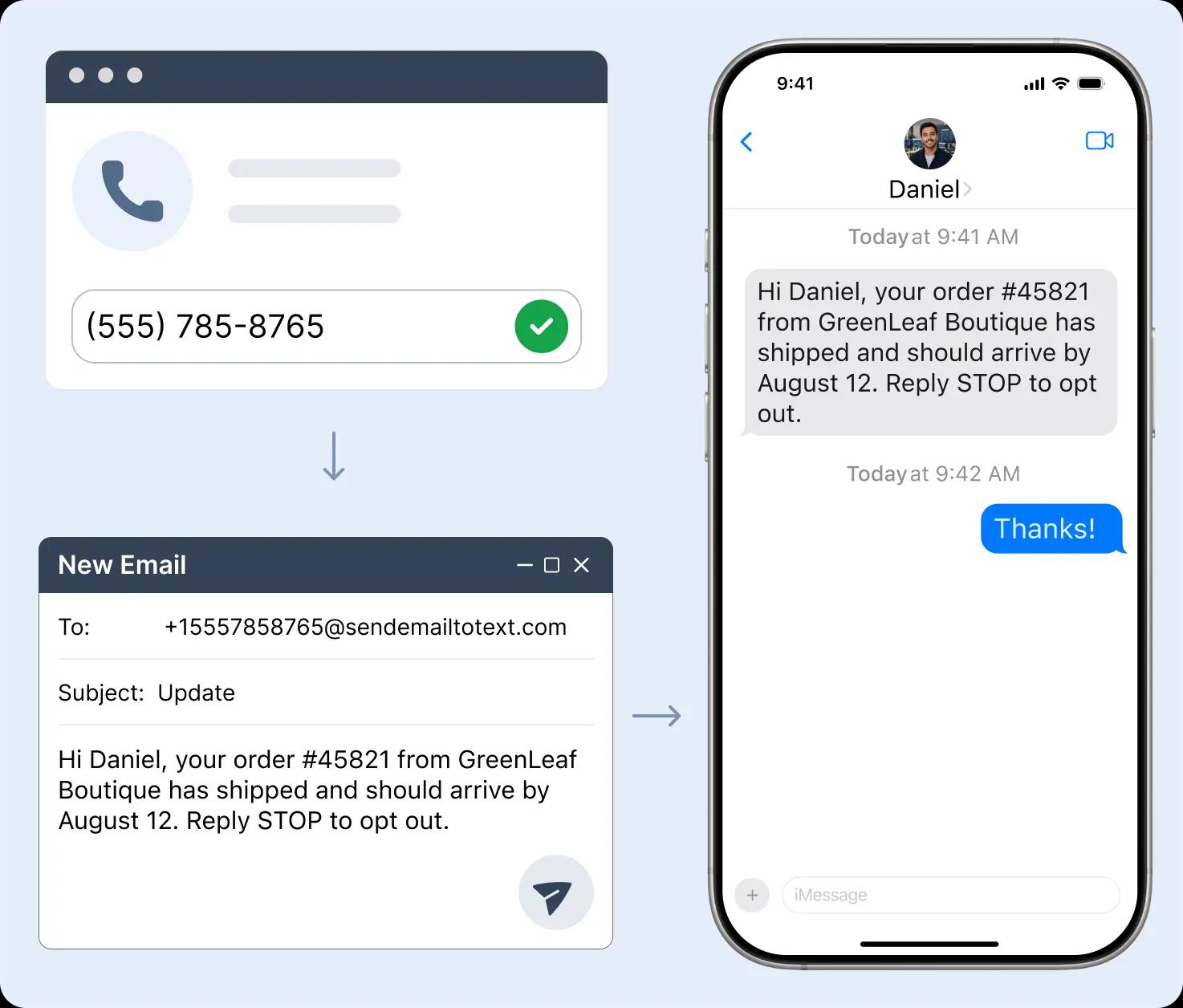
Enter the recipient’s phone number using your TextBolt email-to-SMS address format: +1XXXXXXXXXX@sendemailtotext.com. Save frequently used numbers as contacts for faster sending. The email subject and body are converted into an SMS message.
Step 4 — Send From Your Existing Inbox
Send the message directly from your email. Customers receive a standard text message on their phones without installing an app or creating an account.
Step 5 — Receive Replies in Your Inbox
When customers respond, replies return as threaded emails that are searchable, organized, and easy for your team to track.
How Small Businesses Use TextBolt to Save Time
From appointment reminders to last-minute schedule changes, small business owners use TextBolt to handle everyday customer communication faster and more reliably than calls or emails.
A customer has an appointment tomorrow but forgot about it. A text reminder gets a quick confirmation and the slot stays filled. Businesses that send text reminders see far fewer no-shows and less wasted time for their staff.
Order and Delivery Updates
A customer’s order shipped but the email notification went unread. A text reaches them instantly so they know when to expect it. Businesses that keep customers updated over text spend less time on the phone fielding status checks.
Service Call Notifications
Your team is on the way to a job but calling the customer goes to voicemail. A text lets them know the arrival window so they’re ready when you show up. No wasted trips, no phone tag, and your crew stays on schedule.
Invoice Reminders
An invoice has been sitting unpaid for a week and the email reminder went unread. A text gets their attention and they pay the same day. One message replaces a round of follow-up calls and keeps your cash flow moving.
Booking Confirmations
A new customer books online but never saw the confirmation email. A text confirms the details so they show up prepared. Businesses that confirm bookings over text stop chasing customers with follow-ups.
Last-Minute Changes
You need to close early or someone on your team called in sick. A text to affected customers takes seconds and they reschedule instead of showing up to find out the hard way. No angry customers, no wasted visits.
Small Business Text Message Templates You Can
Send Today
Keep customers updated with text templates for appointments, orders, and schedule changes. Limit general sends and keep each message focused on one clear ask.
Appointment Reminder
Hi [Name], this is [Business] confirming your appointment on [Date] at [Time]. Reply YES to confirm or call us to reschedule. Reply STOP to opt out.
Order and Delivery Update
Hi [Name], your order #[Number] from [Business] has shipped and should arrive by [Date]. Reply STOP to opt out.
Service Call Notification
Hi [Name], our technician is on the way and should arrive by [Time]. Reply STOP to opt out.
Invoice Reminder
Hi [Name], your invoice #[Number] for $[Amount] is due [Date]. Pay online at [Link] or call us with questions. Reply STOP to opt out.
Booking Confirmation
Hi [Name], you’re confirmed for [Service] on [Date] at [Time]. Reply YES to confirm or call to reschedule. Reply STOP to opt out.
Last-Minute Schedule Change
Hi [Name], [Business] update: we’re closing early today at [Time]. Reply STOP to opt out. Call us with questions.
CUSTOMER REVIEWS
What Our Clients Say
Join thousands of satisfied businesses using TextBolt

On Google Workspace Marketplace, with
 263K+ installs

I used to call every client the day before their appointment. Now I send a text from my email in the morning and most of them confirm within an hour. I got half my day back.

Office Manager
Dental Clinic
We used to call every customer before a service visit. Half the time it went to voicemail. Now we text them from email and they’re ready when we pull up. Saves us at least an hour a day.

Business Owner
HVAC
Clients used to miss their appointments because the reminder email got buried. Now we text them the morning of and almost everyone confirms within an hour. Our no-show rate dropped and we stopped losing revenue to empty time slots.

Clinic Owner
Physical Therapy
Frequently Asked Questions
Got questions? We’ve got answers.
Can multiple team members send texts from the same business number?
Yes. TextBolt includes up to 10 users, so owners, front-desk staff, and team members can all text from the same business number using their own email accounts. Every message is tagged with the sender, making it easy to track customer communication across your team.
Can customers reply to text messages?
Yes. Customers can reply directly to your texts, and responses arrive in the sender’s email inbox. Appointment confirmations, order questions, and follow-ups stay organized in a searchable email thread.
Can I text all my customers at once, and is it legal?
Yes. One email is sent to your entire customer list at the same time, so a schedule change or promotion reaches everyone in one step. It is legal when every recipient has opted in to receive texts and each message honors opt-outs. TextBolt includes A2P 10DLC registration support, and when a customer replies STOP, future messages to that number are blocked automatically.
What features should a small business text messaging service have?
A small business text messaging service should help teams communicate with customers faster without adding unnecessary complexity. Look for features like email-to-SMS messaging, which allows staff to send texts directly from tools they already use, such as Gmail or Outlook, instead of managing another platform.
The right solution should also support two-way texting so customers can reply to appointment reminders, order updates, and notifications. A dedicated business number keeps customer conversations separate from personal phones, while 10DLC compliance support helps maintain reliable message delivery and meet carrier requirements.
For growing teams, multi-user access allows owners, managers, and employees to send messages from the same business number using their own accounts. Transparent monthly pricing also makes it easier to manage costs without unexpected messaging fees.
Can I text from my business’s existing phone number?
No. TextBolt assigns your business its own verified business number for texting, so you do not send from the office landline or a staff member’s personal cell. Customers see a consistent number for your business, and every conversation stays with the business rather than on a personal device.
Does TextBolt work with our business software, and can we replace an old carrier email-to-text gateway?
Yes to both. If your scheduling, invoicing, or CRM software can send an email notification, TextBolt delivers it as SMS with no API integration. Businesses still using an AT&T, Verizon, or T-Mobile email-to-text gateway can migrate in about 30 minutes by updating the destination email address, and existing reminders keep working.
What is the best mass texting service for a small or mid-size business?
The best mass texting service for most small and mid-size businesses is an email-to-SMS tool like TextBolt, because it sends to your whole customer list from the Gmail or Outlook the office already uses, with no new app for staff to learn. That holds whether your business has one location or several. A business that wants large-scale marketing campaigns with audience segmentation and automated drip sequences is better served by a platform built for that, such as SimpleTexting or SlickText. A business that wants to build texting into its own app needs a developer platform like Plivo or Twilio, not an inbox-based tool.
Start Sending Small Business Text Messages From Your Inbox
Keep your customers connected with appointment reminders, order updates, invoice notices, and booking confirmations sent directly from the email tools your team already uses.
7-day free trial
Up to 98% Delivery
30-min setup