Send SMS Alerts Directly
from Gmail
Turn any Gmail email into an instant SMS alert with TextBolt. Take action faster.
-
 Send SMS from Gmail instantly
-
Works with your 10DLC business number
-
Replies return directly to your inbox


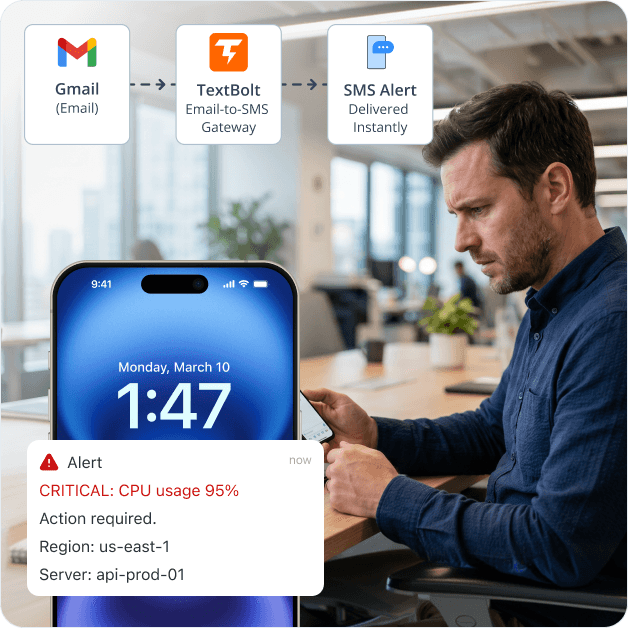
Any Tool That Emails Can Text
Every tool below already sends email notifications. Point them at +1[phone]@sendemailtotext.com and the emails arrive as SMS. No plugin, no webhook, no developer.
 Salesforce
HubSpot
Pipedrive
Datadog
New Relic
PagerDuty
ServiceNow
Stripe
Shopify
Zendesk
Freshdesk
Jira
Calendly
Zapier
Make
Salesforce
HubSpot
Pipedrive
Datadog
New Relic
PagerDuty
ServiceNow
Stripe
Shopify
Zendesk
Freshdesk
Jira
Calendly
Zapier
Make
Every one of these tools has an email recipient field somewhere in its alert or notification settings. Paste the TextBolt gateway address there. That’s the integration.
Why Sending SMS from Gmail Got Hard
For years, businesses sent text messages by emailing a carrier gateway from Gmail. The FCC tightened business SMS rules, carriers shut the gateways down, and the workarounds left behind (Apps Script, Twilio, per-seat dashboard tools) all introduce their own friction. Six problems Gmail users now face when they need SMS.

Gmail Has No Native SMS Feature
Google retired the Gmail Chat to SMS feature years ago, citing carrier policy changes and spam abuse. Searches for “send SMS from Gmail” land on Gmail Community threads with no first-party answer. Gmail itself does not include a built-in way to send a text message to a phone number.

Carrier Email-to-SMS Gateways Have Shut Down
AT&T retired txt.att.net in June 2025. T-Mobile took tmomail.net offline in December 2024. Verizon’s vtext.com shutdown completes by March 31, 2027. Carriers cite spam abuse and FCC Campaign Registry rules that email gateways cannot satisfy. Any business that relied on Gmail-to-gateway sending now has broken alerts.

Carrier Gateways Were Never Reliable for Business
Even when gateways worked, sending SMS from Gmail through them required knowing the recipient’s carrier (different address per carrier), accepting a 140-character cap, and watching messages arrive from an unknown number that recipients ignored. Carriers aggressively filtered links and shortened URLs, and silent bounce-backs left senders unaware of failures.
SMS Sent from Gmail Has No 10DLC Compliance or Audit Trail
The FCC requires US business SMS to be registered through The Campaign Registry. Gmail-to-gateway sending offers no sender authentication, no consent record, no timestamped delivery log, no exportable audit trail. For regulated workflows like healthcare reminders, legal notices, dispatch confirmations, or billing, sending SMS from raw Gmail leaves the business exposed.
Replies Disappear Instead of Returning to Your Inbox
Carrier gateways routed replies inconsistently. Some carriers used do-not-reply addresses, some dropped replies silently, and some bounced them to unrelated inboxes. A customer or technician replying “ETA?” or “Confirmed” to an SMS sent from Gmail had no reliable path back to the original sender. Gmail-to-SMS effectively became one-way only.
Apps Script and Twilio Workarounds Fragment Teams
Google Apps Script does not natively support SMTP for SMS, and Twilio requires developer setup, API keys, and per-seat licensing. A 10-person Google Workspace team building a Twilio integration ends up paying per-user fees for what was once a free Gmail trick, with no shared business number, no shared inbox for replies, and audit logs scattered across individual accounts.
How TextBolt Adds SMS to Gmail
TextBolt connects Gmail to a registered 10DLC business number so any email you compose becomes an SMS. Your inbox stays where it is; a capability gets added on top.

Send SMS from Gmail Instantly
Compose an email in Gmail, address it to +1[phone]@sendemailtotext.com, hit send. The recipient’s phone gets an SMS in seconds from your toll-free business number. No new app, no Chrome extension required.

10DLC-Compliant Business Number
TextBolt registers your sender identity with The Campaign Registry during onboarding. Messages route through carrier-approved 10DLC infrastructure, not retired email gateways. Up to 98% delivery rate, professional toll-free number, no spam-folder filtering.

Two-Way Replies to Your Gmail Inbox
When the recipient texts back, the reply lands as an email in your Gmail inbox, threaded with the original message. The whole front desk, on-call rotation, or sales team sees the response and can reply by sending another email. No separate texting app to check.

Multi-User Access for Google Workspace Teams
Standard plan ($49/month) and Professional plan ($99/month) include multi-user access for up to 10 team members on one shared account. Anyone in your Workspace can send SMS from Gmail using the same business number, no per-seat fees.

Complete Audit Trail for Every SMS
Each message is logged with timestamp, sender, recipient phone, delivery status, and reply thread. Export logs for compliance documentation, dispute resolution, or internal review. Full history available in your TextBolt account, separate from Gmail’s storage.

No Apps Script, No Twilio, No Code
TextBolt is email-based, not API-based. There is no Apps Script project to maintain, no Twilio account to bill, no webhook endpoint to monitor. If your team can send a Gmail message, your team can send an SMS. Same for any system that already emails Gmail addresses.
Set Up Gmail SMS in About 30 Minutes
End-to-end setup, including 10DLC business verification and the first test message, takes around 30 minutes. No developer, no Workspace admin training session.
01 Install TextBolt from Google Workspace Marketplace
Find TextBolt on the Google Workspace Marketplace (4.4★, 493 reviews, 273K+ installs) and install it for your domain. Workspace admins approve once for the whole team.
02 Create Your TextBolt Account
Sign up at textbolt.com with your Google Workspace email. Your account links automatically to the Workspace installation for seamless team management.
03 Choose a Toll-Free Business Number
Select a dedicated toll-free number from available options. This becomes your team’s shared SMS sender identity for all outbound messages.
04 Complete 10DLC Business Verification
Submit your business details for The Campaign Registry verification. TextBolt guides you through each field. Approval typically completes within the setup window.
05 Send Your First SMS from Gmail
Open Gmail, compose a new email to +1[phone]@sendemailtotext.com, type your message, and hit send. Confirm the SMS arrives on the recipient’s phone within seconds.
06 Invite Up to 10 Team Members
Add team members from your TextBolt dashboard. Each member can send SMS from their own Gmail account using the shared business number. No per-seat fees on Standard or Professional plans.
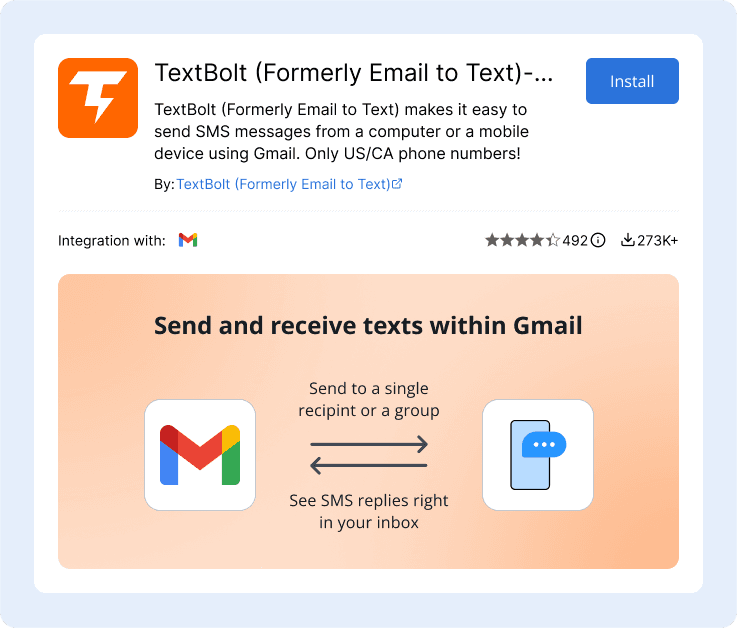
Three Ways to Send SMS from Gmail
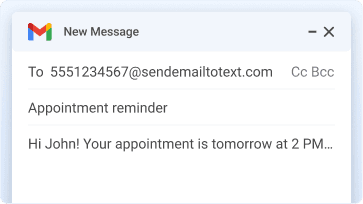
Manual Compose from Gmail (Most Common)
Open Gmail, click Compose, address to +1[phone]@sendemailtotext.com, type your message, hit send. The body of the email becomes the SMS body. Subject line is optional and prepended if filled. Replies thread back to your Gmail inbox.
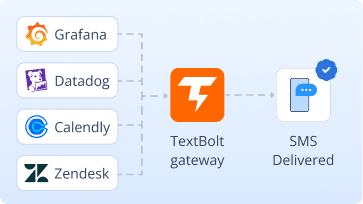
Automated from a System Already Emailing Gmail
If your monitoring tool, scheduler, CRM, or billing system already sends email notifications (Grafana, Datadog, Calendly, Stripe, Zendesk, Salesforce), point those emails at the TextBolt gateway address instead of, or in addition to, Gmail. Each notification email becomes an SMS automatically. No code, no API, no Apps Script.
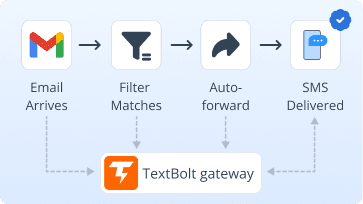
Email Forwarding from Gmail Filters
For systems you cannot reconfigure, set up a Gmail filter to auto-forward matching emails to +1[phone]@sendemailtotext.com. Critical alerts that already arrive in Gmail get converted to SMS without touching the source system. Useful for legacy software, vendor dashboards, and locked-down monitoring tools.
Teams That Send SMS from Gmail with TextBolt
Six common workflows where Gmail-to-SMS replaces a per-seat dashboard, a Twilio script, or a dead carrier gateway. Each links a Gmail inbox to an SMS-receiving phone in seconds.
IT and DevOps Teams
Forward Grafana, Datadog, Nagios, or PagerDuty email alerts from Gmail to the TextBolt gateway. On-call engineers get SMS the moment a server, deployment, or incident alert fires. No phone-tree dashboard to check.
Healthcare and Service Front Desks
Send appointment reminders, prescription-ready notifications, and check-in confirmations as SMS directly from the front desk Gmail. Patients respond by text; replies appear in the shared inbox for the whole team.
Sales and Lead Notification Teams
When a new lead arrives via CRM email notification, auto-forward it through TextBolt to SMS the assigned sales rep. Response time drops from hours to seconds. Follow-up texts go out from the same business number.
E-Commerce and Billing Operations
Convert Stripe, PayPal, or WooCommerce payment confirmation emails into SMS order updates. Shipping notifications, delivery confirmations, and payment reminders reach customers on the channel they actually check.
Customer Support and Escalation
Escalation emails from Zendesk, Freshdesk, or Intercom trigger SMS to the on-call support lead. Critical tickets get human attention immediately instead of waiting in a queue behind routine requests.
Field Service and Dispatch
Dispatch coordinators send job assignments, schedule changes, and emergency calls as SMS from Gmail. Field technicians get instant notifications without needing a separate dispatch app or checking email on-site.

Gmail SMS Options: Carrier Gateways, Twilio, or TextBolt
Three common paths for adding SMS to Gmail, three different mental models. Carrier gateways are dead or dying. Twilio is a developer platform. TextBolt is a gateway your existing tools already know how to use.
Carrier Email-to-SMS Gateways
Free, but ending
The historical workaround: email [phone]@vtext.com or @txt.att.net from Gmail. AT&T and T-Mobile are gone, Verizon ends in 2027. No compliance, unreliable replies, silent bounces.
-
 AT&T txt.att.net retired June 2025
-
T-Mobile tmomail.net offline
-
Verizon vtext.com ends 2027
-
No 10DLC, no audit trail
-
Replies often dropped
Recommended

$49/month (Standard plan)
Email-to-SMS gateway built for Gmail and Google Workspace teams. Send from any Gmail account to +1[phone]@sendemailtotext.com
and the email becomes an SMS from your business number. Replies thread back into Gmail.
-
 Up to 98% delivery rate
-
10DLC-compliant business number
-
Multi-user access: up to 10 team members
-
Two-way replies in Gmail inbox
-
Complete audit trail per message
-
30-minute setup, no code
Twilio + Apps Script DIY
Per-message pricing plus dev time
Build a Google Apps Script project that calls the Twilio API on email triggers. Powerful, but requires developer effort, ongoing maintenance, API key management, and per-seat licensing for the team.
-
Developer setup required
-
API keys and webhook to monitor
-
Per-message billing complexity
-
Replies need separate webhook
-
Audit logs scattered across tools
Why Gmail Teams Choose TextBolt
The numbers that matter when adding SMS to a Gmail or Google Workspace workflow.
Up to 98%
SMS Delivery Rate
30 min
End-to-End Setup
$49/mo
Standard Plan, 10 Users
4.4★
Workspace Marketplace (493 reviews)
Frequently Asked Questions
Can Gmail send text messages on its own?
No. Gmail has no built-in feature to send SMS to a phone number. The old Gmail Chat to SMS integration was retired by Google. To send SMS from Gmail, the inbox needs a connection to an email-to-SMS gateway (TextBolt) or a third-party SMS API (Twilio, ClickSend). TextBolt is the no-code path: install once, address an email to +1[phone]@sendemailtotext.com, and the message arrives as an SMS.
What replaced vtext.com, txt.att.net, and tmomail.net for Gmail users?
There is no carrier-provided replacement. AT&T, T-Mobile, and Verizon shut down their email-to-SMS gateways due to FCC regulations and spam abuse. The replacement for Gmail users is a registered email-to-SMS service like TextBolt, which routes messages through compliant 10DLC infrastructure instead of carrier email gateways.
How do I send SMS from Gmail without writing Apps Script or using Twilio?
Install TextBolt from the Google Workspace Marketplace, complete the 10DLC registration (about 30 minutes), and then compose emails to +1[phone]@sendemailtotext.com from Gmail. The email body becomes the SMS. No code, no API keys, no Apps Script project to maintain.
Is sending SMS from Gmail with TextBolt 10DLC compliant?
Yes. TextBolt registers your business and messaging campaign with The Campaign Registry during onboarding. All SMS sent through TextBolt routes through carrier-approved 10DLC infrastructure with a verified sender identity, meeting FCC requirements for business SMS in the United States.
Do replies to SMS sent from Gmail come back to my Gmail inbox?
Yes. When the recipient replies to the SMS, TextBolt converts the reply into an email and delivers it to your Gmail inbox, threaded with the original message. Your entire team can see and respond to the reply directly from Gmail.
Can my whole Google Workspace team send SMS from Gmail?
Yes. TextBolt’s Standard plan ($49/month) and Professional plan ($99/month) both support up to 10 team members on a single shared account. Each team member sends SMS from their own Gmail using the same business number. No per-seat fees.
Does this work with personal Gmail or only Google Workspace?
TextBolt works with both personal Gmail accounts and Google Workspace accounts. The multi-user team features are designed for Workspace teams, but individual Gmail users can set up and use TextBolt for business SMS as well.
How much does it cost to send SMS from Gmail with TextBolt?
TextBolt offers a Standard plan at $49/month and a Professional plan at $99/month. Both include multi-user access for up to 10 team members, a dedicated toll-free business number, two-way SMS, and a complete audit trail. There are no per-seat fees or per-message surcharges beyond the plan’s included volume.
Can I forward existing Gmail emails to send them as SMS?
Yes. Set up a Gmail filter to auto-forward matching emails to +1[phone]@sendemailtotext.com. Any email that matches the filter criteria is automatically converted to SMS and delivered. This is useful for monitoring alerts, CRM notifications, and any system that already sends email to Gmail.
How long does it take to set up Gmail-to-SMS with TextBolt?
About 30 minutes from start to first SMS. That includes installing from the Google Workspace Marketplace, creating your TextBolt account, selecting a toll-free number, completing 10DLC business verification, and sending a test message. No developer or Workspace admin training session required.
Add SMS to Gmail Without Leaving Your Inbox
Send compliant business SMS from any Gmail account in about 30 minutes. Multi-user access,
two-way replies in your inbox, audit-ready logs.