
- Is AT&T Email-to-Text Still Working?
- Why Did AT&T Discontinue Email to Text?
- Do I Need 10DLC Registration for Business Texting?
- What is an Email-to-SMS Gateway?
- US Carrier Email-to-Text Gateway Addresses (And Their Status)
- How Do I Send a Text From Email Now?
- What to Look for in an AT&T Email to Text Alternative?
- How Do AT&T Email-to-Text Alternatives Compare?
- What Is the Best AT&T Email-to-Text Alternative?
- For Server, On-Call & IoT Alerting
- When Should You Use a Developer SMS API Instead?
- How to Migrate from AT&T Email to Text in 30 Minutes
- Who Needs an AT&T Email-to-Text Alternative?
- Why Is TextBolt the Best AT&T Email-to-Text Alternative?
- Start Your Migration Today
- Frequently Asked Questions
Replace AT&T Email-to-Text
AT&T Email-to-Text Alternatives in 2026: What to Use Now @txt.att.net Is Gone

AT&T permanently shut down its email-to-text gateways, @txt.att.net and @mms.att.net, on June 17, 2025, and messages sent to the old addresses now fail silently with no bounce.
The working replacement is a 10DLC-registered email-to-text service. With TextBolt email to text service, you email +1[PhoneNumber]@sendemailtotext.com from any email app and it arrives as a compliant business text. ClickSend, TextMagic, SMSGlobal, and Twilio fill narrower needs.
Many businesses that relied on sending texts to @txt.att.net addresses found their messages going nowhere, with no delivery and no error.
This guide covers what replaced the gateway, why the shutdown happened, which alternative fits your use case, and how to migrate, including the 10DLC approval window of up to 48 hours
Is AT&T Email-to-Text Still Working?
No. As of June 17, 2025, AT&T’s email-to-text and text-to-email service is shut down. Per AT&T’s own support notice, you “can no longer send or receive texts using email.”
Anything sent to @txt.att.net, @mms.att.net, or the Cricket gateway now fails silently. There is no bounce and no forwarding, and AT&T has not published a replacement gateway.
Why Did AT&T Discontinue Email to Text?
AT&T’s decision to shut down their email to text gateway wasn’t sudden. The @txt.att.net service had been declining in reliability for years. Understanding why carriers abandoned these services explains why modern alternatives are actually better.
The Problems with Carrier Email Gateways
Carrier email gateways like AT&T’s @txt.att.net were never designed for business use. They were a consumer convenience feature. When businesses started using them for appointment reminders, alerts, and notifications, problems multiplied.
- Spam abuse became rampant: The open, unauthenticated nature of carrier gateways made them a prime vector for spam and smishing. Anyone could send to any number without verification, so carriers couldn’t control abuse.
- Delivery rates plummeted: To combat spam, carriers filtered aggressively and blocked legitimate business messages alongside malicious ones.
- No sender verification existed: Email spoofing let bad actors impersonate legitimate businesses, creating security risks across the whole email-to-SMS ecosystem.
- Infrastructure costs escalated: Managing abuse with no revenue to offset it became increasingly expensive for carriers.
Carriers needed a way to tell real businesses apart from spammers, and that answer became 10DLC.
How Did 10DLC Solve the Carrier Gateway Problem?
The telecom industry moved to registered, verified business messaging through 10DLC (10-Digit Long Code) registration. This system requires businesses to register their identity and messaging use case with carriers before sending. Free gateways that couldn’t verify senders didn’t fit that model, so they were retired.
10DLC provides several benefits over the old gateway system:
- Verified senders: Only registered businesses can send messages
- Higher throughput: Registered numbers send more messages per second
- Better delivery rates: Carriers trust verified traffic and deliver it reliably
- Spam reduction: Registration requirements deter bad actors
This shift made carrier email gateways obsolete. AT&T discontinued @txt.att.net on June 17, 2025 (its subsidiary Cricket Wireless also shut down its gateway), T-Mobile’s @tmomail.net quietly stopped delivering in late 2024, and Verizon’s @vtext.com is winding down with a full shutdown reported for March 31, 2027, pushing businesses toward compliant alternatives that meet SMS compliance requirements.
Do I Need 10DLC Registration for Business Texting?
Yes. US carriers require 10DLC registration for business texting from standard 10-digit numbers.
10DLC is the carrier program that registers your business identity and messaging use case. It is the standard route for A2P (application-to-person) messaging, which covers any text sent by a business, app, or automated system.
The old “just email a free carrier gateway” approach is outdated. Business texts sent from unregistered numbers are increasingly filtered or blocked, so any real alternative must handle 10DLC for you. Our 10DLC compliance guide explains what registration involves.
What is an Email-to-SMS Gateway?
An SMS gateway lets computers and software send and receive text messages over cellular networks. An email-to-SMS gateway is the email version of this.
You send a normal email to a special address ending in the recipient’s carrier domain. It arrives on their phone as an SMS, or as an MMS when it includes media.
AT&T’s gateway used number@txt.att.net for SMS and number@mms.att.net for MMS, and both are now shut down. AT&T now points customers to an approved commercial SMS service, meaning a 10DLC-registered provider.
A modern email-to-text service keeps the same email workflow but sends over compliant 10DLC routes, so messages actually deliver. With TextBolt, you email +1[PhoneNumber]@sendemailtotext.com and the subject and body become the text.
US Carrier Email-to-Text Gateway Addresses (And Their Status)
Free carrier gateways are shown for reference only — they are shutting down and should not be relied on for business messaging.
| Carrier / service | SMS address | Status | What to use instead |
| AT&T | number@txt.att.net | Shut down June 17, 2025 | Switch from AT&T |
| Verizon | number@vtext.com | Winding down — full shutdown announced March 31, 2027 | Switch from Verizon |
| T-Mobile | number@tmomail.net | Stopped delivering late 2024 | Switch from T-Mobile |
| TextBolt (recommended) | number@sendemail totext.com | Live — works on every U.S. carrier, 10DLC-registered | See pricing |
Worked example: to text 123-456-7890 today, email 1234567890@sendemailtotext.com from any email client, type your message in the body, and send.
How Do I Send a Text From Email Now?
The mechanics are the same as the old gateway — only the address changes:
- Open a new email in Gmail, Outlook, Apple Mail, or any client you already use.
- Address it to the recipient’s number at a working email-to-text service, e.g.
1234567890@sendemailtotext.com. (Do not use@txt.att.net— it no longer delivers.) - Type your message in the email body. Keep it under the 155-character SMS limit per message; longer messages split into multiple texts.
- Send, and confirm delivery. A compliant service shows delivery status, while the old gateway did not.
Your sending email address must be added as a user on your TextBolt account, and sending starts once 10DLC approval completes (up to 48 hours).
If you’re moving from AT&T specifically, the step-by-step email-to-text sending guide in detail.
What to Look for in an AT&T Email to Text Alternative?
Not all AT&T alternatives are created equal. Many businesses have made the mistake of choosing a replacement that required them to completely change their workflows, learn new software, or spend thousands on API development. The best alternatives preserve what worked about the old system while adding reliability and compliance.
Essential Features:
- Email-based workflow preservation: The gateway’s advantage was sending from your existing email client. Any worthwhile alternative keeps that. If you have to learn a new dashboard or install software, it isn’t a true replacement.
- Built-in 10DLC registration: Because the free AT&T gateway is gone, your replacement must file carrier registration on your behalf, not hand it back to you.
- Professional business number: Modern alternatives send from a dedicated business number recipients recognize and trust.
- High delivery rates: Carrier gateways dropped messages silently. Your alternative should deliver reliably through proper carrier relationships.
- Two-way messaging: Recipients should be able to reply, with replies landing in the original sender’s inbox.
- Team access: Multiple staff should send from the same business number using their own email accounts.
Features to Avoid:
- Requiring API development. If a provider requires code or developers, it’s a developer tool that happens to send SMS, not a drop-in gateway replacement.
- Per-user fees. Platforms that charge per additional user add up fast and discourage team collaboration.
- Complex dashboards. If you need training, it defeats the purpose of email-based texting.
- No compliance handling. Any provider expecting you to handle 10DLC yourself passes the hardest part onto you.
Don’t Rebuild your Workflow Just to replace AT&T
TextBolt preserves email-based texting while adding delivery confirmation, professional business numbers, and 10DLC compliance without APIs or new software.
How Do AT&T Email-to-Text Alternatives Compare?
Below is a comparison of the best AT&T Email-to-Text alternatives:
| Feature | TextBolt | ClickSend | TextMagic | SMSGlobal | Sinch Engage |
|---|---|---|---|---|---|
| Send from any email app | Yes | Yes | Yes | Yes | Yes |
| Pricing model | Monthly plan | Pay-as-you-go top-ups | Pay-as-you-go credits | Pay-as-you-go, no subscription | Monthly plan |
| Starting price | $29/month (500 credits) | $20 minimum top-up | $0.049 per SMS + $10/month number | As low as $0.019 per SMS at high volume | $99/month billed annually (3,000 SMS) |
| Dedicated number | Included on every plan | Not published | $10/month (first month free) | A2P 10DLC number available | 1 toll-free number free, 10DLC numbers $25/month |
| 10DLC registration | Handled for you | Carrier fees apply | Required, $10/month per campaign after first month | A2P 10DLC supported | Compliance tools included |
| Approval before sending | Up to 48 hours | Not published | About 7 business days | Not published | Not published |
| Team users | Up to 10 on Standard and Professional | Unlimited | Unlimited | Not published | 1 on Basics, 2 to 3 on higher plans ($25 per extra user) |
| Replies to email inbox | Yes, to the sender’s inbox | Yes | Yes, when enabled | Not published | Yes |
What Is the Best AT&T Email-to-Text Alternative?
After evaluating the main options, these five stand out for businesses leaving AT&T’s gateway. We recommend TextBolt for most teams; the others fit specific needs.
1. TextBolt: The Most Reliable AT&T Replacement
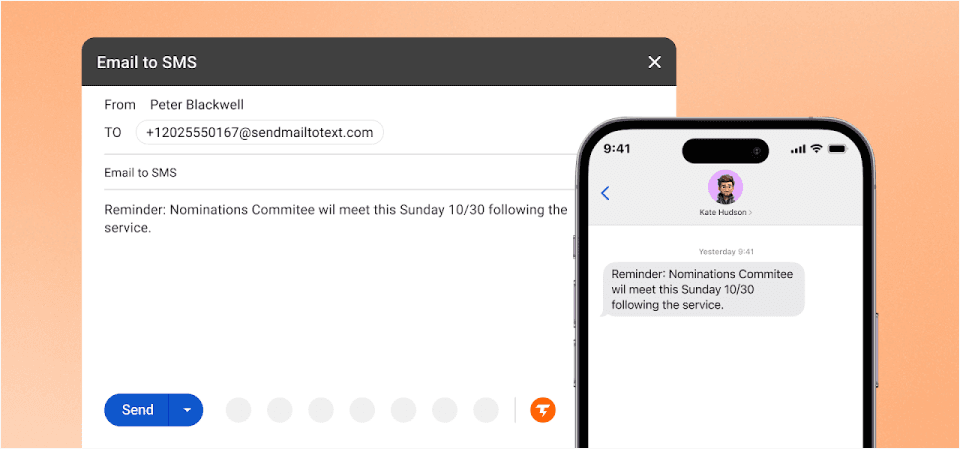
TextBolt exists as a direct stand-in for the retired carrier gateways, so your existing email client stays the sending tool: anything that can send an email can now send a text, and you don’t need any code or developer work. TextBolt files 10DLC registration for every US account, and approval takes up to 48 hours.
Why TextBolt Stands Out
- True email-native workflow. Send texts by composing emails to phonenumber@sendemailtotext.com. Works with Gmail, Outlook, Apple Mail, Thunderbird, or any email client. Your staff uses the same inbox they use for everything else.
- Up to 98% delivery rates. TextBolt sends through carrier-approved 10DLC routes, not legacy gateways. Messages are prioritized as verified business traffic, dramatically improving delivery compared to the old AT&T system.
- 30-minute setup. Most businesses complete migration in under half an hour. Sign up, verify your business, and start sending. TextBolt handles all 10DLC registration paperwork automatically.
- Team collaboration built in. Any team member can send texts from their email address. When Sarah calls in sick, Tom covers without missing a beat. No shared passwords, no single points of failure.
- Professional business number. Every message appears from your dedicated toll-free number, not a random gateway address. Recipients see a legitimate business contact they can save and reply to.
- Complete audit trail. Every text is logged in your email with timestamps and delivery confirmation. Know who sent what, when they sent it, and whether it was delivered.
- Two-way messaging included. Recipients can reply directly to your business number, and responses land right in your email inbox. Handle customer questions, confirm appointments, or follow up on requests without switching between platforms. Every conversation stays in one thread, so nothing gets lost.
- Monitoring and IT alerts. Convert alert emails to SMS from tools like Nagios, Datadog, Grafana, PRTG, and Zabbix by adding one gateway address to existing notification rules.
- CRM and helpdesk alerts. Trigger text notifications from HubSpot, Salesforce, Zendesk, and Freshdesk through their existing email workflow outputs without developer setup.
TextBolt Pricing
| Plan | Monthly Price | Message Credits | Best For |
| Basic | $29/month | 500 credits | Solo practitioners, consultants |
| Standard | $49/month | 1,000 credits | Growing businesses, medical practices |
| Professional | $99/month | 2,500 credits | Busy practices, multi-locations |
| Enterprise | Custom | 5,000+ credits | Large organizations, healthcare networks |
All plans include 10DLC registration, two-way messaging, a 7-day free trial, and email support. The Standard plan adds multi-user access for up to 10 team members.
Restore Email-to-Text Messaging Without Changing Your Inbox
TextBolt turns your existing emails into compliant business texts, with sending live once 10DLC approval completes.
2. ClickSend: Best for Multi-Channel Messaging

ClickSend offers email-to-SMS alongside voice, fax, and direct mail capabilities. It’s a solid choice for businesses that need multiple communication channels in one platform.
Key Features of ClickSend
- Multiple communication channels beyond SMS
- Global reach with international messaging
- Pay-as-you-go pricing option
Limitations vs. TextBolt
- More complex interface with more features than most businesses need
- Email-to-SMS is one of many features, not the core focus
- Pricing can be confusing with multiple options and add-ons
For a deeper breakdown of these differences, see this ClickSend vs TextBolt comparison.
Starting Price: Top-ups start at $20 on the Boost tier, and larger top-ups cut the per-message rate by up to 21%. The full tier breakdown is in our ClickSend pricing guide.
3. TextMagic: Best for Irregular Senders
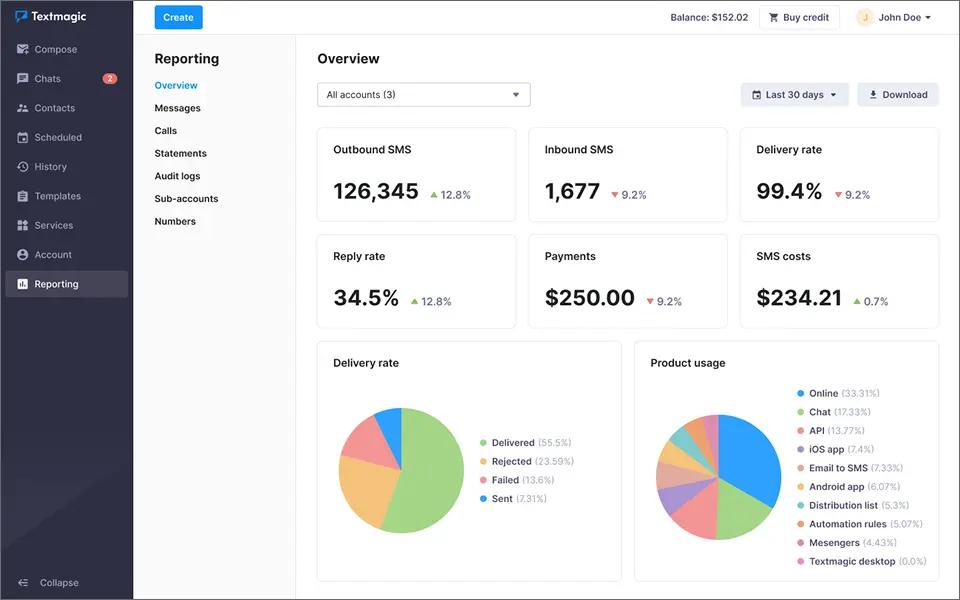
Textmagic pairs email-to-SMS with a broader texting suite that includes a shared inbox and automation flows. Its prepaid credits never expire, which suits businesses that send on an irregular schedule. Our Textmagic vs TextBolt comparison shows how each handles email-based texting.
Key Features of Textmagic
- Prepaid credits that never expire
- Unlimited users at no extra cost
- Free inbound replies, which can be forwarded to email
Limitations vs. TextBolt
- A texting number costs $10 per month on top of message credits
- US 10DLC campaigns cost $10 per month after the first free month
- Verification typically takes about seven business days before you can send
Starting Price: US texts cost $0.049 per SMS, plus $10 per month for a texting number. The full fee breakdown is in our Textmagic pricing guide.
4. SMSGlobal: Best for International Businesses
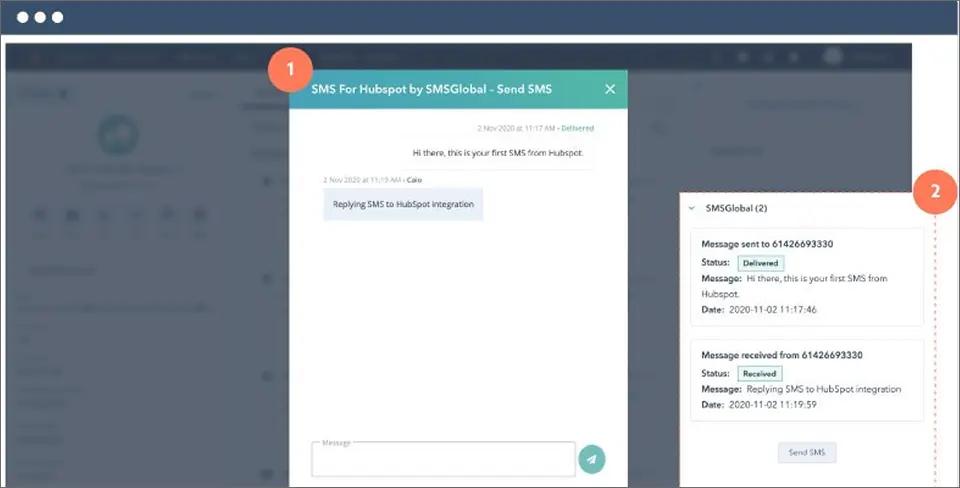
SMSGlobal provides email-to-SMS with strong international coverage. If your business sends texts to multiple countries, SMSGlobal offers competitive rates globally.
Key Features of SMSGlobal
- Strong international presence
- Multiple integration options
- A2P 10DLC numbers available for US sending
Limitations vs. TextBolt
- Complex pricing with carrier pass-through fees
- 10DLC registration support varies
- Need complex integration
For a deeper breakdown of these differences, see this SMSGlobal vs TextBolt comparison.
Starting Price: Pay-as-you-go with no subscription. US texts cost as low as $0.019 per SMS on large single-transaction purchases, with higher rates on smaller buys. The full breakdown is in our SMSGlobal pricing guide.
5. Sinch Engage (formerly MessageMedia): Best for Enterprise Integration
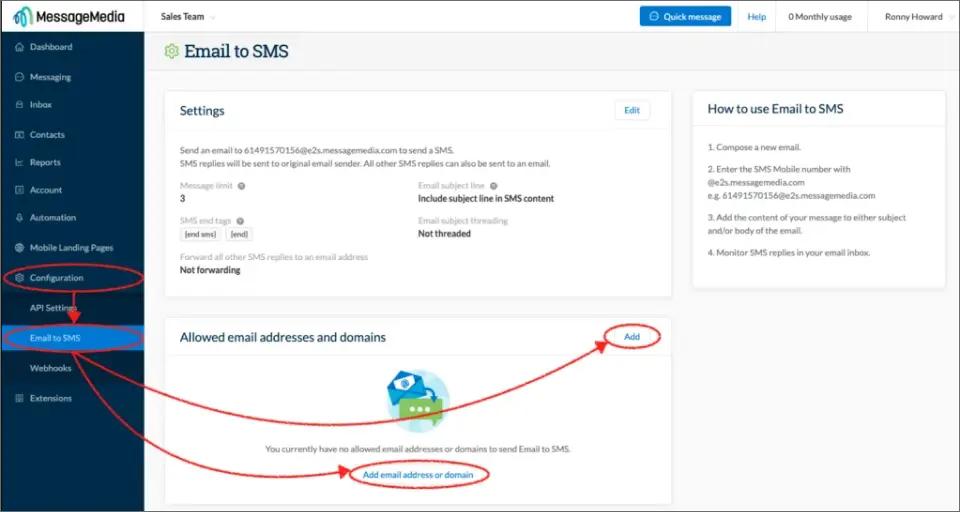
Sinch Engage (formerly MessageMedia) offers enterprise-grade SMS with CRM integrations. Larger organizations with Salesforce or HubSpot deployments may find value in its ecosystem.
Key Features of Sinch Engage
- Strong CRM integrations (Salesforce, HubSpot)
- Enterprise security features
- Dedicated account management
Limitations vs. TextBolt
- Higher price point ($49/month starting)
- Separate platform to learn
- Extra users cost $25 per month each
- Overkill for simple notification needs
Starting Price: $49/month (Basics plan)
Other AT&T Alternatives Worth Knowing
- Notifyre offers email-to-SMS (and online fax), close to the AT&T workflow, with its own dashboard and 10DLC handling; strong for healthcare with HIPAA/BAA and ISO 27001 compliance. Price: base price $4.90 per month, “Receive 200 Fax Plan” plan (vendor’s own page as of Sep 2025); SMS $0.02 per SMS part.
- TXTImpact routes messages through a recipientnumber@text2email.net address and strips email signatures automatically, a relay-style option some teams cite as a gateway replacement. Price available on its own pricing page.
For most teams that just want to keep emailing a number and have it arrive as a compliant text, an email-native service like TextBolt is the closest match to how AT&T’s gateway used to work.
For Server, On-Call & IoT Alerting
This is where most AT&T migrations actually break. Your monitoring stack was quietly texting on-call engineers through @txt.att.net for years, and after June 17, 2025, those pages just stopped. No bounce. No one noticed until an alert went unseen.
If your monitoring stack or alarm panel still points at @txt.att.net, you change only the destination address, with no SDK, no code, no integration project. The email your system already sends just goes somewhere that still delivers.
Which Systems Drop In Without Code?
TextBolt works as an email-to-SMS destination for any tool that sends email alerts, including:
- On-call paging: PagerDuty, Opsgenie, Datadog, Nagios, UptimeRobot, Zabbix, PRTG
- IoT & sensor thresholds: AWS CloudWatch, Grafana, custom webhooks
- Facility & alarm panels: Honeywell, ADT, DSC, Bosch, Notifier
- Broadcast: Off-air and transmitter alerts from Inovonics, Burk ARC Plus, Broadcast Tools, Nautel
Change the destination in each system’s email-alert settings, then send a test alert before you rely on it. Our guide to IT infrastructure SMS alerts covers the setups teams usually connect first.
When the on-call engineer changes, update the destination address in the alert settings. Nothing needs to be redeployed.
When Should You Use a Developer SMS API Instead?
If you are building a custom messaging flow and want programmatic control, a developer API is the right fit:
- Twilio: A programmable SMS API with usage-based pricing. You write code against its API to send and receive texts, so it expects engineering work.
- SignalWire: A similar developer platform for messaging and voice, built for teams that want to program their own flows.
An API gives you code-level control and lower per-message costs at volume, but you build and host the integration. Our email-to-SMS vs SMS APIs guide compares the two in more detail.
If your system already sends email, TextBolt reaches the same phone without an SDK or a public endpoint to host. It suits low-frequency operational alerting rather than a full programmatic build.
How to Migrate from AT&T Email to Text in 30 Minutes
If you’ve been using AT&T’s @txt.att.net addresses, migration to TextBolt takes approximately 30 minutes. Here’s the step-by-step process.
Step 1: Sign Up and Verify Your Business
- Visit TextBolt and create your account
- Complete business verification with your company name and EIN
- TextBolt initiates 10DLC registration automatically (completes in background)
Step 2: Get Your Dedicated Business Number
- Receive your dedicated toll-free number
- This number appears on all outgoing texts
- Recipients can save it as your business contact
Step 3: Swap the Address Format
- Replace @txt.att.net with @sendemailtotext.com
- Example: 5551234567@txt.att.net becomes 5551234567@sendemailtotext.com
- Save the new format in your email contacts
Step 4: Test Your First Message
- Compose a new email in Gmail, Outlook, or your preferred client
- Address it to [phone number]@sendemailtotext.com
- Type your message in the email body
- Send and verify delivery
Step 5: Update Any Automated Systems
- Find any scripts, monitoring tools, or EMR systems using @txt.att.net
- Update the destination address format
- Test each system to confirm messages are delivered
That’s it. Your existing workflow remains identical. The only change is the email domain.
Send & Receive SMS From Email Reliably
TextBolt gives you a modern, compliant alternative to AT&T email-to-text that works seamlessly with Gmail and Outlook.
Who Needs an AT&T Email-to-Text Alternative?
Several types of organizations relied heavily on AT&T’s email gateway and now need reliable alternatives.
1. Healthcare Providers
Medical practices used @txt.att.net for appointment reminders, reducing no-shows by up to 38%. After the shutdown, many practices saw no-show rates spike immediately.
TextBolt provides healthcare-focused messaging. Messages transmit directly without storage on intermediate servers. Complete audit trails document every patient communication.
Common healthcare uses:
- Appointment reminders and confirmations
- Lab result notifications
- Prescription refill reminders
- Pre-procedure instructions
- Mass patient notifications for closures or schedule changes
2. IT Departments
System administrators relied on carrier gateways for critical alerts. When a server goes down at 3 AM, email alone isn’t reliable enough. SMS cuts through.
TextBolt’s IT alert text messaging solutions integrate with monitoring tools like Nagios, Zabbix, and PRTG through simple email configuration. Any system that can send email can now send SMS notification.
Common IT uses:
- Server down notifications
- CPU/memory threshold alerts
- Security incident notifications
- On-call engineer rotation
- Backup failure alerts
3. Small Businesses
Service businesses used @txt.att.net for customer communication without investing in expensive SMS platforms. Auto shops, salons, tutors, and countless other businesses need simple, affordable texting.
TextBolt offers affordable small business text messaging starting at $29/month, which is less than the cost of one missed appointment at most businesses. No learning curve, no training required.
Common small business uses:
- Appointment reminders
- Service completion notifications
- Order status updates
- Payment reminders
- Customer follow-ups
- Urgent lead capture via text button instead of slow contact forms
4. Educational Institutions
Educational institutions used carrier gateways for emergency notifications, parent communication, and staff coordination. Snow day alerts need to reach thousands of parents in minutes.
TextBolt’s education text messaging solution fits seamlessly into existing school workflows through simple email setup. Any system that can send email, whether it’s a school management platform or an internal alert system, can now deliver SMS notifications instantly.
Common education uses:
- Emergency and weather alerts
- Event reminders
- Bus delay notifications
- Parent-teacher communication
- Staff coordination
Why Is TextBolt the Best AT&T Email-to-Text Alternative?
When AT&T shut down their gateway, over 500 businesses switched to TextBolt. Most discovered their messaging actually improved.
1. Same Workflow, Better Results
The transition requires changing one email address. Everything else stays the same. Your contact lists, your email templates, your sending habits. Just swap @txt.att.net for @sendemailtotext.com.
2. Delivery That Actually Works
AT&T’s gateway had become so unreliable that many businesses didn’t even know their messages weren’t being delivered. There were no bounce notifications, no failure alerts. Messages simply vanished.
TextBolt achieves up to 98% delivery rates through 10DLC-registered routes. You’ll see delivery confirmation for every message, and failures are reported immediately.
3. Team Resilience Built In
The biggest risk with phone-based texting is dependence on a single person. When that person is sick, on vacation, or leaves the company, patient reminders stop, IT alerts go unseen, and customer communication breaks down.
With TextBolt, any team member sends texts from their own email address. Shared visibility means anyone can cover. The business number stays consistent regardless of who’s sending.
4. Professional Appearance
AT&T gateway messages came from addresses like 5551234567@txt.att.net. Recipients often didn’t recognize the sender or assumed it was spam.
TextBolt messages arrive from your dedicated business number. Recipients see a professional contact they can save and trust.
5. Complete Documentation
Healthcare providers, IT departments, and regulated businesses need documentation. TextBolt logs every message in your email with timestamps and delivery status. When you need to prove a message was sent and delivered, the evidence exists in your inbox.
Start Your Migration Today
AT&T’s email to text shutdown doesn’t have to disrupt your business communication. TextBolt provides the same workflow you’ve relied on for years, with dramatically better reliability and professional features.
What you get with TextBolt:
- Same email-based sending workflow
- Up to 98% delivery rate (vs. 40% or less with old gateways)
- Professional toll-free business number
- Two-way messaging in your inbox
- Team access without per-user fees
- 30-minute setup with no coding required
- 7-day free trial to test everything
Your appointment reminders, system alerts, and customer messages deserve to actually be delivered. Start your free trial with TextBolt today and experience business texting that works.
Frequently Asked Questions
Is AT&T email to text discontinued?
Yes. AT&T officially discontinued the service on June 17, 2025, and confirms in its support notice that you can no longer send or receive texts using email.
What is the replacement for AT&T email to text?
There is no AT&T replacement gateway. Use a 10DLC-registered email-to-text service for example, email +11234567890@sendemailtotext.com with TextBolt, which keeps the email workflow but delivers reliably.
How much does an AT&T email-to-text alternative cost?
TextBolt plans start at $29/month for 500 credits. ClickSend and SMSGlobal are pay-as-you-go, with ClickSend top-ups from $20 and SMSGlobal from $0.019 per SMS at high volume. Textmagic charges $0.049 per SMS plus $10/month per number, and Sinch Engage starts at $99/month billed annually.
What happens to messages sent to @txt.att.net now?
They silently fail. txt.att.net is not working, so AT&T does not forward them and does not send a bounce notification. You must switch to a working alternative.
Can I send a text from email without AT&T’s gateway?
Yes. Use an email-to-text service: email 1234567890@sendemailtotext.com from Gmail, Outlook, or any client, and it sends as a real business text over compliant 10DLC routes.
What is an SMS gateway?
An SMS gateway is a system that lets computers and software send and receive text messages over cellular networks. Carrier email gateways like @txt.att.net were a free version of this but are shutting down; modern services use compliant 10DLC routes instead.
What was AT&T’s SMS gateway and what replaces it?
AT&T’s SMS gateway was the free email-to-text address number@txt.att.net (and number@mms.att.net for MMS), shut down June 17, 2025. AT&T’s guidance is to use an approved commercial SMS service instead — a 10DLC-registered provider such as TextBolt, where you email 1234567890@sendemailtotext.com and it delivers as a compliant business text.
Is there a free AT&T email-to-text alternative?
No. The free option was the carrier gateway itself, and it closed because free gateways can’t verify senders under 10DLC rules. Any compliant replacement that handles 10DLC registration is a paid service. TextBolt offers a 7-day free trial, and pay-as-you-go tools like ClickSend let you start small.
Do I need 10DLC to text customers in the US?
Yes. U.S. business SMS legally requires 10DLC registration so carriers can verify your identity.
Can I keep the same phone numbers I texted before?
Yes. Recipients’ phone numbers don’t change. You only change the address format, from number@txt.att.net to +1[PhoneNumber]@sendemailtotext.com.
How long does migration take?
Account setup takes minutes, and sending starts once 10DLC approval completes, which can take up to 48 hours. If you only send manually from email, you’re ready once approved. Updating automated systems takes longest because each one needs its address changed and tested.
Does this work with Gmail and Outlook?
Yes. Email-to-text works with Gmail, Outlook, Apple Mail, Yahoo, and any other email app. TextBolt also offers dedicated Gmail and Outlook integrations for extra features.
Is Verizon email to text also shutting down?
Verizon’s @vtext.com is winding down with a full shutdown reported for March 31, 2027, and T-Mobile’s @tmomail.net stopped delivering in late 2024.
How do I migrate an automated alert system off @txt.att.net?
List every system pointed at @txt.att.net and add its sending address as a user on your TextBolt account. Then change the destination and send a test alert. Config files and scripts often hide the address, so search those too. Start with anything that pages on-call staff.