
- How Does Email-to-Text Work for Loan Follow-Ups?
- Why Do Loan Applicants Ignore Follow-Up Emails and Calls?
- How Loan Officers Send Follow-Up Texts Directly From Email
- Step 1: Complete Your TextBolt Account and 10DLC Verification
- Step 2: Organize Applicant Contacts by Loan Type and Stage
- Step 3: Compose a Follow-Up Message and Address It to the Applicant’s Phone
- Step 4: Send the First Text Now and Schedule the Day 3 and Day 7 Texts
- Step 5: Track Delivery Status and Reply From Your Inbox
- Why SMS Follow-Ups Close More Loans Than Phone Calls or Emails
- How to Write Loan Follow-Up Texts That Borrowers Actually Answer
- Which Email-to-Text Addresses Still Deliver Loan Texts in 2026?
- Can Your Loan System or CRM Send These Texts Automatically?
- Ready to Close More Loans Without Growing Your Team?
- Frequently Asked Questions
Borrowers Ignore Emails. They Read Texts.
How to Automate Loan Follow-Ups Using Email to Text

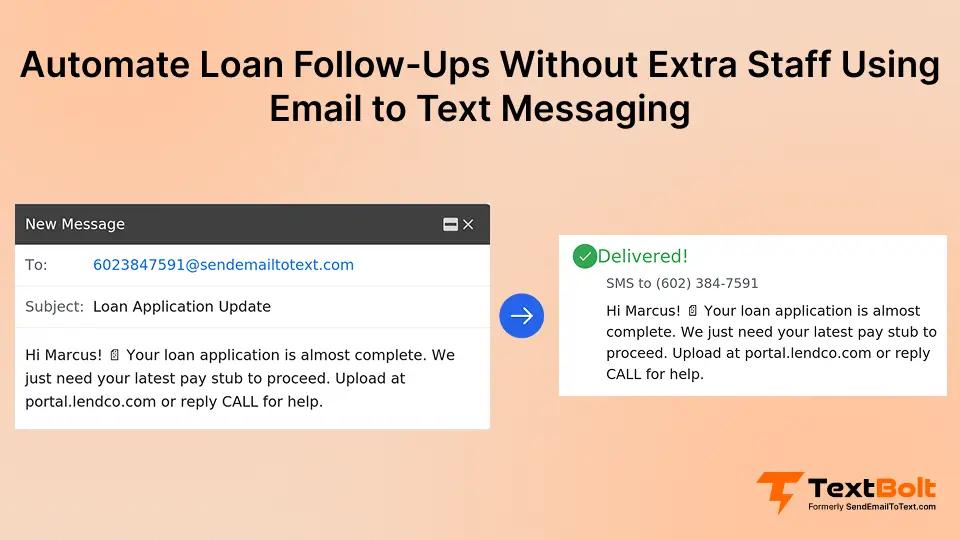
A follow-up email to a loan applicant often waits under a day of newsletters before anyone opens it, while a text shows up on their lock screen. You can automate loan follow-ups by sending those same emails as texts with TextBolt, from Gmail, Outlook or any email inbox your team already uses.
Address the email to the applicant’s +1[PhoneNumber]@sendemailtotext.com address. The subject and body arrive as a text from your business number, and the applicant’s reply threads back to the officer who sent it.
The same address works for a loan officer’s inbox, a branch’s shared mailbox, or a loan system that emails applicants when a file changes stage. That is the core of email-to-SMS for banks and lending.
This guide covers the five-step setup, what each follow-up text should say, which old carrier addresses no longer deliver, and when a mortgage CRM fits better. It assumes your applicants have opted in to texts from your business number.
How Does Email-to-Text Work for Loan Follow-Ups?
TextBolt is an email to SMS gateway that turns each follow-up email into a text. You address the email to the applicant’s number at sendemailtotext.com, and the applicant receives the subject and body as an SMS from your business number. Group applicants by loan type or pipeline stage, keep each text under about 155 characters with one next action, and schedule the sequence ahead of time.
The workflow comes down to four moves:
- Organize contacts by loan type and stage.
- Address the email to the applicant’s number, written as +1[PhoneNumber]@sendemailtotext.com, so the follow-up reaches them as a text from your business number.
- Draft a concise message with one next step.
- Send now, or schedule the Day 3 and Day 7 texts.
The gateway moves the message. It does not decide when a follow-up is due, and it does not chase an applicant who goes quiet. Your schedule or your loan system does that.
Why Do Loan Applicants Ignore Follow-Up Emails and Calls?
Most loan follow-ups get ignored because they arrive in channels applicants rarely check, arrive too late, or feel too intrusive. Borrowers are often shopping multiple lenders at once. The lender who reaches them first and most conveniently wins the business.
1. Follow-Up Emails Compete With Dozens of Unread Messages
The average person receives dozens of emails every day. Your follow-up competes with promotional newsletters, work messages, and spam.
Most applicants don’t actively search their inbox for loan updates. They scan subject lines quickly, and a message from an unfamiliar sender gets skipped.
Email open rates for financial services tend to be low, meaning a significant portion of your follow-ups are never read at all. Even when applicants do open your email, they often plan to “respond later” and forget.
2. Phone Calls Go Straight to Voicemail During Work Hours
Many borrowers screen unknown numbers, especially during work hours. Your call goes straight to voicemail, and many people never listen to voicemails.
Phone tag wastes your loan officers’ hours. Each round of calling, waiting, and redialing eats into time better spent processing applications. For a team managing dozens of active applications, calling every applicant multiple times isn’t realistic without hiring additional staff.
3. Every Hour of Delay Pushes Applicants to Faster Competitors
Speed matters in lending. Applicants who don’t hear back within a few hours often assume you’re not interested.
Manual follow-up processes create natural delays. Your team handles applications in batches, so some borrowers wait a full day before anyone reaches out. During that gap, a competitor who responded quickly has already built rapport. Faster response times significantly increase lead conversion across every lending category.
When you compare these three channels side by side, the difference becomes clear.
| Follow-Up Method | Typical Engagement | Typical Response Time |
| Many go unread | Hours to days | |
| Phone call | Often unanswered | Immediate if answered |
| Text message (SMS) | Most read within minutes | Minutes |
Text messages consistently reach borrowers faster and get read more often. The question is how to put this channel to work without adding complexity to your operation.
How Loan Officers Send Follow-Up Texts Directly From Email
Email-to-SMS turns your existing email workflow into a text messaging system that reaches applicants within seconds of sending. Here’s the step-by-step process.
Step 1: Complete Your TextBolt Account and 10DLC Verification
Sign up and submit your business details. Before the first follow-up goes out, carriers must approve your business number for texting. TextBolt files that registration for you, and approval can take up to 48 hours, so set it up before you promise applicants a text.
Your lending team then texts from one dedicated business number. Carriers check the details listed in TextBolt’s A2P 10DLC registration guide before they approve it..
Step 2: Organize Applicant Contacts by Loan Type and Stage
Add loan applicant phone numbers to Google Contacts or your preferred contact management system.
Organize contacts by loan type, application stage, or follow-up priority to send the right messages to the right applicants. The how to send email to text process works with contacts already in your system.
Step 3: Compose a Follow-Up Message and Address It to the Applicant’s Phone
Start a new message in the inbox you already use and put the applicant’s +1[PhoneNumber]@sendemailtotext.com address in the To field. The subject becomes the start of the text, so keep it short. Name the one item the borrower owes you, such as a missing pay stub or a time for the appraisal.
For group follow-ups, select an entire contact group and send one email. Each applicant receives a separate text.
Step 4: Send the First Text Now and Schedule the Day 3 and Day 7 Texts
On the day an application arrives, send the first follow-up straight away. It reaches the applicant’s phone within seconds.
In the same sitting, queue the Day 3 and Day 7 texts with Gmail’s Schedule Send or Outlook’s scheduled sending. Each goes out at the time you pick, the same way you would schedule SMS from Gmail for any other reminder. If the applicant replies first, delete the queued texts.
Step 5: Track Delivery Status and Reply From Your Inbox
Check your TextBolt dashboard for delivery status updates. You’ll see which messages were delivered within two to five minutes of sending.
The dashboard lets you filter by delivery status, so your team can quickly identify which applicants received their follow-up and which messages need attention.

This filtering makes it easy to spot any undelivered messages and resend them before an applicant slips through the cracks.
Applicant replies arrive as standard email responses in your inbox. Continue the conversation without switching between apps. All conversations are documented in your email, creating a complete audit trail for compliance and record-keeping.
Once your follow-up system is running, the benefits extend well beyond saving time on phone calls.
Stop Losing Loan Applicants to Slow Follow-Ups
Turn every email into an instant text message. Follow up with borrowers before competitors do.
Why SMS Follow-Ups Close More Loans Than Phone Calls or Emails
Automated SMS follow-ups improve conversion rates because they reach applicants faster, more consistently, and through a channel applicants actually read.
1. Sub-Minute Speed-to-Lead Beats Every Other Channel
The first lender to make contact wins the deal more often than not. With email-to-SMS, your follow-up reaches the applicant’s phone within seconds of sending.
No waiting for them to check their inbox. No hoping they answer an unknown number. This speed advantage compounds across your entire pipeline. When every applicant gets a fast follow-up, your overall conversion rate climbs. The same speed-to-lead principle applies when notifying clients about time-sensitive investment opportunities.
2. Scheduled Sequences Ensure No Applicant Falls Through the Cracks
Manual processes break down as volume increases. When your team processes 50 applications a week, some follow-ups inevitably slip through the cracks.
Email-to-SMS eliminates that inconsistency. You can schedule SMS from Gmail and ensure every applicant receives follow-up at the right intervals. No applicant gets forgotten because someone was busy with another task.
3. Text Messages Get Read, Emails Get Buried
Most text messages are read within minutes of delivery. Many emails sit unread for hours or are ignored entirely. An applicant who reads your follow-up is far more likely to act on it, which means fewer abandoned applications.
4. $29/Month Replaces Hours of Daily Dial-and-Wait
Hiring additional staff to handle phone follow-ups costs thousands per month in salary and benefits. Email-to-SMS plans start at $29 per month with 500 message credits.
That’s significantly less than one hour of a loan officer’s daily time spent making calls. Your existing team handles more applications without burning out.
When volume spikes during refinance season or rate drops, your follow-up capacity scales without adding headcount. The TextBolt dashboard helps you monitor message delivery across the team.

The Summary view gives your branch manager a daily snapshot of how many follow-ups went out and whether they were delivered, making it easy to spot gaps in your outreach.
5. Any Loan Officer Covers Follow-Ups When a Colleague Is Out
When a loan officer is out sick, on vacation, or simply overloaded, follow-ups don’t stop. Any team member can send texts from their own email using the same business number.
All plans include 10 user accounts with no per-user fees. Applicants always hear from your organization on time, regardless of who’s in the office. This consistency helps boost customer engagement and builds trust with borrowers.
The right follow-up system is only as good as the messages it sends. Here are the guidelines that separate effective loan follow-up texts from ones that get ignored.
Your Loan Pipeline Shouldn’t Depend on Manual Follow-Ups
Send follow-up texts from your email in minutes. No new software. No extra hires.
How to Write Loan Follow-Up Texts That Borrowers Actually Answer
The most effective loan follow-up texts are short, specific, and focused on one clear next step for the borrower.
1. Stay Under 155 Characters for a Clean Single-Text Delivery
Standard SMS allows 155 characters per segment. Staying within that limit means your message uses one credit and arrives as a single text.
Longer messages get split into multiple segments, which can look fragmented on the recipient’s phone. For more details, review SMS character limits. For a follow-up, you rarely need more than two sentences.
2. Tell the Borrower Exactly What to Do Next
Every follow-up text should tell the applicant exactly what to do. A vague check-in gets ignored. A text that names the one outstanding item and gives one way to respond (reply, call, or visit your secure portal) gets acted on. The simpler the next step, the more likely the borrower is to take it.
3. Send the First Text Within Minutes, Then Day 3 and Day 7
The first follow-up goes out within minutes of submission. It confirms receipt and sets expectations. If the applicant hasn’t responded, a second text follows two to three days later, and a third at day seven provides one final touchpoint.
| Touch | When | What it does |
|---|---|---|
| First text | Within minutes of submission | Confirms receipt and sets expectations |
| Second text | Day 3, if no response | Restates the one next step |
| Third text | Day 7 | Final touchpoint before the file goes quiet |
Avoid sending before 9 a.m. or after 7 p.m. in the applicant’s time zone.
4. Reference the Loan Type but Keep Sensitive Data Out of the Text
Use the applicant’s first name and refer to their specific loan type when possible, so the text reads as personal and relevant. Keep loan amounts, credit scores and account numbers out of SMS. Use the text to prompt a phone call or a secure portal visit for the details.
Financial services firms face growing scrutiny of their communication channels. Our guide on off-channel texting explains why texting clients from personal phones creates compliance risk that a business-registered channel avoids.
| Stage | What the text covers | What stays out of the text |
|---|---|---|
| Document request | Your company name, the one outstanding item, and how to submit it securely | Account numbers, document contents |
| Underwriting update | That the file is in review, and when the next update is expected | Loan amounts, credit scores |
| Appointment or call | The confirmed time, plus a reply or call option | Rates or terms |
5. Include Opt-Out Language and Follow TCPA Requirements
Ensure you have proper consent before texting loan applicants. Include opt-out language like “Reply STOP to unsubscribe” in your messages.
TextBolt handles STOP keyword processing automatically. Follow all applicable SMS compliance laws including TCPA requirements. Your compliance team should review messaging templates before launch. Once the loan closes, the same compliant channel handles ongoing client communication like KYC periodic review reminders without spinning up a separate workflow.
| Element | Good Example | Avoid |
| Length | “Hi Alex, your loan docs are ready. Reply YES to proceed.” | Long paragraphs explaining the entire loan process |
| Next step | “Call us at 555-0100 to finalize your rate.” | “Just following up on your application.” |
| Timing | Within minutes of application, then days 3 and 7 | Random times, weekends, late nights |
| Tone | Professional, helpful, brief | Overly casual or pushy |
Which Email-to-Text Addresses Still Deliver Loan Texts in 2026?
A registered business address does: +1[PhoneNumber]@sendemailtotext.com. The free carrier email-to-text gateways that older loan templates and systems still point at are retired or retiring. A follow-up sent to a retired address never reaches the applicant.
| Carrier | Gateway domain(s) | Status | Effective/scheduled date |
|---|---|---|---|
| AT&T | txt.att.net / mms.att.net | AT&T Shut down; a loan follow-up sent to @txt.att.net no longer reaches the applicant | June 17, 2025 |
| T-Mobile | tmomail.net | T-Mobile Stopped delivering | Late 2024 |
| Verizon | vtext.com / vzwpix.com | Verizon Being retired | By March 31, 2027 |
What Replaces a Retired Gateway Address?
One address works for every applicant, whatever their carrier. Open the loan templates and stage-change emails in your system, find any old carrier address, and replace it with the applicant’s +1[PhoneNumber]@sendemailtotext.com address. Nobody has to know which carrier an applicant uses, and replies come back the same way.
Can Your Loan System or CRM Send These Texts Automatically?
Any system sender that can send email can text an applicant. A CRM, a loan system or a web form emails the applicant’s sendemailtotext.com address when a file changes stage, and the applicant gets a text. Teams already send texts this way from CRMs such as HubSpot, Salesforce and Pipedrive.
To connect a loan system or CRM, approve its sending address (often a noreply@ address) in your TextBolt account. Then set the To: field on its stage-change email to the applicant’s sendemailtotext.com address. Changing the recipient takes a few minutes for each email template.
Middleware covers triggers that live in another app. Zapier (including Email Parser by Zapier), Make.com and Power Automate (via the Office 365 Outlook “Send an email (V2)” action) can watch for an event and send the email that becomes the text.
The gateway does not watch your pipeline. The trigger lives in your loan system or automation, and the gateway delivers what that system sends.
Ready to Close More Loans Without Growing Your Team?
Automated email-to-SMS follow-ups let your existing team reach every applicant faster and more reliably, at a fraction of the cost of manual processes. Your next step depends on your stack:
- Gmail: Type the applicant’s address in the To field and use Schedule Send for Day 3 and Day 7.
- Outlook: Use the same address with Outlook’s scheduled sending.
- HubSpot or Salesforce: Point the stage-change email at the applicant’s sendemailtotext.com address.
See TextBolt pricing to find the plan that fits your lending operation.
Frequently Asked Questions
How does email-to-SMS work for loan follow-ups?
You compose an email addressed to the applicant’s phone number @sendemailtotext.com. TextBolt converts that email into a standard SMS delivered to their phone. Replies come back to your email inbox.
Do I need technical skills to set up automated loan follow-ups?
No. If you can send an email, you can use TextBolt. There’s no coding, no API integration, and no special software to install. Setup takes about minutes.
Is it compliant to text loan applicants?
Yes, with proper consent. TextBolt includes built-in STOP keyword handling for opt-outs. Consult your compliance team to ensure your messaging meets TCPA and industry requirements.
How many follow-up texts can I send per month?
Plans range from 500 to 2,500+ credits per month. Each standard 155-character message uses one credit. Longer messages use additional credits based on segment count.
Can multiple loan officers use the same account and business number?
Yes, on the Standard and Professional plans. Every officer texts from the same business number, so applicants always see one sender. Replies return to whoever sent the text, so the officer taking over a file should send the next one.
What is text messaging for banks and finance companies?
It is the use of SMS from a registered business number to send applicants and clients operational messages such as status updates, document requests and appointment confirmations. It works only for recipients who gave documented opt-in. Carrier filters treat lending as a restricted messaging category, so content should stay operational.
Why is texting applicants from a business-registered channel safer than from personal phones?
A business-registered channel avoids the compliance risk that comes from texting clients on personal phones, which matters as financial firms face growing scrutiny of their communication channels. When officers text from company email, each exchange stays searchable, archivable and auditable in the mailbox, giving compliance teams a full record.