
- Why Do Businesses Look for Two-Way Text Messaging Software?
- What to Look For in Two-Way Text Messaging Software
- How We Selected These Two-Way Text Messaging Platforms
- 10 Best Two-Way Text Messaging Software Compared at a Glance
- 1. TextBolt — Best Two-Way Text Messaging Software for Email-Native Workflows
- 2. Salesmsg — Best for CRM-Attached Two-Way Sales Conversations
- 3. SimpleTexting — Best SMS Marketing Software With Two-Way Conversation Tools
- 4. TextMagic — Best PAYG Two-Way SMS With an Email-to-SMS Path
- 5. Textline — Best HIPAA-Compatible Two-Way Text Messaging Software
- 6. JustCall — Best for Two-Way SMS Bundled With Voice and AI Coaching
- 7. Heymarket — Best Omnichannel Two-Way Messaging Across SMS, Email, and Apps
- 8. EZ Texting — Best Entry-Level SMS Marketing Starter Kit
- 9. Textedly — Best Low-Cost SMS Marketing for Small Teams
- 10. SlickText — Best for SMS Loyalty Programs
- How to Choose the Right Two-Way Text Messaging Software
- Choose the Two-Way Text Messaging Software That Fits How Your Team Actually Works
- Frequently Asked Questions
Turn Email Into Two-Way SMS
10 Best Two Way Text Messaging Software for Businesses

Looking for the best two-way text messaging software for your small business? We shortlisted the top 10 platforms, including TextBolt’s email-to-SMS approach, to help you find your business’s next SMS marketing tool.
Two-way text messaging software lets businesses send texts from a business number and receive replies in a shared system instead of on a personal phone.
Sending the text is the easy part. The bigger difference is where replies go. Some platforms send replies to a dashboard, some to a CRM, some to a developer webhook, and others send them directly back to email.
Different platforms are built for different workflows. CRM-focused tools like Salesmsg are designed for sales conversations. Platforms like SimpleTexting focus on marketing campaigns. API providers like Twilio give developers the tools to build their own solution. Email-to-SMS platforms like TextBolt turn Gmail or Outlook into a texting tool, so teams can send and receive texts without learning new software.
This guide compares pricing, workflows, 10DLC compliance, and reply handling to help you find the best fit for your business.
Why Do Businesses Look for Two-Way Text Messaging Software?
Most teams do not start the search because they want a new app. They start because something in the current setup broke. In this section, we will learn why businesses choose two-way messaging software and what they are exactly looking for:
1. Personal Cell Phones Became the System of Record
When a single staff member texts customers from their own phone, the conversation history walks out the door the moment that person leaves. Two-way text messaging software puts the thread back under business ownership, with shared sending numbers, opt-out automation, and audit logs the company controls. The pattern shows up consistently when teams move to stop using personal phones to text patients or clients.
2. The Reply Landed Somewhere Nobody Was Watching
A scheduling text goes out, the customer replies “can we move it to 3,” and the reply sits unread in a dashboard tab for two hours. By the time anyone notices, the slot has gone elsewhere. Where the reply surfaces, whether that is an email thread, a CRM record, or a shared support queue, is usually the real reason a team upgrades.
3. 10DLC Made Ad-Hoc Sending Stop Working
A2P 10DLC registration and compliance is now mandatory for US business messaging, and STOP-keyword suppression is enforced at the carrier level. Sending ad-hoc texts from an unregistered number quietly stopped working in 2025 when carriers tightened filtering, and many teams only noticed once their reminders and alerts started failing silently.
What to Look For in Two-Way Text Messaging Software
Two-way text messaging software lets businesses run real-time, conversational SMS with customers from a number the company controls. The best business text messaging platforms centralize inbound and outbound threads, so support tickets, appointment reminders, sales conversations, and operational alerts live in one shared surface instead of a single rep’s personal mobile device.
The specific feature set worth filtering on:
- Unified Team Inbox: Multiple agents view and respond to the same conversation from a shared workspace, whether that workspace is a dashboard or an email thread.
- Auto-Responders: Send a quick reply to inbound texts outside of business hours, on keyword match, or as part of an SMS automation software workflow.
- Keyword Triggers: Customers text a keyword (e.g., “SUPPORT”) and the platform forwards the thread to the right department or owner.
- CRM Integrations: Conversations sync with the customer record in Salesforce, HubSpot, Zendesk, or Pipedrive so reps see history in context. Strong CRM texting integration is the main reason CRM-attached tools beat marketing dashboards for sales teams.
- Email-to-SMS Path: For teams that already live in Gmail or Outlook, an email to SMS service like TextBolt skips the dashboard entirely and turns the inbox into a two-way text channel.
The right pick depends on whether the team needs a two-way team collaboration tool, a bulk text messaging service for marketing blasts, or an all-in-one customer messaging platform that handles SMS alongside email, WhatsApp, and other channels.
How We Selected These Two-Way Text Messaging Platforms
We focused on platforms that explicitly handle the two-way conversation, not pure outbound blast tools. The picks below are the strongest business messaging platforms and best SMS marketing platforms we tracked across this evaluation cycle.
Selection criteria:
- Pricing structure and whether costs scale per seat, per message, or flat
- Reply destination and how naturally it fits an existing workflow
- A2P 10DLC and toll-free registration handling
- Setup complexity from signup to first verified two-way exchange
- Compliance posture, including HIPAA support and audit logs
- Workflow fit across email-native, CRM-attached, dashboard-first, marketing-led, loyalty, and developer-API approaches
- Customer-reported strengths and limitations from G2, Capterra, and live review threads
Every pricing and feature reference was verified against the vendor’s live product or pricing page at the time of writing. Rates and tiers shift, so verify before signing.
10 Best Two-Way Text Messaging Software Compared at a Glance
| Platform | Starting Price | SMS / Pricing Model | Workflow |
| TextBolt | $29/mo | 500 SMS bundled; never-expire top-ups | Email-to-SMS from Email |
| Salesmsg | $25/mo | 500 credits, extra Chat Seats $10/mo | CRM-attached shared inbox |
| SimpleTexting | $29/mo + $10/mo number ($ 39) | 500 credits with rollover; $0.055 overage; 3 seats included | Marketing SMS dashboard |
| TextMagic | $0.049/SMS PAYG | Pay-as-you-go + $10/mo number rental | Multi-channel with email-to-SMS path |
| Textline | Custom-quoted | 2,000 credits on Pro; $0.03 add-on credit | HIPAA-compatible shared inbox |
| JustCall | $39 monthly | 500 SMS segments + 1,000 outbound calling min/user | AI-powered voice and SMS workspace |
| Heymarket | $24/user/mo (min 2 users) | $0.03/SMS segment usage billing | Omnichannel customer messaging |
| EZ Texting | $25/month | 500 credits, scales by contact tier | Entry-level SMS marketing starter kit |
| Textedly | $29/month | 600 messages on Basic | SMS marketing for small teams |
| SlickText | $29/mo | 500 credits with rollover | SMS loyalty programs and marketing |
The right pick depends on which row reflects how your team already operates. The reviews below break down each platform’s pricing, strengths, limitations, and ideal fit.
1. TextBolt — Best Two-Way Text Messaging Software for Email-Native Workflows
TextBolt is an operational two way messaging platform that sends outbound messages and threads inbound replies through the email client the team already uses. You compose to a phone-number-based gateway address (for example, +1XXXXXXXXXX@sendemailtotext.com) from Gmail, Outlook, Microsoft 365, an EHR, a monitoring tool, or any other email-capable application. The recipient’s reply threads back into your inbox as a normal email, attached to the original send.

For teams whose customer context already lives in email, this turns two-way SMS into an extension of the existing workflow rather than a new product to learn. Front-desk staff, recruiters, dispatchers, on-call engineers, and small sales teams get a real two-way channel without ever opening a separate app.
TextBolt is purpose-built for operational SMS, transactional text messaging, and SMS notification service workflows like text alert systems, appointment reminders, and on-call paging, not CRM-attached sales conversations or large opt-in marketing programs, which makes it one of the best email to SMS service picks for small businesses that already live in Gmail or Outlook.
Key Capabilities of TextBolt
- Send and receive SMS from Gmail, Outlook, Microsoft 365, and any email-capable application
- No separate dashboard, no API keys, no app for staff to install
- A2P 10DLC-compliant sending across AT&T, Verizon, and T-Mobile
- Canadian carrier support across Rogers, Bell, Telus, and Fido
- Toll-free number available for a flat $45/year
- Up to 10 user seats included on Standard and Professional plans
- Brand and campaign registration handled as part of business verification
- Typical setup completed in under 30 minutes; account activation within 24-48 hours
- Non-expiring additional SMS credits that only draw down after the monthly bucket is consumed
Pros and Cons of TextBolt
| Pros | Cons |
| Send and receive SMS directly from existing email workflows | Only for US and Canada |
| No separate dashboard, app, or per-seat license to roll out | No built-in voice calling |
| Predictable flat monthly pricing with bundled SMS | |
| Up to 10 seats included on Standard and Professional plans | |
| Brand and 10DLC registration handled in-house | |
| Non-expiring top-up credits reduce wasted SMS spend |
TextBolt Pricing
| Plan | Monthly Price | SMS Included | Seats |
| Basic | $29 | 500 | 1 |
| Standard | $49 | 1,000 | Up to 10 |
| Professional | $99 | 2,500 | Up to 10 |
| Enterprise | Custom | 5,000+ | Custom |
What else includes in the TextBolt pricing plans:
- 20% discount with annual billing on every plan
- Toll-free number add-on: $45/year flat
- Brand and 10DLC registration handled at no additional fee
- Non-expiring top-up credit packs available on top of the monthly plan
- 7-day free trial (card required for verification)
To get the complete cost breakdown, check the each tier details live on the TextBolt pricing page.
Is TextBolt the Right Two-Way Text Messaging Software for You?
TextBolt fits teams that need a real two-way SMS channel without adopting another dashboard, especially clinics and dental offices sending appointment reminders, recruiters scheduling candidates, dispatchers coordinating field crews, SREs running server-downtime acknowledgments, and front desks sending order or service updates.
It is also one of the best text messaging services for small business picks when the team’s day-to-day surface is already Gmail or Outlook.
Operational teams in r/sysadmin and r/sre threads consistently cite the email-to-SMS path as the lowest-friction way to wire downtime alerts and on-call pages into existing monitoring stacks without onboarding the team to a new dashboard.
Look elsewhere if you need deep CRM contact-record sync, built-in voice calling, opt-in SMS marketing with segmentation and A/B testing.
Start Two-Way SMS With TextBolt
Send and receive business texts directly from email. No dashboard, no per-seat licenses, no developer work.
2. Salesmsg — Best for CRM-Attached Two-Way Sales Conversations
Salesmsg is a business texting platform built around a shared SMS inbox tied directly to the CRM, making it one of the strongest CRM texting integration picks for conversational texting between reps and leads.

Conversations live next to the contact record, so a rep can see the lead’s pipeline stage, prior emails, and SMS history in one place. Native integrations include HubSpot, Salesforce, Pipedrive, ActiveCampaign, Keap, Intercom, Slack, Aircall, and Make. The depth of CRM contact sync is the reason most teams pick it, and the per-seat Chat Seat cost compounding is the reason some leave.
Teams evaluating both platforms can read the head-to-head Salesmsg vs TextBolt breakdown for the workflow comparison, and the Salesmsg pricing page for the full cost picture.
Key Capabilities of Salesmsg
- Two-way SMS and MMS in a shared team inbox
- Native CRM integrations with HubSpot, Salesforce, Pipedrive, ActiveCampaign, Keap, Intercom, Slack, Aircall, and Make
- Mass texting, scheduled messages, automated responses, and templates with merge fields
- Two-way calling on the same business number
- Reporting on conversation volume, response rates, and team activity
Pros and Cons of Salesmsg
| Pros | Cons |
| CRM-attached inbox with deep HubSpot and Salesforce sync | Per-seat Chat Seat fees compound at $10/month each |
| Two-way SMS and voice on the same business number | Monthly subscription credits reset at cycle close |
| Strong toolkit for outbound sales reps | Heavier than needed for operational-only teams |
| Mass texting and scheduled messages built in | 10DLC and other pass-through fees stack on top |
| Native mobile apps for on-the-go reps | Limited fit for marketing-scale broadcast campaigns |
Salesmsg Pricing
| Plan | Monthly Cost | Credits Included | Overage Per Credit |
| 500 messages | $25 | 500 | 4.0¢ |
| 1,000 messages | $49 | 1,000 | 3.5¢ |
| 2,500 messages | $99 | 2,500 | 3.25¢ |
| 5,000 messages | $179 | 5,000 | 3.15¢ |
| 7,500 messages | $249 | 7,500 | 3.10¢ |
| 10,000+ messages | Custom | Custom | — |
All plans include unlimited contacts, two-way SMS and MMS, mass texting, calling, a free local or toll-free number, a dedicated account manager, and premium phone support.
- Additional Chat Seats are $10/month each across every tier. SMS counts as 1 credit (160 characters)
- MMS counts as 2 credits
- 10DLC campaign and number fees apply separately
- The 14-day free trial auto-converts to the $49 / 1,000-message plan if you don’t cancel.
See our full guide on Salesmsg pricing plans.
Is Salesmsg the Right Two-Way Text Messaging Software for You?
Salesmsg fits sales and customer-facing teams that already run HubSpot, Salesforce, or Pipedrive and want SMS conversations attached to the contact record. The CRM sync is the reason most teams pick it.
Look elsewhere if you need flat-rate pricing without per-seat compounding, an inbox-native workflow, a marketing-scale broadcast platform, or HIPAA-covered messaging on a BAA. If you’re comparing tools beyond features, explore top Salesmsg alternatives to understand where it stands against other SMS platforms in real-world use cases.
3. SimpleTexting — Best SMS Marketing Software With Two-Way Conversation Tools
SimpleTexting is one of the most established SMS marketing platforms in this category, combining a marketing-first dashboard with native two-way messaging, which makes it one of the most complete bulk text messaging service options when reply handling matters as much as broadcast volume.
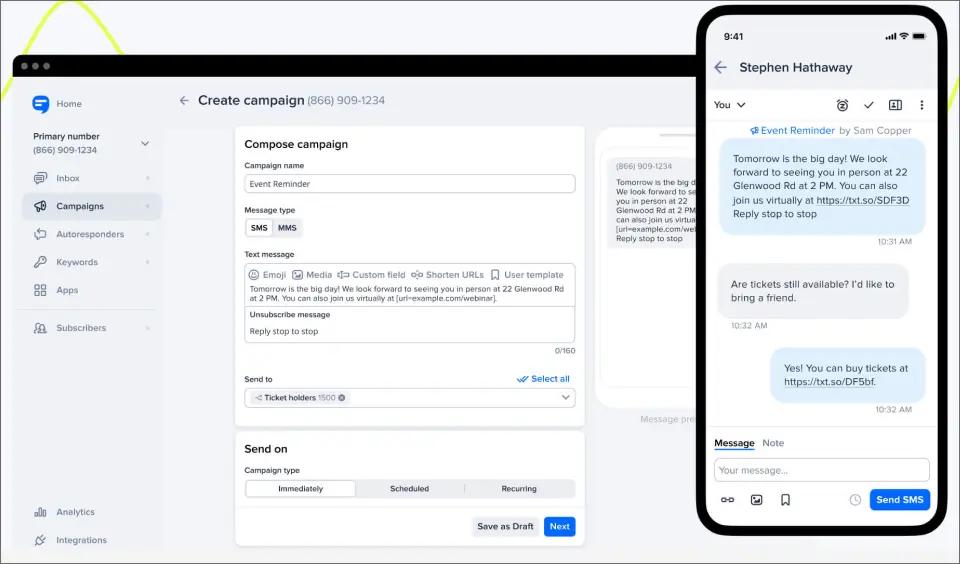
At higher volumes, SimpleTexting pricing has shifted away from fixed tiers toward a usage-based calculator model, where costs scale with selected message volume. You can explore the full SimpleTexting vs TextBolt comparison that explains how its marketing-heavy workflow differs from more operational, workflow-driven SMS tools.
Key Capabilities of Simple Texting
- Two-way SMS conversations alongside mass-texting campaigns
- Inbound SMS that does not consume credits
- Drip campaigns, autoresponders, and scheduled recurring sends
- Keyword opt-ins, text-to-win, text-to-vote, and web signup forms
- Audience segmentation and multi-number support
- Rollover credits where unused monthly capacity carries forward
- 3 user seats included on every paid plan
- AI Assist for message generation and response suggestions
- 10DLC local numbers, toll-free numbers, text-to-landline, and dedicated short codes
Pros and Cons of SimpleTexting
| Pros | Cons |
| Rollover credits help reduce unused volume waste | Additional user seats cost ~$20/month per user beyond included seats |
| Annual and nonprofit discounts available (where applicable) | Local number adds ~$10/month on top of base plan |
| Multiple user seats included on standard plans | $4 one-time carrier registration fee applies to local numbers |
| Strong list growth tools (keywords, web forms, opt-ins) | Limited native CRM integrations (HubSpot/Salesforce not prominently supported) |
| Incoming SMS does not consume message credits | Overage pricing (~$0.055/credit) is higher than several alternatives |
| Supports text-to-landline for existing business numbers | MMS messages consume higher credit volume (plan-dependent multiplier) |
| Built-in scheduling and mass texting tools | Cost scales quickly with team size and usage volume |
SimpleTexting Pricing
SimpleTexting uses a tiered subscription model based on monthly message volume. Its Pricing scales as usage increases, with higher tiers reducing the per-message cost.
| Messages Per Month | Monthly Cost | Cost Per Message |
| 500 | $39 | $0.078 |
| 1,000 | $59 | $0.059 |
| 2,000 | $89 | $0.045 |
| 3,000 | $119 | $0.040 |
| 7,500 | $239 | $0.032 |
| 50,000+ | Contact sales | Custom |
Additional Costs to Consider:
Beyond the base subscription, users may encounter additional charges in pricing plans depending on usage and account setup:
- One-time carrier registration fee: $4
- Additional phone numbers: $10/month each
- Additional team members: $20/month per user
- Overage charges: Varies by plan
The per-user fee is particularly impactful for growing teams. For example, a five-person team adds approximately $80/month in extra user costs alone, excluding messaging and number fees. Get the clear pricing breakdown in this Simple Texting pricing breakdown guide.
Is SimpleTexting the Right Two-Way Text Messaging Software for You?
SimpleTexting fits marketing teams running opt-in campaigns that also need a real two-way inbox for replies, and it is the cleanest best SMS marketing tool pick when keyword opt-ins and web forms are core to the workflow. The 3-seat allowance on every paid plan makes it friendlier for small marketing teams than per-seat platforms. The keyword opt-in, web form, and audience-segmentation tooling is deeper than CRM-attached competitors.
Look elsewhere if you need a CRM-attached shared inbox tied to HubSpot or Salesforce, an email-native workflow, flat per-user pricing without separate credit and number fees, or bundled voice calling. Teams comparing the wider field can also see the SimpleTexting alternatives roundup.
4. TextMagic — Best PAYG Two-Way SMS With an Email-to-SMS Path
TextMagic operates on a pay-as-you-go prepaid model with no fixed subscription or minimum commitment.
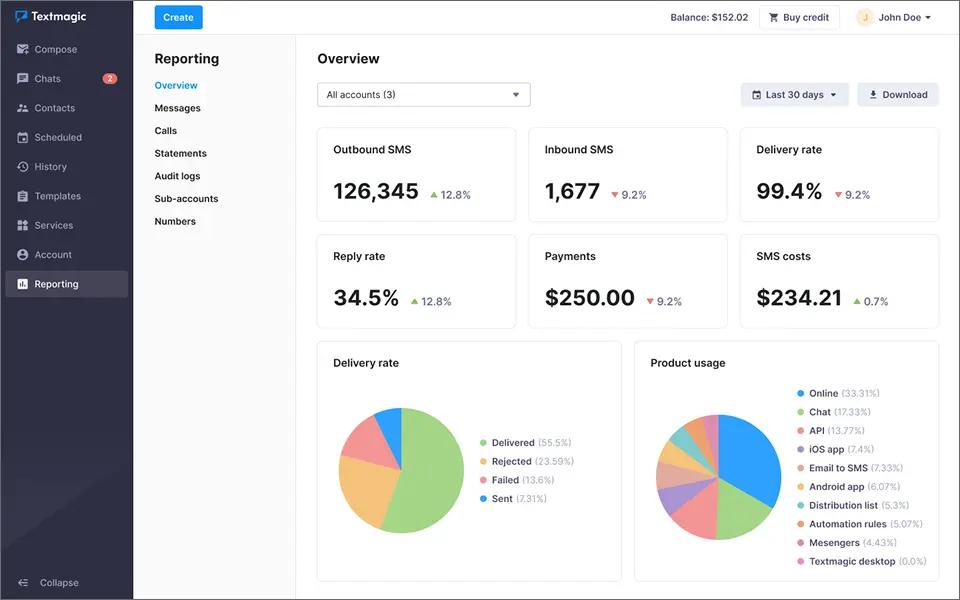
SMS is billed at $0.049 per 160-character segment on the standard rate, with a reduced $0.01 CPaaS rate available for high-volume API usage. Virtual numbers cost $10/month each (first month free), and 10DLC campaign registration is also $10/month with the first month free.
However, unlike dedicated email-to-SMS solutions, this functionality sits alongside a broader messaging suite, meaning workflows may shift between email-based sending and the main dashboard depending on the use case.
Key Capabilities of TextMagic
- Pay-as-you-go SMS starting at $0.049/segment, scaling down to $0.020 at 100,000+ messages/month
- Bring-Your-Own-CPaaS (BYOC) path at $0.01/SMS for connected Twilio, Vonage, Sinch, or Bandwidth numbers (1-way only)
- Three-step email-to-SMS setup with no plugins; works from Gmail, Outlook, business domain, or any email provider
- Shared inbox for two-way conversations with no per-seat fees
- Replies to email-to-SMS messages arrive as regular emails
- Voice calls (inbound $0.023/min, outbound $0.041/min) on the same account
- SMS credits never expire; 100% money-back guarantee on unused credit
- Email campaigns ($0.003/email after first 10,000 free with domain verification)
Pros and Cons of TextMagic
| Pros | Cons |
| Cost-effective for group messaging and basic SMS campaigns; helps streamline communication and reduce no-shows | Slow message delivery reported by some users, especially for time-sensitive communications |
| Simple, easy-to-use interface with a clean dashboard (rated ~4.5/5 for usability) | Strict setup and compliance process can delay onboarding, especially for regulated industries |
| Strong bulk messaging performance; handles large contact lists efficiently for mass notifications | Unexpected feature changes reported by some users without clear communication |
| Efficient for basic workflows like alerts, updates, and group messaging | Limited pricing transparency for advanced features like integrations and automation (often requires sales contact) |
| Good for low-to-moderate usage with flexible pay-as-you-go model | Inconsistent support response times despite advertised 24-hour support SLA |
TextMagic Pricing
TextMagic charges $0.049 per SMS at the standard U.S. rate. For a detailed breakdown of plans, messaging costs, and additional fees, see our TextMagic pricing guide. Its pricing remains consistent across usage tiers for standard messaging, with total costs primarily depending on message volume and additional services such as phone numbers and integrations.
| Monthly Messages | SMS Cost | Toll-Free Number Cost | Total Cost |
| 500 | $24.50 | $10 | $34.50 |
| 1,000 | $49.00 | $10 | $59.00 |
| 2,000 | $80.00 | $10 | $90.00 |
| 5,000 | $175.00 | $10 | $185.00 |
Additional Costs to Consider:
Beyond per-message charges, users should account for potential add-on costs depending on usage and setup requirements:
- Additional users: Pricing not publicly disclosed (varies by account setup)
- Premium integrations and automation features: Custom pricing via sales
- International SMS: Rates vary by destination country
Several TextMagic reviews highlight that while base SMS pricing is transparent, advanced features and integrations may require custom quotes, making total cost harder to estimate upfront.
Is TextMagic the Right Two-Way Text Messaging Software for You?
TextMagic fits teams with unpredictable or seasonal SMS volume that prefer a usage-based meter over a fixed subscription, and teams that want email-to-SMS as one of several sending paths. Recent TextMagic reviews on G2 and Capterra back this positioning, and the wider TextMagic alternatives roundup covers adjacent PAYG and email-to-SMS options.
Look elsewhere if you need a flat monthly plan with predictable cost, a dedicated email-to-SMS workflow without a marketing dashboard layered on top, or a CRM-attached shared inbox.
5. Textline — Best HIPAA-Compatible Two-Way Text Messaging Software
Textline is built around regulated-industry customer support workflows where audit trails, agent assignment, and HIPAA compatibility carry more weight than CRM integration.
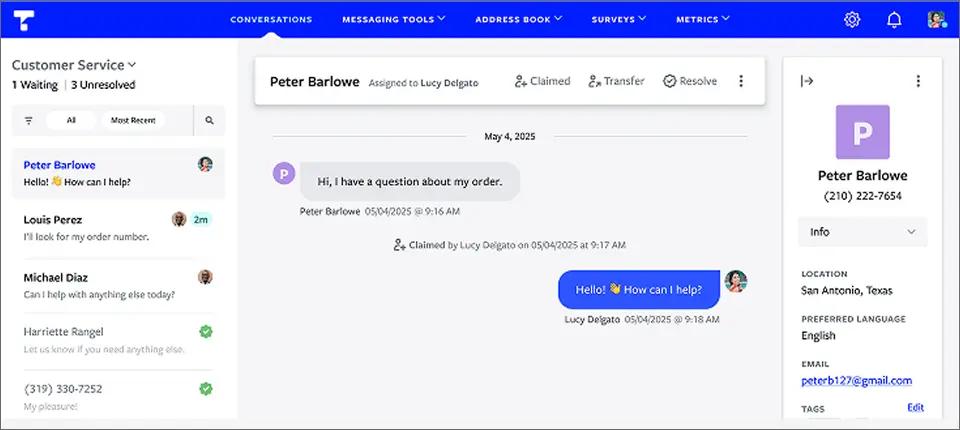
Two-way conversations live in a Universal Inbox that handles SMS, MMS, webchat, Facebook Messenger, and Instagram Business in one place, with routing, claiming, dispositions, internal notes, and whispers for team coordination.
Key Capabilities of Textline
- Pay-as-you-go SMS starting at $0.049/segment, scaling down to $0.020 at 100,000+ messages/month
- Bring-Your-Own-CPaaS (BYOC) path at $0.01/SMS for connected Twilio, Vonage, Sinch, or Bandwidth numbers (1-way only)
- Three-step email-to-SMS setup with no plugins; works from Gmail, Outlook, business domain, or any email provider
- Local, toll-free, and Alphanumeric Sender ID number options ($10/month each, first month free)
- Voice calls (inbound $0.023/min, outbound $0.041/min) on the same account
- SMS credits never expire; 100% money-back guarantee on unused credit
- Email campaigns ($0.003/email after first 10,000 free with domain verification)
- API, Zapier, and Shopify integrations
Pros and Cons of Textline
| Pros | Cons |
| Centralized SMS messaging platform consolidating customer communications into one interface | Limited integration options with third-party business tools. |
| Multi-user collaboration to prevent message overlap and enable team management of conversations | Lacks advanced automation like AI chatbots or smart message handling. |
| Integration with CRM systems like HubSpot, Zendesk, Pipedrive, and Salesforce (Salesforce on Pro and above) for synchronized customer data and messaging history | Outdated user interface that may slow team onboarding. |
| Automated messaging features including scheduled texts and autoresponders to boost communication efficiency | Mobile app coverage is partial compared to dashboard functionality. |
| Support for MMS messaging allowing sending of images, videos, and other media formats | Basic reporting and analytics without customizable dashboards. |
Textline Pricing
| Plan | Monthly Cost | Included Agents | Included Credits |
| Essentials | Custom-quoted | 3 | 600/month minimum |
| Pro | Custom-quoted | 5 | 2,000/month minimum |
| Enterprise | Custom | Custom | Custom |
Is Textline the Right Two-Way Text Messaging Software for You?
Textline fits healthcare, financial services, legal, and regulated-industry customer support teams that need HIPAA-compatible two-way SMS with strong audit and security controls. It is the cleanest pick when the team’s primary job is patient or client communication rather than outbound sales prospecting.
Look elsewhere if you need transparent published pricing without a sales call, a HIPAA BAA included at no additional fee, email-native sending without a dashboard, or a flat per-month plan that does not scale per agent.
6. JustCall — Best for Two-Way SMS Bundled With Voice and AI Coaching
JustCall is an AI-powered business communication platform that bundles cloud phone, SMS, MMS, sales dialers, and conversation intelligence in a single workspace. Two-way SMS sits alongside voice on the same business number, which is the main reason sales teams running heavy call-plus-text workflows pick it over SMS-only tools, and it consistently lands on shortlists for the best business texting app when calling is part of the job.
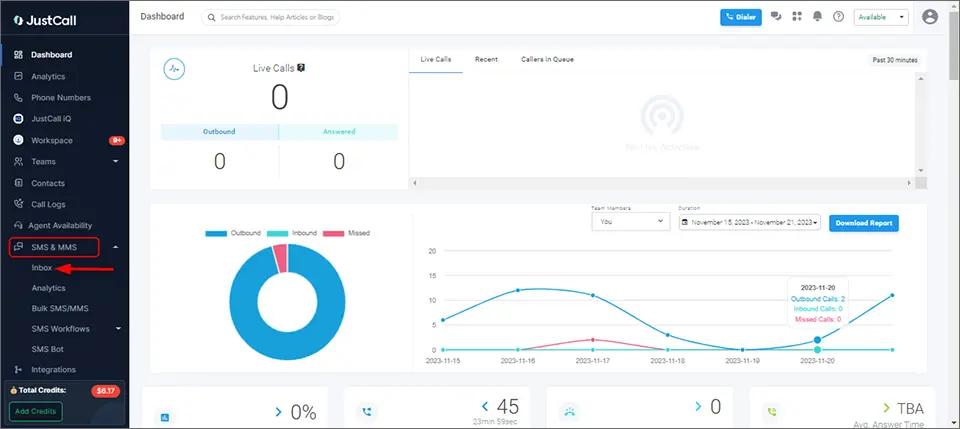
The platform integrates natively with 100+ CRMs, including Salesforce CTI on Pro tiers and above, HubSpot, Zoho, Pipedrive, and Zendesk. Beyond two-way SMS, JustCall differentiates with AI-powered coaching features: real-time agent assistance, call scoring, sentiment analysis, AI-generated summaries, and SMS Copilot.
Key Capabilities of JustCall
- Two-way SMS and MMS from shared business numbers
- Bulk SMS campaigns with scheduling and personalization (Pro and above)
- Shared team inbox for multi-agent conversation management
- 500 SMS segments per user on Team; 1,000 SMS segments per user on Pro and Pro Plus
- Unlimited inbound calling and 1,000 outbound minutes per user on Team, Pro, and Pro Plus
- Click-to-call on every plan; Power dialer on Pro and above; Predictive and dynamic dialers on SalesPro only
- Single-level IVR on Team; multi-level IVR and intelligent routing on Pro and above
Pros and Cons of JustCall
| Pros | Cons |
| Two-way SMS and MMS in a shared team inbox with native CRM message logging | 500 SMS segments per user on Team runs short for high-volume texters |
| Bulk SMS campaigns and automated SMS workflows on Pro and above | Bulk campaigns and workflow/API SMS use separate credits, not bundled SMS segments |
| SMS Copilot AI (tone analysis, rephrasing) on Pro Plus and above | SMS Copilot and AI Review Assist gated to Pro Plus or paid add-ons |
| Shared WhatsApp inbox bundled into the same messaging workspace | 10DLC registration and pass-through carrier fees apply on top of seat cost |
| SMS templates and message dispositions keep agent replies consistent | First invoices often higher than expected once SMS overages, number rentals, and add-ons stack up |
JustCall Pricing
| Plan | Monthly Billing | Annual Billing | SMS / Calling Allowance | Minimum Licenses |
| Team | $39/user/month | $29/user/month | 500 SMS segments + 1,000 outbound minutes/user | 2 |
| Pro | $69/user/month | $49/user/month | 1,000 SMS segments + 1,000 outbound minutes/user | 2 |
| Pro Plus | $109/user/month | $89/user/month | 1,000 SMS segments + 1,000 outbound minutes/user | 2 |
| Business | Custom | Custom | Unlimited SMS and calling (fair use) | 10 |
Is JustCall the Right Two-Way Text Messaging Software for You?
Heymarket is the cleanest omnichannel messaging platform pick when SMS sits alongside email, WhatsApp, Apple Messages for Business, Facebook Messenger, and Instagram inside a single customer messaging platform. The agentic shared inbox brings SMS, MMS, email, Apple Messages for Business, WhatsApp, Facebook Messenger, and Instagram into one secure surface, so a customer who texts on Monday and emails on Tuesday lands in the same conversation thread without manual stitching.
Look elsewhere if you need a flat monthly plan without per-user compounding, email-native two-way SMS, simpler onboarding for non-technical teams, truly unlimited outbound calling at every tier, or primarily use SMS for operational notifications rather than sales outreach.
7. Heymarket — Best Omnichannel Two-Way Messaging Across SMS, Email, and Apps
Heymarket is built for teams that manage two-way conversations across more than just SMS. The agentic shared inbox brings SMS, MMS, email, Apple Messages for Business, WhatsApp, Facebook Messenger, and Instagram into one secure surface.

Heymarket focuses on omnichannel customer engagement and internal collaboration, making it a strong fit for service-driven teams. It is SOC 2 Type 2, TCPA, and HIPAA compliant, with campaigns, automations, and AI-assisted responses. Messaging costs $0.03 per SMS segment, plus a $10/month 10DLC fee per campaign.
Key Capabilities of HeyMarket
- Shared inbox across SMS, MMS, email (add-on across all plans), WhatsApp, Apple Messages for Business, Facebook Messenger, Instagram, and website widget
- Salesforce integration available as a $9/user/month add-on on Pro and above
- API access on Pro and above; SAML SSO and directory sync available as add-ons
- SOC 2 Type 2, TCPA, and HIPAA compliant across every plan
- 2-factor authentication, opt-in management, double opt-in, and configurable data retention
- Each user gets a shared inbox with its own phone number if needed
- Per-segment SMS billing at $0.03, email at $0.0025, AI Agent messages at 3x the base rate; MMS counts as 1 segment; WhatsApp counts toward monthly message allotment
- 10DLC campaign registration at $10/month per campaign
Pros and Cons of Heymarket
| Pros | Cons |
| Unified inbox for SMS, WhatsApp, Facebook Messenger, and Google Business Messages | Higher cost compared to simpler SMS platforms |
| Strong team collaboration features (shared inbox, chat assignment, internal notes) | Advanced automation features locked behind higher-tier plans |
| Deep CRM integrations with tools like Zendesk, HubSpot, and Salesforce | Occasional app glitches and syncing delays during high-volume usage |
| Automation tools and message templates for workflows and repeat communication | Customer support response times can be slow or inconsistent |
| Suitable for multi-channel customer engagement teams | Overly complex for basic one-way SMS blasting or simple campaigns |
Heymarket Pricing
| Plan | Monthly Billing | Annual Billing (18% off) |
| Standard | $24/user/month | $20/user/month |
| Plus | $49/user/month | $41/user/month |
| Pro | $75/user/month | $62.50/user/month |
| Enterprise | Custom | Custom |
Is Heymarket the Right Two-Way Text Messaging Software for You?
Heymarket fits customer service and support teams running multi-channel inboxes that want SMS in the same workflow as email and iMessage, not as a standalone tool. The per-user pricing makes most sense for teams of 2-5 service reps where the omnichannel inbox saves more time than the seat fee costs.
Look elsewhere if you need flat-rate pricing without per-segment usage layers, lower entry pricing for small teams, email-native sending, or a CRM-attached sales workflow rather than a customer-service inbox.
8. EZ Texting — Best Entry-Level SMS Marketing Starter Kit
EZ Texting is designed for beginners launching SMS marketing campaigns. Its platform offers mass texting, keywords, scheduling, basic automation, two-way conversations, QR codes, and AI Compose through a beginner-friendly interface.

EZ Texting prices by contact tier rather than send volume. The base 500-credit allotment stays the same across plans, while the monthly cost increases with contact-list size. The Launch plan also adds a $5/month telecom fee, which is waived on Boost, Scale, and Enterprise. Unused credits expire after 12 months on annual plans. See the EZ Texting pricing breakdown for detailed pricing.
Key Capabilities of EZ Texting
- Mass texting, two-way conversations, scheduled sends, and templates
- AI Compose for message drafting (casual, formal, playful, or passionate tones)
- Drip campaigns, automation, and triggered messages
- HubSpot, Mailchimp, Constant Contact, Salesforce, and Zapier integrations
- 10DLC A2P registration and TCPA opt-out handling included on every plan
- $10/month per additional team member beyond the included seat
- $5/month telecom fee on the Launch plan (waived on Boost, Scale, and Enterprise)
- Live chat support 8 AM – 8 PM ET; no phone support on lower-tier plans
- US and Canada only; not HIPAA-compliant
- iOS and Android mobile apps
Pros and Cons of EZ Texting
| Pros | Cons |
| Beginner-friendly UI with strong onboarding | Pricing scales with contact-list size, not just send volume |
| 14-day no-credit-card trial | Mobile app reviews flag notification reliability gaps |
| Shutterstock and QR code utilities built in | Telecom and 10DLC pass-through fees on lower tiers |
| Affordable Launch tier for first-time SMS senders | Unlimited keywords cost extra on the entry plan |
| AI Compose lowers the blank-page barrier | Heavier than needed for operational-only teams |
EZ Texting Pricing
| Plan | Monthly Billing | Annual Billing | Contact Limit | Credits |
| Launch | $25 | $20/mo | Up to 500 | 500/mo |
| Boost | $75 | $60/mo | 500–2,000 | 500/mo |
| Scale | $125 | $100/mo | 2,000–50,000 | 500/mo |
| Enterprise | $3,000+ | $3,000+ | 50,000+ | 200,000/mo |
Additional Costs Included in the Pricing Plans:
- Overage credit rates vary by plan: $0.030, $0.025, $0.020, and $0.010 per message
- Higher tiers benefit from lower per-message overage costs
- Boost plan waives the $5/month telecom fee
- Scale plan includes onboarding support
- Enterprise plan includes a dedicated short code and white-glove onboarding
- Unused credits expire after 12 months on annual plans
- Unused credits expire after 30 days on monthly plans
- Seasonal or low-frequency senders may experience credit wastage due to expiration policies
Is EZ Texting the Right Two-Way Text Messaging Software for You?
EZ Texting fits first-time SMS senders running a small list (under 500 contacts) who want a low-friction starter kit with template-driven campaigns, QR codes, and an AI composer. The Launch tier at $20/month annual is among the cheapest legitimate entry points in this category. Marketing teams comparing the wider field can also see the EZ Texting alternatives roundup.
Look elsewhere if your contact list is large but send volume is low (the contact-tier pricing penalizes you), you need flat-rate pricing without telecom pass-through fees, an email-native workflow, a CRM-attached shared inbox, or 24/7 support outside Eastern business hours.
9. Textedly — Best Low-Cost SMS Marketing for Small Teams
Textedly is a marketing-focused SMS platform offering bulk messaging, scheduled texts, keyword opt-ins, surveys, basic automation, and AI-assisted message creation. Higher-tier plans include text-to-pay through Stripe, while voice calling is available as an add-on.
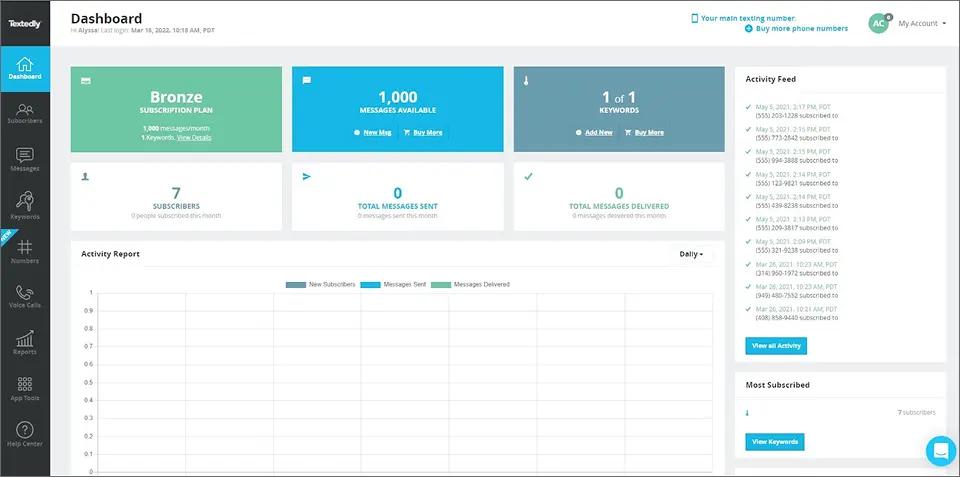
Pricing can be complex, with one user seat per plan, $10/month for each additional user, and an $8/month telecom fee on paid plans. See the Textedly pricing breakdown guide for details.
Key Capabilities of Textedly
- Mass texting, two-way conversations, scheduled sends, drip campaigns, and templates
- Keyword opt-ins, extended character limits, and in-depth analytics
- SMS surveys, Text-to-Vote, and voting tools
- Text-to-pay via Stripe on Plus tier and above (2.90% + $0.30 per transaction)
- Voice Calls add-on for text-enabled phone calls
- Toll-free and 10DLC phone numbers (10DLC registration $4-$44 one-time)
- $8/month telecom surcharge added to every paid plan
- $10/user/month for additional team members beyond the included seat
- $10/keyword/month for keywords beyond the included allowance
Pros and Cons of Textedly
| Pros | Cons |
| Highly affordable entry pricing with low-cost starter plans and competitive per-message rates | Expensive MMS credits compared to SMS usage |
| Easy-to-use interface with quick setup for campaigns, scheduling, and list building | Limited audience segmentation for advanced targeting |
| No heavy hidden fee structure; optional add-ons for features like payments and AI tools | Basic analytics with limited reporting depth |
| Responsive and reliable customer support | Strict CSV import requirements can make contact uploads time-consuming |
| Built-in tools like AI writing assistance and review management | Limited keyword availability on lower-tier plans restricts campaign flexibility |
Textedly Pricing
| Plan | Cost/Month | Messages/Month | Keywords |
| Basic | $29 | 600 | 1 |
| Bronze | $49 | 1,200 | 1 |
| Plus | $79 | 2,400 | 2 |
| Enterprise | $125 | 4,200 | 3 |
| Elite | $169 | 6,000 | 4 |
| Business | $299 | 12,000 | 6 |
Additional Pricing Details and Usage Limits
- Voice Calls and text-to-pay (Plus plans and above) are priced separately
- Each paid plan includes 1 user seat by default
- Additional team members cost $10/user/month
- Additional keywords cost $10 per keyword/month
- A flat $8/month telecom surcharge applies to every paid plan
- Overage messages cost $30 for 500 messages ($0.06 per message)
- Unused credits expire at the end of each billing cycle
Is Textedly the Right Two-Way Text Messaging Software for You?
Textedly works best for solo operators and small marketing teams that benefit from flexible, tiered messaging plans, especially when sending volume is unpredictable. Its 14-tier structure makes it easy to scale up or down without switching platforms, and it is particularly useful for businesses where text-to-pay via Stripe is a core workflow.
Textedly may not be the right fit. If you need a native mobile app, fully flat-rate pricing without additional surcharges or per-seat fees, rolling credit usage across billing cycles, an email-first sending workflow, or HIPAA-compliant messaging support, check Textedly alternatives.
10. SlickText — Best for SMS Loyalty Programs
SlickText is an SMS marketing platform built around Campaigns, Inbox, Workflows, Web Forms, and Segments. It offers mass messaging, scheduled broadcasts, keyword opt-ins, rollover credits, MMS, AI Compose, and Opt-out Intelligence.
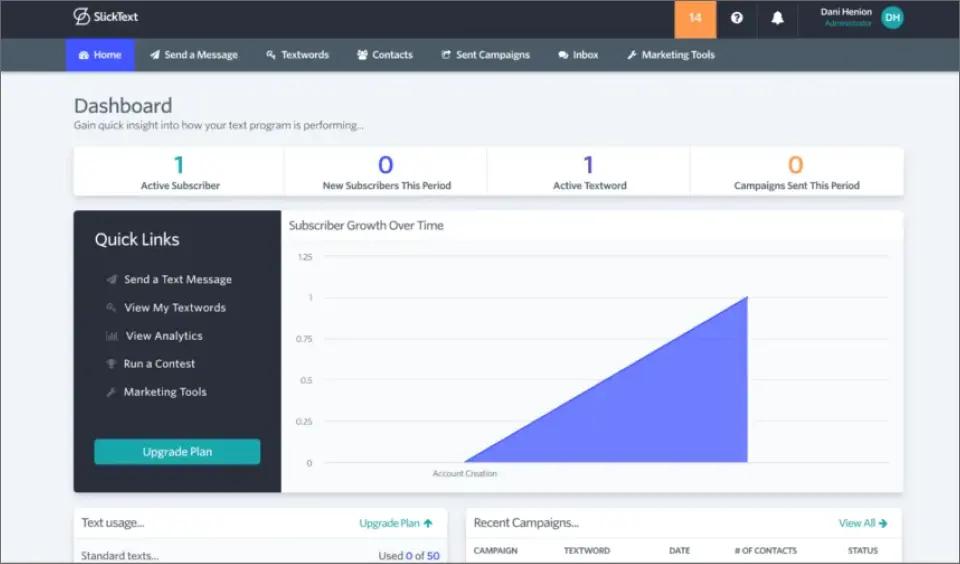
For retail and e-commerce brands, Workflows and Segments can support SMS loyalty programs through automated messaging and targeted campaigns. Its two-way Inbox also handles customer replies and support conversations.
Key Capabilities of SlickText
- Full feature access on every paid plan (no tier-gated feature lockouts)
- Mass texting, two-way conversations, scheduled sends, and templates
- MMS up to 1,600 characters (3 credits per segment)
- Rollover credits: 1 month on monthly plans, 1 year on annual plans
- Native integrations with Shopify, Mailchimp, Salesforce, Zapier, and Make
- US and Canada only; short codes and local phone numbers incur extra fees
- Phone number registration typically completes within a few hours
- SimpleTexting price-match available on standard plans
- 14-day free trial
Pros and Cons of SlickText
| Pros | Cons |
| User-friendly interface with an intuitive dashboard that is easy for beginners to learn | Can become expensive for businesses sending high SMS volumes |
| Highly rated customer support known for fast and knowledgeable assistance | MMS messages and media content may require additional credits or higher messaging costs |
| Rollover credits help reduce wasted message volume from month to month | Fewer native integrations than some competitors, often requiring Zapier for additional connections |
| Powerful automation and workflow builder for drip campaigns, follow-ups, and customer journeys | Contact segmentation and group management can feel confusing for some users |
| Strong compliance features, including automatic opt-outs and unsubscribe management | Limited to the US and Canada; short code, local number, and carrier fees add to the base plan cost |
SlickText Pricing
| Plan | Monthly Cost | Credits | Onboarding |
| Starter | $29 | 500 | Self-service |
| Professional | $49 | 1,000 | Self-service |
| Business | $79 | 2,000 | Self-service |
| Growth | $129 | 3,500 | 1-on-1 onboarding |
| Scale | $169 | 5,000 | 1-on-1 onboarding |
| Advanced | $319 | 10,000 | 1-on-1 onboarding |
| Premium | $579 | 25,000 | Dedicated CSM + onboarding |
| Custom | Contact sales | Custom | Custom |
Annual billing includes two free months of message credits. Every paid plan includes free incoming texts, unlimited contacts, one premium sending number, and rollover credits (one month for monthly plans; one year for annual).
Is SlickText the Right Two-Way Text Messaging Software for You?
SlickText fits brands by building an SMS loyalty or rewards program where repeat-purchase behavior is the goal, especially retail, e-commerce, and food-service operators with an existing customer base to migrate from email to text. The loyalty toolkit is the differentiator.
Look elsewhere if loyalty programs are not part of the strategy, you need flat per-user pricing, email-native sending, or a CRM-attached sales inbox.
How to Choose the Right Two-Way Text Messaging Software
The best pick is almost always the one whose reply destination matches where your team already works. Find the diagnostic statement that fits your team and the answer falls out.
If your team works in Gmail or Outlook all day and texting is operational (reminders, alerts, on-call acknowledgments), pick TextBolt. The inbox becomes the two-way surface, no new tab to monitor, which is what makes it one of the best SMS software picks for small businesses that already live in email.
If your customer context lives in HubSpot, Salesforce, or Pipedrive, pick Salesmsg. The CRM-attached shared inbox is the reason to pay the per-seat Chat Seat cost.
If your team runs structured outbound with heavy voice and SMS together (and outbound stays under 1,000 minutes per user), pick JustCall. AI call scoring and real-time agent assist are the differentiators.
Choose the Two-Way Text Messaging Software That Fits How Your Team Actually Works
You can read every comparison guide on the internet and still not know which platform your team will actually open every morning. The only reliable answer comes from sending one and watching where the reply lands.
If your team lives in Gmail or Outlook and texting is operational (reminders, alerts, appointment confirmations, on-call acknowledgments, customer follow-ups), TextBolt turns the inbox you already have into a compliant two-way SMS channel.
Up to 10 seats on Standard, $45/year toll-free, 10DLC handled for you in onboarding, never-expiring top-up credits, and zero new software for your team to learn.
You can complete the setup in about 30 minutes, with 1–2 business days for 10DLC carrier approval. Once approved, you can start sending business text messages through TextBolt. If the workflow fits, you can have a working business SMS system before the end of the week. If it doesn’t, you’ve spent time testing it, not signed a contract.
TextBolt’s 7-day trial is the shortest path to that answer. No need for technical set up and worry about training your staff for managing the dashboard.
Send Two-Way SMS From the Inbox You Already Use
TextBolt makes business texting feel like email. Send from Gmail or Outlook, replies thread back to the same conversation, no dashboard to learn. Set up in 30 minutes.
Frequently Asked Questions
What is two-way text messaging software?
Two-way text messaging software lets a business send SMS from a number it controls and receive the recipient’s reply through software rather than a personal phone. The category covers CRM-attached shared inboxes, marketing dashboards, loyalty-focused platforms, programmable APIs, and email-to-SMS gateways. The right pick depends on where your team’s customer context already lives.
How is two-way SMS different from one-way SMS broadcasting?
One-way SMS pushes outbound messages and ignores anything the recipient sends back. Two-way SMS captures the reply and sends it somewhere a human will see, whether that is a dashboard, a CRM record, a shared support queue, or an email inbox. For appointment confirmations, customer service, recruiting, and on-call alerting, the reply is the whole point.
How do I send emails as text messages?
You send emails as text messages by composing to a phone-number-based gateway address from your normal email client. With TextBolt, the format is +1XXXXXXXXXX@sendemailtotext.com from Gmail, Outlook, Microsoft 365, or any email-capable application. The recipient sees a standard SMS on their phone and their reply threads back to your inbox as an email.
How can I receive text replies from emails?
You receive text replies from emails by using an email-to-SMS gateway that supports two-way threading, such as TextBolt. When the recipient replies to your text, the response lands back in your email inbox as a threaded message attached to the original send. No separate dashboard or app is required for the reply to reach the right person.
Do I need A2P 10DLC registration to send two-way SMS in the US?
Yes. Every business sender in the US that uses a 10-digit long code needs A2P 10DLC brand and campaign registration with The Campaign Registry. Most platforms, including TextBolt, handle this registration on your behalf as part of business verification. Plan on a 24-48 hour carrier approval window before sending is fully unblocked.
Can I send two-way SMS from Gmail or Outlook?
Yes, with an email-to-SMS gateway. You compose to a phone-number-based gateway address from Gmail or Outlook and the message lands as an SMS on the recipient’s phone. The recipient’s reply threads back as an email in your inbox.
How long does it take to set up two-way SMS?
The visible setup, including account creation, number provisioning, and initial configuration, can take 30 minutes to a few hours. 10DLC brand and campaign registration typically takes 1–2 business days. Claims of “five-minute setup” often exclude the carrier approval process.
What happens when a recipient texts STOP?
The carrier network automatically suppresses every future send from your number to that recipient. Your platform records the STOP event against the contact. This is mandatory under TCPA and CTIA messaging principles and is not configurable. Recent delivery-failure patterns often trace back to STOP suppression the sender did not realize had been triggered.