
- What Are Employee Alerts?
- What Types of Employee Alerts Do Organizations Send?
- What Are the Common Delivery Channels for Employee Alerts?
- What Must Change Now That Carrier Email-to-Text Gateways Are Retiring?
- Which Employee Alert Tools Fit Which Job?
- 1. TextBolt: Text Alerts From the Systems and Inboxes You Already Run
- 2. AlertMedia: Safety Alerts Paired With Threat Intelligence
- 3. DeskAlerts: Desktop Pop-Ups and Screen Takeovers
- 4. Yourco: App-Free, SMS-First Alerts for Deskless Workers
- 5. Simplified Alerts: A Dedicated Employee Alert Platform
- 6. SnapComms: Desktop Alerts for Staff at Computers
- How Do Check-In Texts Work for Staff Working Alone?
- How Do Employees Sign Up to Receive Text Alerts?
- Make Sure Your Next Employee Alert Reaches a Phone
- Frequently Asked Questions
Turn Email Alerts Into Texts
Employee Alerts: Types, Channels and Tools Compared (2026)

Employee alerts are the urgent and routine messages an organization sends its own staff. Safety alerts cover severe weather, active threats and facility closures. Operational alerts cover IT outages, shift changes and HR notices.
They reach employees by text, email, desktop pop-ups, voice and workplace chat. The TextBolt email to SMS gateway turns any system or inbox that already sends email into a text channel for those alerts.
What Are Employee Alerts?
At 5:40 AM the facilities director closes the plant because overnight ice has made the lot unsafe. The closure email reaches every staff inbox two minutes later. The first shift is already on the road, and none of them check email before backing out of the driveway.
That gap between sending an alert and reaching the person is what every employee alert system is built to close. In this guide you will learn the alert types, the channels, and which tools fit which job.
Every employee alert has four parts:
- Trigger: A person (HR, facilities, security) or a system sender, such as a monitoring tool or alarm panel, starts the alert.
- Audience: Everyone, or a group targeted by location, department or shift.
- Channel: Text, email, desktop, voice or workplace chat. Most organizations use more than one.
- Response: A read, a reply, or a two-way “mark as safe” confirmation that tells the sender who is accounted for.
What Types of Employee Alerts Do Organizations Send?
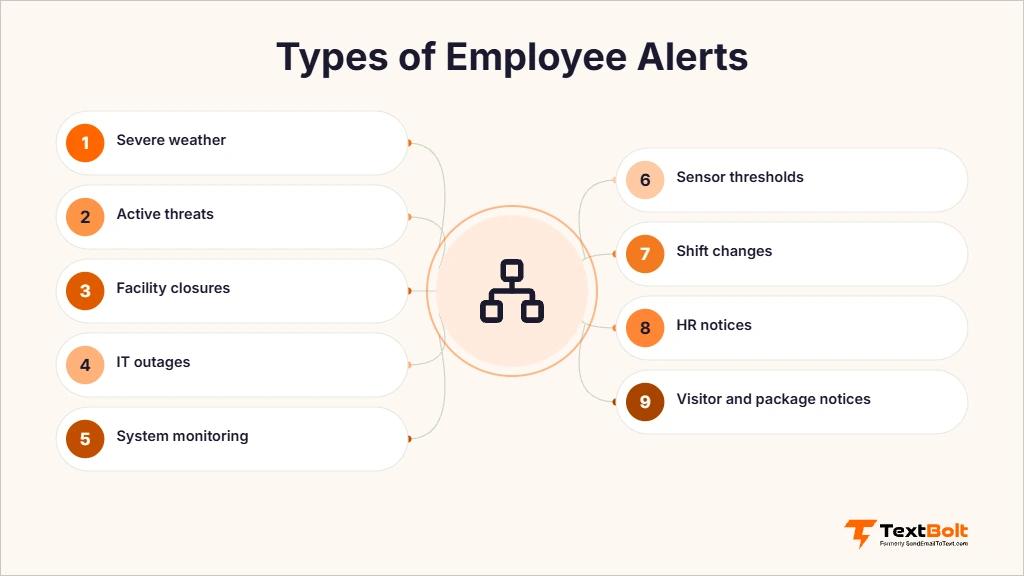
Organizations send three broad types of employee alerts: emergency and safety, IT and infrastructure, and HR and shift. The type decides how fast the alert must land and whether you need a reply.
Emergency and Safety Alerts
Emergency alerts have to reach staff within minutes, which is why most organizations send them as texts. Our guide to setting up employee emergency text alerts walks through the setup step by step.
- Severe weather: Weather-related closures, delayed openings and shelter-in-place instructions.
- Active threats: Lockdown and stay-away notices during a security incident.
- Facility closures and evacuations: Building evacuations, closures and reopening notices.
- Employee alarm systems: In the US, OSHA’s employee alarm systems standard (29 CFR 1910.165) sets the requirements for workplace alarms. A text alert adds to that system and doesn’t replace it.
IT and Infrastructure Alerts
- IT outages: Email, network, VPN or timekeeping systems going down, and the all-clear when they return.
- System monitoring. Server, uptime and threshold alerts paging on-call engineers, such as website uptime monitoring text alerts from UptimeRobot.
- Facility alarms: Intrusion, fire, temperature or water signals from building alarm panels.
- Sensor thresholds: IoT readings, such as a cooler temperature, crossing a set limit.
HR and Shift Alerts
- Shift changes: Open shifts, swaps and schedule updates.
- Schedule reminders: Training sessions, inspections and start-time changes.
- HR notices: Benefits enrollment windows and policy updates.
- Payroll documents: Notices that pay stubs or W-2s are available.
- Visitor and package notices: Telling an employee a guest or delivery has arrived.
What Are the Common Delivery Channels for Employee Alerts?
Most employee notification systems send on several channels at once, because no single channel reaches every worker in every situation.

- SMS text: Reaches any mobile phone without an app. Its reliability depends on how the text is sent, which is why the carrier-gateway section matters.
- Email: The default record for routine notices. It is slow for urgent alerts when staff are away from a desk.
- Push and desktop pop-ups: Screen takeovers interrupt staff at computers. Push alerts need an installed app.
- Voice calls: For alerts staff must hear, such as an evacuation.
- Slack or Microsoft Teams: Reaches office teams where they already work, but only while they are signed in.
What Must Change Now That Carrier Email-to-Text Gateways Are Retiring?
Many employee alerts never pass through an alert platform. A monitoring tool, alarm panel or VoIP system emails an address like [PhoneNumber]@vtext.com, and the carrier turns that email into a text. Those carrier addresses are going dark, and a business email to text service is what replaces them.
Which Carrier Gateways Have Shut Down?
Three carrier email-to-text gateways have shut down or are closing:
- AT&T (txt.att.net). Shut down on June 17, 2025, according to AT&T’s notice. Any tool still emailing this domain is no longer sending texts.
- T-Mobile (tmomail.net). Stopped delivering in late 2024, with no public notice.
- Verizon (vtext.com). Shuts down fully by March 31, 2027, according to Verizon’s notice.
A system that still emails one of these domains will usually record the email as sent. That log shows the email left the system. It does not show that a phone received a text.
What Replaces the Carrier Address?
Replace the carrier address in your monitoring tool, alarm panel or VoIP system with +1[PhoneNumber]@sendemailtotext.com, which accepts email from any system that can send it. The subject and body become the text, so the system keeps sending the same email and only the destination changes.
- One domain for every carrier: There is no lookup table of which employee uses which carrier.
- Sender approval: Add the system’s sending address as an approved sender in your TextBolt account, then change the To address.
| Old carrier address | Replace with | Migration guide |
| [PhoneNumber]@txt.att.net | +1[PhoneNumber]@sendemailtotext.com | AT&T email-to-text migration |
| [PhoneNumber]@tmomail.net | +1[PhoneNumber]@sendemailtotext.com | T-Mobile email-to-text migration |
| [PhoneNumber]@vtext.com | +1[PhoneNumber]@sendemailtotext.com | Verizon email-to-text migration |
Still Sending Alerts to a Carrier Address?
Point your monitoring tools, alarm panels and inboxes at TextBolt, and your employee alerts arrive as texts from a registered business number.
Which System Senders Should You Audit Before the Verizon Date?
Search each sender’s notification settings for txt.att.net, tmomail.net and vtext.com. These are the usual places those addresses are configured:
- Monitoring and on-call: PagerDuty, Opsgenie, Datadog, Nagios, Zabbix, UptimeRobot, AWS CloudWatch, PRTG, Grafana.
- Alarm panels: Honeywell, ADT, DSC, Bosch, Notifier.
- VoIP voicemail: RingCentral, 8×8, Zoom Phone, Nextiva, Allworx and 3CX store the carrier gateway address in their voicemail-to-email or notification settings, so check there first.
- Broadcast monitors: Inovonics, Burk ARC Plus, Broadcast Tools, Nautel.
- Web forms and help desks: Contact Form 7, WPForms, HubSpot, Zendesk, Freshdesk, Jira.
- IoT sensors and custom webhooks: Any device or script that sends an email when a threshold trips.
Which Employee Alert Tools Fit Which Job?
Employee alert tools split into two groups. Full employee notification suites such as DeskAlerts, AlertMedia, Yourco, Simplified Alerts and SnapComms offer desktop takeover, threat intelligence and deskless reach, according to their own pages. Email-to-text services such as TextBolt are the text channel for alerts that already start as email, not desktop suites.
| Option | Setup effort | Replies | Delivery status | Sender | Address format |
| TextBolt | Change the destination email address | Back to the sender’s inbox when a person sends the alert | SMS Activity / History dashboard | Registered business number, with registration filed at signup | +1[PhoneNumber]@sendemailtotext.com |
| SMS API integration | Developer code and an integration project | A webhook endpoint you build and host | Whatever you build | Your own carrier registration | An API call, not an email address |
| Retired carrier gateway | Shut down or closing | No business reply path | The sending system’s outbox only | Not a registered business sender | A different domain for each carrier |
1. TextBolt: Text Alerts From the Systems and Inboxes You Already Run
If a system or inbox can already send email, TextBolt, an email to SMS gateway, turns it into a text sender. You change the destination to +1[PhoneNumber]@sendemailtotext.com, the same address our guide to sending SMS from Outlook uses, and nothing else in the system changes.
- Best for: IT, SRE and facility teams whose monitoring tools and alarm panels already send email, and HR or operations staff who send alerts from their own inbox.
- Known for: Turning system senders and email clients into a two-way text channel, as a drop-in replacement for the retired carrier gateways.
- How it works: A person types a phone number into the To field in Gmail, Outlook or any email client, and the reply threads back to that inbox. A system sender gets the same result by changing one destination address.
- Registration: TextBolt is a Verified A2P 10DLC business sender and handles 10DLC registration for each US account, which can take up to 48 hours to approve. See the 10DLC compliance guide.
- Delivery tracking. The SMS Activity / History dashboard shows whether each text was delivered and why a failed one didn’t arrive.
- Pricing. Plans start at $29 a month for 500 credits, with a 7-day free trial that includes 10 credits. Full plan details are on the TextBolt pricing page.
2. AlertMedia: Safety Alerts Paired With Threat Intelligence
- Best for: Organizations that want employee safety messaging and threat monitoring in one platform.
- Known for: Two-way safety communication with integrated threat intelligence, according to its own positioning.
- Pricing: No verified figure for this review. Request current pricing from AlertMedia.
3. DeskAlerts: Desktop Pop-Ups and Screen Takeovers
- Best for: Office staff who spend the workday at a computer.
- Known for: Desktop pop-up alerts and screen takeovers that interrupt whatever is on screen.
- Pricing: Request current pricing from DeskAlerts.
4. Yourco: App-Free, SMS-First Alerts for Deskless Workers
- Best for: Deskless and frontline workforces without a desk or company inbox.
- Known for: An app-free, SMS-first approach to employee alerts built for deskless teams.
- Pricing: Request current pricing from Yourco.
5. Simplified Alerts: A Dedicated Employee Alert Platform
- Best for: Organizations that want a standalone employee mass notification platform.
- Known for: Employee mass notification. Its homepage carries a banner about the AT&T/Verizon SMTP shutdown.
- Pricing: Request current pricing from Simplified Alerts.
6. SnapComms: Desktop Alerts for Staff at Computers
- Best for: Organizations whose staff work mainly at computers.
- Known for: Desktop pop-up alerts and screen-based notifications for employees.
- Pricing: Quote-based, like DeskAlerts and Yourco.
If your alerts already start as email, book a TextBolt demo and point one system sender at a test number before the Verizon date.
How Do Check-In Texts Work for Staff Working Alone?
A check-in text asks a lone worker, such as a night-shift maintenance tech, to reply that they’re okay. Your safety team sends it from the inbox it already uses, and the plain-text reply comes back there. Any phone works, because there’s no app to install.
Before you start, agree who acts, and when, if a reply doesn’t arrive. Our guide to lone-worker check-in systems covers setting the schedule and the escalation rule.
How Do Employees Sign Up to Receive Text Alerts?
Send text alerts only to employees who have agreed to receive them. Carriers expect every business sender to collect that consent before texting.
- Ask at onboarding. Add a mobile number and a line agreeing to text alerts to the new-hire paperwork.
- Let staff choose. Offer text alongside email so each person picks how they’re reached.
- Keep the list current. Remove a number when someone leaves, and honor any request to stop texts.
Make Sure Your Next Employee Alert Reaches a Phone
An alert that sits in an inbox, or goes to a retired carrier address, doesn’t reach the shift already on the road. The system logs it as sent, and nobody finds out until it matters.
TextBolt, an email to SMS gateway, turns the email alerts your systems and staff already send into texts from a registered business number, with replies back in the sender’s inbox.
Start with one sender, such as the monitoring tool still pointed at @vtext.com. Swap its address, send a test, and you can live within 48 hours.
Your next step: Start your 7-day free trial and point one alert sender at a test number.
Frequently Asked Questions
Which is better for system alerts, a carrier gateway, an SMS API or an email-to-text service?
Not a carrier gateway, because AT&T’s and T-Mobile’s have stopped and Verizon’s closes by March 31, 2027. An SMS API suits teams with developer time to build and host it. If the alert already leaves as an email, an email-to-text service is the shorter path.
Do employees need an app to receive text alerts?
No. A text alert arrives as a normal SMS, so it reaches any mobile phone, including shared and older phones, with nothing to install.
Can employees reply to a text alert?
Yes, when a person sends the alert from their inbox. The employee replies by text, and the reply arrives as an email in that sender’s inbox.
How long does it take to set up text alerts with TextBolt?
You sign up online, and TextBolt files your carrier registration. Approval takes up to 48 hours. After that, any person or system can send alerts by changing one email address.
Does a text alert replace a workplace alarm system?
No. A text alert adds another way to reach staff, but it doesn’t replace a building’s alarm or PA system. Run text alerts alongside the alarm.