
- What “Email-to-SMS for SCADA” Actually Means?
- Why Carrier Email-to-Text Gateways Stopped Working?
- From Alarm to Text: How Predix Edge and CIMPLICITY Deliver SMS Alerts
- What the Alarm Email Actually Looks Like
- How to Set Up Email-to-SMS for GE Predix Edge or CIMPLICITY
- Which Industrial Alarms Make Sense to Turn into SMS Alerts?
- What Silently Breaks SCADA Alarm Delivery (and How Do You Avoid It)?
- How Reliable is Email-to-SMS for Production Alarm Traffic?
- Want to Replace Legacy Carrier Email-to-SMS Gateways? [Follow This Migration Checklist]
- Frequently Asked Questions
Ready to Route Your Predix Edge or Cimplicity Alarms to SMS?
Send GE Predix Edge & CIMPLICITY Alarms as SMS Text Messages


Your SCADA or HMI already knows how to send an email when an alarm trips. The problem is nobody is watching an inbox at 2 a.m. A text message is.
Whether you’re using GE Predix Edge, CIMPLICITY, or another SCADA, HMI, or building automation platform, you can convert existing SMTP alarm emails into SMS using an email-to-SMS gateway. There’s no need to build API integrations or modify your SCADA application because the workflow uses the email notifications your system already generates.
If you’re replacing legacy carrier gateways such as @vtext.com, @txt.att.net, or @tmomail.net, the migration is equally straightforward. Your SCADA system continues sending email, but instead of routing messages through retired carrier gateways, a business email-to-SMS gateway like TextBolt delivers them into SMS messages to the operator’s phone.
This guide is intended for controls engineers, facilities and BMS managers, system integrators, and industrial operations teams using GE Predix Edge, CIMPLICITY, iFIX, Wonderware/AVEVA, Ignition, or alarm dispatchers such as Alarm Cast and FirstPAGE. If your platform can send SMTP email, you can use the same workflow to deliver production alarms as SMS.
TL;DR
- Send alarm emails to +1XXXXXXXXXX@sendemailtotext.com for SMS delivery in seconds.
- One email can notify your entire on-call team with individual SMS messages.
- Keep alarm text in the email body, use an authorized sender, and send only to US/Canada mobile numbers.
- A modern, A2P 10DLC-compliant replacement for vtext.com, txt.att.net, and tmomail.net.
- Starts at $29/month, with a 7-day free trial and ~30-minute setup after business verification.
What “Email-to-SMS for SCADA” Actually Means?
Email-to-SMS for SCADA means configuring your industrial control systems to send critical alarm emails directly to mobile phones as SMS/text messages. When an alarm triggers, the SCADA system sends an SMTP email to an email-to-SMS gateway like TextBolt, which translates it into a text message or SMS alert for the on-call engineer.
Nearly every modern SCADA, HMI, and BMS platform supports SMTP notifications, including CIMPLICITY, Predix Edge, iFIX, Ignition, Wonderware/AVEVA, Alarm Cast, and FirstPAGE. Instead of sending alarms only to inboxes, those same email notifications can be routed directly to mobile phones without custom API integrations or hardware modems.
How the Workflow Functions
Supervisory Control and Data Acquisition (SCADA) and Human-Machine Interface (HMI) systems are built for industrial control rather than mobile messaging; they rely on basic SMTP (Simple Mail Transfer Protocol) to push notifications. The flow has three steps:
- Alarm trigger: A monitored condition exceeds a threshold, such as high pressure, rising temperature, low tank level, or equipment failure.
- Email notification: The SCADA system generates an email containing the alarm details and sends it through your SMTP server.
- SMS Conversion: An email-to-SMS gateway receives the email, converts the message body into an SMS, and delivers it to the on-call engineer. If supported, replies are forwarded back to the original sender mailbox for acknowledgements.
Three Common Approaches to Routing
Industrial environments achieve this conversion in one of three ways:
- Carrier email-to-SMS gateways such as @vtext.com, @txt.att.net, and @tmomail.net converted carrier-specific email addresses into SMS but have now been retired or are being phased out.
- Third-party email-to-SMS gateways convert alarm emails into A2P-compliant SMS messages and deliver them across US and Canadian carriers using a single address format.
- Dedicated cellular gateways use on-site hardware and SIM cards to send SMS locally, reducing internet dependency but adding hardware, cellular plans, and maintenance increases cost overhead, which many industries and SCADA software users use email to A2P messages providers to send SMS from email notification to the operator’s phone.
Why Industrial Plants Use this Pattern
Industrial facilities continue to rely on email-to-SMS because it builds on existing SCADA infrastructure instead of requiring new integrations or hardware. Most platforms already support SMTP notifications, making SMS deployment fast and cost-effective.
- It bypasses complex scripting: Legacy SCADA software does not always support modern cloud APIs like Twilio, and even when it does, building the integration takes developer time most plants do not have on staff. SMTP email is a native feature on nearly every SCADA, HMI, and BMS platform, so the SMS workflow ships in an afternoon rather than a sprint.
- It keeps operators mobile: Engineers cannot sit in front of an HMI terminal 24/7, and the on-call rotation that picks up alarms after hours is rarely in the same room as the screens. Teams running environmental monitors hit the same wall, which is why they keep getting text alerts from HOBO data loggers instead of watching a dashboard. Converting alarms to texts ensures plant operators receive critical warnings on the devices they actually carry, with no app to install and no internet required on the recipient side.
- It replaces aging platforms without a rip-and-replace: It is a lightweight way to mimic legacy alarm systems (older WIN-911 versions with carrier-gateway recipients, vendor-specific paging tools, hardware modems hooked to a desktop) without a forklift software upgrade. The dispatcher, the email templates, and the on-call list all stay where they are.
Of the three approaches, third-party email-to-SMS gateways have become the standard replacement for carrier gateways. With TextBolt, sending an alarm to +1XXXXXXXXXX@sendemailtotext.com delivers an SMS to any US or Canadian mobile number using a single address format, regardless of carrier.
That shift wasn’t driven by changes to SCADA systems. It was driven by the retirement of the carrier email-to-text gateways that industrial facilities had relied on for years.
Why Carrier Email-to-Text Gateways Stopped Working?
For nearly two decades, industrial plants used free carrier email-to-text gateways to deliver alarms as SMS. As messaging volumes increased and business messaging became regulated under A2P 10DLC, carriers began retiring these services between 2025 and 2027.
| Carrier | Gateway address | Status as of 2026 |
| AT&T | @txt.att.net, @mms.att.net | Permanently discontinued June 17, 2025 |
| Verizon | @vtext.com, @vzwpix.com | Degrading, ~1 in 3 messages fail silently, full shutdown March 31, 2027 |
| T-Mobile | @tmomail.net | Effectively discontinued 2024 |
Even before the shutdowns, these gateways were a poor fit for alarm-grade traffic. They were never built for business-critical alerting, and three weaknesses bit plant teams the hardest.
- No delivery guarantees, message logs, or vendor support.
- Aggressive spam filtering that can block high-volume alarm notifications.
- Carrier-specific email addresses that require updating routes whenever operators change mobile providers.
- No reliable two-way acknowledgments, preventing operators from replying “ACK” to confirm alarm receipt.
The best email to SMS gateway most plants land on is a purpose-built business gateway. It solves each of those problems, but more importantly, it gives the plant something the free gateways never offered, an audit trail. When something goes wrong at 2 a.m. and the post-incident question is “was the on-call team actually notified,” a message log with timestamps and delivery status answers it in 30 seconds.
From Alarm to Text: How Predix Edge and CIMPLICITY Deliver SMS Alerts
A Predix Edge or CIMPLICITY alarm follows a straightforward path. The SCADA system triggers an event, the dispatcher turns it into an email, the mail relay sends it through SMTP, and the email-to-SMS gateway converts it into a text message for the on-call team.
End-to-End Flow
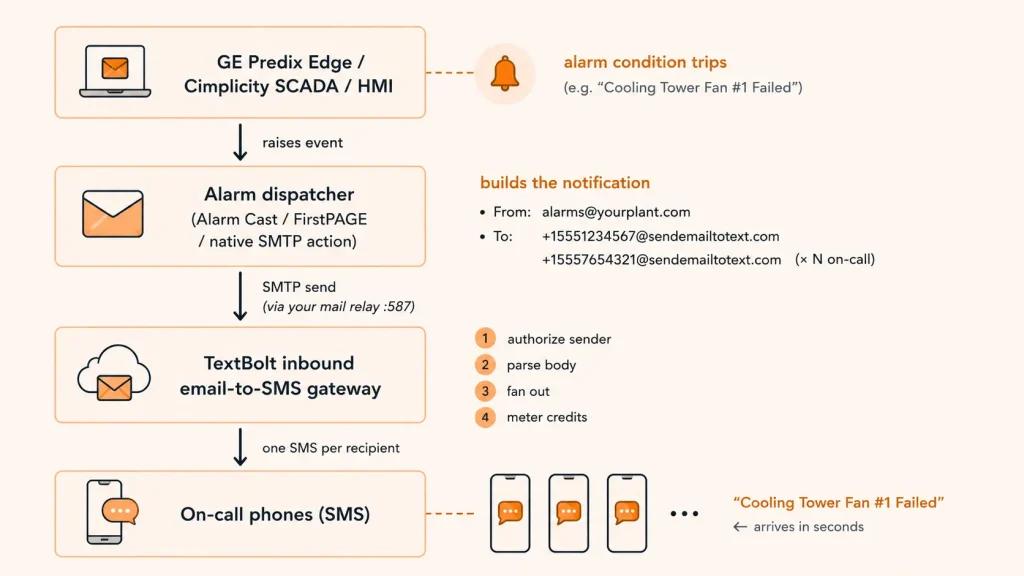
The diagram above shows the end-to-end notification flow, from the alarm generated by Predix Edge or CIMPLICITY to the SMS received by the on-call operator. Most of this workflow already exists in your environment. Your SCADA system detects the alarm, your notification service sends the email, and your SMTP server delivers it. TextBolt simply converts that email into a business SMS and forwards it to the recipient’s mobile phone.
Under normal conditions, the entire process completes within seconds. The only new component introduced is the email-to-SMS gateway, which sits between your mail server and the mobile carrier network.
What the Alarm Email Actually Looks Like
The email that leaves your dispatcher and hits the gateway is a plain SMTP message. Nothing exotic. Here is what a real Cimplicity or Predix Edge alarm looks like on the wire, so you can compare it against what your dispatcher is actually sending:
From: alarms@yourplant.com
To: +15551234567@sendemailtotext.com
Subject: Critical Alarm – Cooling Tower Fan #1
Date: Tue, 01 Jul 2026 02:14:07 -0500
Content-Type: text/plain; charset=utf-8
CRITICALCooling Tower Fan #1 Failed
Location: Building A, roof
Time: 02:14 AM
Acknowledge via reply or dispatcher
The gateway reads two things from that message: the From header (to authorize the sender) and the plain-text body (to send as the SMS).
Everything else, including the Subject, Date, Content-Type, and Message-ID, is standard SMTP metadata that the gateway parses but does not use in the outbound SMS body. If your dispatcher sends multipart or HTML-only messages instead, the parsed body ends up empty and the message is dropped, which is one of the three silent failure modes covered later.
While the workflow itself is straightforward, two design principles determine how reliable it remains in production.
1. Fan-Out Happens in the Notification Service
The notification service (Alarm Cast, FirstPAGE, or a custom .bcl script) sends one email to every intended recipient. TextBolt then converts that single email into an individual SMS for each operator.
This means there are no SMS distribution groups to maintain inside TextBolt. Your on-call rotation continues to be managed where it already exists, making it easier to add or remove engineers without keeping multiple contact lists synchronized.
2. Email to SMS Gateway like TextBolt Authorizes the Sender, Not the Recipient
Unlike consumer messaging systems, TextBolt authenticates the sender email address before processing notifications. Every mailbox or service account that sends alarms, whether it’s a production mailbox, shared service account, or test environment, should be registered before deployment.
Registering every sender email address during setup helps prevent notification failures and ensures every alarm follows the same trusted delivery path.
How to Set Up Email-to-SMS for GE Predix Edge or CIMPLICITY
Setting up GE Predix Edge SMS alerts or CIMPLICITY SMS notifications typically takes about 30 minutes, plus 1-2 business day for A2P verification. Most migration issues come from three preventable mistakes:
- Unregistered sender email addresses
- Incorrect recipient formatting
- Alarm text missing from the email body
The steps below help you avoid all three.
What to Prepare Before You Start
Before updating your dispatcher, gather the following information. Correcting these details after deployment can delay your migration.
- Legal business name and EIN: A2P 10DLC registration is tied to your legal business entity, not the plant name or sending domain. If your facility operates under a parent company, use the parent’s EIN. An incorrect EIN typically requires resubmitting the registration.
- The actual sender email address: Verify the From address your dispatcher currently uses by checking the header of a recent alarm email. Documentation is often outdated, and registering the wrong sender can prevent alarm delivery.
- Current on-call recipient list: Confirm every recipient uses the +1<10-digit> format and is located in the US or Canada. Unsupported numbers will not receive SMS messages.
Step 1: Register the Business Sender
US carriers require every business sender on a 10DLC pipe to be registered. So, complete your A2P 10DLC registration using your legal business name, EIN, website, sample messages, and expected message volume. Approval typically takes one business day, although corrections may extend the process.
This registration is completed once per legal entity and covers all sites operating under that brand.
You only do this once per brand. Every alarm, every recipient, every site under the same legal entity uses the same registration. After it clears, you move to the address-level authorization, which is where most migrations actually get stuck.
Step 2: Authorize Every Sender Address
Beyond the brand-level 10DLC approval, the gateway checks the specific sender address on every inbound email. If the From is not on your authorized list, the message is dropped with no bounce, no SMS, no log entry. Your dispatcher records a successful send. The gateway records nothing. The alarm is gone, and nobody notices until the post-incident review.
The fix is to register every From address your dispatcher might use, not just the obvious one:
- The main alarm mailbox (alarms@yourplant.com or similar).
- The service mailbox CIMPLICITY or Alarm Cast actually sends from, which is often different from the documented one.
- Any address used for one-off testing, even if you do not remember setting it up. Especially if you do not remember setting it up.
- The Predix Edge service account that might appear after a firmware update with a new local-part.
- Per-site addresses on multi-plant operations.
Review the authorized sender list after infrastructure changes, firmware updates, or new deployments to ensure new service accounts are included.
Step 3: Point the Dispatcher to the SMS Gateway
Update each recipient to the email-to-SMS format:
+1<mobile-number>@sendemailtotext.com
If you are migrating from a carrier gateway such as @vtext.com, the change is typically a domain swap plus the +1 prefix.
For CIMPLICITY, navigate to:
Project → Equipment → Alarm Cast Gateway → User ID
Then configure the recipient list under Settings. Multi-project deployments should also verify the listening TCP port assigned to each project.
Keep escalation rules, distribution lists, severity levels, and acknowledgements inside the dispatcher. The gateway should only handle the email-to-SMS conversion.
Step 4: Make Sure the Alarm is in the Email Body
The gateway converts the email body into the SMS message. If the dispatcher places alarm details only in the subject line, or sends HTML without a plain-text body, recipients may receive a blank message.
Most dispatchers handle this with a single checkbox in the alarm action: include the message body, or equivalent.
Subject-line passing can be turned on as a per-account setting if you need it, but the body almost always wins because the SCADA subject is usually a system identifier like ALM_42_HIGH, not the human-readable alarm. Nobody on call wants to wake up to a hex-style alarm code.
Step 5: Run a Real Alarm Test
Trigger an actual alarm condition. Not a mock send. Not a test email from your laptop. A real alarm that exercises the same path your production traffic will use.
Walk it through in order:
- The dispatcher’s outbound queue (did the email leave?).
- The mail relay log (did SMTP complete?).
- The gateway delivery log (did it get authorized and converted?).
- Every on-call phone (did the SMS land?).
If three or four phones receive it, the test fails. That is not a “mostly worked” outcome. Missing phones almost always trace to formatting (no +1, a non-NANP number, a stray space, a dash where the dispatcher does not expect one). Fix every gap before going live. Catching one missing recipient at 2 a.m. during a real incident is much more expensive than the 10 minutes you save by skipping the test now.
Multi-Site Setup Note
If your organization operates multiple plants, register the sender brand under the parent company’s legal entity. Individual sites can continue using their own authorized sender addresses, but the A2P 10DLC registration should remain tied to the parent organization.
Multi-site setups are one common special case. If any of those sites also run WIN-911, that platform brings its own set of quirks worth handling before you cut over.
WIN-911 Specifics (V7 and V2021)
Many migrations involve WIN-911 V7 or V2021 environments. WIN-911’s email notifier requires:
- A dedicated sender mailbox
- SMTP server credentials
- Incoming mail configuration for two-way acknowledgements
Register that mailbox as an authorized sender in TextBolt.
Before going live, also verify:
- SQL Server and required administrator permissions are in place
- The WIN-911 account can acknowledge CIMPLICITY alarms
- Windows password changes do not invalidate the WIN-911 service account
WIN-911 also supports hardware SMS modems, but teams evaluating WIN-911 alternatives often replace them with an email-to-SMS gateway to remove the need for SIM cards, cellular contracts, and hardware maintenance.
Ready to Point Your Dispatcher at the Gateway?
The setup is quick once A2P 10DLC verification clears, with affordable plans available. Migrate before your next on-call rotation.
Once the notification path is configured and tested, the next step is deciding which alarms should generate SMS notifications and which are better suited for email or dashboard alerts.
Which Industrial Alarms Make Sense to Turn into SMS Alerts?
SMS should be reserved for alarms that require an immediate response. Routine notifications are better suited for email, dashboards, or scheduled reports. Limiting SMS to high-priority events helps reduce alert fatigue and ensures critical notifications receive immediate attention.
The most common SMS-worthy alarms fall into four categories.
1. Building Automation and BMS
Typical building automation alarms include:
- Chiller faults
- High chilled-water temperature
- Compressor failures
- Cooling tower fan failures
- AHU filter differential pressure alarms
- Boiler lockouts
- Freeze-stat trips
- Life-safety overrides
Building Management Systems (BMS) is the noisiest category by a wide margin. These systems often generate large numbers of related alarms from a single fault. Use alarm suppression, de-bouncing, and severity filtering in the dispatcher so only actionable events generate SMS notifications. On Johnson Controls sites the same filtering logic applies to Metasys alarms delivered as text, where the Event Filter trims the noise before the alarm email ever leaves the server.
2. Process and SCADA
GE Predix Edge, CIMPLICITY, and other SCADA platforms commonly generate alarms such as:
- Tank level alarms
- Pump trips
- Pressure and flow excursions
- Batch process failures
- Environmental KPI breaches
- Recipe deviations
These events typically have higher operational impact than building automation alarms. Configure the dispatcher to send SMS only for critical or high-severity events, while routing warnings and informational alarms to email.
3. Power and Utility
Power-related SMS alerts commonly include:
- UPS battery events
- Generator start and failure
- Transfer switch operations
- Substation events
- Power outage and restoration notifications
Power events often occur in bursts during outages or transfers. Plan SMS capacity for peak event volumes rather than average daily traffic.
4. IT and OT edge
SMS alerts are also valuable for monitoring supporting infrastructure, including:
- Edge device offline
- Gateway heartbeat failures
- Server or NAS outages
- Historian storage warnings
- Certificate expiration
- Scheduled task failures
These alerts usually originate from monitoring platforms such as PRTG, Datadog, or Zabbix rather than the SCADA system itself. Register each monitoring platform’s sender address separately so notifications follow the same email-to-SMS workflow.
5. Two-Way Acknowledgement
Two-way acknowledgements allow engineers to reply with messages such as “ACK” or “GOT IT,” with the response delivered back to the sender’s mailbox. This provides a simple acknowledgement workflow without requiring a separate mobile application.
Each alarm is delivered individually to every member of the on-call rotation. Adding or removing recipients only requires updating the dispatcher contact list, while TextBolt handles SMS delivery to each authorized mobile number.
What Silently Breaks SCADA Alarm Delivery (and How Do You Avoid It)?
Most SCADA email-to-SMS migration guides focus on configuration but overlook what happens when message delivery fails. In production, silent failures are more dangerous than visible errors because the dispatcher records a successful SMTP send while no SMS is ever delivered.
Most delivery failures fall into three categories:
1. Unauthorized / Malformed From Address → Dropped, No Bounce
The gateway only converts an email into an SMS if the From address matches an authorized sender on your account. Unlike consumer messaging, where the recipient’s phone number determines delivery, business email-to-SMS gateways use the sender address as the primary authorization check.
If your dispatcher sends from an unregistered or malformed address, such as one containing an extra quotation mark, a second @ symbol, or an invalid domain, the email is rejected before SMS conversion. The dispatcher and mail relay still record a successful SMTP transaction, but no SMS is sent because the sender fails the gateway’s authorization check.
✗ From: “alarms@yourplant.com” <“alarms@”@yourplant.com> ← stray second “@”, parsed as a DIFFERENT address → dropped
✓ From: alarms@yourplant.com
✓ From: “Plant Alarms” <alarms@yourplant.com>
This commonly happens because industrial environments or SCADA platforms use multiple sender addresses over time, including service accounts, test mailboxes, site-specific addresses, and firmware-generated accounts. Every sender must be explicitly authorized.
A Predix Edge service account starts sending after a firmware refresh with a brand-new local-part nobody added to the authorized list. Every sending address has to be on the registered list, and the registration is exact-match: display names like “Plant Alarms” do not matter for authorization, only the bracketed address inside the < > does.
How to detect this in production: Compare the alarm dispatcher’s outbound log to the TextBolt message log on a weekly basis for the first month after migration. If the dispatcher shows 47 sends and the gateway shows 38 conversions, the missing 9 are coming from an unregistered sender. Compare dispatcher logs with gateway logs during the first few weeks after migration. Missing conversions usually indicate an unregistered sender address.
2. Alarm Text in the Subject (or HTML-only) → Empty Body → Dropped
By default, the gateway converts the email body into the SMS message. If your GE Predix Edge, CIMPLICITY, or other SCADA dispatcher places alarm details only in the Subject line, or sends an HTML-only email without a plain-text body, the gateway has no message content to convert. The resulting SMS may be blank or display “None,” depending on the carrie
There are two ways to resolve this:
- Preferred: Configure GE Predix Edge or CIMPLICITY to include the alarm text in the email body.
- Alternative: Enable subject forwarding if your deployment depends on subject-based notifications.
In many GE Predix Edge and CIMPLICITY deployments, the subject line contains identifiers such as ALM_42_HIGH, while the email body includes the descriptive alarm message, such as Cooling Tower Fan #1 Failed. Using the email body provides operators with clear, actionable information.
This issue commonly appears when migrating from legacy carrier gateways such as @txt.att.net, which convert the email subject into the SMS message by default. Modern business email-to-SMS gateways use the email body unless subject forwarding is explicitly enabled.
How to detect this in production: Trigger a test alarm from GE Predix Edge or CIMPLICITY after migration and verify that the SMS contains the complete alarm message. If the SMS is blank, displays “None,” or contains only sender information, the dispatcher is not populating the email body correctly.
3. Non-US/Canada Recipient numbers → Not Delivered
Delivery is US and Canada mobile (NANP) only. International recipients will not receive the text, and the gateway does not return an error to your dispatcher (the message is accepted, then dropped at the carrier handoff with no visible signal).
If international engineers require SMS alerts, provision a US or Canadian number for alerting or use an alternative 2-way text messaging platform. Forwarding services, dual-SIM setups, and dedicated alerting phones all work. Trying to route international recipients through the gateway and hoping for the best leaves a recipient class out of the rotation without any signal that they are missing alarms.
How to detect this in production: Cross-reference your on-call recipient list against the +1 country code on every entry before going live. Any non-NANP number is a guaranteed silent drop and should either be replaced with a NANP number or routed through a different alerting tool.
Other Edge Cases Worth Designing For
Beyond the common migration issues, a few operational considerations can affect the reliability and efficiency of your email-to-SMS workflow. Planning for them upfront helps reduce unnecessary alerts, simplify troubleshooting, and improve long-term reliability.
| Case | What happens | Recommended approach |
| Alarm storm | A single equipment fault can generate dozens of related alarms, resulting in large SMS fan-outs and unnecessary notifications. | Apply de-bouncing, alarm grouping, and severity filtering in the dispatcher. Send SMS only for actionable or critical alarms. |
| Fan-out message usage | Each recipient receives an individual SMS. Long messages may be split into multiple SMS segments (approximately 160 characters each), increasing message usage. | Keep alarm messages concise and size your messaging plan based on expected alarms, recipients, and message segments. |
| Quiet periods | No SMS messages may be sent for days or weeks when no alarms occur. | Schedule a periodic heartbeat or test alarm to verify the notification path remains operational. |
| Outbound SMTP or firewall restrictions | Firewalls, mail relays, or security tools such as UFW or Fail2ban may block or rate-limit outbound SMTP traffic. | Allowlist the SMTP path and verify connectivity before migration. Ensure security controls do not block production or test notifications. |
| Attachments or images | SMS supports text only. Attachments and embedded images are removed during conversion. | Include essential alarm details in the message body and link to dashboards or monitoring systems when additional context is required. |
| Delivery verification | After an incident, operators may need to confirm whether an alarm was successfully delivered. | Use the TextBolt message log to review timestamps, delivery status, and message history for every notification. |
Most of these issues are easy to avoid with proper configuration. The next consideration is understanding how the email-to-SMS path performs under production workloads and what level of reliability you can realistically expect.
Avoid Silent Alarm Drops on Your Next Migration
TextBolt logs every send with timestamp and delivery status, so you can audit the gap between dispatcher output and SMS delivery rather than guessing at it during a post-incident review.
How Reliable is Email-to-SMS for Production Alarm Traffic?
Reliable enough to trust on operational alarms, with specific numbers and caveats worth understanding before you go live. The six dimensions below cover what plant teams actually ask during evaluation.
1. Delivery Speed and Latency
Single-digit seconds, end to end. The path from your dispatcher’s outbound SMTP to the SMS landing on a phone runs in roughly 2 to 10 seconds under normal carrier load. Most of that variance sits in the cellular handoff, not the gateway itself, which processes each message in well under a second. If you see minute-plus delays in normal conditions, check your mail relay queue or the recipient carrier first; the gateway is rarely the bottleneck.
2. Delivery Rate Ceiling
Well-configured deployments typically achieve up to 98% delivery rates when using verified business senders, A2P 10DLC registration, supported US and Canadian carriers, and properly formatted messages.
No SMS provider can guarantee 100% delivery because the final handoff depends on mobile carrier networks. Scheduling a periodic heartbeat alarm provides an easy way to detect delivery issues before a real incident occurs.
3. Message Logging and Audit Trail
Every send is logged with sender, recipient, body, delivery status, and timestamp. The log lives on the TextBolt dashboard and is queryable by date range. When the post-incident question of “was the on-call team actually notified” comes up, you can pull a timestamped delivery record instead of relying on assumption. For regulated industries that need to demonstrate notification compliance, this is the difference between a finding and a clean audit.
4. Two-Way Replies and Acknowledgement
Replies route back to the sender’s email inbox, which is the same address your dispatcher sent From. An engineer texts “ACK” or “GOT IT” and the dispatcher or ops team sees the reply in the inbox where they already manage email-based escalation. That two-way path is what makes the gateway feel like a paging tool rather than a one-way fire-hose, and it is the workflow the carrier gateways killed under A2P rules before the gateways themselves went dark.
5. Sender Phone Number and Identity
Texts arrive from a shared business number by default, or from a dedicated toll-free number for an extra $45/year. The dedicated number gives the on-call staff a consistent inbound caller-ID they learn to recognize as plant alarms at a glance, which reduces ignored-text incidents during storms. The shared number works for outbound-only alerts but weakens two-way trust because the inbound rotates. Most plants running production alarms with acknowledgement workflows pay the $45.
6. Infrastructure Footprint on the Plant Side
No additional on-premises hardware is required. Your SCADA platform, dispatcher, SMTP relay, and on-call workflows remain unchanged. The migration typically involves only two configuration updates:
- Updating recipient addresses to the email-to-SMS gateway.
- Authorizing the sender email addresses used by your SCADA environment.
With the technical requirements covered, the next step is replacing any remaining legacy carrier email-to-SMS gateways with a modern, supported email-to-SMS workflow. The checklist below walks through the migration process.
Want to Replace Legacy Carrier Email-to-SMS Gateways? [Follow This Migration Checklist]
If you’re looking for a vtext / txt.att.net replacement, TextBolt provides a modern business email-to-SMS gateway that preserves your existing SCADA workflow. Instead of rebuilding your notification system, you simply register your business for A2P 10DLC, authorize your sender email addresses, and replace legacy carrier gateway addresses.
Use the checklist below to complete the migration with minimal disruption.
1. Prepare Before Migration
Complete these checks before making any configuration changes:
- Confirm your legal business name and EIN for A2P 10DLC registration.
- Inventory every sender email address used for alarm notifications, including shared mailboxes, service accounts, and site-specific addresses.
- Verify all on-call recipients use valid US or Canadian mobile numbers.
- Confirm your SMTP server or mail relay can send outbound email over ports 587 (TLS) or 25, according to your organization’s security policy.
2. Update Your Notification Workflow
Once your business verification is underway:
- Complete your A2P 10DLC business registration with your legal business name, EIN, and a sample alarm message.
- Register every sender email address used for alarm notifications.
- Replace legacy carrier gateway addresses (such as @vtext.com, @txt.att.net, or @tmomail.net) with your TextBolt gateway address (+1[number]@sendemailtotext.com).
- Verify alarm details are included in the email body or configure subject forwarding if required.
- Confirm every notification recipient is using a supported North American mobile number.
3. Verify After Cutover
Before relying on the new notification path for production alarms:
- Trigger a live test alarm and confirm every recipient receives the SMS notification.
- Verify delivery status and timestamps in the TextBolt message log.
- Configure a recurring heartbeat alarm to confirm the notification path remains operational.
- Compare SMTP sends with TextBolt delivery logs during the first few weeks to identify any unregistered sender addresses or configuration issues.
Most plants complete the whole migration inside 1 to 2 business days end to end: the configuration itself is roughly 30 minutes, and the rest is waiting on A2P 10DLC verification. If your stack is CIMPLICITY-specific, the CIMPLICITY email-to-SMS integration page walks through the exact Alarm Cast and .bcl script changes, the User ID setup, and the sender-authorization steps you would run through on a real project.
Book a demo or email support@textbolt.com with a description of your alarm flow. A real engineer will map your setup before you commit to the migration.
Stop Relying on Legacy Carrier Gateways
Move your CIMPLICITY alarm notifications to reliable business SMS with TextBolt. No APIs, no SCADA changes, and no new infrastructure to manage.
Frequently Asked Questions
Do I need to write code or call an API to route Cimplicity alarms to SMS?
No. If your alarm system can send email, and Predix Edge, Cimplicity, iFIX, Ignition, Wonderware/AVEVA, Alarm Cast, and FirstPAGE all can, you only change the destination addresses to +1XXXXXXXXXX@sendemailtotext.com and register your dispatcher’s sender address. There is no SDK to install and no firewall change on the gateway side. Most plants are sending their first test SMS within 30 minutes of finishing business verification.
Can one alarm notify my whole on-call team?
Yes. Address the alarm email to each person’s +1<number>@sendemailtotext.com address and the gateway delivers one SMS per recipient. Recipients are unlimited on TextBolt plans, so adding a person to the rotation is a single line in your dispatcher’s contact list, not a billing event. If your dispatcher supports distribution lists, those work too.
Why did your test arrive but show nothing or “None” at the top?
Almost always one of two things. Either your dispatcher put the alarm in the email subject only, or it sent an HTML-only email with no plain-text part. The gateway texts the body by default, so an empty body becomes an empty (or “None”) SMS. Move the alarm text to the body, or ask support to enable subject passing on your account.
Some alarms never arrive but others do. What’s going on?
In nine cases out of ten, the missing alarms are coming from an unregistered sender address. A new service account, a one-off test address, or a per-site local-part that nobody remembered to register. The gateway silently drops mail from unauthorized senders to protect your account from spoofing. Audit the from addresses your dispatcher is actually sending from (not the ones you intended to use) and add every one to your registered sender list.
It has been quiet for two days. Is it broken?
Probably not, alarms are event-driven and a quiet plant is a healthy plant. The reliable answer is to schedule a recurring heartbeat alarm (one a day is plenty) that fires regardless of plant state. If the heartbeat arrives, the path is live. If the heartbeat fails, you have a real signal to investigate. Do not infer health from silence.
Can recipients reply?
Yes. Replies route back to the sender’s email inbox, which is the same address your dispatcher sent From. That is what makes two-way acknowledgement work without a separate app. An engineer texts “ACK” and the dispatcher sees the reply in its inbox or shared mailbox, where the existing escalation rules can act on it.