
- Why Do Businesses Consider Alternatives to Salesmsg?
- How We Selected These Salesmsg Alternatives
- 7 Best Salesmsg Alternatives Compared at a Glance
- 7 Salesmsg Alternatives and Competitors for Businesses Looking to Switch
- 1. TextBolt — Best Salesmsg Alternative for Email-to-SMS Communication
- 2. Textline — Best Salesmsg Alternative for Customer Support Teams
- 3. JustCall — Strongest CRM-Native Voice and SMS With AI Coaching
- 4. Heymarket — Multi-Channel Business Messaging Across SMS, Email, and Messaging
- 5. SimpleTexting — Best Salesmsg Alternative for SMS Marketing With Rollover Credits
- 6. Salesmate — Full CRM With Built-In Texting and Calling
- 7. TextMagic — Pay-as-You-Go SMS With an Email-to-SMS Path
- How to Choose the Right Salesmsg Alternative
- Why TextBolt is the Right Salesmsg Alternative for Operational Texting
- Choose the Salesmsg Alternative That Fits How You Actually Communicate
- Frequently Asked Questions
Reach Contacts Faster Without Leaving Your Inbox
7 Best Salesmsg Alternatives for Reliable Business SMS in 2026


Salesmsg is a business texting platform that helps companies manage two-way SMS and MMS conversations at scale. Its feature set includes shared team inboxes, mass texting, scheduled messaging, automated responses, contact management, message personalization, and integrations with popular CRMs like HubSpot, ActiveCampaign, Pipedrive, and Marketo.
While Salesmsg works well for businesses that rely heavily on SMS communication, it may not be the best fit for every team. As messaging volumes grow, some organizations begin looking for alternatives that offer different pricing models, simpler workflows, broader communication channels, or more flexibility for operational messaging.
Today, businesses can choose from a wide range of alternatives, including email-to-SMS platform like TextBolt that let teams send texts directly from Gmail or Outlook without learning a new dashboard, shared inbox tools, customer communication suites, and API-based messaging services designed for different use cases and budgets.
In this guide, we compare the best Salesmsg alternatives based on pricing, features, ease of use, scalability, and overall workflow fit to help you find the right solution for your business. From sales and customer engagement platforms to email-to-SMS tools for reminders, alerts, and notifications, these alternatives serve a variety of business communication needs.
Why Do Businesses Consider Alternatives to Salesmsg?
Salesmsg is designed for teams that want SMS conversations connected to their CRM. With shared inboxes, two-way texting, automation, and integrations with platforms like HubSpot, Salesforce, Pipedrive, and ActiveCampaign, it works well for sales and customer-facing teams that manage communication directly from contact records.
However, as businesses grow and messaging needs evolve, some organizations begin exploring alternatives that better align with their workflow, budget, and communication requirements.
1. Pricing Becomes More Complex as Teams Grow
While Salesmsg’s pricing structure appears straightforward at first, total costs can increase as teams scale. Adding more users, phone numbers, and messaging volume often introduces additional expenses that aren’t always obvious upfront. Over time, this makes budgeting harder for growing teams evaluating Salesmsg pricing breakdowns or comparing long-term cost structures.
2. Credits Don’t Always Match Real Usage Patterns
Salesmsg subscription credits reset at the end of each billing cycle, which may not suit businesses with seasonal demand or fluctuating message volumes. Teams with inconsistent usage often find themselves paying for capacity they don’t fully use every month.
3. Operational Messaging Requires Different Workflows
Not every business uses SMS for sales conversations. Many organizations rely on texting for appointment reminders, alerts, notifications, internal communication, and service updates. In these cases, a CRM-centric shared inbox may feel heavy compared to simpler email-to-SMS workflows or operational messaging platforms designed for speed and automation.
For more real-world use cases and limitations, see our analysis of Salesmsg reviews and user feedback.
4. Limited Fit for Some Communication Needs
Salesmsg is primarily built around CRM-connected SMS conversations. Businesses looking for international messaging, omnichannel communication, email-native texting, or highly customized messaging workflows may find that alternative platforms better match their requirements.
Ultimately, the best platform depends on how your team communicates. The Salesmsg alternatives below offer different approaches to business texting, from CRM-integrated sales engagement tools to email-to-SMS solutions, customer communication platforms, and API-driven messaging services.
How We Selected These Salesmsg Alternatives
To identify the best Salesmsg alternatives, we evaluated leading business texting, customer communication, and messaging platforms commonly considered by teams replacing Salesmsg.
Our assessment focused on the factors that have the greatest impact on long-term value and day-to-day usability, including:
- Pricing structure and cost predictability
- SMS, voice, and multi-channel communication capabilities
- Team scalability and per-user costs
- Compliance-related fees, including 10DLC and number registration costs
- Workflow fit across CRM, dashboard, API, and email-based messaging
- Set up complexity and deployment speed
- Customer reviews, reported strengths, and common limitations
We also analyzed how each platform differs from Salesmsg in terms of workflow, target audience, and overall positioning. Rather than ranking providers solely on features, we considered which types of businesses each solution serves best.
To maintain accuracy, pricing and feature information were verified using official vendor documentation, product pages, and publicly available sources.
The comparison table below provides a quick overview of pricing, messaging capabilities, ideal use cases, and key differences between the top Salesmsg alternatives.
7 Best Salesmsg Alternatives Compared at a Glance
Most messaging platforms may look similar at first glance, but the real differences show up in how they fit into daily workflows, how pricing scales per user or message, and the true total cost of ownership. Some tools prioritize CRM-style engagement, others focus on shared inbox messaging, while a few are built specifically for SMS-heavy teams or email-first workflows.
The comparison below breaks down the key platforms side by side.
| Platform | Starting Price | SMS / Pricing Model | Workflow |
| TextBolt | $29/mo | 500 SMS bundled; never-expire top-ups | Email-to-SMS from Gmail and Outlook |
| Textline | Custom-quoted (contact sales) | 600 minimum included message credits per month | Web based conversation dashboard |
| JustCall | $39/user/mo (minimum 2 users) | 500 SMS segments plus unlimited calling | AI-powered sales engagement and business phone system |
| Heymarket | $24/user/mo | Usage-based SMS charges apply | Omnichannel customer messaging |
| SimpleTexting | $29/mo + $10/mo number | 500 credits with rollover | Marketing SMS dashboard with rollover credits |
| Salesmate | $29/user/mo | CRM subscription plus SMS add-ons | CRM with built-in calling and texting |
| TextMagic | $59/mo for 1,000 SMS* | Pay-as-you-go pricing ($0.049/SMS) plus number rental | Multi-channel messaging with email-to-SMS support |
Some Salesmsg alternatives focus on operational texting, while others are built for CRM-driven sales engagement, omnichannel customer support, or API-based messaging. The best choice depends on your communication workflow, deployment requirements, and whether you need capabilities such as CRM integrations, international SMS, HIPAA compliance, or email-to-SMS functionality.
The reviews below compare each platform’s pricing, features, strengths, limitations, and ideal use cases to help you identify the Salesmsg alternative that best fits your business.
7 Salesmsg Alternatives and Competitors for Businesses Looking to Switch
1. TextBolt — Best Salesmsg Alternative for Email-to-SMS Communication
TextBolt takes a fundamentally different approach to business texting than Salesmsg. While Salesmsg relies on a CRM-connected dashboard and shared inbox environment, TextBolt allows teams to send and receive SMS messages directly from email using tools they already use every day, including Gmail, Outlook, Microsoft 365, help desk platforms, monitoring systems, and other email-enabled applications.

Instead of logging into a separate messaging platform, users simply send an email to a phone-number-based address (for example, +1XXXXXXXXXX@sendemailtotext.com). The message is delivered as an SMS, and any replies are automatically routed back to the original email thread. This creates a seamless two-way texting experience without requiring additional software, user training, or workflow changes.
For businesses that primarily use SMS for operational communication rather than sales outreach, TextBolt offers a simpler and often more cost-effective alternative to dashboard-based texting platforms. It is particularly well-suited for appointment reminders, customer notifications, recruiting, dispatch coordination, IT alerts, service updates, and internal communications.
Organizations evaluating both platforms can also review a detailed Salesmsg vs TextBolt comparison to better understand the differences between email-native texting and CRM-attached messaging workflows.
Key Features and Capabilities
- Send SMS directly from Gmail, Outlook, Thunderbird, Apple Mail, and virtually any email-capable application
- Two-way texting with replies delivered back to the original email conversation
- Customer ticket updates routed as SMS from Zendesk and Freshdesk to keep support teams responsive
- Order and fulfillment text alerts from Shopify, WooCommerce, and Magento without custom development
- Pipeline failure alerts from GitHub Actions, GitLab CI, and Jenkins to catch broken builds before they hit production
- No separate messaging dashboard required
- A2P 10DLC-compliant messaging across major US carriers, including AT&T, Verizon, and T-Mobile
- Canadian carrier support, including Rogers, Bell, Telus, and Fido
- Toll-free messaging available for a flat annual fee
- Up to 10 included user seats on Standard and Professional plans
- Fast onboarding with most accounts activated within 24–48 hours
- Typical setup completed in less than 30 minutes
- Non-expiring top-up SMS credits that are only used after monthly plan allowances are exhausted
Pros and Cons of TextBolt
| Pros | Cons |
| Send and receive SMS directly from existing email workflows | Limited contact management compared to CRM-focused tools |
| No separate dashboard or employee training required | No built-in voice calling |
| Predictable monthly pricing with included SMS allowances | |
| 10 seats included on Standard and Professional plans | |
| Fast deployment and simple onboarding | |
| Non-expiring top-up credits help avoid wasted SMS spend |
TextBolt Pricing
TextBolt uses a flat monthly pricing model with bundled SMS credits and non-expiring top-ups. Unlike platforms that charge per user, Standard and Professional plans include up to 10 team members, making costs more predictable as teams grow.
| Plan | Monthly Price | SMS Included | Seats |
| Basic | $29 | 500 | 1 |
| Standard | $49 | 1,000 | Up to 10 |
| Professional | $99 | 2,500 | Up to 10 |
| Enterprise | Custom | 5,000+ | Custom |
Key Pricing Advantages
- Save 20% with annual billing on all plans
- Up to 10 team members included on Standard and Professional plans
- Non-expiring top-up credits help reduce wasted SMS spend
- Compliance and carrier registration support included
- No coding, developers, or custom integrations required to get started
- Typical setup completed in less than 30 minutes
For most growing businesses, the Standard plan offers the best balance of cost, messaging volume, and team access, making it a practical alternative to platforms that charge separately for additional users.
Is TextBolt the Right Salesmsg Alternative for You?
TextBolt is an excellent choice for businesses that use SMS primarily for operational communication and want to avoid the complexity of CRM-connected texting platforms. It works especially well for organizations sending:
- Appointment reminders
- Customer notifications
- Service updates
- Recruiting communications
- Dispatch instructions
- IT and system alerts
- Internal team messaging
- System alerts
Because texting happens directly through email, teams can continue using familiar workflows without adopting another communication platform or paying for additional user licenses.
Start Operational SMS in Minutes With TextBolt
Send compliant business texts directly from email without building or managing a dashboard or per-seat licenses. Set up in minutes and keep your existing workflow intact.
2. Textline — Best Salesmsg Alternative for Customer Support Teams
Textline is a business texting platform built around team based customer support, with HIPAA compatibility and SOC 2 compliance as core selling points. Where Salesmsg centers on CRM-attached sales conversations, Textline is designed for regulated-industry teams where audit trails, agent routing, and conversation management carry more weight than pipeline tracking.
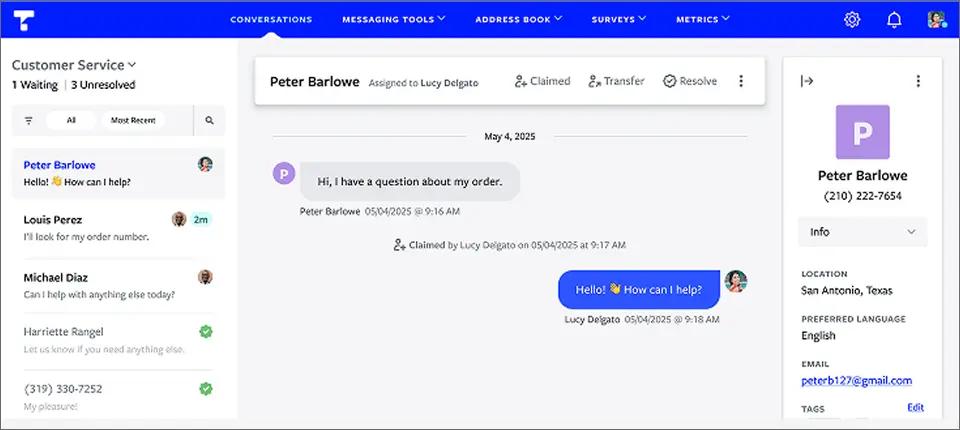
The platform uses a universal inbox that consolidates SMS, MMS, webchat, Facebook Messenger, and Instagram Business into one view. Every plan includes multiple agents, automations, scheduled messages, address book management, metrics, and mobile companion apps for iOS and Android. Textline does not publish plan pricing on its website and directs prospective customers to sales for a personalized quote.
Key Capabilities of Textline
- Universal Inbox spanning SMS, MMS, webchat, Facebook Messenger, and Instagram Business
- Mass texting, group texting, and two-way SMS and MMS conversations
- Shortcuts (pre-written SMS templates) to cut manual typing
- Built-in NPS, CSAT, and custom text surveys
- Text-enable an existing landline business number
- HIPAA-compatible across every plan tier with an additional fee
- SOC 2 compliant with multi-factor authentication and enterprise-grade security
- Salesforce, HubSpot, Zendesk, Talkdesk, Pipedrive, Aircall, Slack, Shopify, and Zapier integrations plus API and webhooks
- iOS, Android, and Chrome plugin companion apps
Pros and Cons of Textline
| Pros | Cons |
| Centralized SMS messaging platform consolidating customer communications into one interface | Limited integration options with third-party business tools |
| Multi-user collaboration to prevent message overlap and enable team management of conversations | Lacks advanced automation like AI chatbots or smart message routing |
| Integration with CRM systems like Salesforce for synchronized customer data and messaging history | Outdated user interface that may slow team onboarding |
| Automated messaging features including scheduled texts and autoresponders to boost communication efficiency | No fully functional native mobile app for on-the-go use |
| Support for MMS messaging allowing sending of images, videos, and other media formats | Basic reporting and analytics without customizable dashboards |
Textline Pricing
| Plan | Monthly Cost | Included Agents | Included Credits |
| Essentials | Custom-quoted | 3 | 600/month minimum |
| Pro | Custom-quoted | 5 | 2,000/month minimum |
| Enterprise | Custom | Custom | Custom |
Additional Costs and Credit Structure:
- Add-on credits: $0.03 per credit (one purchase allowed per billing cycle)
- Backup credits: $0.04 per credit, automatically purchased in minimum batches of 250 credits when your balance falls below the set threshold
- 10DLC campaign fee: $15/month
- Toll-free numbers: No monthly registration fee
- HIPAA compatibility: Available on all plans for an additional fee
- SMS credit usage: 1 credit = 1 SMS segment (up to 160 characters)
- MMS credit usage: 1 MMS = 3 credits
Is Textline the Right Salesmsg Alternative for You?
Textline is a strong fit for healthcare, financial services, legal, and regulated-industry customer support teams that need HIPAA-compatible texting with strong audit and security controls. It is the cleanest swap from Salesmsg when the team’s primary job is patient or client communication rather than outbound sales prospecting.
Consider another option if you need:
- Transparent published pricing without a sales call
- A HIPAA BAA included at no additional fee
- Native HubSpot integration at the dashboard level
- Email-native sending without a dashboard
- A flat per-month plan that does not scale per agent
3. JustCall — Strongest CRM-Native Voice and SMS With AI Coaching
JustCall is an AI-powered business communication platform that combines cloud phone, SMS, MMS, sales dialers, and conversation intelligence in a single workspace. Unlike Salesmsg, which focuses primarily on texting and CRM-based messaging, JustCall is built for sales and support teams that manage high volumes of calls and texts across multiple reps.
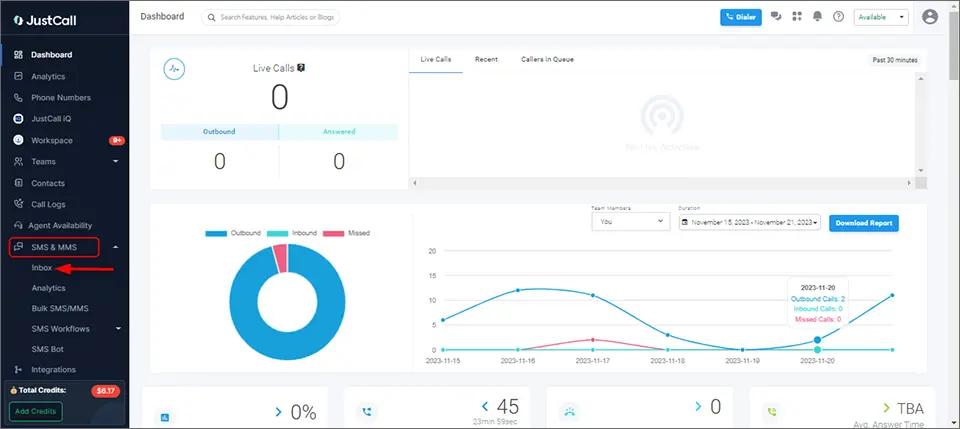
The platform integrates with more than 100 CRMs, help desks, and business applications, including native Salesforce CTI, HubSpot, Zoho, Pipedrive, and Zendesk. Beyond messaging, JustCall differentiates itself through AI-powered coaching features such as real-time agent assistance, call scoring, sentiment analysis, AI-generated summaries, and SMS Copilot.
For organizations running structured outbound sales programs, JustCall provides a more complete communication stack than Salesmsg, combining voice, SMS, dialers, automation, and coaching tools under one platform.
Key Capabilities of JustCall
- Two-way SMS and MMS messaging from shared business numbers
- Bulk SMS campaigns with scheduling and personalization
- Automated SMS workflows, auto-replies, and transactional messaging
- Team inbox for managing conversations across multiple agents
- 500 SMS segments per user on Team; 1,000 SMS segments per user on Pro and Pro Plus
- Native integrations with 100+ CRM, help desk, and business platforms
- Salesforce CTI integration on Pro plans and above
- Power dialer, predictive dialer, progressive dialer, and click-to-call functionality
- AI-powered SMS Copilot for message generation and response assistance
- AI call summaries, sentiment analysis, call scoring, and real-time agent coaching
Pros and Cons of Using JustCall
| Pros | Cons |
| Native Salesforce CTI and 100+ integrations | $29 Team plan minimum 2 users |
| AI call scoring and real-time assist on Pro Plus | Premium AI features priced for sales-org buyers |
| Bundled calling and SMS in one platform | 500 SMS segments/user can run short for high-volume texters |
| Power dialer and bulk SMS campaigns on Pro | Carrier 10DLC fees apply on top of seat cost |
| Strong reporting for sales coaching workflows | AI coaching tooling assumes structured sales-management workflow |
JustCall Pricing
| Plan | Monthly Billing | SMS Allowance |
| Team | $39/user/month | 500 SMS segments/user |
| Pro | $69/user/month | 1,000 SMS segments/user |
| Pro Plus | $109/user/month | 1,000 SMS segments/user |
| Business | Custom | Unlimited SMS* |
All plans include:
- Unlimited inbound and outbound calling
- Unlimited AI transcription minutes
- Business phone numbers in 70+ countries
- Two-way SMS and MMS messaging
- 100+ CRM and business integrations
- API access and workflow automation
- Minimum 2-user commitment on Team, Pro, and Pro Plus plans
Is JustCall the Right Salesmsg Alternative for You?
JustCall is a strong fit for sales teams running structured outbound with CRM-attached calls and texts, especially organizations using HubSpot or Salesforce that want SMS, calling, dialers, and AI coaching in a single platform.
The combination of two-way texting, bulk SMS campaigns, power dialing, call routing, and conversation intelligence makes it well-suited for high-volume sales workflows.
Consider another option if you need a flat monthly plan without per-user compounding, email-native texting workflows, simpler onboarding for non-technical teams, or primarily use SMS for operational notifications rather than sales outreach.
Teams that don’t need dialers, call-center features, or AI coaching may find JustCall more complex than necessary for day-to-day business texting.
4. Heymarket — Multi-Channel Business Messaging Across SMS, Email, and Messaging
Heymarket is built for teams that manage customer conversations across multiple channels, not just SMS. Instead of limiting communication to a single channel, it brings SMS, MMS, email, Apple Messages for Business, WhatsApp, and Facebook Messenger into a unified shared inbox.

Unlike sales-centric platforms such as Salesmsg, Heymarket is positioned around omnichannel customer engagement and internal collaboration, making it more suitable for service-driven workflows than outbound sales sequences.
The platform also includes structured messaging tools for campaigns, automations, and AI-assisted responses, helping teams manage conversations at scale while maintaining consistency across channels.
Messaging usage is billed separately per SMS segment, along with applicable 10DLC campaign requirements, which may affect overall cost depending on usage volume. For teams that prioritize a centralized, cross-channel inbox over a pure SMS tool, Heymarket offers a more unified communication layer for customer interactions.
Key Capabilities of Heymarket
- Unified inbox across SMS, MMS, email, WhatsApp, iMessage, and Facebook Messenger
- Campaigns, automations, and reporting tools for structured messaging workflows
- Integrations with HubSpot, Microsoft Teams, and Zapier
- Salesforce integration and API access available in higher tiers
- Enterprise-grade security and admin controls in advanced plans
- Free trial available (no credit card required)
Pros and Cons of Using Heymarket
| Pros | Cons |
| Automated messaging and scheduled texts help streamline outreach workflows (reported by sales users) | New users may face a learning curve during onboarding |
| Shared inbox improves coordination across teams handling customer conversations | Not ideal for teams focused purely on SMS-based sales automation |
| Strong CRM integrations support smoother lead and customer management workflows | Some advanced capabilities are limited to higher-tier plans |
| Custom bulk messaging improves client engagement and campaign execution | Pricing structure and feature gating can feel restrictive for smaller teams |
| Highly customizable messaging workflows for different business needs | Advanced setup may require time to fully configure |
Heymarket Pricing
Heymarket follows a per-user pricing structure with tiered feature access and separate usage-based messaging costs.
| Plan | Monthly Billing | Key Allowance |
| Standard | $24/user/month | Shared inbox, SMS + email, basic reporting, HubSpot integration |
| Plus | $49/user/month | Campaigns, automations, AI Essentials, Teams + Zapier integrations |
| Pro | $75/user/month | API access, AI Advanced, advanced security, Salesforce add-on |
| Enterprise | Custom | Full customization, white-glove onboarding, priority 7×365 support |
Is Heymarket the Right Salesmsg Alternative for You?
Heymarket is a strong fit for customer service and support teams running multi-channel inboxes who want SMS in the same workflow as email and iMessage, not as a standalone tool.
Consider another option if you need: A flat-rate pricing model without per-segment usage layers, lower entry pricing for small teams, email-native sending, or a CRM-attached sales workflow rather than a customer-service inbox.
5. SimpleTexting — Best Salesmsg Alternative for SMS Marketing With Rollover Credits
SimpleTexting is a marketing-focused SMS platform built around opt-in campaigns, audience growth tools, and rollover credits. Unlike Salesmsg, which centers on CRM-attached sales conversations, SimpleTexting is positioned for marketing teams that run scheduled broadcasts, keyword opt-ins, and drip campaigns from a single dashboard.
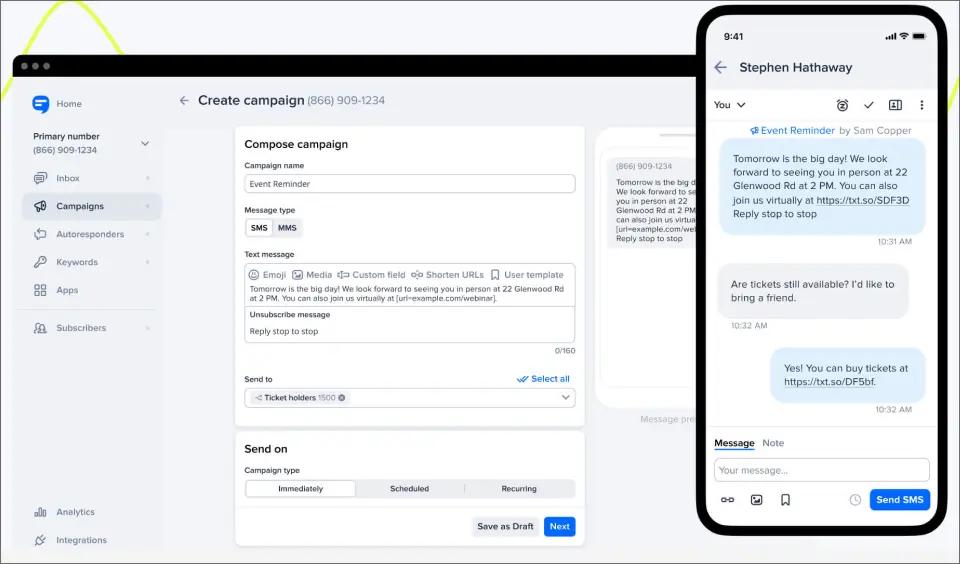
SimpleTexting’s feature set covers mass texting, two-way messaging, MMS, scheduled and recurring texts, drip campaigns, autoresponders, keyword opt-ins, text-to-win, text-to-vote, web signup forms, and an AI Assist tool for message generation. Integrations include Zapier, Mailchimp, and direct API access, with 1,000+ apps available through Zapier connections.
Key Capabilities of SimpleTexting
- Mass texting and SMS broadcasting with scheduled and recurring sends
- Two-way messaging with inbound SMS that does not consume credits
- MMS with photo and GIF attachments
- Keyword opt-ins, text-to-win, text-to-vote, and text-to-join campaigns
- Web signup forms and audience segmentation
- Multi-number support with internal notes and conversation assignment
- Rollover credits where unused monthly credits carry forward
- AI Assist for message drafting and response suggestions
Pros and Cons of SimpleTexting
| Pros | Cons |
| Rollover credits help reduce wasted spend compared to platforms where unused credits expire each billing cycle | Additional user seats cost $20/month each, which can increase costs for larger teams |
| Affordable entry pricing starting at $29/month with 500 credits | Local numbers require an additional $10/month fee plus activation costs |
| Strong list-building tools including keywords, web forms, text-to-win, and text-to-vote campaigns | Overage credits are billed at $0.055 each, which can become expensive at scale |
| Free inbound SMS messages help lower messaging costs | Direct HubSpot and Salesforce integrations are not highlighted in standard plans |
| Supports text-to-landline messaging for businesses using existing phone numbers | Marketing-focused feature set may be more than operational messaging teams need |
| Connects with 1,000+ applications through Zapier and API integrations | Dedicated short codes start at $1,000/month, making them costly for smaller businesses |
| Annual and nonprofit discounts can significantly reduce long-term costs |
SimpleTexting Pricing by Monthly Credits
SimpleTexting uses a usage-based pricing model built around monthly messaging credits. Plans start at $29 per month for 500 credits, with additional costs for phone numbers, extra users, and message overages.
| Monthly Credits | Starting Price* |
| 500 Credits | $29/month |
| 1,000 Credits | $59/month |
| 2,000 Credits | $89/month |
| 3,000 Credits | $119/month |
| 7,500 Credits | $239/month |
| 15,000 Credits | $409/month |
| 25,000 Credits | $559/month |
| 50,000 Credits | $909/month |
| 50,000+ Credits | Contact Sales |
Additional Costs to Consider
- Local number: $10/month per number
- One-time carrier registration: $4 per local number
- Additional user seats: $20/month per user
- Additional phone numbers: $10/month per number
- Message overages: $0.055 per credit beyond the included monthly allotment
- Carrier fees: Additional carrier pass-through fees may apply depending on destination and message type
- Dedicated short code: Starting at $1,000/month
- Incoming MMS messages: Cost 1 credit each
- Custom integrations and advanced automation services: Available with custom pricing
Note: Toll-free numbers do not carry an additional monthly fee, though activation and carrier-related fees may apply.
For detailed cost breakdown, explore this guide on complete overview of Simple Texting pricing.
Is SimpleTexting the Right Salesmsg Alternative for You?
SimpleTexting is a good fit for businesses focused on SMS marketing, audience growth, and rollover credits. Its keyword campaigns, web forms, and promotional tools make it stronger for marketing use cases than Salesmsg.
Consider Simple Texting alternative or another Salesmsg alternative if you need:
- HubSpot or Salesforce-centric sales conversations
- Built-in voice calling alongside SMS
- HIPAA-compliant messaging with a BAA
- Email-to-SMS messaging from existing inboxes
- Simpler pricing without separate credit and number fees
6. Salesmate — Full CRM With Built-In Texting and Calling
Salesmate is a CRM-first platform that combines pipeline management, calling, and messaging in a single system. Unlike SMS-first tools, texting here is part of a broader sales workflow rather than the core focus.
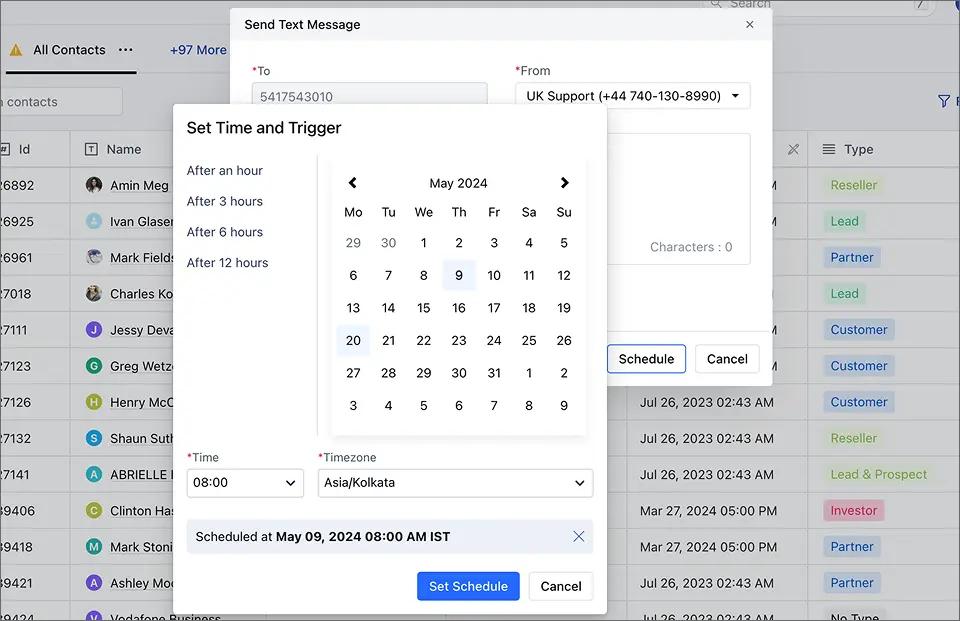
Messaging and calling are available as paid add-ons. Salesmate is best suited for teams that want a single CRM system with built-in communication tools, instead of managing separate tools like a CRM plus a dedicated SMS platform.
Key Capabilities of Salesmate
- AI-powered CRM that centralizes customer data, deals, tasks, and communication in one platform
- Built-in communication tracking across email, meetings, and messaging, including SMS conversations tied directly to CRM records
- No-code automation workflows and sequences to streamline follow-ups, outreach, and revenue operations
- Integrated SMS and messaging support for real-time customer engagement and faster response cycles
- CRM-native AI agents that can update records, route leads, and automate repetitive communication tasks
- Cross-functional support for sales, marketing, and customer success teams with shared visibility and handoff tracking
Pros and Cons of Salesmate
| Pros | Cons |
| Highly intuitive and easy-to-use CRM interface with smooth onboarding | Integration gaps with some external CRMs and third-party tools |
| Strong customer support experience with fast response times | Advanced automation setup can feel complex for new users |
| Effective automation features that improve sales productivity | Feature depth may feel limited for highly advanced or enterprise customization needs |
| Built-in communication tools including email, calling, and SMS within CRM | Reporting and analytics flexibility can be limited for deep custom insights |
| Clean UI with strong usability across sales teams | Some users report learning curve for advanced workflows and configuration |
Salesmate Pricing
| Plan | Monthly Price | Automation Credits |
| Basic | $29/user | 5K/user/month |
| Pro | $49/user | 10K/user/month |
| Business | $79/user | 15K/user/month |
| Enterprise | Custom | Custom |
Additional costs:
- Phone numbers from $1.10/month
- SMS credits are billed separately based on usage
Is Salesmate the Right Salesmsg Alternative for You?
Salesmsg is built for SMS-first sales workflows, while Salesmate is a full CRM with built-in communication tools like email, calling, and messaging. Salesmsg focuses on texting, whereas Salesmate centralizes the entire revenue process in one platform.
Salesmate is a strong fit for teams that want an all-in-one CRM, avoid multiple tools, and prefer a structured, pipeline-driven sales process with integrated communication.
It may not be ideal if you need a dedicated SMS-first tool with deeper texting features, advanced CRM integrations like HubSpot or Salesforce, a lightweight messaging-only solution, or strong omnichannel marketing automation.
7. TextMagic — Pay-as-You-Go SMS With an Email-to-SMS Path
TextMagic has evolved from a standalone SMS tool into an all-in-one business communication platform that bundles SMS, email campaigns, a shared inbox, automation flows, CRM, voice, and WhatsApp/Facebook/Instagram messaging into one dashboard. It offers both pay-as-you-go and monthly subscription pricing.
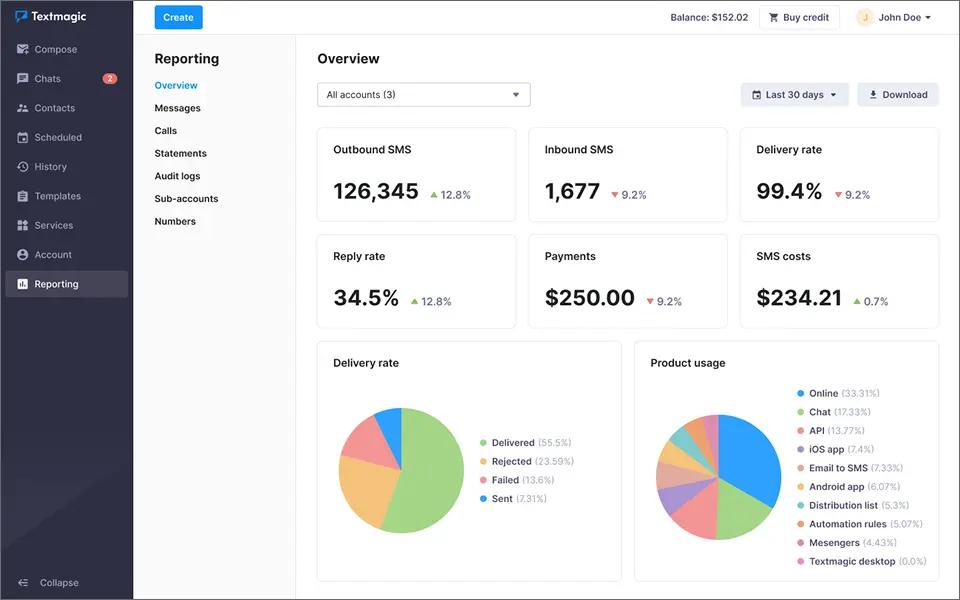
What separates TextMagic from the rest of this list is its explicit email-to-SMS gateway as one of its sending paths. You can compose in Gmail or Outlook and route through TextMagic, which is closer in spirit to TextBolt than to Salesmsg. The trade-off is that email-to-SMS is one feature inside a much larger platform, not the core product. Costs also add up: $10/month per virtual number, $10/month for 10DLC, and the platform charges for failed deliveries.
Key Capabilities of TextMagic
- Email-to-SMS as one of the supported sending paths (Gmail or Outlook routing)
- Virtual numbers $10/month each with the first month free
- Shared inbox, two-way messaging, message templates, contact management
- Unlimited team users at no per-seat fee plus API and Zapier integrations
- Free account with no credit card required
Pros and Cons of TextMagic
| Pros | Cons |
| Strong multi-channel messaging options | Costs can scale quickly at higher message volumes |
| Unlimited users included without per-seat fees | Number and campaign fees add up over time |
| Email-to-SMS supported through email clients | Interface can feel cluttered for simple SMS workflows |
| Easy free signup with no credit card | 10DLC campaign fee adds ongoing cost |
| Email-to-SMS is not a standalone optimized workflow |
TextMagic Pricing
| Number of SMS | Total SMS Bundle Cost | Toll-Free Number Cost | Estimated Total Cost (Incl. Toll-Free) |
| 500 SMS | $24.5 total | $10 | $34.5 |
| 1,000 SMS | ~$49 total | $10 | ~$59 |
| 2,000 SMS | ~$80 total | $10 | ~$90 |
| 5,000 SMS | ~$175 total | $10 | ~$185 |
| 10,000 SMS | ~$350 total | $10 | ~$360 |
For a full breakdown of per-country rates, number fees, and add-on costs, see our detailed TextMagic pricing guide.
Is TextMagic the Right Salesmsg Alternative for You?
TextMagic is a strong fit for teams with unpredictable or seasonal SMS volume that do not want a fixed monthly subscription, and teams that specifically want a multi-channel dashboard with email-to-SMS as one of several sending paths.
Consider another option if you need: a flat monthly plan with predictable cost, a dedicated email-to-SMS workflow without a marketing dashboard layered on top, or CRM-attached contact-record sync. Teams comparing the wider field can also see our roundup of TextMagic alternatives for adjacent PAYG and email-to-SMS options.
How to Choose the Right Salesmsg Alternative
The best Salesmsg alternative depends less on features and more on how your business actually uses messaging. Most teams pick the wrong platform because they start by comparing products instead of identifying their workflow. Find the branch that matches your real workload, read the recommendation, and skip the rest.
Choose TextBolt if…
Your texting is operational rather than CRM-attached, and your team already works in email.
TextBolt is designed for teams that operate through Gmail or Outlook and need a reliable way to send and receive business SMS without adopting a separate platform.
Common use cases include:
- Appointment reminders from clinic front desks
- IT monitoring and uptime alerts piped to on-call phones
- Recruiter scheduling and candidate follow-ups
- Real estate showing confirmations
- Sales rep follow-ups and customer service updates
- Dispatch communications for service teams
- School closure and emergency notices
- Invoice and payment reminders from accounting systems
- Alarm panel and SCADA notifications forwarded to field technicians
- Legal office client updates and court date reminders
- Insurance claim status updates sent from CRM workflows
- Property management maintenance requests and tenant notices
Instead of managing contacts, campaigns, and dashboards, you send texts from email and replies arrive in the same inbox. The email-to-SMS gateway explainer walks through how the inbox-to-text mechanic works in practice. Pricing starts at $29/month for 500 SMS with 1 seat, scaling to $49/month for 1,000 SMS with 10 seats included on TextBolt’s pricing page.
Choose Textline if…
HIPAA compatibility is non-negotiable and the team is operating in a regulated workflow.
Textline is built for:
- Healthcare customer service teams sending patient communications
- Financial services teams sending regulated client notifications
- Regulated-industry support teams that need three-year-plus conversation history
- Teams running NPS and CSAT surveys alongside SMS
Textline’s Pro plan includes 2,000 monthly credits and 5 agents with unlimited conversation history, Salesforce integration, custom user roles, and time-based automations. Per-agent dollar amounts are not published on the live pricing page, so plan on a sales quote to confirm cost.
Choose JustCall if…
You need a CRM-native shared inbox with voice calling, AI coaching, and sales-management tooling on top of SMS.
JustCall is built for:
- Sales teams running structured outbound from HubSpot or Salesforce
- Teams that need power dialer, predictive dialer, or queue callback
- Sales organizations running call coaching and quality assurance programs
- Workflows where AI call scoring and real-time agent assist matter
- Outbound teams sending bulk SMS campaigns alongside voice
At $39-$109/user/month depending on tier, JustCall is the strongest dashboard swap when the team is already running a CRM-attached sales playbook with structured voice workflows.
Choose Heymarket if…
SMS is one channel inside a broader customer service inbox spanning email, iMessage, WhatsApp, and Facebook.
Heymarket is built for:
- Customer service teams triaging questions across three or four channels
- Support organizations that want Apple Messages for Business in the same inbox as SMS
- Workflows where the binding cost is the per-tool license stack, not the SMS volume
- Brands running both transactional SMS and customer service email from one team
At $49/user/month minimum on the Standard plan (2-seat minimum), plus $10/month per 10DLC campaign, Heymarket replaces a multi-tool customer service stack rather than a single SMS license.
Choose SimpleTexting if…
You run opt-in marketing campaigns and want unused credits to roll over instead of resetting every cycle.
SimpleTexting is built for:
- Marketing teams running scheduled SMS broadcasts to opt-in subscribers
- Retail and ecommerce teams using keyword opt-ins, text-to-win, and drip campaigns
- Nonprofits that benefit from the stacked annual plus nonprofit discount
- Teams that want web signup forms and audience-segmentation tools
- Workflows where unused credits should carry forward, not reset at cycle close
At $29/month for 500 credits plus $10/month for a local number, though additional user seats ($20/month each) add up as the team grows.
Choose Salesmate if…
You are buying a CRM and an SMS tool at the same time, and one combined bill beats two synced products.
Salesmate is built for:
- Sales teams without an existing CRM that want one product for the pipeline plus SMS
- Small startups bootstrapping their sales stack on a single license
- Teams that prefer a single vendor for CRM, calling, and texting
- Workflows where Sandy AI and sequences matter more than dashboard polish
- SMBs replacing a HubSpot or Pipedrive plus Salesmsg stack with one product
At $29-$79/user/month, depending on tier, plus add-on SMS credits and phone numbers, Salesmate is the cheapest entry tier on this list but assumes the team is buying the CRM and the texting together.
Choose TextMagic if…
Your volume swings by 5x across the calendar year, and a flat subscription would be either oversized or oversubscribed at any given month.
TextMagic is built for:
- Seasonal ecommerce shops with quiet stretches and Q4 spikes
- Marketing agencies sending on behalf of multiple client brands
- Teams that want email-to-SMS as one of several sending paths
- Workflows with unlimited team users included at no per-seat fee
- Ops teams that prefer usage-based billing over fixed subscriptions
At $0.049/segment standard rate, TextMagic is the pay-as-you-go alternative that does not punish low months, though virtual numbers ($10/month) and 10DLC campaigns ($10/month) stack at scale. Teams weighing the email-to-SMS half against a flat-rate competitor can see the TextMagic vs Textbolt breakdown before signing.
Why TextBolt is the Right Salesmsg Alternative for Operational Texting
Side-by-side against Salesmsg on the dimensions that directly impact cost, setup time, and day-to-day adoption:
| Feature | TextBolt | Salesmsg |
|---|---|---|
| Team members included | Up to 10 on Standard plan | 1 user; $10/mo per additional chat seat |
| Pricing model | Flat monthly subscription, no per-seat fees | Subscription + per-seat + overage credits |
| Starting cost | $29/mo (500 SMS) | $25/mo (500 credits, 4.0¢ per additional credit) |
| Credit expiration | Top-up credits never expire | Unused plan credits reset monthly |
| 10DLC registration | Handled during onboarding, active in 24–48 hours | 1–2 business days, customer-managed |
| Workflow style | Send from Gmail or Outlook, no new dashboard | Requires learning the Salesmsg dashboard and app |
| Message handling | Replies return to the sender’s own email inbox | Replies managed inside Salesmsg shared inbox |
| Primary use case | Operational SMS from email, scripts, and monitoring tools | CRM-based sales and marketing communication |
Year-One Cost Example (4-person Recruiting Team Sending 1,000 SMS/month)
TextBolt Standard
$49 × 12 + $45 toll-free= $633/year
Annual billing brings this down to $515.40/year with 20% off and up to 10 team members included at no extra seat cost.
Salesmsg Equivalent
$49 Professional plan × 12 + (3 extra Chat Seats × $10 × 12)= $588 + $360
= $948/year (excluding 3.5¢ per additional credit, 10DLC fees, and other pass-through charges))
Difference: ~$315/year lower with TextBolt
Why TextBolt Maintains Cost Stability
- Top-up credits never expire
- Usage only activates after monthly allocation is consumed
- No forced plan upgrades during peak messaging periods
- Predictable billing without seasonal overages
Choose the Salesmsg Alternative That Fits How You Actually Communicate
Not every messaging platform is built for the same job. Some tools are designed for CRM-attached shared inboxes, while others are optimized for operational texting, customer service across channels, developer APIs, or marketing campaigns.
Before choosing a Salesmsg alternative, it is important to identify what your team actually uses day-to-day. The right fit is usually the platform that aligns with your existing workflow, not the one with the most features. That is what ultimately improves adoption, reduces cost leakage, and minimizes operational friction.
If your messaging is primarily operational and tied to email-based workflows such as alerts, reminders, and customer updates, TextBolt offers a simpler, email-first approach to business texting without the overhead of per-seat licenses or dashboard rollouts.
Send SMS Alerts Without Adding Another Tool to Your Stack
TextBolt turns your existing email workflow into a dependable SMS channel, helping teams send updates faster, reduce coordination effort, and keep communication consistent without switching platforms.
Frequently Asked Questions
Why do TextBolt credits never expire while Salesmsg credits reset monthly?
TextBolt’s top-up credit packs sit in your account indefinitely and only draw down after your monthly plan credits are spent. A quiet month does not waste budget. Salesmsg resets unused plan credits at the end of every billing cycle, so teams with seasonal or fluctuating volume end up paying for messages they never send.
Does switching from Salesmsg to another platform require new 10DLC registration?
Usually yes. 10DLC registration ties to the sending platform and the campaign use case, so moving providers typically means registering a new brand and campaign with the carriers. Textbolt handles 10DLC as part of onboarding for new business senders, with a 24-48 hour carrier approval window.
How long does it actually take to switch from Salesmsg to TextBolt?
Plan for two phases. The first is provisioning: 30 minutes to spin up a TextBolt account, configure the inbound gateway address, and send the first test SMS from Gmail or Outlook. The second is 10DLC carrier registration on TextBolt’s side, which runs 24-48 business hours. Most teams run both platforms in parallel for a week to validate delivery before cutting over, which keeps the risk close to zero.
Which Salesmsg alternative is cheapest for a small team under 5 users?
Yes. TextBolt is designed as an email-to-SMS solution for organizations that previously relied on carrier email-to-text gateways. Instead of sending messages through carrier-specific domains, users send messages through TextBolt’s email-to-SMS infrastructure while continuing to work from their existing email workflow.
What about A2P 10DLC and Salesmsg’s brand and campaign registration, do those carry over?
No. A2P 10DLC brand and campaign records are tied to the sending provider’s TCR (The Campaign Registry) submission. When you move to a new platform, the new provider files a new brand and a new campaign on your behalf, and the receiving carriers approve or reject independently of your Salesmsg history. TextBolt files both during onboarding and the typical clearance window is 24-48 hours.