
- Method 1 — Email-to-Text Gateway TextBolt (Recommended, 10DLC-Registered)
- Carrier Email-to-Text Gateway Status in 2026
- Method 2: Outlook Add-ins and Plugins
- How Do the Outlook SMS Methods Compare?
- Can Outlook Lite Send SMS?
- How Do I Text From a Windows PC With Phone Link?
- Why Send Text Messages From Outlook?
- Why Do I Need to Know the Recipient’s Carrier?
- Where and When Does Texting From Outlook Work?
- Business Use Cases for Outlook SMS
- Ready to Send Reliable SMS From Outlook?
- Frequently Asked Questions
Send SMS from Outlook Without Plugins
How to Send SMS From Outlook: 2 Methods for Business (2026 Guide)

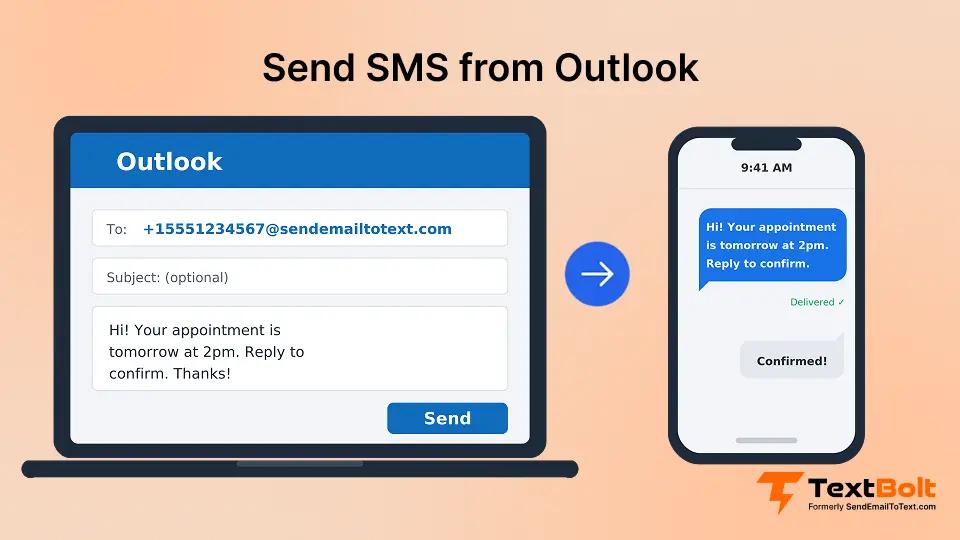
To send a text message from Microsoft Outlook, open a new email, type the recipient’s phone number in the To field, leave the subject blank, write your message, and click Send. Outlook cannot text on its own, so a gateway domain after the number turns the email into an SMS.
That gateway domain is the only real decision, and there are two kinds. The free option is a carrier address such as @vtext.com, which worked for years but is now shutting down and was never 10DLC-registered for business use.
The business option is TextBolt’s email to text service. Address the email to +11234567890@sendemailtotext.com and it arrives as an SMS from your verified business number, on every carrier, with no carrier lookup and no plugin. It works in Outlook desktop, Outlook on the web, and any Office 365 mailbox.
This guide covers how to text from Outlook step by step: the free method first, then the business option. Along the way you will see how Outlook to SMS works, why messages fail, which Outlook versions and Office 365 accounts can use it, and which tool to pick.
This guide gives you the plain, free method first, then the reliable option for business. You will learn what texting from Outlook is, how to do it step by step, why messages sometimes fail, where it works, and which tool to pick. The free method uses a carrier email-to-text address, but those gateways are shutting down. The business method uses a 10DLC-registered service like TextBolt, which sends from a verified business number and works on every carrier with no carrier lookup.
Method 1 — Email-to-Text Gateway TextBolt (Recommended, 10DLC-Registered)
An email-to-text gateway turns an email into an SMS. The method works the same in Outlook desktop, Outlook on the web, the Outlook mobile app and any Microsoft 365 or Office 365 mailbox. The only decision is which gateway domain goes after the number.
How to Send SMS From Outlook 365 (Step by Step)
- Open Outlook and click New Email.
- In the To field, type the recipient’s number in this form: +1
1234567890@sendemailtotext.com. - Leave the subject line blank.
- Type your message and click Send.
The message arrives as an SMS from your verified business number, and replies thread back to your Outlook inbox so your whole team can see them.
TextBolt works on every carrier with no carrier lookup, and it is 10DLC-registered, which U.S. carriers require for business texting. There is no Outlook SMS plugin to install, the Outlook SMS integration is the email address itself.
Worked example: To text the number (234) 567-8908, address your email to +12345678908@sendemailtotext.com, leave the subject blank, type your message, and click Send.
What Does the Recipient Actually Receive?
Through this gateway, the subject and body both become the text, so a filled-in subject is attached to the front of the message and eats into the roughly 155-character limit. That is why the subject stays blank. Longer messages are split into parts or truncated, so staying under 155 leaves headroom.
Can I Receive Text Replies in Outlook?
Yes. When a recipient replies to a TextBolt text, the reply arrives in the sender’s Outlook inbox as an email, threaded with the original message where possible. You read and answer text messages in Outlook the same way you handle email, and your answer goes back out as another SMS.
This is what makes Outlook to text message workflows two-way. If you mainly need inbound texts landing in a shared inbox, the text to email service page explains how incoming SMS reaches Outlook or Office 365.
Carrier Email-to-Text Gateway Status in 2026
These free carrier gateways are unreliable, and most are shutting down. Some guides still show tmomail.net as a working example, so here is each carrier’s status with its date, paired with the single address that replaces all of them.
| Carrier | Gateway domain(s) | Status | Effective / scheduled date | Replacement address | Official source |
|---|---|---|---|---|---|
| AT&T | [PhoneNumber]@txt.att.net / [PhoneNumber]@mms.att.net | Shut down | June 17, 2025 | +1[PhoneNumber]@sendemailtotext.com (migrate from AT&T email-to-text) | Official AT&T support page |
| T-Mobile | [PhoneNumber]@tmomail.net | Stopped delivering | Late 2024 | +1[PhoneNumber]@sendemailtotext.com (migrate from T-Mobile email-to-text) | No public notice from T-Mobile |
| Verizon | [PhoneNumber]@vtext.com / [PhoneNumber]@vzwpix.com | Intermittent; sunsetting | By March 31, 2027 | +1[PhoneNumber]@sendemailtotext.com (migrate from Verizon email-to-text) | Verizon support notice |
| Cricket | [PhoneNumber]@sms.cricketwireless.net / [PhoneNumber]@mms.cricketwireless.net | Reliability not guaranteed | Not dated | +1[PhoneNumber]@sendemailtotext.com | No public notice from Cricket |
| Sprint | [PhoneNumber]@messaging.sprintpcs.com / [PhoneNumber]@pm.sprint.com | Discontinued (merged into T-Mobile) | Not dated | +1[PhoneNumber]@sendemailtotext.com | No public notice |
Why Did the Carriers Shut the Gateways Down?
The free carrier gateways were built in the early days of texting, when almost nobody sent email to a phone. They were never designed for the volume or the abuse that followed. Four problems pushed the carriers to retire them.
- Spam and phishing: Anyone who knew a phone number could push a text through the gateway for free, so scammers used them for bulk fraud and phishing links.
- No sender verification: The gateway accepted mail from any address. Carriers could not tell a legitimate business from a spoofed sender, so they could not block bad actors without blocking everyone.
- Rising abuse and infrastructure costs: Filtering millions of unwanted gateway messages cost money and earned nothing, which is why the gateways became unreliable long before they were switched off.
- The move to regulated A2P messaging: The industry replaced open gateways with A2P messaging (application-to-person), where every business sender is registered through 10DLC and tied to a verified identity.
The result is that the free method now fails for reasons no user can fix.
How Do I Move an Existing Gateway Address to TextBolt?
For a person sending from Outlook, you only change the address. Update the contact, or type the new format in the To field.
For an Outlook rule or a system that sends alerts, first add its sending address as an approved sender in your TextBolt account. Then replace the old carrier address, such as [PhoneNumber]@vtext.com, with +1[PhoneNumber]@sendemailtotext.com. Every other setting stays the same.
The swap works the same way for every carrier. A Cricket address such as [PhoneNumber]@sms.cricketwireless.net and an AT&T address such as [PhoneNumber]@txt.att.net both become +1[PhoneNumber]@sendemailtotext.com.
Do I Still Need to Know the Recipient’s Carrier?
No. With carrier gateways, you had to know whether someone used AT&T, Verizon or T-Mobile, and a wrong guess meant the text never arrived. TextBolt uses one address format for every US and Canadian carrier, so you no longer need to look anything up.
Carrier Email-to-SMS Gateways Were Discontinued
Major carriers retired their email-to-text services, making gateway-based texting unreliable. TextBolt replaced outdated gateways with carrier-approved SMS you can send directly from Outlook.
Method 2: Outlook Add-ins and Plugins
Add-ins put an SMS button or panel inside Outlook and send the message through the provider’s own service. Most need an install and a separate account. In managed Microsoft 365 setups, they usually need IT approval too. Here are the main options, described the way each vendor describes itself.
| Tool | How it works in Outlook | Classic / New Outlook | Availability |
|---|---|---|---|
| ClickSend | The plugin adds a “Send SMS” button to Outlook. Messages can also go to mobile-number@sms.clicksend.com. Includes reply routing and message scheduling. Sells prepaid SMS and MMS, with email-to-SMS as one feature among several. | Yes, depending on the version | Global, including the US |
| touchSMS | Real-time SMS chat inside the Outlook toolbar. Setup uses an API key from your touchSMS account, and replies land in the SMS Chat panel. Listed on Microsoft’s marketplace. | Yes | Australia and New Zealand |
| Edgility SMS | Threaded SMS conversations grouped by recipient, alongside your email. Listed on Microsoft’s marketplace. | Check the listing | Australia and New Zealand |
| CompleteSMS | Add-in with templates, signatures, scheduling and a character count. | Supports both | Check the listing |
For a US team, the availability column matters as much as the feature list. Check the listing before you request an install.
Classic vs New Outlook — Does It Matter?
Yes, for plugins. Add-ins behave differently depending on which Outlook you use. Classic Outlook uses older COM add-ins. New Outlook and Outlook on the web use Web add-ins. Some plugins only support one or the other.
Because TextBolt uses the email-to-text method, it needs no add-in at all. It works the same in Classic Outlook (including Outlook 2016, 2019, and 2021), New Outlook, Outlook on the web, Outlook for Mac, and the mobile app on iPhone and Android.
How Do the Outlook SMS Methods Compare?
Both methods get a text out of Outlook. The differences show up in setup, replies and which phone numbers you can reach. Here’s how TextBolt’s email-to-text gateway compares with the main Outlook add-ins.
| Feature | TextBolt (email-to-text gateway) | ClickSend Outlook plugin | touchSMS / Edgility SMS add-ins |
|---|---|---|---|
| IT approval needed | No, nothing to install | Usually, in managed Microsoft 365 setups | Usually, in managed Microsoft 365 setups |
| Works in every Outlook version | Yes, including mobile | Depends on the version | Check each listing |
| Replies | Thread back to the sender’s Outlook inbox | Reply routing | Threaded chat in the Outlook panel |
| Registered business sender | Yes, registration filed for you at signup | Check with ClickSend | Check with each add-in |
| Delivery status | Shown in the SMS Activity / History dashboard | In the ClickSend dashboard | Check with each add-in |
| Texts US and Canadian numbers | Yes | Yes | No, Australia and New Zealand only |
For a US or Canadian team that wants texting to work in every Outlook version without an install, TextBolt email-to-text gateway is the simpler route.
Can Outlook Lite Send SMS?
Outlook Lite is a separate, lightweight Outlook app. In some regions it supports sending and reading SMS directly inside the app on Android. This is different from mainstream desktop and web Outlook, which cannot send SMS on their own.
If you only need personal texts on a phone, Outlook Lite may help where it is available. For business texting that meets 10DLC rules, use TextBolt with the number@sendemailtotext.com address instead.
How Do I Text From a Windows PC With Phone Link?
Windows Phone Link lets you text from a Windows PC by mirroring your own phone’s messages. It uses your personal number, not a shared business number, and your phone must be nearby and connected.
- On your Windows PC, open the Phone Link app.
- Pair it with your phone using the on-screen QR code.
- Open Messages inside Phone Link.
- Start a new message, type the number, write your text, and send.
Phone Link is fine for personal texts. It is not a business texting tool, because it relies on your personal phone being on and connected, and the messages are tied to one person’s number.
Why Send Text Messages From Outlook?
Now that you know how to send texts from Outlook, here is why the approach pays off for business users:
- Speed. You are already at your keyboard, so you do not break your workflow to pick up your phone.
- A record. Texts sent this way live in your email system with timestamps, which helps compliance-sensitive teams.
- Team access. When texts come through a shared business number, more than one team member can see and answer them.
- Replies come back as email. When someone replies to a text you sent from Outlook, the reply lands in your Outlook inbox as an email, so you answer it from the inbox you already use and get the history of conversations.
- High visibility. Texts get read within minutes, far faster than a typical email, so a time-sensitive message from Outlook lands where people look first.
The challenge is finding a reliable method that delivers these benefits without the headaches of failed messages and carrier restrictions.
Why Do I Need to Know the Recipient’s Carrier?
With the old free method, you did. You had to know whether the person used AT&T, Verizon, or T-Mobile so you could pick the right gateway address. Pick the wrong one and the text never arrives.
With +1number@sendemailtotext.com you never look up a carrier. TextBolt routes to the right network for you, so email to SMS from Outlook works on every carrier without knowing the carrier at all.
Why Is My Outlook SMS Not Working?
If an Outlook SMS is not working, read the bounce first. A mailer-daemon or address-not-found bounce almost always means a retired carrier gateway. A reply saying the provider is not supported means the carrier no longer accepts that route. Switching the address to +1[phonenumber]@sendemailtotext.com fixes both.
Other causes are a filled-in subject line, a message over 155 characters, or a link that carrier filters flagged. The guide to why messages are not delivering walks through each fix.
Where and When Does Texting From Outlook Work?
- Any device. The email-to-text method works anywhere you can send email — Outlook desktop, Outlook on the web, and the Outlook mobile app.
- Any Outlook version. TextBolt works in Classic Outlook, New Outlook, and mobile, because it is not an add-in.
- United States business use. Business texting in the U.S. legally needs 10DLC registration. Free gateways do not have it; TextBolt does.
- When gateways are live. Free carrier gateways only work while that carrier still runs them, and most no longer do (see the table). TextBolt does not depend on carrier gateways at all.
Business Use Cases for Outlook SMS
Understanding when Office 365 SMS messaging makes sense helps you use it well. These are the most common reasons teams send text messages from Office 365 and Outlook.
1. Appointment Reminders
Medical practices, salons, auto shops, and service businesses can send appointment reminders via email to reduce no-shows. A reminder text the day before gets read faster than an email, and a reply of “confirm” or “reschedule” comes straight back to the inbox.
2. Payment and Invoice Notifications
When an invoice is due or a payment processes, a text notification gets attention faster than email. Financial services and B2B companies use Outlook SMS for payment reminders that actually get read.
3. IT and System Alerts
System administrators need critical alerts that break through the noise. When a server goes down at 3 AM, email sits unread while SMS wakes up the on-call engineer.
4. Customer Service Updates
Quick updates about order status, delivery windows, or service completion reach customers immediately through SMS. This improves customer satisfaction and reduces “where’s my order” calls.
5. Internal Team Communication
Shift reminders, urgent announcements, and time-sensitive updates reach distributed teams faster via text than email. Retail, healthcare, and field service teams particularly benefit.
Ready to Send Reliable SMS From Outlook?
Sending SMS from Outlook comes down to one choice: which address you put in the To field. The free carrier gateways still exist on paper, but AT&T and T-Mobile have shut theirs, Verizon is intermittent, and none was ever registered for business texting.
TextBolt replaces that guesswork with a single address. Send to +1[phonenumber]@sendemailtotext.com from Outlook desktop, Outlook on the web, Outlook for Mac, or any Office 365 mailbox, and the message arrives from your 10DLC-registered business number on every carrier, with replies back in your inbox.
There is nothing to install, no carrier to look up, and no separate dashboard to learn. Plans start at $29 per month, see TextBolt pricing for what each includes, or start with the 7-day trial and 10 credits to test it from your own inbox.
Send Your Text From Outlook
TextBolt turns any Outlook email into an SMS. No plugin, no carrier lookup, no separate login.
Frequently Asked Questions
Can Outlook send SMS on its own?
No. Standard desktop and web Outlook cannot send a text message on their own. You address an email to a phone number using an email-to-text address instead. For business, use TextBolt: +1number@sendemailtotext.com. Outlook Lite supports SMS natively in some regions; mainstream Outlook does not.
How long does TextBolt take to set up?
Account setup takes approx 30 minutes. TextBolt then handles 10DLC registration, which takes up to 48 hours. Once approved, you send from Outlook right away with no plugin to install.
My text from Outlook did not arrive — why?
The most common reasons are: you used a carrier gateway that has shut down, the message was over 155 characters, the subject line was not blank, or the message was flagged as spam. Free carrier gateways are being retired, which is the biggest cause today. Switching to a 10DLC service like TextBolt fixes delivery.
How do I text a group from Outlook?
Add several +1[number]@sendemailtotext.com addresses in the To, CC, or BCC field, or use an Outlook distribution list. Each recipient gets their own SMS. Carrier gateways do not handle this reliably and are not 10DLC-registered for business use.
What happens when someone replies to a text I sent from Outlook?
With TextBolt, the reply comes back into your Outlook inbox as an email. You reply from your inbox, and TextBolt sends it on as another SMS.
Is texting from Outlook legal for business?
U.S. business SMS legally requires 10DLC registration. Free carrier gateways are not 10DLC and are shutting down, so they are not a compliant business option.
Does the free carrier gateway method still work in 2026?
Mostly not. AT&T shut down on 17 June 2025, T-Mobile stopped delivering at the end of December 2024, and Verizon is intermittent with a full shutdown set for 31 March 2027. Use number@sendemailtotext.com with TextBolt instead.
What is the email-to-text address to use in 2026?
Use number@sendemailtotext.com. It works on every carrier, needs no carrier lookup, and is 10DLC-registered, which business texting requires.
Can I text from Outlook on the web or mobile?
Yes, if you use the email-to-text method. Plugins usually only work on Outlook desktop, but TextBolt works on Outlook web, mobile, and desktop because it is just an email address.
Why are my carrier gateway texts failing now?
Because the carriers shut the gateways down. AT&T, T-Mobile, and Sprint gateways are dead or merged, and Verizon’s is intermittent. Migrate to TextBolt or use the carrier-specific migration links above.
Is Windows Phone Link good for business texting?
No. Phone Link mirrors your personal phone and uses your personal number, and the phone must be nearby and connected. It is fine for personal texts but not for shared business texting.
Does the method work in Classic and New Outlook?
The email-to-text method works in both, plus Outlook on the web and mobile, because it needs no add-in. Plugins may only support one version, so check before you install.
Do I need to know the recipient’s carrier?
With the old free method, yes. With number@sendemailtotext.com you do not — it works on every carrier with no lookup.
Can you text on Outlook without a plugin?
Yes. Texting on Outlook does not need a plugin. You address a normal email to number@sendemailtotext.com and Outlook sends it as usual. TextBolt converts it to SMS and returns replies to your inbox. Plugins are optional, not required.
What is the character limit for an SMS?
A standard SMS is usually capped at 155 characters. Longer messages get split into multiple parts or truncated. If you need to send an image, use MMS instead.
Can I schedule a text from Outlook?
Yes. Use Outlook’s Delay Delivery (Classic) or Schedule Send (New Outlook and web) on an email addressed to +1number@sendemailtotext.com. Outlook holds the email until the chosen time, then TextBolt sends it as an SMS. Useful for appointment reminders and shift notices.