
- Why Do Businesses Consider Alternatives to Textedly?
- What to Look for in a Textedly Alternative
- How We Select These Alternatives to Textedly Software
- Top 7 Textedly Alternatives: Comparisons at Glance
- The 7 Best Textedly Alternatives for 2026
- 1. TextBolt — Best for Affordable Email-Based Business Texting
- 2. SimpleTexting — SMS Marketing and Texting Platform
- 3. EZ Texting — SMB SMS Platform with AI-Powered Messaging
- 4. SlickText — Loyalty programs and keyword campaigns
- 5. TextMagic — Bulk SMS and Business Texting Hybrid
- 6. Sinch Engage — Multi-channel for mid-market
- 7. ClickSend — Pay-As-You-Go Bulk SMS With API
- How to Choose the Right Textedly Alternative
- TextBolt vs. Textedly: Comparison at Glance
- Choose the Textedly Alternative That Fits How You Actually Text
- Frequently Asked Questions
Turn Your Inbox Into a Business Texting Platform
7 Best Textedly Alternatives (Pricing + Features Compared)


Textedly is a text message marketing platform used for sending SMS campaigns to opted-in contacts. It supports keyword-based list building, scheduled broadcasts, segmented messaging, and basic campaign tracking, making it suitable for marketing-focused use cases.
Many businesses now use SMS beyond marketing for alerts, reminders, hiring updates, and system notifications. In these cases, a campaign-first tool may not fully match operational needs.
As SMS use expands, teams look for best alternatives to Textedly for SMS marketing that better fit different workflows, including marketing platforms, developer APIs, and operational tools. Some also explore inbox-based SMS workflows through email-to-SMS solution, with platforms like TextBolt often considered for operational messaging setups.
We reviewed multiple platforms and selected seven tools commonly featured in Textedly alternatives comparison searches. Each alternative is evaluated based on use case fit, pricing structure, core features, ease of setup, and messaging capabilities.
By the end of this guide, you will clearly understand which messaging platform fits your specific workflow, whether it is marketing-driven, system-based, or operational.
Why Do Businesses Consider Alternatives to Textedly?
Textedly is primarily designed for campaign-based SMS marketing, where businesses send broadcasts to opted-in contact lists. It works well for basic marketing use cases, but limitations become more noticeable as messaging shifts toward operational, automated, or high-volume communication.
As a result, many businesses begin exploring Textedly alternative SMS platforms that better align with cost structure, workflow requirements, and messaging flexibility.
1. Pricing and Cost Predictability Concerns
Pricing can become less predictable as usage grows, especially when message volumes increase or additional features are added on top of the base plan. Many teams also find that per-user charges, telecom surcharges, and overage costs gradually raise the total monthly spend beyond initial expectations.
As a result, budgeting becomes more difficult for businesses with fluctuating or high-volume messaging needs. A closer look at Textedly pricing shows how these additional costs can affect total monthly spend as usage increases.
2. Onboarding and Trial Limitations
Although the platform is generally easy to get started with, some users experience friction during onboarding, particularly around verification, authentication, and initial configuration steps. In addition, limited trial access and the absence of a full sandbox environment can make it harder for teams to properly evaluate the platform before committing to a paid plan.
3. Limitations With Message Management
Message handling can feel restrictive for teams with more advanced communication needs. Users report challenges with consistent message delivery, and limited personalization options. Additional limitations include the lack of message rollover, difficulty organizing or deleting message history, and limited flexibility in customizing or automating repetitive messages.
4. Operational and Account Management Friction
Beyond core messaging features, some users report friction in account management workflows. This includes difficulties with subscription cancellation in certain cases, limited refund flexibility when expectations are not met, and inconsistent support responsiveness depending on the issue.
These factors can create operational delays, especially for time-sensitive messaging workflows. Several of these themes also appear throughout recent Textedly reviews from businesses using the platform in day-to-day operations.
5. Scheduling and Workflow Constraints
Scheduling capabilities are often seen as limited for teams that require precise timing or more advanced campaign control. The platform is optimized for standard broadcast campaigns, which can restrict flexibility for event-driven or logic-based messaging workflows that require tighter control over delivery conditions.
6. Overall Platform Positioning Limitation
Overall, Textedly is built around marketing-focused SMS campaigns rather than broader operational messaging use cases. Teams using SMS for alerts, internal coordination, system notifications, or workflow automation often find that they need additional tools or integrations to fully support those requirements.
Once the limitations are clear, the next step is evaluating what actually makes a better fit. Not all SMS platforms solve the same problem, so choosing the right alternative depends on how messaging is used inside the business.
What to Look for in a Textedly Alternative
Six criteria carry the most weight when comparing options. Scoring each platform against these factors helps avoid switching into another system with the same limitations.
1. Pricing Model
Pricing structure directly impacts long-term cost efficiency. Flat monthly plans offer predictable billing, while pay-as-you-go (PAYG) models are better suited for irregular or seasonal messaging patterns. Prepaid credit systems sit between the two, giving flexibility for teams that can forecast usage over short cycles.
Choosing the wrong pricing model often has a greater financial impact than choosing a slightly less feature-rich platform, especially as messaging volume scales over time.
2. Workflow Fit
Workflow alignment determines how naturally a tool integrates into daily operations. Most platforms fall into three categories: dashboard-based marketing tools, API-first developer platforms, or email-to-SMS systems that work directly through existing inbox workflows.
When the workflow does not match how teams actually operate, hidden costs emerge through training, adoption friction, and operational inefficiencies. Even a low-cost tool becomes expensive if it forces teams to change how they already work.
3. Toll-Free and 10DLC Cost Transparency
Carrier-related costs are often overlooked during evaluation but can significantly impact total spend. Toll-free numbers typically range from $3.60 to $25 per month depending on the provider, while 10DLC registration fees generally fall between $4 and $44 per month based on campaign type and compliance requirements.
In many cases, these costs exceed base subscription pricing. As a result, understanding the full carrier cost structure upfront is essential before switching platforms.
4. Setup Time and Deployment Speed
Time to deployment varies widely across SMS platforms. Email-to-SMS solutions can be operational in as little as 30 minutes, API-based platforms may require a few hours, while more complex or enterprise systems can take one to two days or longer.
Setup time becomes particularly important for non-technical teams that need immediate deployment without engineering support or long onboarding cycles.
5. Two-Way Reply Routing
Reply routing plays a critical role in communication reliability. Depending on the platform, incoming SMS replies may be delivered to a dashboard, a separate messaging inbox, or directly into an email thread.
When replies are not visible within the team’s primary workflow, messages are often missed or delayed. This can create the perception of system failure when the real issue is simply poor reply discoverability.
How We Select These Alternatives to Textedly Software
This comparison is based on evaluation across multiple SMS platforms using publicly available product information, pricing documentation, and real-world usage patterns observed across SMB and mid-market messaging workflows. The goal is to focus only on tools that genuinely compete in Textedly replacement scenarios, not generic SMS providers.
We analyzed platforms across several core evaluation areas that directly impact cost, usability, and long-term scalability.
- Pricing structure and plan flexibility
- Per-message economics and total cost efficiency
- 10DLC registration and carrier compliance costs
- Setup complexity and onboarding speed
- Workflow alignment across marketing, API, and operational use cases
From this broader pool, seven platforms were shortlisted based on three key filters: consistent relevance in Textedly alternative searches, transparent and verifiable pricing as of 2026, and clear differentiation in either workflow design or target audience.
To maintain accuracy, all pricing and feature details were cross-checked against official vendor documentation and publicly available sources. Only verifiable information has been included in this comparison.
Since SMS pricing, carrier fees, and compliance requirements change frequently, final costs should always be confirmed directly on the provider’s official website before making a decision.
Top 7 Textedly Alternatives: Comparisons at Glance
The table below provides a quick comparison of how each Textedly alternative is positioned in terms of pricing, messaging capacity, and ideal use case. While most platforms appear similar at a surface level, their real differences show up in workflow design, carrier costs, and operational flexibility.
| Platform | Starting Price | SMS Included | Toll-Free | Best For |
| TextBolt | $29/mo | 500 | $45/yr flat | Email-to-SMS, operational texting |
| SimpleTexting | $29/mo | 500 | $10/mo or $120/year | SMS marketing campaigns |
| EZ Texting | $25/mo | 500 | Not publicly listed | SMB marketing, AI-assisted messaging |
| SlickText | $29/mo | 500 | Not publicly listed | Loyalty programs and keyword campaigns |
| TextMagic | $24.50/mo | 500 | $10/mo or $120/year | Hybrid bulk SMS and business texting |
| Sinch Engage | $99/mo ( 2 Users) | 3,000 | $25/mo | Multi-channel messaging (SMS, WhatsApp, RCS) |
| ClickSend | Pay-as-you-go | Usage-based | From $3.60/mo | API-first, transactional messaging |
While headline pricing appears similar across platforms, it rarely reflects the actual cost of ownership. The real difference shows up in carrier-related charges, especially toll-free numbers and 10DLC registration fees, which are often required for compliant messaging.
In practice, these hidden costs can significantly change the annual spend. For example, a platform priced at around $24.50 per month can exceed $700+ annually once toll-free rentals, 10DLC fees, and occasional overages are included.
This is why evaluation should not stop at monthly pricing alone. The more accurate comparison comes from combining base plan cost, carrier fees, and expected message volume into a single total cost view before choosing a platform.
The 7 Best Textedly Alternatives for 2026
1. TextBolt — Best for Affordable Email-Based Business Texting
TextBolt is an email-to-SMS gateway designed for operational communication, where messages are sent directly from existing email tools like Gmail or Outlook and delivered as SMS through a verified business number.

Instead of using dashboards, campaign builders, or contact list systems, users simply send an email to a phone-number-based address such as +1XXXXXXXXXX@sendemailtotext.com. The message is delivered as an SMS, and any reply from the recipient is returned as a threaded email response to the original sender. This keeps all communication inside the inbox without introducing new tools or workflows.
This makes TextBolt a strong fit when texting is operational rather than promotional. Common use cases include appointment confirmations from clinic front desks, recruiter scheduling, real estate showing confirmations, sales follow-ups, and IT alerting systems for on-call teams. If a team already works inside email, TextBolt adds SMS functionality without changing behavior or requiring retraining.
Key Capabilities of TextBolt
- Email-native sending directly from Gmail, Outlook, Thunderbird, Apple Mail, and any SMTP-compatible email client without additional software
- Two-way message threading where SMS replies return as email responses in the same conversation
- CI/CD pipeline failure alerts from GitHub Actions, GitLab CI, and Jenkins to catch broken builds before they hit production E-commerce order alerts from Shopify, WooCommerce, and Magento without custom development
- Workflow automation via Zapier connects TextBolt to thousands of apps for triggered SMS without writing code
- A2P 10DLC verified messaging across major U.S. carriers including AT&T, T-Mobile, and Verizon
- Canada carrier support including Rogers, Bell, Telus, and Fido
- Fast onboarding with setup completed in approximately 30 minutes and no developer required
- Credit-based system with non-expiring top-ups that activate only after monthly plan usage is exhausted
- Flexible top-up sizing based on actual team usage rather than fixed overage tiers
- Multi-user access (Standard plan and above): up to 10 user accounts (1 admin + 9 users) at no per-seat cost.
Pros and Cons of Using TextBolt
| Pros | Cons |
| Predictable monthly pricing with no hidden overages | No MMS support |
| No dashboard or training required for staff | No A/B testing or advanced campaign automation |
| Fastest setup in 15 minutes among compared platforms | |
| Lower toll-free costs compared to most competitors |
TextBolt Pricing
| Plan | Monthly Price | SMS Included |
| Basic | $29 | 500 |
| Standard | $49 | 1,000 |
| Professional | $99 | 2,500 |
See the TextBolt pricing plans for annual discounts and enterprise options.
Is TextBolt the Right Choice for You?
TextBolt is built for businesses that use texting to support operations rather than run marketing campaigns. It’s particularly well-suited for healthcare clinics, recruiting teams, sales organizations, IT operations, dispatch services, alarm monitoring centers, property management companies, and any team that already lives by email but needs a faster way to reach people by text.
Because messages are sent directly from your existing email workflow, teams can start texting without learning a new platform, importing contact lists, or managing another dashboard.
TextBolt is a great fit if you need to:
- Send appointment reminders, scheduling updates, and follow-ups
- Deliver alerts, notifications, and operational communications
- Enable two-way texting directly from email
- Avoid complex SMS marketing software and contact databases
- Keep messaging costs predictable with flat monthly pricing
TextBolt may not be the best fit if you need:
- Subscriber keyword opt-in programs
- Advanced marketing automation workflows
- A/B testing and campaign optimization tools
If your goal is operational texting that works alongside the tools your team already uses every day, TextBolt is designed specifically for that workflow. If your primary goal is customer engagement through promotional campaigns, platforms like SimpleTexting, SlickText, or EZ Texting may be a better fit.
Simplify Business Texting With TextBolt
Start sending business texts directly from email in undernminutes. No new dashboard, no complex setup, and no long-term contracts.
2. SimpleTexting — SMS Marketing and Texting Platform
SimpleTexting is a cloud-based SMS communication platform that helps businesses send marketing campaigns, manage two-way customer conversations, and automate text messaging workflows. It combines bulk SMS, audience segmentation, opt-in tools, and basic automation inside a single dashboard, making it suitable for both promotional campaigns and customer engagement at scale.
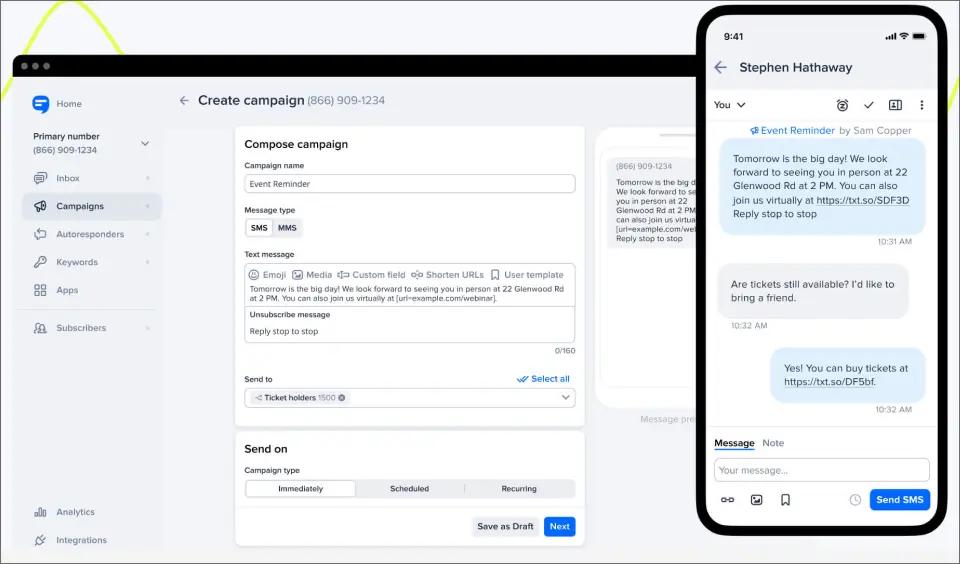
It is primarily used by small to mid-sized businesses that want a structured, compliance-friendly way to run SMS marketing without building their own messaging infrastructure.
Key Capabilities of Simple Texting
SimpleTexting provides a complete set of SMS tools focused on marketing and customer communication:
- Bulk SMS campaigns: Send messages to large contact lists with scheduling, personalization, and targeting options.
- Two-way messaging inbox: Manage customer replies in a shared dashboard for real-time conversations.
- Opt-in collection tools: Build subscriber lists using text-to-join keywords, web forms, and landing page integrations.
- MMS messaging support: Send images and multimedia content alongside SMS messages.
- Compliance and carrier registration: Built-in TCPA support and 10DLC registration guidance to improve deliverability and compliance.
SimpleTexting Pricing
SimpleTexting follows a message-based subscription model where pricing increases with monthly SMS volume. Plans are designed to scale with usage, with lower per-message costs at higher tiers.
| Messages Per Month | Monthly Cost | Cost Per Message |
| 500 | $39 | $0.078 |
| 1,000 | $59 | $0.059 |
| 2,000 | $89 | $0.045 |
| 3,000 | $119 | $0.040 |
| 7,500 | $239 | $0.032 |
| 50,000+ | Contact sales | Custom |
Additional Costs to Consider
- 10DLC carrier registration: ~$4 one-time fee
- Extra phone numbers: ~$10/month per number
- Additional users: ~$20/month per seat
Overall, Simple Texting pricing is predictable at entry level but increases as message volume and team size grow. For deeper cost breakdown and hidden fees, see the full SimpleTexting pricing plans guide.
Pros and Cons of Using SimpleTexting
| Pros | Cons |
| Intuitive, easy-to-use interface with a low learning curve | Incoming message visibility can feel limited in the dashboard |
| Core features (automation, segmentation, analytics, two-way messaging) included across plans | Not always reliable for time-sensitive messaging due to occasional delivery delays |
| Strong mobile app for managing campaigns on the go | Support experience can be inconsistent during urgent issues |
| Good for SMS marketing campaigns and promotional broadcasts | Overage charges may occur without clear real-time usage warnings |
| Per-user and add-on costs can increase total monthly spend | |
| Less suitable for operational or workflow-based messaging use cases |
These pros and trade-offs are based on real-world usage patterns and expanded in our detailed SimpleTexting reviews analysis. When teams start feeling these limitations, they usually begin exploring other options. Our roundup of SimpleTexting alternatives breaks down the best ones in detail.
Is Simple Texting the Right Choice for You?
This SMS marketing platform is best for businesses running SMS marketing and customer engagement campaigns, especially:
- Small to mid-sized businesses sending promotions and updates
- Marketing teams managing segmented contact lists
- Event organizers and nonprofits running outreach campaigns
- Teams using basic automation and scheduled messaging
Not ideal for:
- Time-sensitive or real-time alert systems
- Large teams needing cost-efficient collaboration
- Email-native or API-first workflows
- High-volume operational messaging use cases
For teams that need faster delivery, simpler workflows, and built-in scalability without per-user costs, TextBolt emerges as a strong alternative to SimpleTexting. You can see a full side-by-side breakdown in the SimpleTexting vs TextBolt comparison.
3. EZ Texting — SMB SMS Platform with AI-Powered Messaging
EZ Texting is a long-standing SMS marketing platform built for small and mid-sized businesses to run bulk text campaigns, manage customer communication, and automate basic messaging workflows from a simple dashboard. It is widely recognized for its ease of use, driven by an intuitive interface, structured templates, and beginner-friendly campaign tools.

A key differentiator is its AI-powered message composer, which helps users quickly generate campaign copy. It also offers a native Shutterstock integration for adding licensed visuals to SMS campaigns, making it more content-rich than many basic texting tools.
It is commonly evaluated in detail in our full EZ Texting reviews, especially by businesses comparing usability, pricing, and scalability before choosing a platform.
Key Capabilities of EZ Texting
EZ Texting offers a comprehensive set of SMS marketing tools designed to support both customer engagement and list growth:
- Bulk SMS messaging: Send messages instantly to 10 or 10,000+ contacts
- MMS messaging: Send images and multimedia messages with Shutterstock-powered media support
- Two-way SMS: Manage real-time customer conversations in a shared inbox
- SMS short codes: Improve engagement using 5–6 digit short code numbers
- Unlimited contacts: Store and manage large subscriber lists without caps
- Opt-in tools: Grow SMS lists using forms, keywords, and signup integrations
- Campaign scheduling: Plan and schedule SMS campaigns in advance
For a deeper breakdown of how these features compare to modern SMS platforms, see the full EZ Texting vs TextBolt comparison.
EZ Texting Pricing
EZ Texting follows a tiered, message-credit-based pricing model where costs depend on monthly SMS volume and selected features. A full breakdown of plan changes, hidden costs, and scaling behavior is available in the EZ Texting pricing guide.
Plans are available on both monthly and annual billing, with annual plans offering better effective per-message rates.
| Plan | Monthly Price | Contacts |
| Launch | $25/month | Up to 500 |
| Boost | $75/month | 500–2,000 |
| Scale | $125/month | 2,000–50,000 |
| Enterprise | $3,000/month | 50,000+ |
Usage Costs
- SMS: 1 credit per message
- MMS: 3 credits per message
- Overages: $0.03–$0.04 per message depending on plan
- Telecom fee: applicable on lower-tier plans (waived on higher tiers)
- User seat: 1 included per plan
Pros and Cons of Using EZ Texting
| Pros | Cons |
| Very easy-to-use interface with a clean, minimalist design that requires little learning | Credits expire after 12 months, which can lead to wasted spend during low-usage periods |
| Proactive and responsive support with regular campaign guidance and compliance help | Limited support hours (no 24/7 coverage or weekend support) |
| Long-term reliability with strong user trust and consistent platform performance | Costs increase quickly as you scale from basic to higher-tier plans |
| Restrictions on certain use cases (including political messaging) with reported refund concerns | |
| Not suitable for HIPAA-compliant healthcare messaging workflows |
Because of these limitations, some businesses explore EZ Texting alternatives with different pricing models, support coverage, and compliance flexibility depending on their use case.
Is EZ Texting the Right Choice for You?
EZ Texting is best for businesses that want an easy, ready-to-use SMS marketing platform without technical setup.
Ideal for:
- Small and mid-sized businesses running promotional campaigns
- Marketing teams focused on list growth and engagement
- Nonprofits and event communications
- Teams prioritizing ease of use and compliance
Not ideal for:
- Real-time alerts or time-sensitive messaging
- API-first or developer-heavy workflows
- Large teams focused on cost-efficient scaling
- High-volume transactional messaging systems
4. SlickText — Loyalty programs and keyword campaigns
SlickText is an SMS marketing platform built around customer retention and engagement, with a strong focus on loyalty programs, keyword-driven opt-ins, and promotional campaigns. Compared to general-purpose texting tools, it is more oriented toward repeat customer interactions rather than standalone broadcast messaging.
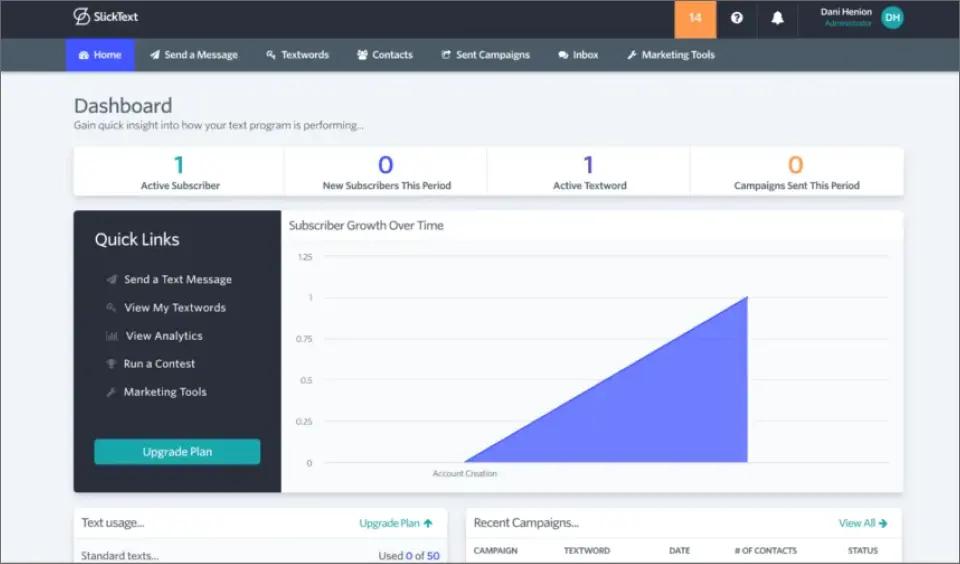
It is commonly used by retail brands, restaurants, gyms, and local businesses that rely on ongoing customer engagement, promotions, and loyalty-driven messaging strategies.
Key Capabilities of SlickText
SlickText provides engagement-focused SMS tools designed to grow and retain subscribers:
- Text-to-join keyword opt-in campaigns
- Loyalty program features for repeat customer rewards
- Drip SMS campaigns for ongoing engagement
- Polls and surveys for customer feedback collection
- Mass texting with audience segmentation
SlickText Pricing
SlickText pricing starts at around $29/month for 500 messages, with higher tiers available for larger contact lists and increased messaging volume. A loyalty program add-on is available separately depending on campaign needs, and pricing increases based on usage and feature requirements.
Pros and Cons of Using SlickText
| Pros | Cons |
| Strong loyalty and engagement-focused features | Higher cost at lower messaging volumes |
| Fast and responsive customer support | Limited pricing transparency for add-ons |
| Easy keyword-based subscriber growth | No native email-to-SMS functionality |
| Fewer advanced automation workflows compared to larger platforms |
Is SlickText the Right Choice for You?
SlickText is best suited for businesses that prioritize customer engagement and retention over high-volume or technical messaging workflows.
Best for:
- Retail stores and eCommerce brands running loyalty programs
- Gyms and membership-based businesses
- Businesses running giveaways, contests, and promotional campaigns
- Marketing teams focused on repeat engagement and subscriber growth
Not ideal for:
- API-first or developer-heavy SMS systems
- High-volume transactional messaging use cases
- Complex automation workflows or advanced logic-based campaigns
- Businesses requiring deep email-to-SMS integration
5. TextMagic — Bulk SMS and Business Texting Hybrid
TextMagic is a business messaging platform that combines bulk SMS campaigns, two-way customer conversations, and team messaging tools within a single dashboard. Unlike many SMS marketing platforms that focus primarily on promotional campaigns, TextMagic positions itself as a broader business communication solution, supporting SMS, email, voice, WhatsApp, and API-based messaging workflows.
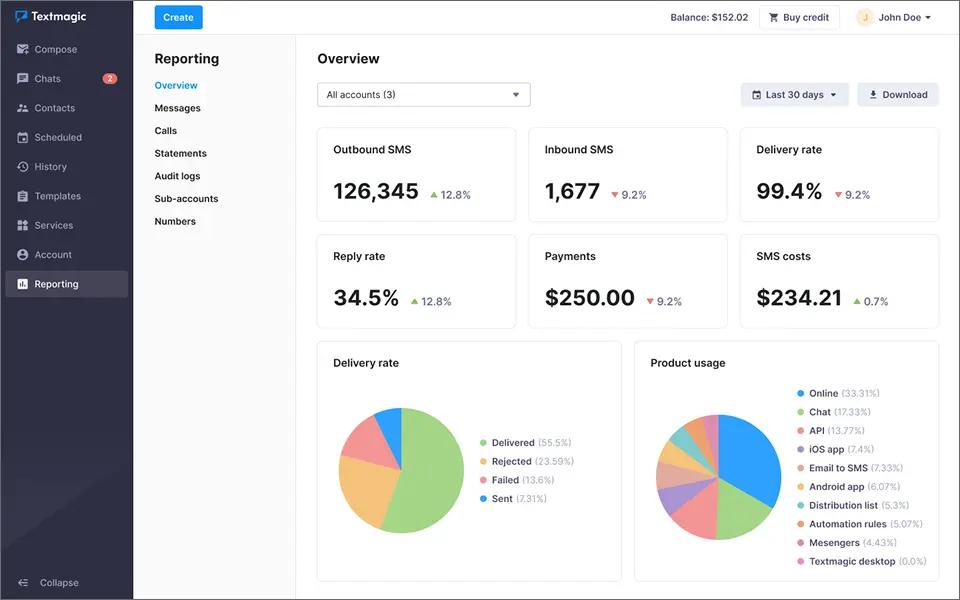
One of its most distinctive features is the built-in email-to-SMS gateway, allowing users to send text messages directly from Gmail, Outlook, or other email clients. This makes TextMagic particularly appealing to businesses that want to add texting capabilities without changing existing email-based workflows.
Key Capabilities of TextMagic
TextMagic provides a mix of marketing, customer communication, and business texting features:
- Bulk SMS campaigns with personalization
- Two-way messaging inbox for customer conversations
- Email marketing campaigns alongside SMS
- WhatsApp messaging support
- Shared team inbox for collaboration
- Contact management and segmentation
- SMS API for developers and custom integrations
TextMagic Pricing
TextMagic uses a pay-as-you-go pricing model with no monthly subscription required. You purchase SMS credits as needed and pay separately for a sending number.
| Monthly Messages | SMS Cost | Toll-Free Number Cost | Total Cost |
| 500 | $24.50 | $10 | $34.50 |
| 1,000 | $49.00 | $10 | $59.00 |
| 2,000 | $80.00 | $10 | $90.00 |
| 5,000 | $175.00 | $10 | $185.00 |
| 10,000 | $350.00 | $10 | $360.00 |
Additional Costs to Consider
- Local number: $10/month
- Toll-free number: $10/month
- 10DLC brand and campaign registration required
- SMS rates decrease at higher volumes
- Bring-your-own-CPaaS option available for lower delivery costs
- Unlimited users and contacts included
- Unused credits do not expire
Overall, TextMagic pricing is flexible for businesses with fluctuating messaging needs because you only pay for what you send rather than committing to a monthly SMS plan.
Pros and Cons of Using TextMagic
| Pros | Cons |
| Cost-effective for businesses with lower or variable messaging volumes | Message delivery can be inconsistent for time-sensitive communications |
| Simple, easy-to-use interface with minimal learning curve | Setup and compliance requirements can be restrictive for some organizations |
| Strong bulk SMS capabilities for large contact lists and mass notifications | Some users report unexpected feature changes affecting workflows |
| Advanced feature pricing is not always transparent upfront | |
| Support response times can vary depending on issue complexity |
Is TextMagic the Right Choice for You?
TextMagic is best suited for businesses that want to combine marketing messages, customer conversations, and operational texting within a single platform.
Best for:
- Small and mid-sized businesses managing customer communication
- Businesses using both SMS and email channels
- Organizations needing API access and custom integrations
- Teams looking for a mix of campaign messaging and one-to-one texting
Not ideal for:
- Businesses focused primarily on advanced SMS marketing automation
- Teams requiring extensive loyalty or promotional campaign tools
- Organizations seeking the simplest possible SMS-only experience
- High-volume senders looking for highly predictable messaging costs
If you’re researching user experiences before committing, our TextMagic reviews analysis covers common praise, complaints, and real-world feedback from customers. You can also see a direct feature-by-feature comparison in our TextMagic vs TextBolt guide to understand how the platforms differ for business texting and SMS marketing use cases.
6. Sinch Engage — Multi-channel for mid-market
Sinch Engage (formerly MessageMedia) is a business messaging platform built for companies that want to manage SMS, MMS, WhatsApp, RCS, and customer conversations from a single dashboard. Unlike many SMS-only providers, Sinch positions Engage as a multichannel customer engagement platform with automation, CRM integrations, team inboxes, and marketing workflows.

The platform is commonly used by healthcare providers, retailers, ecommerce brands, professional services firms, and enterprises that need both promotional messaging and transactional notifications.
Key Capabilities of Sinch Engage
Sinch Engage provides a broad set of customer communication and engagement features:
- Shared team inbox for managing customer conversations
- Automated reminders, notifications, and customer journeys
- Customer segmentation and audience management
- Rich media messaging with images, GIFs, and videos
- Conversation assignment and team collaboration tools
- Contact synchronization across CRM and ecommerce platforms
- Messaging templates for support and sales teams
Sinch Engage Pricing
Sinch Engage uses a subscription-based pricing model with included monthly SMS allowances. Plans scale based on message volume, users, automations, and account management features.
| Plan | Monthly Price | Included SMS | Users |
| Conversations | $99/mo | 3,000 SMS | 2 |
| Pro | $249/mo | 10,000 SMS | 3 |
| Pro Plus | $450/mo | 20,000 SMS | 3 |
| Advanced | $799/mo | 40,000 SMS | 3 |
Additional Costs to Consider
- Additional users: $20/month per user
- Additional subaccounts: $20/month each
- Social channels add-on (WhatsApp, Messenger, Instagram): $10/month
- Additional WhatsApp template conversations billed separately
- Carrier pass-through fees may apply
- Toll-free numbers beyond the included number cost $25/month
- A2P 10DLC numbers cost $25/month
- Short codes start at approximately $1,000/month
- Additional SMS beyond plan allowances are billed separately based on plan tier and volume discounts.
Overall, Sinch Engage pricing becomes more attractive as messaging volume increases because higher-tier plans include lower overage rates, additional automation capacity, and more advanced account management features.
Pros and Cons of Using Sinch Engage
| Pros | Cons |
| Supports SMS, MMS, WhatsApp, and RCS in one platform | Pricing becomes expensive for smaller businesses as usage grows |
| Strong CRM and ecommerce integrations | Additional carrier and messaging fees can increase total costs |
| Mobile app and email-to-SMS options increase flexibility | Advanced features are concentrated in higher-tier plans |
| Workflow automation and customer journey tools included | Multi-channel add-ons introduce extra monthly costs |
| Cost structure can be difficult to forecast for high-volume senders | |
| Setup and compliance requirements may require additional onboarding |
Is Sinch Engage the Right Choice for You?
Sinch Engage is best suited for businesses that need more than basic SMS marketing and want customer conversations, notifications, and multi-channel messaging managed within a single platform.
Best for:
- Mid-sized and enterprise businesses
- Companies using HubSpot, Salesforce, Shopify, or Zoho CRM
- Organizations running SMS and WhatsApp campaigns together
- Multi-location businesses needing shared messaging infrastructure
Not ideal for:
- Small businesses looking for the lowest-cost SMS solution
- Organizations that only need basic bulk texting
- Teams with highly predictable SMS-only use cases
- Businesses focused primarily on simple promotional campaigns
If you’re comparing business texting platforms, Sinch Engage offers considerably broader channel support than many SMS-only providers.
7. ClickSend — Pay-As-You-Go Bulk SMS With API
ClickSend is a cloud-based business communication platform that combines SMS, MMS, voice, email, fax, and direct mail services within a single platform. Unlike traditional SMS marketing tools that focus primarily on text campaigns, ClickSend positions itself as a multi-channel communications solution for businesses that need to reach customers through several channels from one dashboard.

One of ClickSend’s biggest differentiators is its pay-as-you-go pricing model. Instead of committing to a monthly subscription, businesses only pay for messages and services they actually use. Combined with global coverage across 200+ countries and extensive API support, ClickSend appeals to companies with variable messaging volumes and technical integration requirements.
Key Capabilities of ClickSend
ClickSend provides a broad set of communication and messaging features:
- Two-way messaging with free inbound SMS
- Transactional email delivery
- REST API and developer SDKs
- Delivery tracking and reporting
- Contact list management
- Scheduled messaging
- Multi-channel communication from a single dashboard
- International messaging support
ClickSend Pricing
ClickSend uses a pay-as-you-go pricing model with no monthly contracts, setup fees, or minimum commitments. Pricing decreases as message volume increases.
*Based on ClickSend’s published starting U.S. SMS rate of approximately $0.0226 per SMS. Actual costs may vary depending on carrier surcharges, number fees, message length, and destination.
Other ClickSend Service Costs
| Service | Cost |
| MMS Messages | $0.0355/message |
| Outbound Voice Calls | $0.0137/call |
| Inbound SMS | Free |
| Inbound Voice | Free |
| Outbound Fax | $0.0322/page |
| Transactional Email | Starting at $0.0067/email |
Additional Costs to Consider
- Dedicated phone numbers may incur additional monthly fees
- 10DLC registration is required for U.S. local numbers
- Carrier surcharges are passed through to customers
- Messages exceeding 155 characters may be billed as multiple SMS segments
- Emoji-containing messages may be limited to 70 characters before splitting
- International numbers can be significantly more expensive than U.S. numbers
- Failed messages may still be charged if accepted by carriers
- Toll-free number approvals can take days or weeks in some cases
Overall, ClickSend pricing is attractive for businesses with fluctuating messaging volumes because there are no monthly commitments. However, carrier surcharges, number fees, and message-splitting charges can make total costs less predictable than subscription-based alternatives.
Pros and Cons of Using ClickSend
| Pros | Cons |
| No monthly contracts or subscription commitments | Carrier surcharges can make costs difficult to predict |
| Free inbound SMS and inbound voice messages | Some users report inconsistent customer support experiences |
| Supports SMS, MMS, email, voice, fax, and direct mail | Account verification and approval processes can be slow |
| Global messaging coverage across 200+ countries | Message costs increase quickly with long messages and emojis |
| Strong API ecosystem for developers | Some users report inactivity fee concerns |
| Advanced automation capabilities are relatively limited | |
| Approval delays can impact time-sensitive campaigns |
While ClickSend receives positive feedback for its pay-as-you-go flexibility and multi-channel capabilities, some users report concerns around support responsiveness, approval delays, and overall cost predictability. Our ClickSend reviews analysis explores common customer feedback in greater detail.
Is ClickSend the Right Choice for You?
ClickSend is best suited for organizations that need multiple communication channels beyond SMS and prefer a usage-based pricing model over fixed monthly subscriptions.
Best for:
- Businesses needing SMS, voice, email, and fax in one platform
- Companies sending messages internationally
- Developer teams requiring API access and custom integrations
- Organizations with unpredictable messaging volumes
- Businesses that prefer pay-as-you-go billing
Not ideal for:
- High-volume senders seeking predictable monthly costs
- Small businesses focused only on SMS marketing
- Teams wanting advanced automation and AI-powered workflows
- Organizations needing rapid campaign approvals
- Businesses looking for the simplest email-to-SMS workflow
- Budget-conscious companies sensitive to per-message charges
Businesses that need SMS, voice, email, and fax from a single platform may find ClickSend a strong fit, especially when messaging volumes vary month to month. However, organizations focused primarily on SMS marketing automation or highly predictable pricing may want to compare ClickSend alternatives before making a decision.
How to Choose the Right Textedly Alternative
The best Textedly alternative depends less on features and more on how your business actually uses texting. Most teams choose the wrong platform because they start by comparing products instead of identifying their messaging workflow.
Choose a Marketing-Focused SMS Platform If…
Your primary goal is customer engagement, promotions, and subscriber marketing.
Platforms such as SimpleTexting, EZ Texting, and SlickText are designed for:
- Promotional SMS campaigns
- Subscriber list management
- Keyword opt-ins
- Automated drip campaigns
- Audience segmentation
If your team regularly sends coupons, product launches, event promotions, or marketing announcements, these platforms provide the tools you need.
Choose TextBolt If…
Your texts are operational rather than promotional.
TextBolt is designed for teams that already work in email and simply need a reliable way to send and receive business text messages without adopting a separate SMS platform.
Common use cases include:
- Appointment reminders, notifications
- Recruiting and interview scheduling
- Customer service notifications
- Any System alerts
- On-call escalation messages
- Internal operational communication
Instead of managing contacts, campaigns, and dashboards, you send texts directly from email and receive replies in your existing inbox.
Choose ClickSend If…
Your messaging volume fluctuates significantly throughout the year.
ClickSend’s pay-as-you-go pricing works well for:
- Seasonal businesses
- Variable messaging volumes
- Developer-managed systems
- Organizations that prefer usage-based billing
Rather than paying for unused credits every month, you only pay for the messages you send.
Choose Sinch Engage If…
You need more than SMS.
Sinch Engage is built for businesses managing customer conversations across multiple messaging channels, including:
- SMS
- MMS
- RCS messaging
It’s particularly well suited for mid-sized organizations that have dedicated sales, support, or customer engagement teams handling two-way conversations.
Choose EZ Texting If…
EZ Texting is a strong fit for teams running subscriber campaigns, keyword opt-ins, drip sequences, and promotional messaging. It offers one of the lowest starting points among established platforms, though most businesses upgrade to higher-tier plans as their contact lists and automation needs grow.
TextBolt vs. Textedly: Comparison at Glance
Before choosing between the right Textedly alternative, it’s worth reviewing a detailed Textedly vs. TextBolt comparison to understand how pricing, workflows, compliance costs, and day-to-day usability differ.
Here’s how the two platforms compare for everyday business texting:
| Feature | TextBolt | Textedly |
| Pricing Model | Flat monthly pricing | Monthly plans plus compliance fees |
| Starting Price | $29/month (500 SMS) | $29/month (500 SMS) |
| Setup Time | Around 30 minutes | Typically 1–2 hours |
| Sending Workflow | Email-based | Web dashboard |
| Reply Management | Replies arrive in your inbox | Dashboard inbox |
| Contact Management | Uses existing email contacts | Built-in contact database |
| Campaign Builder | Not included | Included |
| Best Fit | Operational texting | SMS marketing |
Annual Cost Example
A dental practice sending approximately 500 appointment reminders per month would spend:
TextBolt (annual billing, 20% off monthly rate):
- $23.20/month × 12 = $278.40
- $45 toll-free number yearly
- Total: $323.40/year
Textedly (annual billing gives 20% more messages, NOT a price discount):
- Still $29/month × 12 = $348 (same price, just 600 messages instead of 500)
- $8/month telecom surcharge × 12 = $96
- 10DLC registration: $4 to $44
- Total: approximately $448 to $488/year
The gap becomes larger as messaging volumes increase.
TextBolt’s top-up credits never expire and are only used after monthly plan credits are exhausted, allowing businesses to absorb occasional spikes without upgrading plans. Higher-volume teams can also move to customized top-up packages based on actual usage rather than fixed plan tiers.
Choose the Textedly Alternative That Fits How You Actually Text
Not every SMS platform is built for the same job. Some are designed for marketing campaigns and subscriber engagement, while others focus on operational communication, customer updates, and everyday business conversations.
Before choosing a Textedly alternative, consider where texting fits inside your workflow. The platform that aligns with how your team already works will typically deliver better adoption, lower costs, and less day-to-day complexity.
If your texting revolves around reminders, notifications, scheduling, and operational communication, TextBolt provides a simpler, email-first approach to business SMS.
Make Business Texting as Simple as Sending an Email
Whether you’re confirming appointments, coordinating schedules, or sending customer updates, TextBolt helps you text from the tools you already know
Frequently Asked Questions
Does switching from Textedly to another platform require new 10DLC registration?
Usually yes. 10DLC registration ties to the sending platform and the campaign use case, so moving providers typically means registering a new campaign and sometimes provisioning a new number. TextBolt handles 10DLC as part of onboarding for new business senders. Budget 1-2 business days for carrier approval to clear even when the setup itself takes 30 minutes. See our 10DLC compliance guide for the full process.
Can I keep my existing phone number when I switch SMS providers?
Sometimes. Toll-free numbers can usually be ported between providers, though the port window runs 7-14 business days. Short codes are stickier and often cannot be ported. Confirm port-out support with the new provider before canceling the old contract. The cost of a port-failed mid-migration (renewed Textedly contract plus duplicated new-provider setup) usually beats the savings of switching by itself.
How does an email-to-SMS gateway compare to a marketing platform like Textedly?
Email-to-SMS removes the dashboard. You send messages by composing emails from any inbox you already use, and replies come back as email threads. Marketing platforms like Textedly use a web dashboard, contact lists, and campaign tools. The trade-off: email-to-SMS is lighter and faster for operational use, but it doesn’t support marketing campaign workflows like scheduled blasts or keyword opt-ins. Most teams that say “we just need to text appointment reminders” are a fit for email-to-SMS, not a marketing platform.
How long does it actually take to switch from Textedly to TextBolt?
Plan for two phases. The first is provisioning: 30 minutes to spin up a TextBolt account, configure the inbound address, and send the first test SMS. The second is 10DLC carrier registration, which is 1-2 business days for the carriers to approve. Most teams run both platforms in parallel for a week to validate delivery before cutting over, which keeps the risk close to zero.
Does Textedly charge extra for additional team members?
Yes. Textedly includes one user seat per plan. Each additional team member costs $10/month. For a five-person team, that adds $40/month to your bill. TextBolt includes up to 10 users on Standard plans and above at no extra per-seat cost.