
- 10 Best Alternatives of Text Magic Compared at a Glance
- What is Textmagic, and Why Do Teams Look for Alternatives?
- How Much Does Textmagic Really Cost?
- 10 Top Textmagic Alternatives for Businesses
- 1. TextBolt: Best for Email-Native Business Texting
- 2. SimpleTexting: Best for SMS Marketing Campaigns
- 3. SlickText: Best for E-Commerce and Audience Growth
- 4. Textedly: Best for Simple Promotions and Text-to-Pay
- 5. EZ Texting: Best for Beginners Running Bulk Campaigns
- 6. Salesmsg: Best for CRM-Native Texting
- 7. Textline: Best for Customer Support Teams
- 8. TextUs: Best for Sales and Recruiting Teams
- 9. ClickSend: Best for Multi-Channel Communication
- 10. Twilio: Best for Developers and Custom Builds
- How to Choose the Right Textmagic Alternative
- How to Switch From Textmagic Without Losing Contacts
- Why TextBolt is the Textmagic Alternative for Email-Based Teams
- Frequently Asked Questions
Send Alerts From the Email Tools You Already Use
10 Best Textmagic Alternatives for Reliable Business Messaging in 2026


The best TextMagic alternatives include TextBolt for teams and system senders that text from Gmail, Outlook, or any tool that sends email; SimpleTexting for marketing campaigns; EZ Texting for small businesses wanting a traditional, simple SMS platform; and Textedly for high-volume mass texting. The right choice depends on where your texts start and who sends them.
TextMagic is a capable business texting platform. Most teams that look for TextMagic alternatives are not leaving because it breaks. They leave because the cost grows with volume, the platform does more than they need, or their texts start somewhere TextMagic doesn’t live, often a monitoring tool, an alarm panel, or an inbox.
Below you’ll find a quick comparison table, the real cost of TextMagic, a dated look at the carrier email-to-SMS gateways that are being retired, and a neutral read on each alternative.
Key Takeaways
- Best for email and system alerts: TextBolt turns everyday emails and system alert emails into texts, with two-way replies threaded back to the original sender’s inbox.
- Best for marketing campaigns: SimpleTexting pairs mass texting with a polished campaign builder, drip sequences, and keywords.
- Best for small-business, traditional SMS: EZ Texting is an easy-to-use, traditional platform focused on simple SMS marketing with guided setup.
- Best for high-volume mass texting: Textedly is built for simple, high-volume bulk text messaging and scalability.
- Best for shared-inbox support teams: Textline lets agents claim conversations, add internal notes, and answer the same customers as a team.
- Best for CRM-native texting: Salesmsg combines two-way SMS and business calling with native CRM integrations.
10 Best Alternatives of Text Magic Compared at a Glance
Here is how the 10 alternatives compare with Textmagic on starting price, pricing model, and user ratings. Textmagic sits in the last row as the baseline.
| Platform | Starting Price | Best For | Pricing Model |
| TextBolt | $29/month | Email-to-SMS alerts, system notifications, and team communication | Monthly plans |
| SimpleTexting | $39/month | SMS marketing campaigns and automated messaging | Monthly plans with message credits |
| SlickText | $29/month | Marketing campaigns, subscriber growth, and customer engagement | Monthly plans based on message volume |
| Textedly | $29/month | Bulk texting for small businesses | Monthly plans |
| EZ Texting | $25/month | SMS marketing for small businesses | Contact-based monthly plans |
| Salesmsg | $25/month | Sales teams and CRM-based business texting | Monthly subscription plus usage, seats, and numbers |
| Textline | Quote-based (3 agents, 600 credits) | Customer support teams | Subscription with included agents and credits |
| TextUs | $299/month (Pro) | Sales and recruiting teams | Subscription with included messages |
| ClickSend | $0.0274/SMS | Multi-channel business messaging | Pay-as-you-go messaging |
| Twilio | $0.0083/segment | Custom messaging applications and developer workflows | Pay-as-you-go per segment |
We compared each business texting and SMS tool on cost, setup and 10DLC time, team access, integrations, and fit for its main job. Prices come from vendor pricing pages and vendors change pricing often, so confirm before you buy.
What is Textmagic, and Why Do Teams Look for Alternatives?
Textmagic is a business messaging platform for SMS and email campaigns, reminders, and two-way chat. Its breadth is also why many teams start looking elsewhere. These reasons come up most often.
1. Per-Message Costs Add Up as Volume Grows
TextMagic charges for every US text. That feels cheap at a few hundred messages a month, but at a few thousand the bill grows with every send. Monthly fees for the texting number and 10DLC renewal come on top.
2. A Longer Wait Before the First Text
Every US business texting from a local number has to register for 10DLC before carriers will deliver its messages. Textmagic gives you a guided registration flow, but you submit the details yourself.
Textmagic says approval typically takes around seven business days. Teams replacing a broken tool often can’t wait that long.
3. More Platform Than an Alert or Reminder Team Needs
Textmagic bundles SMS campaigns, email marketing, a help desk, live chat, WhatsApp, and sales pipelines. For a front desk sending reminders or an IT team routing alerts, that’s another dashboard to learn.
4. Texting Lives Outside the Tools Teams Already Use
Textmagic does offer email-to-SMS, but most of its features live in its own web app and mobile apps. Teams that work all day in an inbox, or whose alerts come from monitoring tools and alarm panels, often want texting to stay where their work already happens.
5. Longer and Multilingual Texts Cost More
Textmagic counts 160 plain-text characters as one message part, but emoji or accented letters drop that to 70. A Spanish-language reminder can split into two or three parts and cost two or three times as much. This happens on every per-part platform, so it matters most when volume is high.
6. A Need for a Specialist Tool
Textmagic is a generalist. Sales teams may want texting inside their CRM, online stores may want list-growth tools, and developers may want a raw API.
For more user feedback, read these Textmagic reviews from real users. The next section breaks down exactly what Textmagic costs once every fee is counted.
How Much Does Textmagic Really Cost?
Textmagic charges about $0.049 per US text. You also pay $10 a month for a texting number and $10 a month to renew your 10DLC campaign, after a free first month for each. At 1,000 texts, that adds up to about $69 a month.
Here is how that compares with TextBolt’s Standard plan, which includes 1,000 credits. Our full Textmagic pricing breakdown covers higher volumes.
| What 1,000 texts a month costs | Textmagic | TextBolt Standard |
| 1,000 texts | $49 | Included |
| Business number | $10/month | Included on every plan |
| 10DLC campaign | $10/month after the first month | Handled by TextBolt |
| Users | Free, no seat limit | Up to 10 users |
| Approximate monthly total | About $69 | $49 |
Figures come from Textmagic’s published pricing, checked September 2026.
Textmagic also offers a bring-your-own-carrier option. Teams already on Twilio, Vonage, Sinch, or Bandwidth can connect those numbers and pay Textmagic a penny per message part, plus their provider’s fees. Credits work differently too. Textmagic’s prepaid credits never expire.
10 Top Textmagic Alternatives for Businesses
Each alternative below solves a different problem, starting with alerts, then team conversations, marketing, and developer tools.
1. TextBolt: Best for Email-Native Business Texting
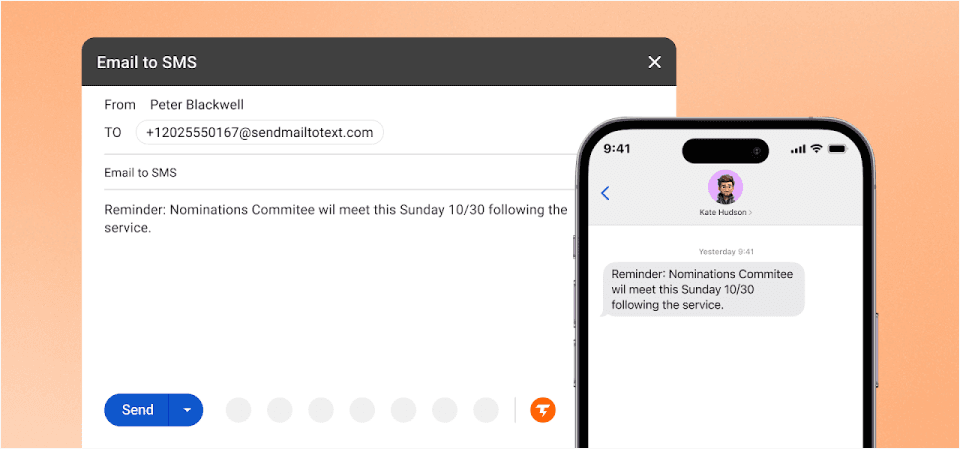
If your team already lives in Gmail or Outlook, the TextBolt business text messaging platform eliminates the need to learn new software entirely.
Here’s what makes TextBolt different: you send texts by sending emails. Address an email to +1[phonenumber]@sendemailtotext.com, and your message arrives as an SMS. No dashboards, no apps, no training.
TextBolt vs Textmagic Comparison
Here’s a TextBolt vs Textmagic comparison giving you an overview of how TextBolt stacks over Textmagic in terms of features, setup time, delivery rates, and compliance.
| Feature | TextBolt | Textmagic |
| Email-native workflow | Yes | Limited gateway |
| Team members included | Up to 10 team members on Standard and Professional plans | Extra cost |
| Setup time | 30 minutes | 1-2 hours |
| Delivery rate | Up to 98% | Variable |
| 10DLC compliance | Included | Manual setup |
| Two-way messaging | Yes (to email) | Yes (dashboard) |
| Learning curve | None | Moderate |
Key Capabilities
- Email-native workflow: Works directly from Gmail, Outlook, Thunderbird, Apple Mail, and any email client your team already uses
- Team access included: Up to 10 team members on Standard and Professional plans with no per-seat fees
- Up to 98% delivery rate: 10DLC compliant for carrier-approved messaging
- Professional business number: Messages appear from your business, not random addresses
- Complete audit trail: Every message logged with timestamps
- Two-way messaging: Replies come back to your email inbox
- 30-minute setup: No developers or IT department required
- Non-expiring top-up credits: Unused credits carry forward indefinitely so quiet months don’t waste budget
- Workflow automation: Connect to thousands of apps via Zapier for triggered SMS without code
- System senders: Monitoring tools, alarm panels, VoIP systems, web forms, and scripts send an email, and TextBolt delivers it as an SMS alert
Pros and Cons
| Pros | Cons |
| Zero learning curve | No built-in drip campaigns |
| Unlimited team access | Requires email access |
| Works from any email client | No mobile app (uses email) |
| Replies in your inbox |
Who Uses TextBolt?
Healthcare practices send appointment reminders from their front desk. IT departments trigger alerts from monitoring systems. Small businesses keep their entire team in the loop without sharing a phone.
If you’ve ever asked “What happens when Sarah calls in sick and she’s the only one who can text patients?”, TextBolt solves that problem.
TextBolt Pricing
TextBolt pricing fits businesses of any size, from solo users to high-volume teams. All plans include Gmail-based SMS, delivery tracking, and opt-out compliance.
| Plan | Monthly Cost | Credits | Best For |
| Basic | $29/month | 500 | Solo practitioners |
| Standard | $49/month | 1,000 | Growing businesses |
| Professional | $99/month | 2,500 | Multi-location operations |
| Enterprise | Custom | 5,000+ | Large organizations |
Best For: Teams that want SMS without learning new software. If your workflow runs through email, TextBolt fits seamlessly.
Send Texts From the Email Tools Your Team Already Uses
TextBolt turns emails and system alerts into texts, with 10DLC registration handled for you. No app. No training. No new platform.
2. SimpleTexting: Best for SMS Marketing Campaigns
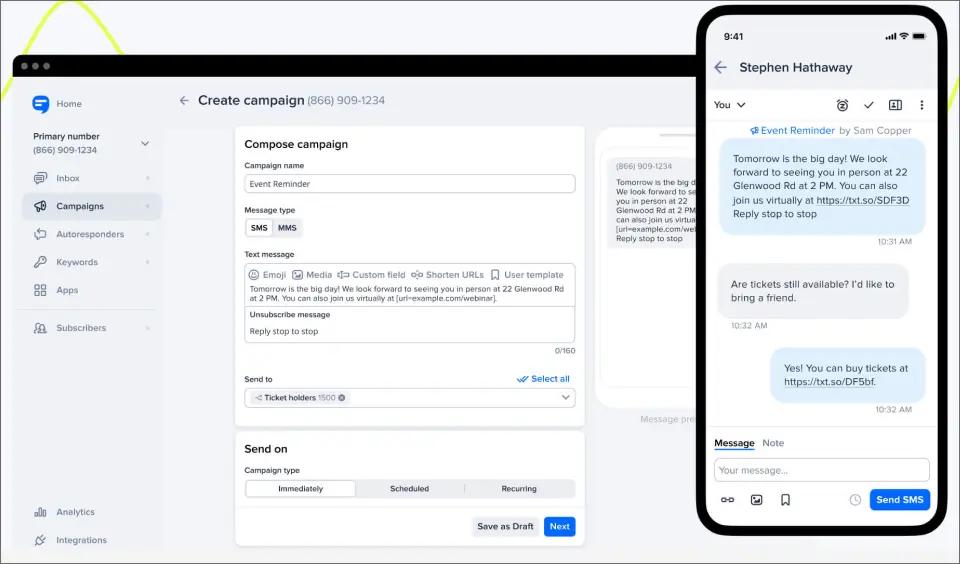
SimpleTexting is an easy-to-use SMS marketing platform. It covers mass texting, two-way messaging, drip campaigns, keywords, and an AI message writer.
Every paid plan includes three users, and every feature is available on every plan.
SimpleTexting vs Textmagic Comparison
Here’s how SimpleTexting compares with Textmagic on pricing and focus.
| Feature | SimpleTexting | Textmagic |
| Pricing model | Monthly credit plans | Pay as you go or monthly plans |
| Starting price | $29/month for 500 credits (toll-free) | $0.049 per SMS |
| Unused credits | Last until the end of the following month | Never expire |
Key Capabilities
- AI message generator for content creation
- Unlimited contacts and keywords on all plans
- Free compliance messages (opt-in/out handling)
- Mobile app with full functionality
- Contact segmentation for targeted campaigns
- Drip campaign automation
Pros and Cons
| Pros | Cons |
| All features on every plan | $20/month per additional user |
| Strong automation tools | Higher starting price |
| User-friendly interface | Some delivery delays reported |
SimpleTexting Pricing
SimpleTexting prices plans by monthly texts, from 500 up to 50,000, with custom plans above that. The 500-credit plan costs $29 a month, and a local number adds $10 a month plus a $4 one-time carrier registration.
| Cost item | Price |
| 500 credits | $29/month |
| Local number | $10/month (same-day activation) |
| Carrier registration | $4 one-time |
| Extra credits | 5.5¢ each |
| Extra users (after 3) | $20/month each |
| Extra numbers | $10/month each |
Carrier fees are passed through at cost, averaging about $0.0025 per message in the US and $0.0068 in Canada. Yearly billing saves 20%, and nonprofits get 15% off monthly plans.
A standard text uses one credit, extended texts up to 306 characters use two, and image texts use three. Unused plan credits stay available until the end of the following month but are lost if you downgrade.
SimpleTexting offers a free trial with no credit card and a 30-day money-back guarantee. See the full SimpleTexting pricing breakdown.
Best for: Small businesses that want a simple SMS marketing tool with every feature on every plan.
3. SlickText: Best for E-Commerce and Audience Growth

SlickText focuses on building and engaging SMS subscriber lists. Their audience growth tools make them a favorite among e-commerce brands and marketers looking for a Textmagic replacement.
SlickText vs Textmagic Comparison
Here’s how SlickText compares with Textmagic on pricing and focus.
| Feature | SlickText | Textmagic |
| Pricing model | Monthly credit plans | Pay as you go or monthly plans |
| Starting price | $29/month for 500 credits | $0.049 per SMS |
| Strongest at | Subscriber list growth | Broad SMS and email campaigns |
| E-commerce focus | Shopify integration | Integrations via Zapier and API |
Key Capabilities
- Multiple opt-in methods (forms, pop-ups, QR codes)
- AI Compose for message creation
- Drip campaign automation
- MMS support for rich media
- Text-to-join keywords
- Advanced subscriber segmentation
Pros and Cons
| Pros | Cons |
| Excellent list-building features | Costs increase at scale |
| Free plan available | Limited native integrations |
| Strong e-commerce focus | Advanced features locked to higher tiers |
SlickText Pricing
SlickText starts at $29 a month for 500 credits, with a 14-day free trial and no credit card required. Unused credits stay usable for one more billing term, and carrier fees are passed through at cost.
Best For: Online stores and retailers focused on growing an SMS subscriber list.
4. Textedly: Best for Simple Promotions and Text-to-Pay
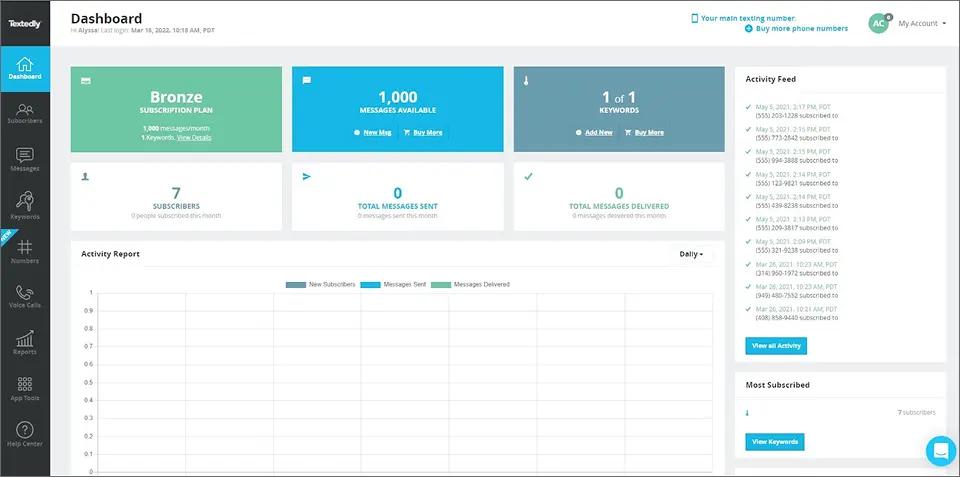
Textedly covers the basics of SMS marketing, including mass texts, keywords, scheduled sends, and drip campaigns. Its standout feature is text-to-pay, which sends a secure Stripe payment link by text.
It also helps businesses collect Google reviews, and every feature is included on every plan.
Textedly vs Textmagic Comparison
Here’s how Textedly compares with Textmagic on pricing and focus.
| Feature | Textedly | Textmagic |
| Pricing model | Monthly message plans, annual billing adds 20% more messages | Pay as you go or monthly plans |
| Starting price | $29/month for 500 messages | $0.049 per SMS |
| Phone numbers | Free toll-free and 10DLC number | $10/month per number |
| 10DLC registration | Paid by Textedly for your first number | Free at first, then $10/month campaign renewal |
| Team members | $10/month per teammate | Free, no seat limit |
Key Capabilities
- Mass SMS and MMS support
- Automated conversation triggers
- Free incoming messages
- Text-to-pay functionality
- Link shortening tools
- Geographic data collection
Pros and Cons
| Pros | Cons |
| Lower entry price | Slow customer support |
| Simple interface | Limited automation |
| Text-to-pay included | Basic analytics |
Textedly Pricing
Textedly starts at $29 a month for 500 messages, or 600 a month when billed annually. Extra teammates cost $10 a month each. For every plan and fee, see our Textedly pricing breakdown.
Best For: Budget-conscious businesses that need basic SMS functionality without premium pricing.
5. EZ Texting: Best for Beginners Running Bulk Campaigns

EZ Texting sets up its standard plans within one business day. It supports local numbers, toll-free numbers, and text-enabled landlines, with dedicated short codes on its Enterprise plan.
10DLC registration is included at no extra cost, and EZ Texting says most applications are approved within 24 hours.
EZ Texting vs Textmagic Comparison
Here’s how EZ Texting compares with Textmagic on pricing and focus.
| Feature | EZ Texting | Textmagic |
| Pricing model | Monthly credit plans | Pay as you go or monthly plans |
| Starting price | $25/month for 500 credits | $0.049 per SMS |
| Users included | 1, then $10/month each | Free, no seat limit |
| 10DLC registration | Included | Guided flow, $10/month renewal |
Key Capabilities
- Multiple number types (10DLC, toll-free, short codes)
- Unlimited contacts on all plans
- AI-powered message composer
- Team inbox for collaboration
- Smart Contact Cleaner
- Age verification for compliance
Pros and Cons
| Pros | Cons |
| Lowest entry pricing | Pricing confusing at scale |
| AI writing assistance | Credit system adds up |
| Flexible number options | Interface complexity grows |
EZ Texting Pricing
The Launch plan starts at $25 a month for 500 credits and one user, plus a $5 monthly telecom fee. Boost ($75) and Scale ($125) add higher-volume numbers and lower overage rates. For more options, see these EZ Texting alternatives.
Best For: Small businesses new to SMS marketing who want guided setup and hand-holding.
6. Salesmsg: Best for CRM-Native Texting

Salesmsg puts texting and calling next to your CRM. It integrates with HubSpot, Salesforce, Pipedrive, and ActiveCampaign, so conversations log to the contact record.
A shared inbox shows who owns each conversation, so handoffs between reps stay clear.
Salesmsg vs Textmagic Comparison
Here’s how Salesmsg compares with Textmagic on pricing and focus.
| Feature | Salesmsg | Textmagic |
| Pricing model | Subscription plus seats and numbers | Pay as you go or monthly plans |
| Starting price | $25/month for 500 credits | $0.049 per SMS |
| Users included | 1, then $10/month each | Free, no seat limit |
| Calling | Built in, 1 credit per minute | Call forwarding and voice |
Key Capabilities
- Salesmsg provides native CRM integrations with platforms like HubSpot, Salesforce, Pipedrive, ActiveCampaign, and Keap, connecting text conversations directly with sales workflows.
- It includes a shared team inbox for managing two-way conversations with assignments, ownership, and team visibility.
- Teams can create scheduled messages, follow-ups, and automated texting workflows for customer engagement.
- Keyword automation allows businesses to trigger responses based on specific inbound keywords.
- Salesmsg also combines business texting with voice features such as calling, forwarding, and voicemail drops.
Pros and Cons
| Pros | Cons |
| Texting connects directly with sales workflows and CRM records | Costs increase as seats, numbers, and usage grow |
| Quick setup for teams using supported CRM platforms | Better suited for sales conversations than large-scale notifications |
| Team inbox features make conversation ownership clear | Less focused on automated system alerts |
Salesmsg Pricing
Salesmsg’s Basic plan starts at $25 a month for 500 credits, including one phone number and one user, with a 14-day free trial. The Pro plan costs $329 a month for 10,000 credits, Enterprise pricing is custom, and annual billing adds two free months.
Extra seats cost $10 a month, extra numbers cost $5 a month, and carrier and 10DLC fees are billed separately. For the complete cost breakdown, take a look at our Salesmsg pricing guide.
Best For: Sales and service teams whose reps live in HubSpot or Salesforce and want texting attached to the contact record. Teams that need different pricing models, email-based workflows, or alternative messaging approaches can explore these Salesmsg alternatives.
7. Textline: Best for Customer Support Teams
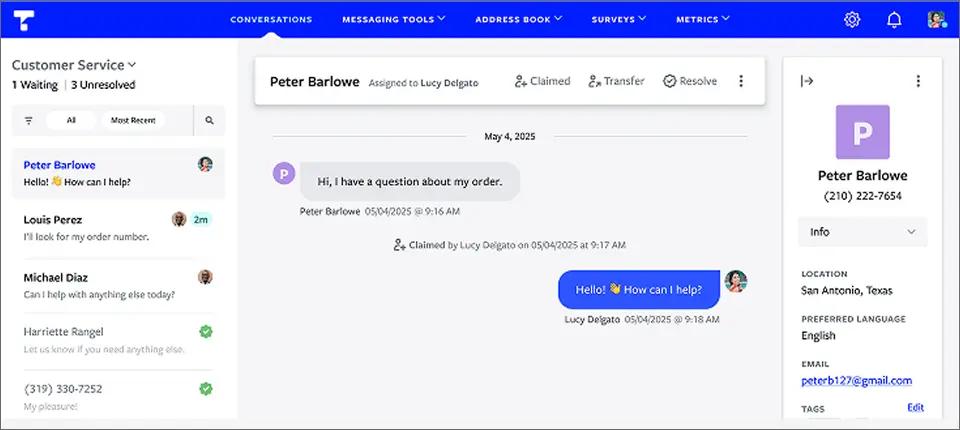
Textline is a shared texting inbox built for support and service teams. Agents can claim conversations, add internal notes, and see full customer history before they reply. Pro and Enterprise plans add routing rules.
It also sends bulk announcements, and each reply opens as a one-on-one thread rather than a group chat. Beyond SMS, the same inbox handles webchat, Facebook, and Instagram messages.
Textline vs Textmagic Comparison
Here’s how Textline compares with Textmagic on pricing and focus.
| Feature | Textline | Textmagic |
| Pricing model | Subscription with included agents and credits | Pay as you go or monthly plans |
| Starting point | Quote-based; Essentials includes 3 agents and 600 credits | $0.049 per SMS |
| Extra messages | $0.03 per add-on credit | $0.049 per SMS |
| 10DLC campaign fee | $15/month | $10/month |
| Strongest at | Routing support conversations across a team | Broad SMS and email campaigns |
Key Capabilities
- Claim conversations and add internal notes, with routing on Pro and Enterprise
- Bulk texts where each reply opens a private thread
- Scheduled messages, automated replies, and NPS or CSAT surveys
- HubSpot, Zendesk, Slack, and Zapier, with Salesforce on Pro and Enterprise plans
- Text-enable most existing business landlines
- iOS and Android apps plus a Chrome extension
Pros and Cons
| Pros | Cons |
| Conversation claiming and internal notes | Base plan prices are not published |
| Webchat and social messages in one inbox | $15/month 10DLC campaign fee on top |
| HIPAA-compatible plans | No calling, only call forwarding |
Textline Pricing
Textline doesn’t publish base plan prices, so you’ll need a quote. Each plan includes a set number of agents and monthly message credits, and add-on credits cost $0.03 each.
| Plan | Included Agents | Included Credits | Extra Agents |
| Essentials | 3 | 600/month | $50/month each |
| Pro | 5 | 2,000/month | $70/month each |
| Enterprise | Negotiable | Negotiable | Negotiable |
Your total cost comes down to the plan, the message credits you use, number registration fees, and any add-ons. Registration fees aren’t included in the subscription.
One credit covers one SMS segment of up to 160 characters. Image texts (MMS) use three credits each.
When included credits run out, Textline uses add-on credits first. These cost $0.03 each, are bought in advance, and can only be purchased once per billing cycle. If add-on credits also run out, Textline switches to backup credits at $0.04 each. These are bought automatically when your balance drops below a minimum threshold, in blocks of at least 250 credits.
Textline supports toll-free numbers and 10-digit long codes. A 10DLC number adds a $15 monthly campaign fee, while toll-free numbers currently have no monthly registration fee.
Best For: Support and service teams that need several people answering the same customer conversations.
8. TextUs: Best for Sales and Recruiting Teams
TextUs is built for sales and recruiting teams that text leads and candidates at volume. It pairs a shared inbox with automated sequences, A/B testing, and campaign analytics.
Integrations with CRMs and applicant tracking systems (ATS) let reps text from the records they already work in.
TextUs vs Textmagic Comparison
Here’s how TextUs compares with Textmagic on pricing and focus.
| Feature | TextUs | Textmagic |
| Pricing model | Subscription with included messages | Pay as you go or monthly plans |
| Starting price | $299/month (Pro) | $0.049 per SMS |
| Free trial | Demo only | Free test balance |
| Strongest at | CRM and ATS-driven outreach | Broad SMS and email campaigns |
Key Capabilities
- Automated follow-ups over days or weeks, triggered by keywords
- Compare message versions and track replies and clicks
- Route, assign, and comment on conversations as a team
- Salesforce, HubSpot, Bullhorn, and Greenhouse on higher tiers
- Response rates and time to respond per team member
Pros and Cons
| Pros | Cons |
| Sequences and A/B testing for outreach | High entry price for small teams |
| CRM and ATS integrations | No self-serve free trial |
| Response analytics per rep | Built around sales, not general texting |
TextUs Pricing
TextUs pricing lists its Pro plan from $299 a month, including 5,000 messages and five phone numbers. Enterprise pricing is custom, and plans are sold through a demo rather than a self-serve trial.
Best For: High-volume sales, recruiting, and staffing teams that live in a CRM or ATS.
9. ClickSend: Best for Multi-Channel Communication

ClickSend offers more than SMS. Their platform includes voice, email, fax, and even direct mail alongside text messaging. See how TextBolt compares to ClickSend for email-to-SMS workflows.
ClickSend vs Textmagic Comparison
Here’s how ClickSend compares with Textmagic on pricing and focus.
| Feature | ClickSend | Textmagic |
| Pricing model | Pay as you go only, no subscription | Pay as you go or monthly plans |
| Starting price | About 2.9¢ per US SMS on a $20 top-up, plus carrier fees | $0.049 per SMS, plus $10/month per number |
| Volume discounts | Up to 21% off on top-ups of $10,000 or more | Discounted rates on monthly plans |
| Channels for new customers | SMS, MMS, and RCS only | SMS, MMS, email campaigns, live chat, WhatsApp, Facebook, Instagram, and voice |
Key Capabilities
- SMS, MMS, RCS
- Simple dashboard interface
- API for developers
- Link tracking and analytics
- Global SMS delivery
- Integrations with Slack, Salesforce, and Shopify
Pros and Cons
| Pros | Cons |
| True multi-channel platform | Interface feels dated |
| Pay only for what you use | Occasional performance issues |
| Lower per-message rates at volume | Complex pricing structure |
ClickSend Pricing
ClickSend groups its rates into four top-up tiers. Boost starts at $20, Growth at $500 (7% off), Scale at $3,000 (14% off), and Enterprise at $10,000 (21% off). Senders above 100,000 messages a month can ask for a custom rate.
Best For: Teams that want pay-as-you-go texting with no subscription, including senders outside North America.
10. Twilio: Best for Developers and Custom Builds
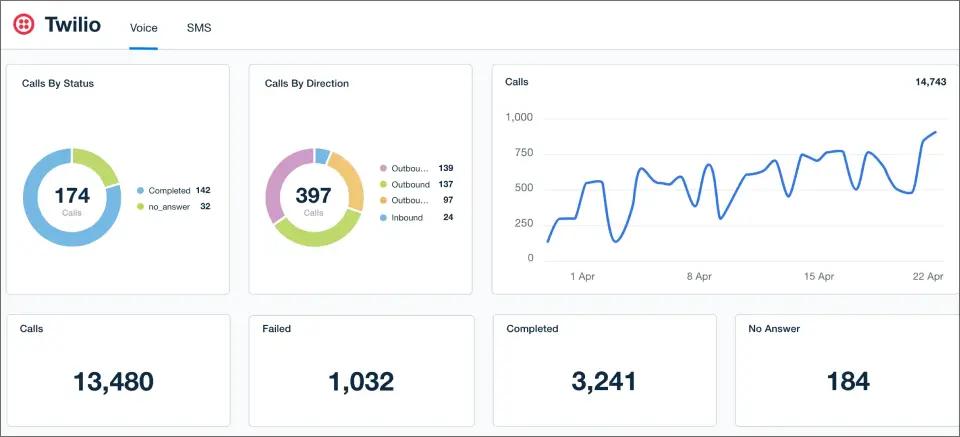
Twilio is a programmable messaging platform. Developers use its APIs to build SMS, WhatsApp, and voice into their own apps and systems.
Textmagic can even connect to Twilio numbers through its bring-your-own-carrier option.
Twilio vs Textmagic Comparison
Here’s how Twilio compares with Textmagic on pricing and focus.
| Feature | Twilio | Textmagic |
| Pricing model | Pay as you go per segment | Pay as you go or monthly plans |
| Outbound SMS | $0.0083 per segment, plus carrier fees | $0.049 per SMS |
| Inbound SMS | $0.0083 per segment | Free |
| Local number | $1.15/month | $10/month (first month free) |
| Interface | You build it with APIs | Ready-made web and mobile apps |
| Who sets it up | Developers | Non-technical teams |
Key Capabilities
- SMS, MMS, WhatsApp APIs
- Programmable voice and video
- Conversations API for unified messaging
- Studio visual editor for workflows
- Multi-language SDK support
- Global carrier network
Pros and Cons
| Pros | Cons |
| Lowest per-message rates | Requires developer resources |
| Complete customization | Costs escalate with scale |
| Enterprise-grade scaling | No user-friendly dashboard |
Twilio Pricing
Image texts cost $0.022 to send and $0.0165 to receive. Carrier fees add $0.0035 to $0.005 to each outbound text, depending on the carrier.
Toll-free numbers cost $2.15 a month, and short codes start at $1,000 a quarter. The Engagement Suite costs $0.015 per message after the first 1,000 each month, and failed messages carry a $0.001 fee.
Best For: Development teams with the resources to build and maintain their own messaging.
How to Choose the Right Textmagic Alternative
Not every SMS platform is built for the same purpose. While Textmagic supports a wide range of messaging needs, businesses that primarily use SMS for alerts, notifications, and operational communication often need a simpler solution focused on reliability and ease of use.
Here are the key factors to consider when choosing a Textmagic competitor.
1. Choose a Platform Built for Your Use Case
Many SMS platforms focus on marketing campaigns, contact lists, and promotional messaging. If your team mainly sends alerts, reminders, or system notifications, a dedicated email-to-SMS platform can provide a faster and more straightforward workflow.
TextBolt is built specifically for email-to-SMS communication, allowing teams to send text alerts directly from the email tools and systems they already use.
2. Look for Simple Setup and Easy Integration
A good Textmagic alternative should fit into your existing workflow without requiring complex development work. Look for platforms that support email forwarding, SMTP, or simple integrations that allow your team to start sending SMS notifications quickly.
With TextBolt, businesses can convert emails into SMS messages without managing APIs, campaigns, or complicated automation setups.
3. Prioritize Reliable Message Delivery
For operational alerts, appointment reminders, and time-sensitive notifications, message delivery reliability is critical. A platform should provide dependable delivery, clear sending status, and consistent performance when messages need to reach recipients quickly.
TextBolt helps businesses send important updates through a communication channel people check frequently.
4. Compare Pricing Based on Your Actual Usage
SMS costs can vary depending on message volume, phone numbers, subscriptions, and additional features. Some platforms include marketing tools and features that businesses may not need for simple notifications.
TextBolt offers straightforward monthly plans designed for businesses that need predictable email-to-SMS messaging without paying for unnecessary campaign features.
5. Select a Platform That Scales With Your Team
As messaging needs grow, your platform should continue supporting higher volumes without adding unnecessary complexity. A focused email-to-SMS solution can make it easier to scale alerts, reminders, and notifications while keeping workflows simple.
Whether you need Textmagic alternatives for small businesses, CRM integrations, inventory alerts, or a simple SMS platform, focus on the workflow your team needs rather than just the number of features offered.
How to Switch From Textmagic Without Losing Contacts
Moving platforms is mostly about protecting your contacts and consent records. Follow these five steps.
- Export your contacts: Download your TextMagic contacts as a CSV, including opt-in dates and sources. Consent records do not transfer on their own.
- Move your opt-outs across: Keep anyone who replied STOP off your new lists so you stay compliant from day one.
- Register for 10DLC: Submit your business details; on an email-to-SMS service that registers for you, this step is handled (approval timing above).
- Point your texts at the new address: Save each recipient’s sendemailtotext.com address as a contact. For systems, add the address to existing alert emails or set a forwarding rule.
- Test, then switch off TextMagic: Text yourself first and check delivery status in your new dashboard. Keep TextMagic active until your new business number is confirmed.
Why TextBolt is the Textmagic Alternative for Email-Based Teams
If your texts are reminders, alerts, and one-to-one updates, paying for a full messaging platform adds cost and another tool to learn. Every per-text charge, number fee, and renewal fee adds up month after month.
TextBolt sends texts from the email tools and systems you already have in place. Replies come back to your inbox, 10DLC registration is handled for you, and team access is included on Standard and Professional plans. See how the TextBolt email-to-text service fits your workflow.
Sign up, allow up to 48 hours for 10DLC approval, and route one reminder or alert through TextBolt first.
Your next step is a 7-day free trial to test your first alert or reminder.
Switch From TextMagic and Keep Texting From Your Inbox
TextBolt sends texts from Gmail, Outlook, or any email client your team already uses, and every reply threads back to the sender’s inbox.
Frequently Asked Questions
Is Textmagic free?
No. Textmagic is a prepaid service with no free tier. It offers a trial with a small starting credit and no credit card required, after which you buy credits to send. Unused credits roll over for up to two months on monthly plans.
How do I cancel my Textmagic subscription?
Log in to your Textmagic account, open the billing section, and select Cancel Subscription. You can also contact Textmagic support to cancel. Do not cancel before any number transfer has completed, because canceling early can cost you the number.
What is the best text marketing platform?
It depends on the job. SimpleTexting starts at $39 a month with three users included. EZ Texting is the lowest entry at $20 a month billed annually plus a $5 telecom fee. Textedly adds text-to-pay from $29 a month, and SlickText leads on list growth at the same price.
Which SMS sending service is the best?
It depends on who sends and where texts start. Campaign senders fit SimpleTexting, EZ Texting, or Textedly. Shared-inbox support teams fit Textline, CRM-based reps fit Salesmsg, and sales and recruiting teams fit TextUs. If texts start in Gmail, Outlook, or a monitoring tool, TextBolt fits, from $29 a month.
Can I send texts from an email like Textmagic?
Yes. TextBolt specializes in email-to-SMS, letting you send texts directly from any email. ClickSend also offers email-to-SMS gateway functionality, though with a more complex setup.
Which platform has the best delivery rates?
TextBolt reports up to 98% delivery rates with 10DLC compliance. All platforms using proper 10DLC registration will see higher delivery than older carrier gateways.
How long does it take to switch from Textmagic?
Most platforms allow CSV export of your contacts. Migration typically takes 30 minutes to 2 hours, depending on your list size and how much historical data you want to preserve.
Can I migrate my contacts from Textmagic to TextBolt?
Yes. Export your Textmagic contacts as a CSV file and import them into TextBolt or sync with your existing Google Contacts. Most teams complete the migration in under 30 minutes.
What makes TextBolt a better Textmagic alternative for teams?
TextBolt includes up to 10 team members on Standard and Professional plans with no per-seat fees. Textmagic charges extra for each additional user. A 5-person team sending 1,000 messages pays $49/month flat on TextBolt versus $49 in message costs plus user fees on Textmagic.
What email clients does TextBolt work with?
TextBolt works with Gmail, Outlook, Thunderbird, Apple Mail, and any SMTP-compatible email client. No plugins or extensions required. If your team can send an email, they can send a text.
What are the best Textmagic alternatives for ERPs?
The best Textmagic alternatives for ERPs are platforms that can turn system-generated notifications into SMS alerts without adding complex workflows. Businesses using ERP systems should look for solutions that support email-to-SMS, automation, reliable delivery, and easy integration with existing tools. TextBolt is a strong option for teams that need to send ERP alerts, reminders, and operational updates directly to mobile devices.