
- Why Do Businesses Consider Alternatives to TextUs?
- How We Selected and Evaluated These TextUs SMS Alternatives
- Top 7 TextUs Alternatives: Comparison at a Glance
- 7 Best TextUs Alternatives Compared: A Detailed Review
- 1. TextBolt — Best for Email-Based Business Texting
- 2. Textedly — Best for Recruitment Marketing and SMS Campaigns
- 3. SimpleTexting — Best for General Business Texting and SMS Marketing
- 4. EZ Texting — Best for SMS Marketing and Automated Messaging
- 5. SlickText — Best for High-Volume SMS Marketing
- 6. Salesmsg — Best for Sales and Recruiting Teams That Need Calling and Texting
- 7. Twilio — Best for Custom SMS Infrastructure
- How to Choose the Right TextUs Alternative for Your Business
- Choose the TextUs Alternative That Fits Your Workflow
- Frequently Asked Questions
Ready for a Simpler TextUs Alternative?
7 Best TextUs Alternatives (Pricing + Features Compared)


TextUs is a two-way texting platform built for staffing agencies, recruiters, and sales teams, with native integrations into Bullhorn, Greenhouse, Salesforce, and Workday. Its Essential plan runs $99 a month for two phone numbers, its Pro plan runs $199 a month for five, and every message on top of the platform fee adds another $0.02, all locked into a standard 12-month agreement.
That structure works well for staffing firms that live inside an ATS all day and need every reply synced back to a candidate record automatically. It’s a heavier commitment for a solo recruiter, a two-person agency, or a hiring manager who just needs candidates to show up for interviews on time.
As texting spreads beyond recruiting into sales follow-ups, appointment confirmations, and internal alerts, teams start comparing best alternatives to TextUs for recruiting against lighter dashboard tools, pay-as-you-go platforms, and email to text options like TextBolt. Some are looking to cut the per-message overage, others want out of the annual contract, and some never needed ATS syncing in the first place.
We reviewed seven platforms that consistently show up in TextUs alternatives comparison searches, scored on pricing transparency, setup speed, and how well each one actually fits a recruiting or business texting workflow rather than a generic marketing blast.
By the end of this guide, you’ll know which platform matches how your team actually texts, whether that’s high-volume candidate outreach, one-to-one scheduling, or operational alerts sent straight from an inbox you already use.
Why Do Businesses Consider Alternatives to TextUs?
TextUs is designed for teams that want SMS conversations connected to their ATS or CRM. With a shared inbox, two-way texting, campaign automation, and native integrations into platforms like Bullhorn, Greenhouse, Salesforce, and Workday, it works well for staffing agencies and recruiting teams that manage candidate communication directly from contact records.
However, as businesses grow or their messaging needs shift, some organizations begin exploring alternatives that better align with their budget, team size, and day-to-day workflow.
1. Pricing Becomes More Complex as Volume Grows
TextUs’s $99 Essential and $199 Pro plans look straightforward at first, but the $0.02-per-message charge sits on top of the platform fee rather than replacing it, and each additional phone number adds another $29 a month. As message volume and team size increase, the total bill often climbs well past the advertised starting price, which makes long-term budgeting harder for teams comparing TextUs pricing against flat-rate alternatives.
2. A 12-Month Contract Doesn’t Suit Every Team
Every TextUs agreement, including Essential, locks in a standard 12-month term, and there’s no published self-serve trial to test the workflow first. That’s a reasonable trade for a staffing firm confident in its volume, but it’s a hard commitment for a team that wants to try texting for a quarter before signing anything longer.
3. Not Every Business Needs a Recruiting-Scale Platform
Not every business uses SMS for managed candidate pipelines. Many organizations text for appointment reminders, alerts, internal coordination, and service updates instead. In those cases, a shared inbox built around ATS syncing and campaign tooling can feel heavier than a simpler email-to-SMS workflow designed for that kind of operational messaging.
4. Limited Fit for Some Messaging Needs
TextUs is built primarily around dashboard-based, ATS-connected conversations. Businesses looking for pure pay-as-you-go pricing, developer-controlled API messaging, or a workflow that runs through an inbox they already use often find that alternative platforms match their requirements more closely.
Ultimately, the best platform depends on how your team communicates. The TextUs alternatives below take different approaches to business texting, from CRM-connected shared inboxes to email-native gateways, pay-as-you-go pricing, and developer-first APIs..
How We Selected and Evaluated These TextUs SMS Alternatives
To identify the best TextUs alternatives, we evaluated leading business texting, recruiting communication, and messaging platforms commonly considered by teams replacing TextUs.
Our assessment focused on the factors that have the greatest impact on long-term value and day-to-day usability, including:
- Pricing structure and cost predictability
- SMS, voice, and multi-channel communication capabilities
- Team scalability and per-user costs
- Compliance-related fees, including 10DLC and number registration costs
- Workflow fit across ATS/CRM, dashboard, API, and email-based messaging
- Setup complexity and deployment speed
- Customer reviews, reported strengths, and common limitations
We also looked at how each platform differs from TextUs in workflow, target audience, and overall positioning, rather than ranking providers solely on feature count. The goal was identifying which types of businesses each platform actually serves best, not crowning a single universal replacement.
To maintain accuracy, pricing and feature information were verified directly against official vendor pricing pages, product documentation, and publicly available sources, including TextUs’s own site rather than third-party aggregators alone. SMS pricing and carrier fees shift often, so confirm final costs directly on each provider’s site before switching.
The comparison table below provides a quick overview of pricing, messaging capabilities, ideal use cases, and key differences between the top TextUs alternatives.
Top 7 TextUs Alternatives: Comparison at a Glance
Here’s how the seven platforms compare on starting price, included volume, number costs, and the teams each one fits best.
| Platform | Starting Price | Included Volume | Best For |
| TextBolt | $29/month | 500 SMS credits included | Email-to-SMS for recruiting, operations, and business texting |
| Textedly | $29/month | 500 messages included | Keyword opt-ins, recruitment marketing, campaign-style SMS |
| SimpleTexting | $39/month | 500 message credits, 3 user seats | Business texting and SMS marketing |
| EZ Texting | $25/month | 500 message credits, 1 user seat | SMB marketing and promotional SMS |
| SlickText | $29/month | 500 credits, rollover included | High-volume SMS marketing and subscriber growth |
| Salesmsg | $25/month | 500 credits, 1 user seat | Sales and recruiting teams that need calling and texting |
| Twilio | $0.0083/segment | Pay-as-you-go, no included volume | Developer-built custom SMS infrastructure |
Note: Six of these seven platforms cluster between $25 and $39 for the same 500 messages, so the entry price tells you almost nothing. What separates them is what happens at user two. EZ Texting and Salesmsg add $10 per seat, SimpleTexting adds $20 after the third, and TextBolt includes up to 10 users on Standard and Professional at no per-seat cost.
The real comparison comes from mapping your monthly volume and team size against each structure. Add carrier pass-through fees and 10DLC campaign costs before you commit, because those apply on every platform in this table.
7 Best TextUs Alternatives Compared: A Detailed Review
1. TextBolt — Best for Email-Based Business Texting
TextBolt takes a different approach from TextUs. Rather than managing conversations inside a dedicated texting platform, this email to text service lets businesses send and receive SMS through the email client they already use. Messages go out from Gmail, Outlook, Apple Mail, or virtually any email application, and replies return to the original thread.

This suits operations teams, IT departments, healthcare providers, service businesses, and support teams that don’t need CRM synchronization or shared conversation management. Instead of adopting another dashboard, teams keep working in email while adding professional business texting..
Key Capabilities Include
TextBolt is designed for organizations that value simplicity, predictable pricing, and fast deployment over advanced recruiting workflows.
TextBolt is built for organizations that value simplicity, predictable pricing, and fast deployment.
- Send and receive business texts from Gmail, Outlook, Apple Mail, Thunderbird, Zoho Mail, or any SMTP-enabled email application
- Two-way conversations that stay within the original email thread
- No dedicated messaging dashboard or additional software to manage
- Works with any existing business system that can send email
- A2P 10DLC-compliant messaging across major U.S. carriers, including AT&T, Verizon, and T-Mobile
- 10DLC registration and business verification handled for you, with carrier approval typically within 48 hours
- Toll-free messaging available for $45 per year
- Up to 10 team members on Standard and Professional plans, with no per-seat fee
- Setup completed in about 30 minutes, walked through in the setup TextBolt guide
- Non-expiring top-up SMS credits for months when you exceed your plan allowance
TextBolt Pricing
TextUs combines a platform subscription with per-message charges. TextBolt pricing includes SMS credits in every monthly plan, which makes the monthly total easier to estimate.
| Plan | Monthly Price | Included SMS Credits | Users |
| Basic | $29 | 500 | 1 |
| Standard | $49 | 1,000 | Up to 10 |
| Professional | $99 | 2,500 | Up to 10 |
| Enterprise | Custom | 5,000+ | Custom |
Other Highlights
- 20% discount on annual billing
- One credit covers 155 standard characters or 70 with emojis, explained in full under SMS character limits
- Non-expiring top-up credits
- Seven-day free trial, card required for verification
- 10DLC registration and compliance support included
Pros and Cons of Using TextBolt
| Pros | Cons |
| No separate messaging platform to learn | SMS only, with no MMS or picture messaging |
| Uses existing Gmail or Outlook workflows | Only for US and Canada |
| Lower starting price than TextUs | |
| Included SMS credits help make monthly costs predictable | |
| Easy to set up with no SDK and no code change | |
| Up to 10 users with no per-seat charge on Standard and Professional |
Who Should Choose TextBolt?
TextBolt is a better fit than TextUs for businesses that primarily need operational business texting rather than a dedicated recruiting platform.
It works particularly well for:
- Recruiters scheduling interviews and following up with candidates
- HR teams sending onboarding updates
- Healthcare appointment reminders
- Customer service notifications
- IT and operational alerts
- Dispatch and field service communication
- Internal employee messaging
If your organization depends on native CRM or ATS integrations with shared conversation management, TextUs remains the stronger choice. If your goal is professional two-way texting without changing how your team already communicates, TextBolt is the simpler and cheaper route. Our TextUs vs TextBolt comparison covers the full feature and pricing breakdown side by side.
2. Textedly — Best for Recruitment Marketing and SMS Campaigns
Textedly is a campaign-focused business texting platform built around broadcast messaging, keyword-based opt-ins, contact lists, and scheduled campaigns. Founded in 2015, it targets small businesses and nonprofits that want bulk texting without technical setup.
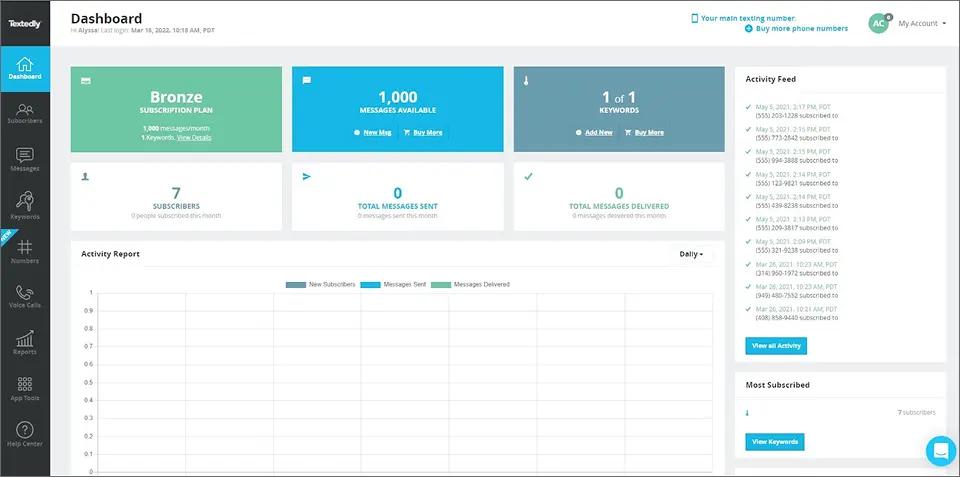
That makes Textedly a fit for promotional offers, event invitations, appointment blasts, and customer announcements. Teams weighing it against other campaign platforms often compare the same shortlist covered in our roundup of Textedly alternatives.
Key Features and Capabilities
- Bulk SMS campaigns for reaching opted-in contacts
- Keyword-based opt-in and list-building tools
- Scheduled and drip campaigns
- Contact segmentation for targeted messaging
- Two-way texting managed through the Textedly dashboard
- Text-to-pay via Stripe on Plus plans and above
- AI-assisted message creation
- MMS and picture messaging support
- Free inbound messages
- Native integrations with Salesforce, HubSpot, Slack, Shopify, Mailchimp, and Zapier
- No long-term contract
Textedly Pricing
Textedly pricing starts at $29/month. Message allowances below reflect annual billing, which delivers 20% more messages rather than a lower price.
| Plan | Monthly Price | Messages (annual billing) | Keywords |
| Basic | $29 | 600/month | 1 |
| Bronze | $49 | 1,200/month | 1 |
| Plus | $79 | 2,400/month | 2 |
| Enterprise | $125 | 4,200/month | 3 |
| Elite | $169 | 6,000/month | 4 |
| Business | $299 | 12,000/month | 6 |
Higher tiers continue well beyond this range for high-volume senders.
Additional Textedly costs and terms:
- Telecom surcharge: $8/month on every paid plan
- Additional users: $10/month each
- Additional keywords: $10 per keyword per month
- Overage messages: $30 per 500 texts, or $0.06 each
- 10DLC registration: $4 to $44 one-time
- Text-to-pay transactions: 2.90% plus $0.30 each
- Credit rollover: none, unused monthly messages expire
- Free trial: 14 days
Pros and Cons of Using Textedly
| Pros | Cons |
| Low entry price and no long-term contract | The $8 telecom surcharge applies to every plan |
| Strong keyword opt-in and list-building tools | Unused messages expire monthly |
| Text-to-pay via Stripe is rare at this price | No mobile app, so campaigns are managed from desktop |
| Free inbound messages | Per-user fees add up on larger teams |
| Native CRM and ecommerce integrations | Automation is basic next to SlickText or SimpleTexting |
Is Textedly the Right TextUs Alternative?
Textedly suits teams whose texting is mostly outbound and list-based, and the text-to-pay feature is genuinely uncommon at this price point. Textedly reviews split sharply by platform, with strong G2 and Capterra ratings sitting against a much lower Trustpilot score driven by billing, cancellation, and refund disputes.
Teams that need contact-level conversation management or a shared workspace for two-way threads will find TextUs closer to the mark. For a breakdown against an email-native approach, see Textedly vs TextBolt.
3. SimpleTexting — Best for General Business Texting and SMS Marketing
SimpleTexting is a general-purpose business texting platform that combines SMS marketing, campaigns, two-way messaging, and contact management in a dedicated dashboard. It is built for businesses running promotional campaigns alongside everyday customer conversations.
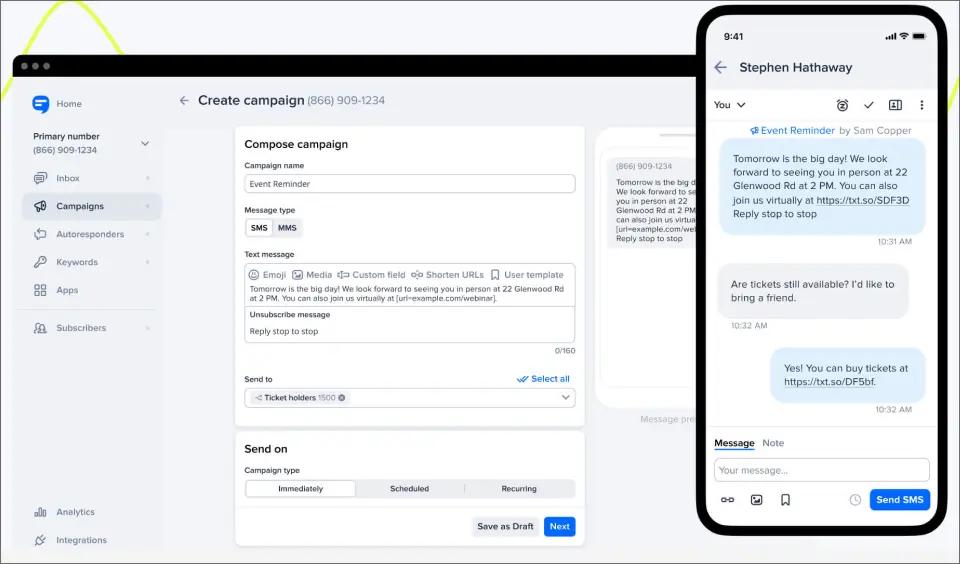
Where TextUs organises everything around contact records and CRM sync, SimpleTexting organises around lists and campaigns. The full feature set ships on every tier, so you pay for message volume rather than unlocking capabilities as you scale.
Key Features and Capabilities
- Mass texting and two-way messaging with free incoming SMS
- Auto-replies, drip campaigns, and scheduled sends
- Unlimited contacts and unlimited text-to-join keywords
- Advanced audience segmentation
- API access on every plan
- Rollover credits on unused monthly allowance
- Native Mailchimp and Zapier integrations, with other tools connected through Zapier
- iOS and Android apps alongside the web dashboard
- Live support seven days a week
- Local, toll-free, text-enabled landline, and dedicated short code options
SimpleTexting Pricing
SimpleTexting pricing starts at $39/month for 500 credits with a local number. The same 500 credits cost $29/month on a toll-free number, since toll-free carries no monthly line fee. Three user seats come with every paid plan.
| Pricing Item | SimpleTexting Cost |
| Starting plan | $39/month with a local number, or $29/month with toll-free |
| Included credits | 500 |
| User seats included | 3 |
| Additional users | $20/month each |
| Additional numbers | $10/month each |
| Additional credits | $0.055/credit |
| Carrier registration | $4 one-time |
| Carrier fees | About $0.0025 per message in the US, passed through at cost |
| Credit rollover | Yes, expires at the end of the following month |
| Annual billing | 20% discount |
| Contract | None, with a 30-day money-back guarantee |
Plans scale to 50,000 credits at $909/month, with custom pricing above that. Nonprofits and tax-exempt organizations receive 15% off monthly plans.
Pros and Cons of Using SimpleTexting
| Pros | Cons |
| Three user seats included on every plan | Fourth user onward costs $20/month each |
| Full feature set on every tier, including API access | Rollover credits expire after one month and are lost on downgrade |
| Unused credits roll over | Only Mailchimp and Zapier connect natively |
| Toll-free numbers carry no monthly line fee | MMS burns three credits, and messages past 160 characters burn two |
| Seven-day live support and mobile apps | Tier jumps are steep through the mid-range |
Is SimpleTexting the Right TextUs Alternative?
SimpleTexting fits small and mid-sized businesses that blend customer engagement with SMS marketing. The three included seats make it one of the cheaper options for a small team once you count real headcount rather than headline price, and choosing toll-free over local drops the entry cost to $29.
Businesses that need contact-level conversation management or native CRM connectivity will still find TextUs closer to the mark. For teams weighing a dashboard against their existing inbox, the SimpleTexting vs TextBolt trade-off comes down to whether campaign tooling justifies a second place to log in.
4. EZ Texting — Best for SMS Marketing and Automated Messaging
EZ Texting is a business messaging platform focused on SMS marketing, customer engagement, and automated communication. Founded in 2004 and now serving over 230,000 businesses, it pairs campaign management with two-way messaging, contact tools, AI-assisted content, and workflow automation.

The structural quirk to understand before comparing prices: every tier below Enterprise includes the same 500 monthly credits. Higher plans buy lower overage rates, bigger contact ceilings, faster sending throughput, and a waived telecom fee, not more messages.
Key Features and Capabilities
- SMS keywords, QR codes, sign-up forms, and click-to-text tools for list growth
- Unlimited contacts, contact tags, and custom fields for segmentation
- Team inbox with per-user logins and permissions
- Visual campaign calendar with drip campaigns and keyword auto-replies
- Drag-and-drop automation workflows
- Branded contact cards, shortened links, and click tracking
- RCS business messaging with branded verified sender
- Call forwarding, reporting, and an open API
- Integrations including Salesforce, HubSpot, Zendesk, Squarespace, Shutterstock, and Zapier
- Local 10DLC, toll-free, dedicated short code, and text-enabled landline options
- A2P carrier registration included at no extra cost
EZ Texting Pricing
EZ Texting pricing runs on a credit model across four tiers. SMS costs one credit at up to 160 characters, MMS costs three at up to 1,600, and inbound messages are free.
| Plan | Monthly Price | Monthly Credits | Overage Rate | Telecom Fee |
| Launch | $25 | 500 | $0.04 | $5/month |
| Boost | $75 | 500 | $0.035 | Waived |
| Scale | $125 | 500 | $0.03 | Waived |
| Enterprise | $3,000 | 200,000 | $0.01 | Waived |
Additional EZ Texting costs and terms:
- One user seat per plan, with additional seats at $10/month each
- Local textable number assigned at signup; additional numbers cost extra
- Annual plans issue 6,000 credits upfront, expiring 12 months after purchase
- Monthly plan credits roll over one billing cycle, staying usable up to two months
- Rollover is not guaranteed on legacy or custom plans
- Carrier pass-through fees are billed separately based on usage
- Setup within one business day on Launch, Boost, and Scale; four to twelve weeks for Enterprise
- Free trial: 14 days
- Available in the United States and Canada only, and not HIPAA compliant
The $5 telecom fee makes Launch’s real floor $30/month. At any meaningful volume, overage credits become the bill rather than the subscription: a business sending 8,000 messages a month on Scale pays $125 in subscription and roughly $225 in overages.
Pros and Cons of Using EZ Texting
| Pros | Cons |
| A2P carrier registration included, which most competitors bill separately | Every tier below Enterprise includes only 500 credits |
| Shutterstock imagery built into MMS composition, unique among these platforms | Overage rates dominate the bill at real volume |
| Strongest template library and list-growth tooling in this comparison | Support runs 8am to 8pm ET, with no phone or weekend coverage |
| Genuine automation workflows rather than basic drip logic | One user seat included, with $10/month per additional |
| Widest range of number types, including text-enabled landline | Annual credits expire after 12 months |
| Two decades of operating history and a large customer base | Not HIPAA compliant, and US and Canada only |
Is EZ Texting the Right TextUs Alternative?
EZ Texting suits businesses running campaigns and audience-building programmes rather than managing ongoing one-to-one conversations. The automation tooling, template library, and number-type flexibility are the strongest here, and including carrier registration is a real cost advantage.
The credit structure is where it gets expensive. A team sending a few thousand messages a month pays mostly in overages regardless of tier, which makes the plan ladder harder to reason about than a straight volume-based model. For teams weighing that against a flat monthly allowance, EZ Texting vs TextBolt sets out where each pricing model breaks even.
5. SlickText — Best for High-Volume SMS Marketing
SlickText is built primarily for SMS marketing, subscriber growth, promotions, and customer engagement. Every feature ships on every plan, including integrations, so the tiers differ only by message volume and support level.
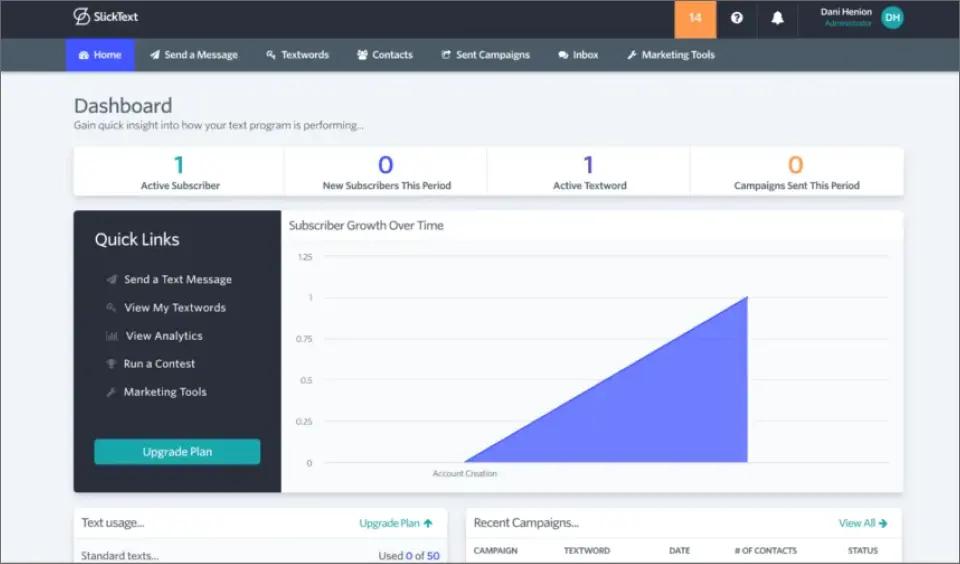
The list-growth tooling is the real draw. Keywords, QR codes, website popups, and tap-to-join links make it the strongest option here for building a subscriber base from scratch, which is a different job from managing conversations with contacts you already have.
Key Features and Capabilities
- Bulk SMS and MMS campaigns
- One-to-one conversations through a dedicated inbox
- Autoresponders, birthday texts, and scheduled drip campaigns
- Rollover credits on monthly and annual plans
- Unlimited contacts across all plans
- One premium sending number included
- Additional team members can be added to the account
- 10DLC, toll-free, short code, and RCS sending options
- Integrations with Shopify, Mailchimp, Zapier, and other third-party tools
- Provide live phone, chat, and email support
- Offers iOS and Android apps
SlickText Pricing
SlickText starts at $29/month for 500 credits. A free plan is available with no card required, and annual billing delivers two free months of credits.
| Plan | Monthly Price | Credits per Month |
| Starter | $29 | 500 |
| Growth | $49 | 1,000 |
| Standard | $79 | 2,000 |
| Plus | $129 | 3,500 |
| Pro | $169 | 5,000 |
| Premium | $319 | 10,000 |
| Elite | $579 | 25,000 |
| Max | $939 | 50,000 |
| Enterprise | Custom | Custom |
Additional SlickText costs and terms:
- Carrier fees: passed through at no markup, billed separately
- RCS: $500 one-time setup plus $200 annual maintenance
- Rollover: one month on monthly plans, one year on annual plans
- Annual billing: two free months of credits
- Free trial: 14 days
- Credits count one per 160-character SMS segment, with MMS consuming three credits per segment at up to 1,600 characters.
Pros and Cons of Using SlickText
| Pros | Cons |
| Clean interface and intuitive campaign builders suit beginners | Costs scale quickly as contact list and volume grow |
| Strongest list-growth tooling here: keywords, QR codes, popups, tap-to-join | Automation is lighter than vendor marketing suggests, with limited multi-step branching |
| Support is widely praised as fast and responsive | Built for mass broadcasting rather than live one-to-one team conversations |
| Integrates with Shopify, Mailchimp, Zapier, and other third-party tools | Carrier fees are billed separately on top of the plan |
| Annual rollover runs a full year, the longest here | RCS carries a $500 setup plus $200 annual maintenance |
| Full feature access on every tier, including integrations | US and Canada only |
| Unlimited contacts and free incoming texts | Onboarding support only starts at the $129 tier |
Is SlickText the Right TextUs Alternative?
SlickText makes the most sense for businesses treating SMS as a marketing and subscriber-engagement channel. The year-long rollover on annual plans suits organizations whose volume spikes a few times a year rather than running evenly, and the price match against SimpleTexting gives you leverage if you are choosing between the two.
Businesses that need contact-level conversation management or live team collaboration on inbound replies will find TextUs closer to the mark, since SlickText is oriented toward broadcasting rather than shared conversation handling.
6. Salesmsg — Best for Sales and Recruiting Teams That Need Calling and Texting
Salesmsg combines business texting and voice calling in one platform, making it one of the closer alternatives to TextUs for teams that reach contacts by phone as well as SMS. Calls sit alongside text threads in the same inbox rather than requiring a separate VoIP tool.

Its shared inbox and native agent assignment suit teams where an inbound reply needs to land on a specific rep’s screen rather than in a shared notifications folder.
Key Features and Capabilities
- Two-way SMS and MMS
- Shared team inbox with native agent assignment
- Voice calling alongside texting from the same number
- Mass texting to contact lists
- CRM integrations including HubSpot, with Zapier covering gaps
- Local and toll-free numbers
- Reporting across standard sales-coaching metrics
- Pay-As-You-Go credits available outside the subscription
Salesmsg Pricing
Salesmsg pricing starts at $25/month for 500 credits and runs to $249/month for 7,500, split across Basic and Pro plan families. Every tier includes one phone number and one user seat.
| Pricing Item | Salesmsg Cost |
| Starting plan | $25/month |
| Included credits | 500 |
| Higher-volume plan | Up to $249/month |
| Phone number | 1 included |
| Additional number | $5/month |
| Additional user | $10/month |
| Account manager | Included |
Pros and Cons of Using Salesmsg
| Pros | Cons |
| Calling and texting in one platform | Additional user fees increase team costs |
| Shared inbox | Additional phone numbers cost extra |
| CRM integrations | No Bullhorn-level ATS integration |
| Dedicated account manager | Less focused on email-based workflows |
| Competitive pricing at higher volumes |
Is Salesmsg the Right TextUs Alternative?
Salesmsg is the closest match to TextUs here for teams needing voice and SMS in one workspace, and the bundled base price is competitive for a small team since number, seat, and credits all sit inside the $25.
Costs climb on per-seat and per-number scaling as headcount grows, and plan credits expiring monthly makes uneven volume expensive. The Salesmsg reviews cover how that scaling plays out for teams past the first few users.
7. Twilio — Best for Custom SMS Infrastructure
Twilio is fundamentally different from the other TextUs alternatives on this list. Rather than providing a ready-to-use recruiting or business texting workspace, Twilio provides programmable communications infrastructure that developers can integrate into websites, applications, CRMs, and internal systems.
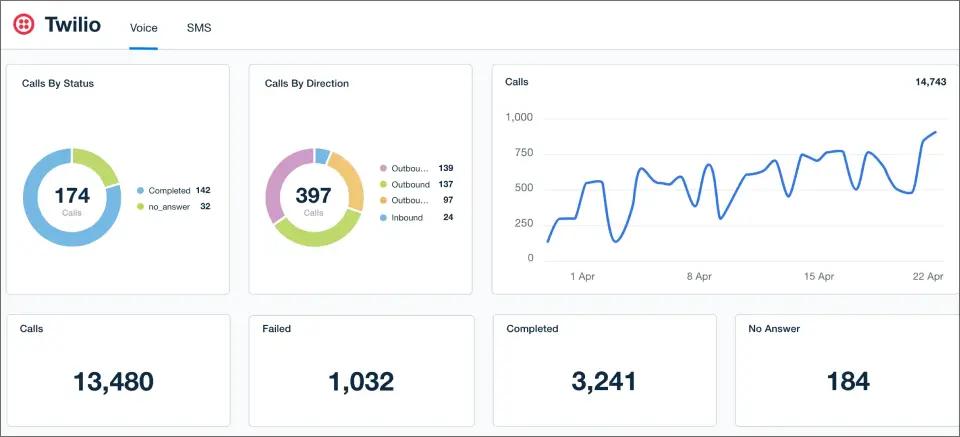
That flexibility makes Twilio particularly valuable for organizations with engineering resources that want complete control over how messaging works. It is less suitable for a recruiter who simply wants to start sending texts without building or configuring a messaging application.
Key Features and Capabilities
- Programmable SMS and MMS APIs
- Pay-as-you-go messaging
- Global carrier coverage
- Phone number provisioning
- Webhooks for inbound messages and delivery events
- Programmable voice and other communication channels
- Custom CRM and ATS integrations
- Developer APIs and SDKs
- Messaging automation through custom applications
Twilio Pricing
Twilio uses usage-based pricing rather than a fixed monthly platform fee. U.S. SMS starts at approximately $0.0083 per segment, before applicable carrier fees, with phone numbers charged separately.
| Pricing Item | Twilio Cost |
| U.S. outbound SMS | From $0.0083/segment |
| Local phone number | About $1.15/month |
| Platform subscription | None |
| Pricing model | Pay-as-you-go |
| Carrier fees | Additional |
Pros and Cons of Using Twilio
| Pros | Cons |
| Low base SMS rate | No ready-made shared inbox |
| Pay-as-you-go pricing | Requires development resources |
| Extensive global carrier coverage | CRM and ATS workflows must be built or integrated |
| Highly customizable | More technical setup than dedicated texting platforms |
| Strong API and developer ecosystem |
Is Twilio the Right TextUs Alternative?
Twilio is best suited to organizations with developers that want to build their own messaging infrastructure or connect SMS deeply into an existing ATS, CRM, or business application.
For teams looking for an out-of-the-box texting platform, Twilio requires considerably more implementation work than TextUs, Textline, or TextBolt. Its strength is flexibility rather than simplicity.
The right TextUs alternative comes down to how your team actually communicates, not which platform has the longest feature list. Map your monthly volume and headcount against each pricing model, and the shortlist usually narrows to two.
How to Choose the Right TextUs Alternative for Your Business
The best TextUs alternative depends on how your business uses texting, which tools your team already relies on, how many messages you send, and how much platform functionality you actually need.
TextBolt, for example, takes a different approach from TextUs by adding SMS to an existing email workflow instead of requiring teams to manage texting through a separate dashboard.
1. Start With Your Messaging Use Case
Identify what your team primarily sends through SMS, whether that’s customer conversations, appointment reminders, sales follow-ups, employee notifications, recruiting messages, marketing campaigns, or operational alerts.
If your team mainly needs straightforward two-way texting, reminders, and notifications, TextBolt can be a practical fit because messages are sent from Gmail, Outlook, or another email client. Teams that need advanced campaign management, contact intelligence, or ATS and CRM workflows may benefit from a more feature-heavy platform.
2. Compare the Total Cost of Using Text Messaging Services
Don’t compare providers using their starting prices alone. Look at the platform fee, including SMS credits, per-message charges, additional phone numbers, user fees, overages, carrier fees, and contract requirements.
TextBolt uses a flat monthly model with included SMS credits, while TextUs combines its platform fee with message-credit charges. Comparing the complete monthly cost based on your actual message volume makes the difference between the two models easier to understand.
3. Check Your Required Integrations
Consider the systems your team already uses, including CRMs, ATS platforms, help desks, ecommerce platforms, monitoring tools, and email applications.
If you need native integrations with systems such as Bullhorn, Greenhouse, Salesforce, or other business platforms, prioritize providers that support those workflows. If your team already manages communication through email, TextBolt can connect SMS to that workflow without requiring a separate CRM or messaging dashboard.
4. Match the Platform to Your Workflow
Think about how your team wants to send and manage messages. TextUs provides a dedicated messaging environment for managing conversations, contacts, campaigns, and integrations. TextBolt takes a simpler email-to-SMS approach, allowing users to send and receive texts through the inbox they already use.
For teams that need shared inboxes, campaign automation, or advanced contact management, a dedicated messaging platform may be the better choice. For teams that want to send and receive business SMS without learning another application, TextBolt offers a simpler workflow
5. Review Setup and Contract Requirements
Consider how quickly you need to start and whether you want a long-term commitment. TextBolt is designed for quick setup, with most configurations completed in about 30 minutes, and does not require a 12-month contract.
TextUs agreements start with a 12-month term, although monthly billing is available within that commitment. The difference matters if your business wants to test SMS before making a longer-term commitment.
6. Focus on the Features You Actually Need
A longer feature list doesn’t automatically make a platform a better choice. Focus on the capabilities your team will use regularly, such as two-way texting, shared inboxes, automation, integrations, delivery tracking, compliance support, team access, or email-based sending.
TextUs is a stronger fit when your business needs a dedicated messaging platform with deeper integrations and structured communication workflows. TextBolt is better suited to teams that want professional business texting without changing the way they already communicate.
The right choice comes down to workflow, not just price. If your business needs an integrated texting workspace, TextUs may be the better fit. If you want predictable pricing and two-way SMS directly from the email inbox your team already uses, TextBolt offers a simpler alternative.
See How TextBolt Fits Your Existing Workflow
Start a 7-day free trial, connect one email-based texting workflow, and compare the experience before making a full switch.
Choose the TextUs Alternative That Fits Your Workflow
Choosing a TextUs alternative comes down to more than finding a lower monthly price. The right platform should match your message volume, existing tools, team size, required integrations, and the way your employees already communicate.
TextUs remains a strong option for organizations that need a dedicated business texting platform with advanced integrations, shared conversations, and structured messaging workflows. TextBolt takes a simpler approach for businesses that want to send and receive SMS directly from Gmail, Outlook, or another email client without adding another dashboard to the workflow.
If your team needs deep CRM or ATS connectivity, compare those integrations first. If you’re looking for a simpler way to send and receive business SMS from the inbox your team already uses, contact TextBolt or start your trial to see how email-to-SMS fits your workflow.
Frequently Asked Questions
How long does it take to switch from TextUs to another platform?
Budget two phases. Account setup is fast on most platforms here, with EZ Texting and SlickText activating within a business day and email-native options like TextBolt taking about 30 minutes. Carrier-side 10DLC approval typically takes one to two business days regardless of provider, and Twilio can run longer if you are building the integration yourself.
What happens to my 10DLC registration if I switch providers?
10DLC registration ties to the sending platform and campaign use case, so switching usually means registering a new campaign under the new provider, and sometimes provisioning a new number. Costs vary: EZ Texting includes registration at no extra charge, SimpleTexting charges $4 one-time, and Twilio bills brand and campaign fees monthly. Carrier approval generally clears in one to two business days.
How does an email-to-SMS gateway compare to a dashboard platform like TextUs?
An email-to-SMS gateway removes the dashboard entirely. You send messages by composing emails, and replies come back as threaded email responses. TextUs and similar dashboard platforms give you contact records, campaign tools, and team-wide reply routing that an inbox alone can’t replicate. Email-to-SMS is faster to set up and lighter to run, but it doesn’t manage a shared pipeline the way a CRM-integrated platform does.
Which alternative fits a one or two-person team best?
TextBolt or SlickText, depending on whether you are sending operational messages or building a subscriber list. Both avoid the CRM-scale features a small team wouldn’t use, and neither requires the 12-month agreement TextUs asks for. Salesmsg is worth a look if you need calling in the same inbox, since its base plan bundles one seat and one number.