
- What Is Two-Way Messaging?
- How Does Two-Way Messaging Work?
- Benefits of Two-Way Messaging for Business
- Two-Way Messaging Use Cases That Drive Results
- Two-Way Messaging by Industry
- How to Choose a Two-Way Messaging Platform
- Two-Way Messaging Best Practices
- How TextBolt Handles Two-Way Messaging
- Two-Way Texting After the Carrier Email-to-Text Gateways Shut Down
- Start Two-Way Conversations Today
- Frequently Asked Questions
Start Two-Way Conversations From Your Email
Two-Way Messaging: What It Is and How It Works for Businesses

Two-way messaging is business texting where customers can reply and someone on your team answers, all in one conversation. Instead of sending a reminder and hoping, you get a “Yes, see you then” or a “Can we move it to Friday?” back, and you can act on it.
Providers such as TextBolt, SimpleTexting and Textedly offer two-way messaging from a dedicated business number. TextBolt, an email to SMS gateway, runs it from the inbox you already use. You send from Gmail, Outlook or any email client, and each reply comes back to the person who sent the original text.
A field-service company sends tomorrow’s appointment reminders at 4 PM. One customer replies: “Gate code changed, can someone call me?” On a one-way system, that reply goes nowhere. The next morning the technician waits outside a locked gate, the customer calls the office, and the office has no record of the text.
Two-way messaging closes that gap. The customer’s gate-code reply lands in the same conversation as your reminder, so someone calls them back before the technician leaves the depot.
What Is Two-Way Messaging?
Two-way messaging puts outbound and inbound texts in one conversation, so a business can act on every reply instead of ignoring it. The business sends, the customer answers, and both sides keep talking in the same thread.
Think of it this way. One-way messaging is a megaphone. Two-way messaging is a phone call, but faster, less intrusive and written down.
When a customer replies to your text, the reply reaches your team right away. They might be confirming an appointment, asking about your hours or responding to an offer. Either way, you see the reply and can keep the conversation going.
Still not sure how two-way messaging differs from standard SMS blasts? Here’s a side-by-side breakdown.
One-Way vs. Two-Way Messaging: The Key Difference
| Feature | One-Way SMS | Two-Way Messaging |
| Direction | Business → Customer only | Business ↔ Customer |
| Customer replies | Ignored or undelivered | Received and actionable |
| Conversation flow | Single broadcast | Ongoing dialogue |
| Engagement rate | Low (no response channel) | High (45% response rate) |
| Customer experience | Impersonal | Personal and interactive |
| Use cases | Alerts, notifications | Support, sales, feedback, reminders |
The distinction matters more than most businesses realize. When customers can’t reply to your messages, they call your office instead, tying up phone lines, increasing wait times, and costing your team hours of productivity every week.
How Does Two-Way Messaging Work?
Two-way messaging relies on a few core components working together behind the scenes. You don’t need to understand the technical details to use it, but knowing the basics helps you choose the right platform. Here are the three building blocks that power every two-way SMS conversation.
1. Dedicated Business Numbers
Your two-way messaging service assigns your business a dedicated phone number, either a toll-free number or a local 10-Digit Long Code (10DLC) number. This is the number customers see when they receive your texts, and the number they reply to.
Unlike carrier gateways that use random, rotating addresses, a dedicated number builds recognition and trust. Customers know who’s texting them, and replies go back to the right place every time.
2. SMS Keywords and Auto-Responses
Keywords let you automate the start of a two-way conversation. A customer texts “HOURS” to your number and instantly receives your business hours. They text “CONFIRM” and their appointment locks in. No human effort required for routine interactions.
You define the keywords, write the auto-responses, and let the system handle the volume. When a message falls outside your keywords, it routes to a team member for a personal reply.
3. 10DLC Compliance
If you’re sending business text messages in the United States, 10DLC compliance isn’t optional. It’s required. 10DLC (10-Digit Long Code) registration verifies your business identity with carriers, ensuring your messages get delivered instead of flagged as spam.
Registered 10DLC numbers see delivery rates of up to 98%*. Unregistered numbers? Carriers increasingly block them outright.
Ready to Start Two-Way Conversations?
TextBolt lets you send and receive text messages directly from your email inbox. No new software, no training required.
Benefits of Two-Way Messaging for Business
Two-way messaging helps customers engage, cuts support time and keeps every conversation in one place. Here’s where those gains come from.
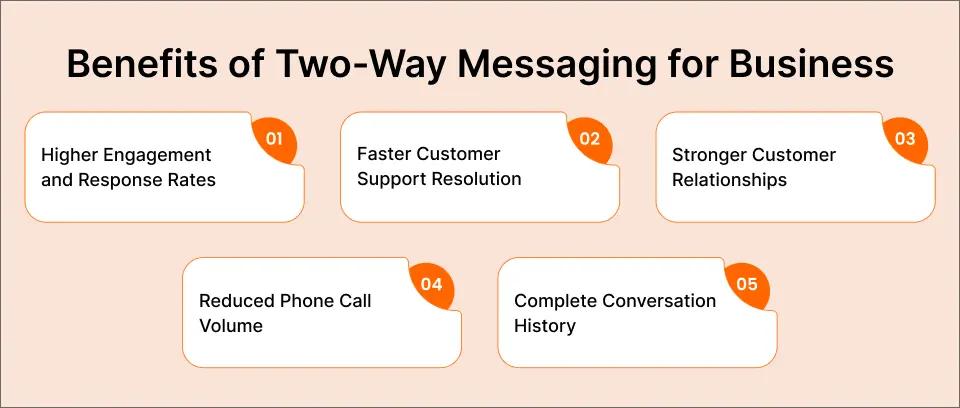
1. Higher Engagement and Response Rates
Text messages already outperform every other communication channel. Salesforce’s SMS marketing research shows SMS open rates reach 98%, compared to just 22% for email. And when customers can actually reply, engagement climbs even higher.
According to CTIA’s 2025 Annual Survey, with Americans exchanging nearly 2.2 trillion text messages last year, the average response time to a text message is 90 seconds. Compare that to email, where the average response takes 90 minutes, if it comes at all. Two-way messaging meets customers where they’re already active and gives them a frictionless way to respond.
2. Faster Customer Support Resolution
Two-way messaging lets a customer ask about an appointment, order, or account by text instead of calling. Your team answers from a shared thread and resolves issues in seconds rather than the minutes a phone call takes.
For small businesses without dedicated call centers, this changes the math. One office manager can handle 10 text conversations simultaneously. Try doing that with phone calls.
3. Stronger Customer Relationships
Receiving a broadcast and having a conversation feel different to the customer. Two-way messaging makes customers feel heard. A thoughtful reply builds the kind of trust that drives repeat business and referrals.
This matters especially in healthcare, where patients want to feel like more than a number. A quick “Thanks for confirming, see you Thursday at 2:00 p.m.” goes a long way.
4. Reduced Phone Call Volume
Every text conversation that resolves a question is one fewer phone call your team has to answer. For businesses fielding dozens or hundreds of calls daily, two-way messaging cuts phone volume significantly, freeing staff to focus on in-person customers and higher-value tasks.
5. Complete Conversation History
Unlike phone calls (which disappear unless recorded), text conversations create an automatic paper trail. Every message sent and received is logged with timestamps. This audit trail protects your business in disputes, satisfies compliance requirements, and gives managers visibility into team communication. Understanding how secure text messages are also helps your team decide which information belongs in SMS versus a secure portal.
Two-Way Messaging Use Cases That Drive Results
Two-way messaging isn’t a single-purpose tool. From reducing no-shows to resolving billing questions, here’s how businesses across industries use it to solve real problems and recover revenue.
1. Appointment Confirmations and Reminders
This is the most common and most profitable use case. Send a reminder 24 hours before an appointment. The customer replies “YES” to confirm or “RESCHEDULE” to change.
The impact is measurable. Text reminders reduce missed appointments. For a healthcare practice where each missed appointment costs $200, that’s thousands in recovered revenue every month.
2. Customer Support and FAQs
Route common questions through SMS. Customers text your number asking about hours, pricing, directions, or order status. Auto-responses handle the routine queries. Your team steps in for anything that needs a human touch. Our SMS templates for customer service cover ready-to-use reply scripts for the most common inbound questions.
3. Feedback Collection and Surveys
After a service appointment or purchase, send a quick survey via text: “How was your visit today? Reply 1-5.” The simplicity of SMS drives response rates that email surveys can’t match. Customers who’d never open a survey email will reply to a two-word text in seconds.
4. Order, Delivery, and Payment Updates
E-commerce and service businesses send delivery confirmations that customers can answer: “Your order ships tomorrow. Reply TRACK for tracking info.” A friendly payment reminder works the same way. Customers reply with questions about their balance, due date, or payment options, which resolves billing questions before they become overdue accounts.
5. On-Call Alerts From System Senders
Monitoring tools that send email alerts can page on-call engineers by text, and the engineer replies to acknowledge. When a server goes down at 3:00 a.m., the first engineer to reply “ACK” claims the incident, and everyone else on the thread knows it’s handled. No one has to open an app or log in.
Because the alert starts as an ordinary email, there’s nothing new to build. Teams that already notify staff about server downtime by email just point that alert at the on-call engineer’s TextBolt address.
6. Emergency Alerts and Notifications
Schools, healthcare facilities, and IT departments use two-way messaging for critical alerts. An emergency text messaging service with two-way capability lets recipients confirm receipt (“Reply OK to acknowledge”) so administrators know the message reached its audience.
For IT teams, server alert acknowledgments prevent duplicate responses to the same incident. The first engineer to reply “ACK” claims the ticket, and everyone else knows it’s handled.
Two-Way Messaging by Industry
Different industries use two-way messaging in different ways, but the common thread is the same: faster communication, fewer missed connections, and less time wasted on phone calls. Here’s how it looks in practice.
Healthcare
Healthcare providers use two-way messaging for appointment reminders, prescription notifications, test result alerts, and post-visit follow-ups. Patients reply to confirm, reschedule, or ask questions, reducing no-shows and phone call volume simultaneously.
When choosing a healthcare texting platform, look for solutions that address HIPAA considerations. TextBolt processes only phone numbers and message content with direct transmission. No patient data stored on external servers. We recommend consulting your compliance team to ensure any platform fits your specific requirements.
IT Departments and System Administrators
When a server goes down at 3:00 a.m., the on-call engineer needs to know immediately. Two-way messaging delivers critical system alerts and lets the engineer reply to acknowledge the incident. No app to open, no login required. Just reply to the text.
With the average cost of IT downtime at $5,600 per minute according to EMA Research’s 2024 IT Outage Cost Report, fast acknowledgment and response is not a nice-to-have. It’s a financial imperative. See how TextBolt works for IT departments.
Small Businesses and Service Companies
For small businesses, two-way messaging replaces the chaos of managing customer communication through one person’s phone. Booking confirmations, service updates, and customer questions all flow through a shared system that any team member can access.
No more “only David knows the passcode to the texting phone.” No more lost conversations when someone calls in sick. TextBolt’s small business texting solution gives your whole team access to customer conversations from their existing email.
Schools and Educational Institutions
Parent communication demands speed and reliability. Two-way messaging lets schools send emergency alerts, weather closings, and event reminders, then confirm parents received them. A simple “Reply 1 if you can attend the conference Thursday” replaces hours of phone tree coordination.
See How Two-Way Messaging Works With Your Email
Send a text by composing an email. Get replies right back in your inbox. Every plan includes 10 user accounts with no per-user fees.
How to Choose a Two-Way Messaging Platform
Choose a two-way messaging platform on four things: how you send, where replies land, how long setup takes, and what it costs per message. Some platforms require developers, others charge per user, and a few lock you into contracts before you’ve sent a single message.
Must-Have Features
- Dedicated business number: Messages should come from your number, not a random sender ID
- 10DLC or toll-free registration: Carrier-approved registration for reliable delivery.
- Auto-responses: Handle routine replies without human intervention
- Team access: Multiple staff members should be able to view and respond to conversations
- Audit trail: Full message history with timestamps and sender identification
- Delivery confirmation: Know when messages are delivered, not just sent
Questions to Ask Before You Buy
- How complex is the setup? Some platforms require API development and weeks of onboarding. Others work in minutes. If you don’t have a developer on staff, choose simplicity.
- What does it cost per message? Watch for hidden fees. Some platforms charge for incoming messages, per-user seats, or keyword setup.
- Can your whole team access it? Two-way messaging loses its power if only one person can see the replies. Look for multi-user access from devices your team already uses.
- Who handles registration? Ask whether the vendor files your 10DLC registration and how long carrier approval takes.
- Do you need another app? The best two-way messaging platforms is one your team will actually use. If it requires learning new software, adoption will suffer.
Skip the $300/Month Enterprise Platforms
TextBolt delivers two-way messaging through your existing email inbox. Send a text by composing an email, and replies come right back to Gmail or Outlook. No apps, no training required.
Two-Way Messaging Best Practices
Two-way messaging works when replies get fast, short, personal answers. These six habits separate businesses that get results from those that burn through their contact list.

1. Get Proper Consent First
Before sending any business text messages, you need opt-in consent from your recipients. This isn’t just good practice. It’s the law under the Telephone Consumer Protection Act (TCPA). Always provide a clear way to opt in, and honor every opt-out request immediately.
Include STOP keyword functionality in every conversation. When someone replies “STOP,” their number is removed automatically. No exceptions.
2. Respond Quickly
The whole point of two-way messaging is conversation. If a customer replies and waits hours for a response, you’ve broken the implicit promise of the channel. Aim to respond within five minutes during business hours. If you can’t staff real-time responses, set up auto-replies that acknowledge the message and set expectations: “Thanks for your message! We’ll get back to you within 30 minutes.”
3. Keep Messages Concise
Standard SMS supports 155 characters per segment, depending on the platform. Longer messages split into multiple segments, which can arrive out of order or increase costs. Keep your outbound messages clear and brief. Save the details for the reply thread.
If you trim copy to fit a single segment, our roundup of text abbreviations for business SMS explains which acronyms customers actually understand.
With TextBolt, the segment limit is 155 characters for standard text or 70 characters when using emojis or Unicode. Longer messages split automatically, with each segment using one credit.
4. Personalize When Possible
“Hi Sachin, your appointment with Dr. Chen is tomorrow at 2:00 p.m. Reply YES to confirm” outperforms “Your appointment is tomorrow. Reply to confirm” every time. Use the customer’s name, reference specific details, and make the message feel human.
5. Don’t Over-Message
Two-way messaging works because it feels personal and respectful. Sending more than two to three messages per week erodes that trust fast. The FCC’s 2025 TCPA enforcement rules require businesses to honor opt-out requests promptly. Unwanted calls and texts remain the FCC’s top consumer protection priority. Respect your customers’ attention.
6. Track and Optimize
Monitor your response rates, opt-out rates, and resolution times. If a particular message template gets low engagement, test a different approach. A/B test your wording, timing, and call-to-action to find what resonates with your audience.
How TextBolt Handles Two-Way Messaging
TextBolt turns your existing inbox into a two-way texting platform: you send the text from a normal email, and the customer’s reply comes back into the same inbox, with no separate dashboard, app, or developer project.
How Do You Send a Text From Your Email?
- Open Gmail, Outlook, or any email client.
- In the To field, enter the recipient’s number in the format +1[PhoneNumber]@sendemailtotext.com, replacing [PhoneNumber] with the 10-digit US number and no spaces or dashes.
- Write the message. The subject and body become the text, so keep it short and put the key point first.
- Send. The reply threads back into your inbox like any other email.
Because TextBolt assigns each account a dedicated US toll-free or 10DLC number, registered for business use, recipients always see the same business number, so their replies come back to that number and thread into your inbox. Gmail users can start with our Gmail text integration.
Where Do the Replies Go?
TextBolt sends each reply back to the inbox of the person who sent the original text, so it doesn’t land in a shared catch-all. On the Standard and Professional plans, up to 10 teammates send from their own email addresses through one business number, with no per-user fees.
That matters when a conversation runs across a shift change. If a customer texts the front desk at 4:55 PM, whoever is on in the morning can answer, because the thread belongs to a shared business number and doesn’t sit on one person’s phone.
How Does TextBolt Keep an Audit Trail?
TextBolt uses your existing inbox as the dashboard. Every text and reply lives in email, where it is searchable, archivable, and auditable. Delivery status appears in the TextBolt dashboard, so you can see what was delivered instead of assuming it was.
How Does TextBolt Handle 10DLC Registration?
TextBolt handles all 10DLC registration during setup. You provide your business information, and TextBolt manages the carrier approval process. Once approved (typically within 48 hours), your messages are carrier-verified. That means up to 98% delivery rates* instead of the 60-70% you get from unregistered numbers or carrier gateways.
Start sending two-way texts from your email. Sign up for a 7-day free trial with 10 message credits included. Account setup takes 30 minutes, and 10DLC approval typically completes within 48 hours.
Two-Way Texting After the Carrier Email-to-Text Gateways Shut Down
For years, many businesses and monitoring systems sent texts through free carrier addresses such as number@txt.att.net. Those addresses only worked one way. A customer could read the text, but any reply was lost. Most of these gateways are now closed or closing, which gives teams a reason to move to a setup where replies come back.
Which Carrier Gateways Have Shut Down?
| Carrier | Addresses to look for | What happens now | Date | Official source |
|---|---|---|---|---|
| AT&T | txt.att.net, mms.att.net | Texts no longer go through | Closed June 17, 2025 | AT&T support notice |
| T-Mobile | tmomail.net | No longer delivered reliably | Stopped working late 2024 | No public notice from T-Mobile |
| Verizon | vtext.com, vzwpix.com | Still delivered for now | Full shutdown by March 31, 2027 | Verizon support notice |
How Does TextBolt Replace a Carrier Gateway?
TextBolt uses one address format for every carrier, +1[PhoneNumber]@sendemailtotext.com, so you never have to look up which network a customer is on. Each text goes out from your registered business number. When the customer replies, the reply comes back to the inbox that sent it, so an old one-way alert becomes a two-way conversation.
Switching is an address change. Here are a few examples:
- AT&T: an alert sent to 5551234567@txt.att.net now goes to +15551234567@sendemailtotext.com.
- Verizon: an alert sent to 5551234567@vtext.com now goes to +15551234567@sendemailtotext.com.
- Cricket: an alert sent to 5551234567@sms.cricketwireless.net now goes to +15551234567@sendemailtotext.com.
Before the first send, approve the address your system sends from in your TextBolt account. Each carrier has a step-by-step guide: AT&T email to text migration, T-Mobile email to text migration and Verizon email to text migration.
Which Systems Can Send Two-Way Texts Through TextBolt?
Any tool that sends email notifications can text through TextBolt without code changes. This covers on-call and monitoring tools such as PagerDuty and Datadog, booking and scheduling software, help desks and alarm panels. When a recipient replies, the reply goes back to the address the alert came from. Point that address at a monitored inbox so someone sees it.
Libraries that use Koha can send patron hold and overdue notices the same way. In Koha’s settings, choose Email as the SMS send driver, turn on enhanced messaging preferences, and enter sendemailtotext.com as the cellular provider domain. Then test one notice type before turning it on for all patrons.
Start Two-Way Conversations Today
Two-way messaging transforms SMS from a broadcast tool into a conversation channel. It drives higher engagement, faster support resolution, fewer missed appointments, and stronger customer relationships.
The businesses winning with two-way messaging aren’t the ones with the biggest budgets or the most sophisticated technology. They’re the ones who made it easy for their team to send and receive texts, and easy for their customers to reply.
TextBolt makes two-way messaging as simple as sending an email. No new software. No developer resources. Just conversations that happen where your team already works.
Start your free trial today with 10 message credits included, and your team can start sending once 10DLC approval completes (typically within 48 hours).
*Delivery rates vary based on carrier policies, message content, and compliance factors.
Frequently Asked Questions
What is it called when you send the same message to multiple people?
Sending one message to many people at once is called a broadcast. A broadcast is one-way when replies can’t come back. It becomes two-way messaging when each reply is captured and answered in its own conversation thread.
Is Two-Way Messaging Compliant With TCPA Regulations?
Yes, when implemented properly. You must obtain opt-in consent before texting customers, honor all opt-out requests (STOP keyword), and follow SMS compliance laws for your industry. Your messaging platform should handle STOP keyword processing automatically.
What Is 10DLC and Why Does It Matter for Two-Way Messaging?
10DLC stands for 10-Digit Long Code. It’s a carrier-mandated registration system for businesses sending Application-to-Person (A2P) text messages. Without 10DLC registration, carriers may block or throttle your messages. With it, your messages are trusted and delivered reliably. That’s critical for two-way conversations where customers expect fast responses.
Do I Need a Developer to Set Up Two-Way Messaging?
Not with every platform. API-based solutions like Twilio require coding skills. But email-based solutions like TextBolt require zero development. If you can send an email, you can send and receive text messages. Account setup takes 30 minutes with no technical skills needed, and 10DLC approval typically completes within 48 hours.
What types of business messaging are there?
There are two types. One-way messaging only sends alerts and notifications. Two-way messaging also takes replies. Businesses send texts from a web dashboard, from an email client by addressing a phone number, or through code a developer writes against an API.
How do businesses use two-way texting?
They use it wherever a reply changes what happens next. Common uses include appointment confirmations, customer support questions, quick surveys, order and payment updates, and on-call alerts where an engineer replies ACK to claim an incident.
Will I know if a business text fails to deliver?
It depends on the platform. Look for delivery status that shows whether each text actually reached the phone, not just that it was sent. For time-critical messages such as appointment reminders, check that status and follow up on anything undelivered.