
- Why Are Businesses Replacing Verizon vText Now?
- What a Modern Verizon vText Alternative Should Deliver
- Comparison of Top 5 Verizon vText Alternatives
- 5 Best Verizon vText Alternatives for Email to Text in 2026
- Which vText Alternative Is Right for Your Team?”
- Is There a Free Alternative to Vtext?
- What About Verizon EMAG (Enterprise Messaging)?
- Why is TextBolt the Closest Replacement for Verizon vText?
- How to Migrate from Verizon vText to TextBolt in 6 Steps
- Replace vText Gateway Before Your Next Alert Goes Missing
- Frequently Asked Questions
Switch to a More Reliable Email-to-SMS Solution
Verizon vText Discontinued: Top 5 vText Alternatives for Email to Text


The best Vtext alternatives for Verizon’s vtext.com email-to-text gateway are email-to-SMS gateways that keep your current email workflow. The closest drop-in option is TextBolt. You swap [PhoneNumber]@vtext.com for +1[PhoneNumber]@sendemailtotext.com and send from the same inbox, now on a 10DLC-registered business route.
Verizon has started shutting down vtext.com and vzwpix.com and expects to finish by March 31, 2027, and many messages already fail silently because Verizon filters them as spam.
Once the shutdown is complete, emails sent to vtext.com and vzwpix.com will no longer reach any phone. If your alerts, reminders, or staff notices still go through vtext.com, you need a replacement now. The option that changes the least about how you work is an email-to-text gateway.
AI Summary
- TextBolt: Replaces your old Verizon address with +1XXXXXXXXXX@sendemailtotext.com: same inbox, 10DLC-compliant, two-way replies threaded back, no code.
- ClickSend: Send SMS by emailing [phonenumber]@sms.clicksend.com; multi-channel platform with email-to-SMS as a secondary feature.
- TXTImpact: Email-to-SMS gateway aimed at small and mid-size businesses.
- Notifyre: Email the combined phone-number-plus-account-ID address; pay-as-you-go, plus fax.
- Salesmsg: CRM-integrated texting managed inside its own app, not from your email inbox.
This guide compares the five best Vtext alternatives on delivery, team access, compliance, and price.
Why Are Businesses Replacing Verizon vText Now?
Verizon vText was a free email-to-SMS gateway that let anyone send a text by emailing a phone number at @vtext.com. For years, IT teams, schools, healthcare offices, and small businesses used it to turn automated email alerts and reminders into text messages, without writing a single line of code.
The format was simple. A monitoring tool or staff member would send an email to 5551234567@vtext.com, and Verizon’s gateway converted it into an SMS to the Verizon customer at that number. Picture messages worked the same way through @vzwpix.com.
There were no API keys, no developer time, and no monthly subscription. Our Verizon SMS gateway address guide explains the full routing behind this system.
Verizon built vText for low-volume personal use, not business messages. Many businesses relied on it anyway, because it was free and needed no setup. The Verizon vText service gateway had no sender authentication, no business verification, and no rate controls, which turned it into a soft target for smishing campaigns and spoofed senders.
By late 2024 Verizon began rolling back the service, and the architecture that made Verizon vText so easy to use is the architecture that makes it impossible to keep running at scale today.
What a Modern Verizon vText Alternative Should Deliver
After the free carrier gateways started dying, companies didn’t just want a replacement; they wanted a route that doesn’t silently drop. Here’s what a true vText alternative must provide:
- Registered delivery: Texts go out on a registered business route, with a delivery status you can check for each message.
- Built-in compliance basics: 10DLC business registration and automatic opt-out handling, so you aren’t setting them up yourself.
- Scheduling: The option to schedule texts for reminders and routine updates
- Full message history: You want simple logs so you can see what was sent, when, and to whom.
- Carrier independence: Your messages should go through business-approved routes, so they keep working, even if old gateways disappear.
- Two-way replies: Responses come back where the sender already works, not into a shared black hole.
US business texting requires A2P 10DLC registration; that is the law of the route now, not an optional extra. Our 10DLC compliance guide covers what registration involves and why carriers require it.
Comparison of Top 5 Verizon vText Alternatives
| Feature | TextBolt | Salesmsg | ClickSend | TXTImpact | Notifyre |
|---|---|---|---|---|---|
| Email-to-SMS | ✅ | ❌ | ✅ | ✅ | ✅ |
| Business / 10DLC Number Support | ✅ | ✅ | ✅ | ✅ | ✅ |
| Team Access / Multi-User | ✅ | ✅ | ✅ | ✅ | Limited |
| Two-Way SMS via Email | ✅ | ✅ | Supported with routing setup | Supported with configuration | Limited |
| Works From Gmail / Outlook (No Coding) | ✅ | ❌ | Outlook plugin required | ❌ (requires setup and routing rules) | ❌ |
| Dedicated vText Migration Support | ✅ | ❌ | ❌ | ❌ | ❌ |
Let’s learn about each vText alternative in detail.
5 Best Verizon vText Alternatives for Email to Text in 2026
Below is a detailed, objective breakdown of the best alternatives based on reliability, compliance, ease of use, and cost.
1. TextBolt — The Most Reliable Verizon vText Alternative for Email-to-Text Messaging
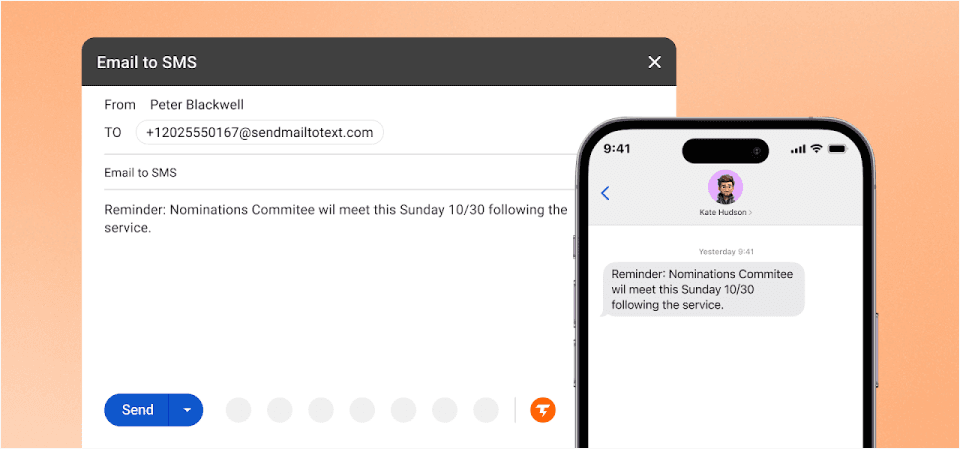
TextBolt email to text gateway is built specifically as a modern, business grade replacement for email to text services. It doesn’t use carrier gateways instead, it uses registered 10DLC and toll-free routes, giving businesses up to 98% delivery rates.
If you liked vText for its simplicity, TextBolt keeps that (you still send a text by sending an email) and adds the registered route, the business number, and the reply thread vText never had.
Want to see how it works in real workflows? Watch demo
Why TextBolt Stands Out
- Designed for Businesses (Not Carriers): No personal numbers, no shared phones, no missed messages. Teams get one centralized business texting system straight from email.
- Up to 98% SMS Deliverability: Messages are sent through verified business routes, not carrier gateways. This eliminates silent failures, the biggest vText problem.
- 10DLC Registration Included: Every account is a Verified A2P 10DLC business sender; registration can take up to 48 hours.
- Inbox Native Workflow: Send and receive texts from Gmail, Outlook, or any email provider. You can even schedule SMS from Gmail for reminders and routine business updates no new software to learn.
- How It Works — One Simple Change: Old (failing): 5551234567@vtext.com to new (TextBolt): +15551234567@sendemailtotext.com. That’s it. Same email workflow, new address, reliable delivery. For the full cutover checklist, see the Verizon vText migration.
- Multi User Access With Permissions: Allow multiple staff members to send texts from the same business number without sharing a phone.
- Built-In Compliance Stack: 10DLC business registration, automatic TCPA opt-out handling, and per-user audit logs cover the day-to-day record-keeping needs of regulated industries.
- Automated Opt Out Handling: Complies with TCPA regulations automatically.
- Message Logging for Every User: Every text is logged with details on when it was sent, so your team can easily reference past communications whenever needed. Messages stay organized, making it easy for everyone to follow up or pick up a conversation right where it left off.
- Two-Way Messaging: Every account is a Verified A2P 10DLC business sender; registration can take up to 48 hours.
- 30-Minute Setup: Quick implementation without IT overhead. Start sending text messages within 30 minutes of signup.
Who Uses TextBolt?
TextBolt is trusted by businesses of all sizes that need fast, dependable SMS right from their email inbox. Whether you’re scheduling appointments, sending service updates, or keeping teams connected, TextBolt streamlines communication for:
- Healthcare providers and clinics: Send appointment reminders, follow-ups, and urgent notices directly to patients.
- Educational institutions: Instantly notify students and staff about closures, deadlines, and alerts.
- Maintenance and service centers: Confirm appointments, update customers on job status, and communicate service completions.
- Salons and spas: Stay ahead of no shows with automated reminders and last minute notifications.
- Real estate teams and agencies: Share listing updates, schedule showings, and coordinate transactions with clients.
- Banks and financial organizations: Deliver secure alerts, transaction verifications, and important account updates.
- Insurance agencies: Speed up claims, manage renewals, and send critical policy reminders with ease.
- Service based businesses of every kind: Keep customers informed and engaged, from order updates to support tickets.
- Transport & Logistics: Dispatch workers, confirm deliveries, and coordinate field operations — all quickly, reliably.
- Retail and e-commerce: For order updates, delivery notifications, promotional offers, and customer support.
- Events and entertainment: For ticketing reminders, schedule announcements, and audience engagement.
- Restaurants and cafes: For confirming reservations, sending waitlist updates, sharing daily specials, and managing order pickups.
TextBolt is the smart choice for any business that needs a reliable way to deliver important messages, reach everyone on time, and keep workflows running smoothly no matter what industry you’re in.
TextBolt Pricing
TextBolt pricing plans fit any business size. Each plan includes a 7 day free trial and scalable features to match your business growth.
| Plan | Monthly Price | Message Credits | Best For |
| Basic | $29/month | 500 credits | Solo practitioners, consultants |
| Standard | $49/month | 1,000 credits | Growing businesses, medical practices |
| Professional | $99/month | 2,500 credits | Busy practices, multi-locations |
| Enterprise | Custom | 5,000+ credits | Large organizations, healthcare networks |
Client Testimonial
We were using Verizon’s messaging tools and kept hitting limitations. With TextBolt, our team just sends an email and the patient gets a text. No new software to learn, no extra logins.
— Operations Manager, Multi-Location Dental Practice
Verdict
TextBolt is a robust, user-friendly, and business-focused email-to-SMS platform that enables organizations to send professional text messages directly from their computer. With high deliverability, built-in compliance, and seamless team access, TextBolt provides an ideal solution for businesses looking to upgrade from outdated carrier gateways or manual phone texting. Its combination of reliability, swift onboarding, and operational transparency makes it a standout choice for teams that prioritize consistent communication and operational resilience without the complexity of traditional SMS apps or marketing platforms.
Send Business-Grade Texts in Minutes
Start texting from Gmail, Outlook, or your favorite email platform—no new software required and experience up to 98% delivery plus full compliance.
2. Salesmsg — Best for CRM-Driven Sales Teams

Salesmsg is an SMS platform built for sales communication. It integrates with popular CRM systems, which makes it a strong choice for lead generation, outbound outreach, and follow-up messages triggered by CRM activity.
Our Salesmsg vs TextBolt comparison explains how its CRM-based inbox differs from texting by email.
Key Strengths
- Advanced CRM integrations connect text messaging with client profiles, opportunities, and sales pipelines.
- Multi-user access supports sales departments collaborating to engage prospects and customers.
- A straightforward, modern interface makes managing customer communication easy.
Limitations Compared to TextBolt
- Pricing increases as you add more users, which may be costly for larger teams.
- Messaging is not email native, texts are managed within the platform rather than from standard email inboxes.
- The platform is less suitable for sending high volume operational notifications, handling appointment reminders, or facilitating day to day coordination across departments.
- Salesmsg is designed specifically for sales conversations rather than general business messaging or broad team use.
Teams with broader needs can compare other Salesmsg alternatives.
Best for: Sales teams, not general business messaging.
Salesmsg Pricing
Salesmsg includes one user seat and one number per plan. Extra seats cost $10/month each, and the free trial runs 14 days with 25 credits. See our full Salesmsg pricing breakdown for add-on and 10DLC fees.
3. ClickSend — Best for Business Messaging

ClickSend offers an email-to-SMS gateway, letting businesses send texts from any email client via special addressing. This makes it suitable for those looking for a basic workflow similar to the discontinued Verizon vText service.
Key Strengths
- Email-to-SMS: Send SMS by emailing [phonenumber]@sms.clicksend.com
- Supports both individual and bulk messaging
- Basic logging and delivery tracking
Limitations Compared to TextBolt
- Conversation threading & inbox workflow: TextBolt allows users to view, reply to, and manage SMS conversations directly within their regular email inbox (Gmail, Outlook, etc.), providing a seamless workflow and full message threading, even for multiple users. ClickSend, while it allows replies to go back to your inbox, does not provide true threaded conversation management within email; for organized threads and conversations, you must use its dashboard interface.
- Multi-User team collaboration: TextBolt is designed for teams: it supports multiple staff members sending SMS from the same business number, allows role-based permissions, and tracks who sent each message. ClickSend supports multiple “allowed” senders, but lacks structured team roles, comprehensive multi-user audit trails, and business inbox sharing as robustly as TextBolt.
- Compliance & Business Verification: TextBolt builds in 10DLC compliance and automatic business verification, mandatory for U.S. businesses, and automates opt-out management (TCPA). ClickSend does not automatically handle 10DLC business registration or advanced compliance for regulated industries, you may need to manually configure compliance and handle verification separately for each business account.
- Audit Logging & Message Tracking: TextBolt tracks every SMS sent and received, storing detailed logs for auditing, compliance, and business continuity across users and shifts. ClickSend offers delivery status and basic logs, but its message logs and auditing capabilities are less granular, especially for businesses needing detailed user-based history.
- Migration and Support: TextBolt offers hands-on migration and onboarding guidance for businesses switching from Verizon, AT&T or other carrier gateways. ClickSend has general support but does not specify dedicated migration help for former vText/AT&T users.
Best for: Suited for simple email-to-SMS messaging and basic business alerts, but not optimized for advanced team workflows or automated compliance like TextBolt.
ClickSend Pricing
Under 5,000 messages, each SMS costs $0.1105; from 5,000 to 50,000, it’s $0.0983; from 50,000 to 150,000, it’s $0.0881; and 150,000+ gets $0.0795 per SMS. For volumes above 250,000, businesses can contact sales for custom rates.
For a full breakdown of tiers, fees, and examples, see our ClickSend pricing guide.
4. TXTImpact — Best for SMB Messaging

TXTImpact an email-to-SMS gateway for small and mid-size businesses that want to send SMS from their email client with minimal setup.
Key Strengths
- Simple setup with minimal technical knowledge.
- Bulk SMS for notifications, reminders, and alerts.
- Contact management and opt-in/opt-out support.
Limitations Compared to TextBolt
- Lacks advanced team inbox features, multi-user access controls, and threaded conversation management.
- Compliance features (10DLC registration, business verification, automated opt-out) are more limited.
- Message logs and audit trails are basic.
- Lower scalability and enterprise support than developer-focused platforms.
TXTImpact Pricing
TXTImpact’s plans run month to month. Credits included and cost per credit scale with the plan, and carrier surcharges apply on every tier. US 10DLC registration costs a one-time $4 brand fee, a one-time $15 campaign fee, and $10 a month per campaign.
| Plan | Monthly Price | Credits Included | Cost per Credit | Users |
|---|---|---|---|---|
| Starter | $29 | 750 | $0.0387 | 1 |
| Growth | $49 | 1,500 | $0.0327 | 1 |
| Professional | $99 | 4,000 | $0.0248 | 5 |
| Business | $299 | 15,000 | $0.0199 | 10 |
Best for: Small businesses needing simple email-to-SMS messaging.
5. Notifyre — Email-to-SMS for Basic Needs
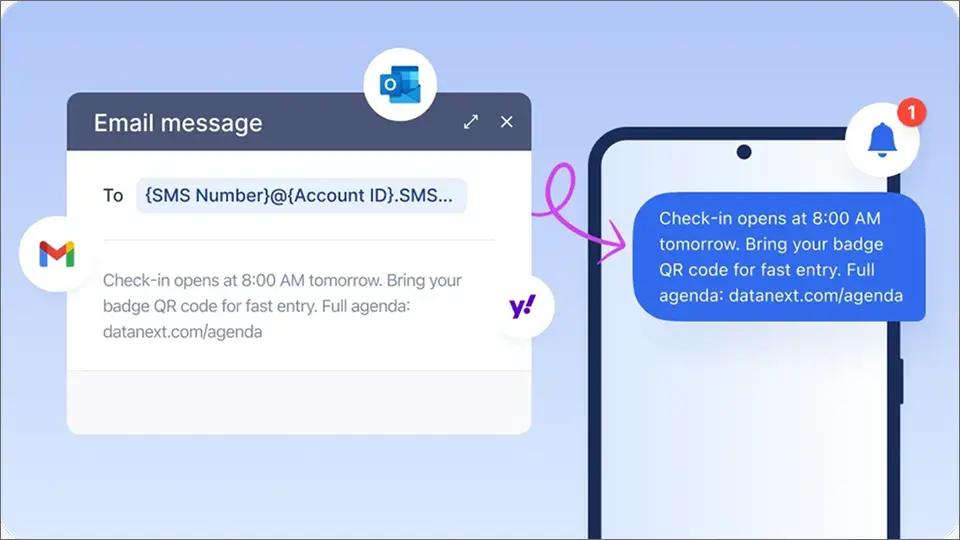
Notifyre is a business SMS and online fax platform with an email-to-SMS gateway. You send texts by emailing an address that combines the phone number and your Notifyre account ID, much like the old carrier gateway workflow.
Our Notifyre vs TextBolt comparison walks through how the two email-to-SMS setups differ day to day.
Key Strengths
- Pay-as-you-go pricing with no monthly commitment
- Supports message tracking and delivery confirmation
Limitations Compared to TextBolt
- Does not integrate natively with Gmail or Outlook — you send to Notifyre’s own email format, not from your regular inbox
- Limited multi-user team access and no role-based permissions
- No threaded conversation management within email — replies require their dashboard
- No dedicated migration support for businesses switching from Verizon, AT&T, or T-Mobile
- Basic message logging compared to TextBolt’s full per-user audit trails
- Newer service with less established track record for business-critical messaging
Best for: Businesses that want pay-as-you-go email to SMS, plus fax, without a monthly plan.
Notifyre Pricing
Notifyre uses a pay-as-you-go wallet with no monthly subscription. US texts cost $0.02 per SMS part, including the carrier fee, and inbound texts are free. See our Notifyre pricing breakdown for the full cost.
MMS costs $0.05 per message. Every US sender must also complete 10DLC registration, which Notifyre sells as a Quick Start package that includes a 10DLC number and three months of campaign maintenance.
Which vText Alternative Is Right for Your Team?”
Start with how your team sends texts today, then match each answer to the tools that fit. These six questions narrow the list quickly.
- Do you want to keep sending from email? TextBolt, ClickSend, TXTImpact, and Notifyre all turn emails into texts. Salesmsg works inside its own app and CRM instead.
- Do systems send texts, not just people? Pick a text messaging service that accepts email from any tool with no code. TextBolt works with monitoring tools like Nagios email alerts through their existing email settings.
- Will more than one person send? Check how each tool handles users. TextBolt’s Standard and Professional plans cover up to 10 users on one number, while Salesmsg charges for each extra seat.
- Where should replies land? TextBolt and ClickSend send replies back to your email. Salesmsg keeps conversations inside its app.
- Do you prefer a flat monthly cost or paying per message? TextBolt, TXTImpact, and Salesmsg use monthly plans. ClickSend and Notifyre charge per message from prepaid credit.
If you want to keep sending from email, include automated systems, and share one number across a team, TextBolt is the closest fit. If you need images or CRM-based texting, start with the other tools.
If cost is your main concern, you may be wondering whether any replacement is free.
Is There a Free Alternative to Vtext?
There’s no free business-grade replacement for vText. The free email-to-text gateways from all three major carriers are ending.
Verizon is shutting down vtext.com and vzwpix.com and expects to finish by March 31, 2027. AT&T shut down its gateway on June 17, 2025, and T-Mobile’s gateway stopped delivering reliably in late 2024.
Google Voice is free for personal texting, but it’s tied to one person and isn’t built for automated alerts or shared team use.
The lowest-cost path is a plan sized to your volume, tested with a free trial first. Most alternatives on this list offer a trial, so you can check delivery before you pay.
Verizon also offers its own paid option for businesses, which is worth understanding before you decide.
What About Verizon EMAG (Enterprise Messaging)?
Enterprise Messaging (EMAG) is Verizon’s commercial replacement for the vtext.com and vzwpix.com gateways. It isn’t a personal texting service. It’s built for businesses and public sector organizations that used those email addresses to send automated alerts or bulk notifications to mobile numbers.
EMAG sends SMS and MMS through a web portal, where teams can also schedule messages, run surveys, and manage contacts. Email to SMS works through SMTP connections your team sets up in the portal, and HTTP, XML, and other APIs are available for other systems.
That setup suits organizations with IT staff. Smaller teams usually want something they can run from an inbox without configuring connections or APIs. Our comparison of alternatives to Verizon EMAG covers the trade-offs in detail.
For teams that want vText’s simplicity without an enterprise setup, TextBolt is the closest match.
Why is TextBolt the Closest Replacement for Verizon vText?
Of the five alternatives, TextBolt keeps the most of what vText users relied on. You still send an email, and the recipient still gets a text. What changes is the address and the business number behind every message.
| Feature | Verizon vText | TextBolt |
| How you send | Email to 5551234567@vtext.com | Email to +15551234567@sendemailtotext.com |
| Who can send | Anyone, with no sender checks | Only addresses registered on your account |
| Sending number | Verizon’s email gateway | Your dedicated, 10DLC-registered business number |
| Recipients | Verizon numbers only | US and Canadian mobile numbers |
| Picture messages | Through vzwpix.com | Not supported (text only) |
| Cost | Free | From $29/month |
| Status | Shutting down by March 31, 2027 | Actively supported |
That makes TextBolt a direct swap for alerts, reminders, and staff notices sent from email or from systems like monitoring tools. It isn’t the right fit if you need picture messages or texts outside the US and Canada.
Every account goes through 10DLC business registration before sending, and delivery reaches up to 98%.
If TextBolt fits how your team works, switching takes one address change in each system.
How to Migrate from Verizon vText to TextBolt in 6 Steps
If your team is still routing alerts through @vtext.com or @vzwpix.com, the cutover does not have to be a project. Follow this six-step playbook to move every workflow to TextBolt in a single working week.
Step 1: Audit Every System That Uses @vtext.com or @vzwpix.com
Search your monitoring tools, scheduling software, scripts, CRM email templates, and shared mailbox rules for @vtext.com and @vzwpix.com. Anything that fires off an automated email to those addresses is currently broken or about to break. Make a list, you will need it in Step 4.
Step 2: Sign Up and Verify Your Business
Create a TextBolt account, choose a plan, and complete 10DLC business verification. Verification can take up to 48 hours, so start before you schedule the cutover.
Step 3: Choose the Right Business Number Type
TextBolt supports 10DLC and toll-free numbers. For internal IT and operational alerts, 10DLC is standard; for nationwide customer notifications, toll-free fits better.
Step 4: Swap the Address in Every System
For each integration from Step 1, change 5551234567@vtext.com to +15551234567@sendemailtotext.com. No API call, no new library, no code change.
Step 5: Send Test Messages Before Cutover
Trigger a real alert from each upstream system and confirm delivery on a real device. Test replies too if the workflow expects them. Keep both Verizon vText and TextBolt running in parallel for 24 to 48 hours so nothing falls through the cracks.
Step 6: Brief the Team and Decommission Verizon vText
Document the new address format in your runbook, share the TextBolt inbox with the team that handles replies, and remove the legacy @vtext.com entries from your systems so no one accidentally reintroduces them.
Replace vText Gateway Before Your Next Alert Goes Missing
Every week a workflow stays on vtext.com, it risks another missed alert, reminder, or staff notice. These failures are easy to miss because the email still looks sent.
TextBolt keeps the part of vText that worked, sending a text by sending an email. Its email-to-text service adds a registered business number, replies in your inbox, and a delivery status for every message.
Start with one system, such as your most important monitoring alert. Sign up, allow up to 48 hours for 10DLC approval, then swap that one address and test it.
Your next step: Start your 7-day free trial and move your first vtext.com workflow this week.
Ready to Retire Your @vtext.com Workflow?
Start a 7-day free trial. Same email-to-SMS workflow, on a 10DLC business route, with team access.
Frequently Asked Questions
Who should NOT switch to an email-to-text gateway replacement?
Email-to-text gateway replacements are built for text-only alerts, reminders, and staff notices to US and Canadian mobile numbers, so they are not the right fit if you need picture messages (MMS) or texts to international numbers. Sales teams that want texting managed inside a CRM app rather than from an email inbox are also better served by a CRM-integrated platform. Match the tool to how your team actually sends today before migrating.
Which vText alternatives support email-to-SMS without coding from Gmail or Outlook?
Of the five compared alternatives, only TextBolt supports true inbox-native email-to-SMS from Gmail, Outlook, or any email provider with no coding. ClickSend requires an Outlook plugin, TXTImpact requires setup and routing rules, Notifyre uses its own account-ID address format, and Salesmsg manages texting inside its own app rather than from email.
Can I keep my existing monitoring tools like Nagios, Zabbix, or PRTG when I switch?
Yes. A drop-in email-to-text gateway accepts email from any tool that already sends alert emails, so you change only the destination address, not the integration; no SDK, SMTP rewrite, or code change is required. The article names monitoring stacks such as PagerDuty, Opsgenie, Datadog, Nagios, UptimeRobot, AWS CloudWatch, and Grafana, which keep generating alerts exactly as before. One caveat: a gateway moves the message but may not auto-retry a failed page, so confirm delivery status during cutover.
Can my whole team send and reply to texts from one business number?
Yes, with a business email-to-SMS platform that supports multi-user access, multiple staff can send from the same business number without sharing a phone, each from their own email inbox. Two-way replies can thread back as email conversations in Gmail or Outlook, so reps own their conversations instead of losing them in a shared catch-all. Note that team roles and threaded replies vary by vendor; some return replies only through their dashboard rather than into the sender’s inbox.
What can I use instead of vText?
The closest replacement is an email-to-SMS service like TextBolt. You keep sending texts by email, but each message goes out from your own 10DLC-registered business number. Other options include TextMagic, ClickSend, SMSGlobal, Notifyre, and Verizon’s EMAG for larger organizations.
Why are my texts to vtext.com not going through?
Verizon is shutting down the gateway and filters much of its traffic as spam. Recipients can also block email-to-text by texting “Off” to 4040. Your sending system still shows the email as sent. TextBolt avoids this by sending from a registered business number.
How long does it take to switch from vText to TextBolt?
Account setup takes around 30 minutes. TextBolt then registers your business for 10DLC, which takes up to 48 hours. Once you’re approved, you swap the vtext.com address in each system and start sending.
Is EMAG available to small and mid-size businesses?
In practice, no. While Verizon does not publish a strict size requirement, EMAG is designed for enterprise organizations with the budget, IT staff, and telecom procurement processes to manage a carrier contract. Most SMBs and mid-market businesses find that the complexity, cost, and minimum-volume requirements make EMAG impractical. Platforms like TextBolt are purpose-built for the operational messaging use cases (alerts, reminders, notifications that vtext handled for smaller teams) at a price point and setup speed that fits non-enterprise organizations.
How is TextBolt different from Verizon EMAG?
TextBolt and EMAG serve different market segments. EMAG is a carrier-contracted bulk messaging platform for large enterprises sending very high message volumes. TextBolt is a self-serve, email-native SMS platform for SMBs and mid-market businesses that need reliable, compliant messaging without a carrier contract. TextBolt keeps the familiar email-to-SMS workflow vtext provided (replace phonenumber@vtext.com with +1phonenumber@sendemailtotext.com) while adding 10DLC compliance, team access, delivery confirmations, and two-way reply threading. Setup takes 30 minutes, pricing starts at $29/month, and there is a 7-day free trial.