
Get Text Alerts Directly from GE Vernova CIMPLICITY
GE Vernova CIMPLICITY already supports industrial alarm notifications through Alarm Cast and custom .bcl scripts.
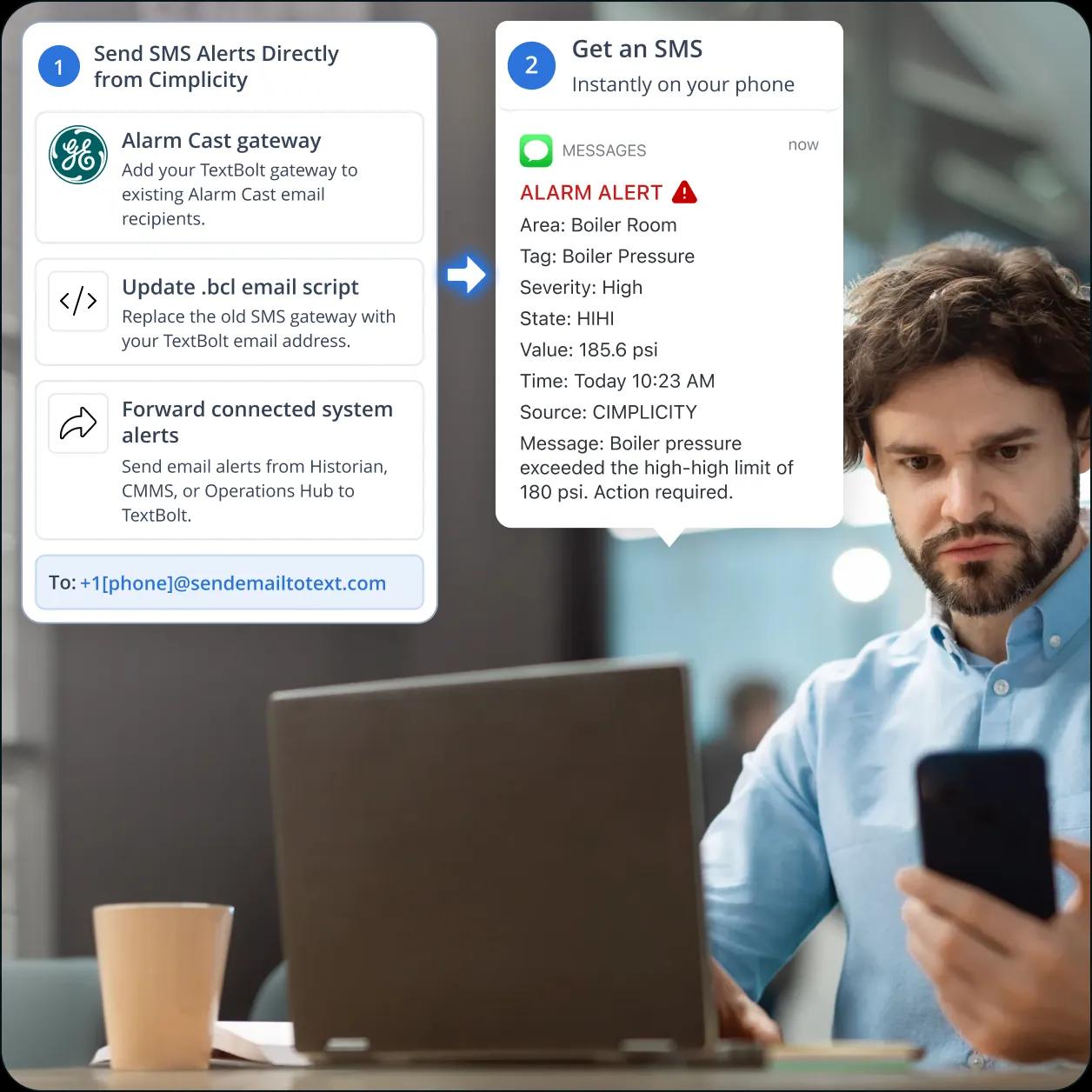
TextBolt adds SMS to those existing workflows by converting alarm notifications into business text messages, so critical alerts reach on-call operators without changing your SCADA application or alarm logic.
-
 Convert Alarm Cast and .bcl email notifications into SMS
-
Send alerts from your 10DLC-compliant business number
-
Receive two-way SMS replies directly in your Gmail or Outlook inbox


What Are the Challenges of Getting SMS Alerts
from a CIMPLICITY Project?
GE CIMPLICITY provides reliable HMI and SCADA monitoring, but native SMS alerting for modern cellular networks is limited. Organizations often rely on carrier email-to-SMS gateways, custom .bcl scripts, or Alarm Cast, each with reliability, maintenance, or licensing tradeoffs. Here are six common challenges teams face when delivering CIMPLICITY alarms via SMS.

No Native SMS Module
CIMPLICITY’s Alarm Cast Server and custom .bcl scripts can send industrial alarm notifications through SMTP, but neither is designed to deliver SMS directly to mobile phones. To notify operators by text, organizations typically route alarm emails through a third-party email-to-SMS gateway, paging service, or SMS notification platform. This adds another layer of dependency and can make alarm delivery harder to maintain as carrier gateway services change.

End of Free Carrier Gateways
For years, many CIMPLICITY deployments relied on free carrier email-to-SMS gateways like txt.att.net, tmomail.net, and vtext.com. That approach is dying. T-Mobile discontinued tmomail.net in December 2024 (migrate from T-Mobile), AT&T shut down txt.att.net on June 17, 2025 (migrate from AT&T), and Verizon will retire vtext.com by March 31, 2027 (migrate from Verizon). Any Alarm Cast or .bcl script still using these gateways is already failing or will soon.

Carrier Gateways Were Unreliable
Even before these shutdowns, carrier email-to-SMS gateways offered no delivery tracking, limited reliability, no 10DLC compliance, and little to no support for two-way messaging. Teams often had no way to confirm whether a critical alarm was delivered, forcing operators to manually verify notifications and undermining the speed and reliability that automated alerting is meant to provide.
Hardcoded Credentials are an Attack Surface
Many legacy .bcl implementations store Gmail SMTP credentials in CIMBasic scripts or VBS files, creating security risks and making password rotation difficult. Gmail also enforces sending limits, so alarm spikes can exhaust quotas and delay critical notifications.

Alarm Acknowledgments Disappear
Carrier gateways were one-way. An operator who got an alarm SMS could not text back ACK and have it land anywhere the supervisor would see. Acknowledgments lived in Webspace logins, two-way radios, or phone calls. None of those are captured in the alarm record after the shift ends.

Multi-Site Plants End Up With Multiple SMS Vendors
Plants with three or four CIMPLICITY sites ended up with three or four separate SMS vendors, three or four sets of compliance paperwork, and three or four different procurement line items. The on-call rotation memorized different numbers per site. Nothing was shared, nothing was reportable across the enterprise.
How TextBolt’s Email to SMS Platform Works with
CIMPLICITY
TextBolt adds SMS to your existing CIMPLICITY workflow without changing your SCADA system. Alarm emails sent through Alarm Cast or .bcl scripts are automatically converted into SMS via Gmail or Outlook, following a simple flow: CIMPLICITY → Email → TextBolt → SMS.

Fast SMS Delivery for Critical Alarms
Alarm Cast or your custom .bcl script sends alarm emails through your existing SMTP server. TextBolt automatically converts those emails into business SMS and delivers them to on-call operators, helping teams respond quickly to critical events without changing their SCADA workflow.

10DLC-Compliant Business Number
Every TextBolt plan includes a 10DLC-registered business number with business profile registration, campaign approval, and TCPA-compliant opt-out handling. Registered business messaging provides a more reliable delivery path than legacy carrier email-to-SMS gateways.

Two-Way SMS Acknowledgments
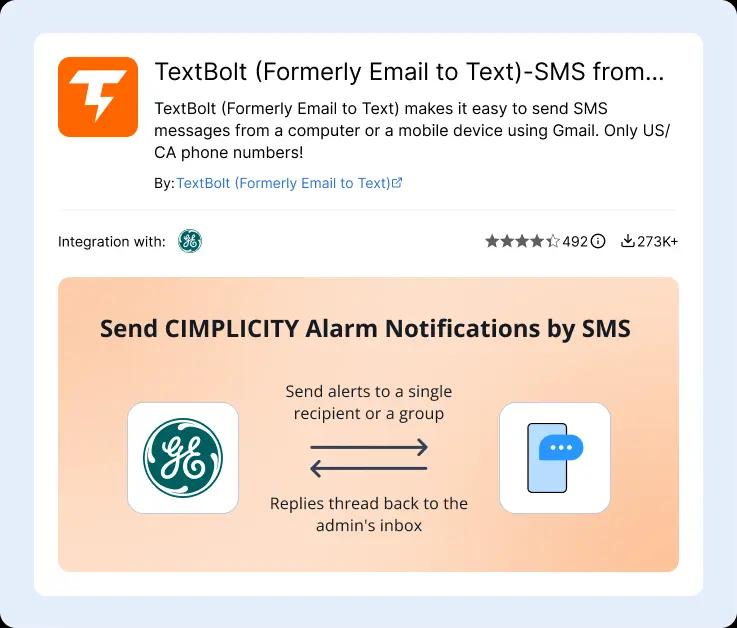
Operators can reply to alarm notifications with “ACK” or a custom message directly from their phones. Replies are delivered back to the original Gmail or Outlook inbox, allowing supervisors to track acknowledgments and conversations alongside the original alarm notification without using a separate messaging application.

Shared Business Number with Individual Logins
SCADA engineers, control room operators, maintenance technicians, and supervisors can share a single TextBolt business number while signing in with their own accounts. Individual logins improve accountability by identifying who sent or acknowledged each message.

Searchable Message History and Audit Logs
Every outbound SMS, inbound reply, and delivery event is recorded, creating a searchable history of alarm communications. Export message logs for operational reviews, compliance reporting, or internal audits without relying on carrier email-to-SMS gateways.

Works with Alarm Cast and .bcl Scripts
TextBolt integrates with your existing CIMPLICITY email notifications. Simply add a TextBolt gateway address to your Alarm Cast recipient list or replace an existing carrier email-to-SMS gateway in your .bcl script. Your alarm logic, alarm classes, distribution groups, and CIMBasic code remain unchanged.
Performance Metrics

Up to 98%
SMS Delivery Rate

Two-Way
SMS Replies to Your Inbox

Carrier-Grade
Routes & Infrastructure

Up to 10
Team Members on Shared Account
How a CIMPLICITY Alarm Becomes an SMS
CIMPLICITY is the brain of the monitoring system. TextBolt, an email to SMS service, is the notification layer that gets the alarm onto the on-call phone. Here is the full chain from sensor to lock-screen.
1. Works with Existing CIMPLICITY Projects
TextBolt integrates with Alarm Cast and existing .bcl email notifications. Add a TextBolt gateway address to your recipient list or replace a legacy carrier gateway without changing your alarm logic, classes, distribution groups, or CIMBasic code.
2. 10DLC-Compliant Business SMS
Every plan includes a registered business number with 10DLC registration, campaign approval, and TCPA-compliant opt-out handling. Registered business messaging offers a more reliable alternative to legacy carrier email-to-SMS gateways.
3. Two-Way Alarm Acknowledgments
Operators can acknowledge alarms or send updates by replying directly to the SMS. Replies appear in the original Gmail or Outlook conversation, giving supervisors visibility into responses without a separate messaging console.
4. Shared Number for Your Operations Team
Control room operators, SCADA engineers, maintenance technicians, and supervisors can all use the same business texting number while signing in with individual accounts, making every message attributable to a specific user.
5. Searchable Audit History
Every outbound SMS, inbound reply, and delivery event is retained, creating a searchable communication history that supports operational reviews, compliance reporting, and faster issue resolution when message activity needs to be verified.
6. Simple Deployment
If CIMPLICITY already sends alarm emails, deployment is straightforward. Add the TextBolt gateway address to Alarm Cast or update the recipient in your existing .bcl script, and your SMS workflow is ready without modifying your SCADA application.
How to Set Up CIMPLICITY SMS in About 30 Minutes
Hands-on setup takes around 30 minutes. TextBolt handles 10DLC business verification with The Campaign Registry on your behalf in parallel. The Enterprise tier isn’t part of the deployment, and there’s no Twilio account to wire up behind it.
Sign Up for TextBolt
Create your TextBolt account using your work email at my.textbolt.com/signup. Account creation takes about 2 minutes. The seven-day free trial does not require carrier verification, so you can run a sandbox alarm class against TextBolt the same day.
Choose a Toll-Free Business Number
Pick a dedicated toll-free number for the site. The number stays with the facility, not the engineer who set it up. Multiple sites can each take their own number under a single TextBolt account.
TextBolt Handles 10DLC Business Verification
Provide your business details during TextBolt onboarding. TextBolt handles 10DLC business and campaign registration with The Campaign Registry on your behalf, so you don’t manage the registration process yourself. Most verifications close in one to two business days. While verification runs, you can test the integration on the toll-free number.
Authorize the Alarm Cast Sender, Then Add the TextBolt Address
CIMPLICITY’s Alarm Cast typically sends from a system address like alarmcast@plantserver.local or do-not-reply@plant.com, and that address can’t click an email invitation link. In the TextBolt dashboard, go to Co-workers, click Invite co-worker, and enter the Alarm Cast sending address. Find the new row in the co-worker list (status: Invited), click the “…” menu, and choose Approve (no click needed). The Alarm Cast sender is now an authorized sender on your TextBolt account.
Once the sender is approved, add the TextBolt gateway address as a recipient. For native Alarm Cast Server, open the CIMPLICITY Workbench, navigate to Alarm Cast, right-click Server, select Properties, and add +1XXXXXXXXXX@sendemailtotext.com to the existing alarm class distribution group. Alarm trigger states (ON, OFF, ACK, RERUN) carry through unchanged. For scripted .bcl notifications, change the DL variable from 5551234567@txt.att.net to +15551234567@sendemailtotext.com. Keep the rest of the script.
Trigger a Test Alarm From a Sandbox Class
Fire a low-criticality alarm in a development project. The SMS should arrive on the on-call phone in under ten seconds with the alarm text, timestamp, and any point ID you included in the email body. Confirm the reply lands in the original inbox.
Add Up to 10 Controls Engineers and Shift Leads
Invite the on-call rotation, the maintenance lead, the SCADA admin, and the shift supervisors to the shared TextBolt account. Each gets their own email-authenticated access. Permissions are role-based, no shared passwords.
Send Your First CIMPLICITY SMS Alerts Directly From Email
Add the gateway address to any Alarm Cast distribution group and the alarm becomes SMS. The Enterprise tier and Twilio account aren’t part of it.

Three Ways to Send CIMPLICITY SMS and Emergency
Alerts with TextBolt
CIMPLICITY supports multiple ways to send email notifications. TextBolt integrates with these existing workflows by converting alarm emails into business SMS, so you can add text messaging without changing your SCADA application. The three approaches below cover most CIMPLICITY deployments.
1. Add a TextBolt Gateway Address to Alarm Cast
If your project uses Alarm Cast, simply add your TextBolt gateway address to the existing alarm recipient list. When an alarm is triggered, Alarm Cast sends an email through your SMTP server, and TextBolt converts it into an SMS for the appropriate on-call personnel. Your alarm classes, distribution groups, and notification rules remain unchanged.
2. Update an Existing .bcl Email Script
Many legacy CIMPLICITY projects use .bcl scripts to send alarm emails through an SMTP server. Instead of sending messages to a carrier email-to-SMS gateway, update the recipient to your TextBolt gateway address. Existing alarm logic and CIMBasic code can remain in place while replacing an outdated SMS delivery method with a modern business messaging service.
3. Forward Alerts from Connected Systems
Many organizations generate notifications from downstream applications such as Historian, Operations Hub, or CMMS platforms like IBM Maximo, Fiix, or UpKeep. If these systems already send email alerts, simply add your TextBolt gateway address to their notification rules. One TextBolt business number can receive alerts from multiple applications across your operations environment.
What are the CIMPLICITY Alarm Categories That Use
TextBolt SMS
Six common CIMPLICITY alarm categories where SMS to the on-call team replaces paging contracts, Twilio scripts, or dead carrier gateways. The same TextBolt address works across Alarm Cast groups, .bcl scripts, and downstream systems. TextBolt is built for opted-in operational alerts, not customer outreach or marketing.
Manufacturing and Plant Operations
A bottleneck packaging machine trips at 2 AM. The MES alarm fires an email to the maintenance distribution group, TextBolt converts it to SMS on the on-call tech’s phone, and they read it on the lock screen without unlocking the device. Plants that escalate critical machine downtime by SMS cut mean-time-to-acknowledge from hours to minutes.
Water and Wastewater Utilities
A booster station’s chlorine residual drops below the regulatory floor. CIMPLICITY fires the alarm, the on-call operator gets an SMS within seconds, and the response starts before the next regulatory reporting cycle. Compliance time-to-response stays defensible.
Power Generation and Substations
A transformer differential trip on a Saturday night cannot wait for the operations engineer to check email Monday. The alarm reaches the right phone in under ten seconds, and the engineer dispatches a crew without driving to the control room first.
Oil and Gas Pipeline and Refining
Tank-farm overflow detection, pipeline pressure excursions, and flare events all need to reach the on-call HSE lead, the operations supervisor, and the control room simultaneously. One CIMPLICITY alarm class, one distribution group, three phones lit at once.
Food and Beverage and Pharma
Batch deviations and cold-chain excursions trigger a quality hold the moment they occur. Process engineers and QA leads see the alarm on their phones, log into the SCADA from home if needed, and decide to hold or release before the next packaging step starts.
Building Automation and Critical Facilities
Hospital generator transfer failures, data center HVAC excursions, and pharmaceutical cleanroom pressure alarms all need a paging-grade response. TextBolt replaces the paging service contract with the email infrastructure the facility already runs.

Built for Compliance and Security

10DLC Compliant

Carrier Approved

Complete Audit Trail
CIMPLICITY SMS Options: Carrier Gateways, Custom
Twilio, or TextBolt
Three common paths for adding SMS alerts to CIMPLICITY. Carrier gateways are deprecated. A custom Twilio or REST build needs a developer to design, deploy, and keep maintaining the integration. TextBolt slots into the Alarm Cast SMTP path CIMPLICITY already supports.
Carrier Email-to-SMS Gateways
Free historic path, now ending
Free carrier gateways that converted emails to SMS, now shutting down with unreliable delivery and zero business features.
-
 AT&T retired txt.att.net on June 17, 2025
-
T-Mobile retired tmomail.net in December 2024
-
Verizon completes vtext.com shutdown by March 31, 2027
-
No 10DLC compliance, no audit trail, no two-way support
-
Hardcoded Gmail App Password sitting in the project file
-
Carrier filters increasingly drop unregistered traffic
Recommended
TextBolt
Flat monthly plan, no per-message billing
Email-to-SMS gateway. Add +1[phone]@sendemailtotext.com to your Alarm Cast distribution group. The alarm email becomes SMS, registered for 10DLC compliance, audit trail, two-way.
-
 Up to 98% delivery rate
-
10DLC-compliant business number
-
No Alarm Cast Enterprise license, no Twilio account, no developer
-
Multi-engineer access: up to 10 team members
-
Replies thread back to the original inbox in Gmail or Outlook
-
Works with CIMPLICITY 9.5, 10, 11, and 2024
Twilio or Custom REST Integration
Custom build with developer time and ongoing maintenance
Developer-built SMS pipelines using Twilio or custom REST APIs that require ongoing maintenance, key rotation, and re-validation with every system upgrade.
-
New OPC UA or REST adapter on the CIMPLICITY server or middleware box
-
API keys to rotate, webhooks to secure, certificates to renew
-
Twilio account to provision and maintain alongside the CIMPLICITY project
-
One-to-two-week developer build, plus re-validation at every CIMPLICITY upgrade
-
Every new alarm source needs another integration pass
CUSTOMER REVIEWS
How Teams Use TextBolt with CIMPLICITY
Three ways customers route SMS through CIMPLICITY with TextBolt: replacing dead carrier-gateway setups, getting the Gmail App Password out of audit findings, and reaching on-call operators without buying another alarm orchestration platform.

On Google Workspace Marketplace, with
 263K+ installs

We have had the .bcl plus Gmail plus txt.att.net pattern running on three sites since 2019. When AT&T pulled the gateway in June every alarm SMS started bouncing. I changed the DL variable in five scripts, pointed them at TextBolt, and we were back inside in an afternoon. No SCADA downtime.

Controls Engineer
Regional Manufacturing
The piece I cared about was getting the Gmail App Password out of the project file. Our auditor flagged it in the last assessment. TextBolt’s SMTP relay solved that without touching the alarm logic.

SCADA Administrator
Water Utility
Operators acknowledge alarms by texting back ACK. The reply lands in the same shared inbox that gets the original alarm, so the supervisor can see who responded and when. Replaced a Webspace acknowledgment screen we had been maintaining for years.

Plant IT Lead
Food and Beverage
Why Cimplicity Using Teams Choose TextBolt
The numbers that matter when wiring SMS alerts into a CIMPLICITY alarm stack.
Up to 98%
SMS Delivery Rate
30 min
End-to-End Setup
Up to 10
Team Members on Standard Plan
4.4★
Workspace Marketplace (483+ reviews)
Frequently Asked Questions
How to integrate CIMPLICITY with a text messaging provider?
Add the TextBolt gateway address (+1XXXXXXXXXX@sendemailtotext.com) as one more recipient inside an existing Alarm Cast distribution group, or as the DL variable in a .bcl script. The text messaging provider sits downstream of your existing SMTP relay, so the integration runs without OPC UA development, custom REST adapters, or a Twilio account behind it. Most CIMPLICITY-to-text-messaging integrations are configured inside thirty minutes, once 10DLC business verification is done in parallel.
What SMS service supports SCADA or HMI alerting?
TextBolt supports industrial alarm notifications from any SCADA or HMI platform that already emails alarms, including CIMPLICITY, Wonderware, Ignition, Rockwell FactoryTalk, Siemens WinCC, and Geo SCADA. The integration runs on the email channel each platform already supports, so the SMS gateway sits at the end of the existing notification pipeline instead of replacing it. Plants configure SCADA alarms to email a monitored mailbox, and TextBolt picks up each alarm email and delivers it as a text within seconds.
Can I send operator alerts from CIMPLICITY to mobile phones?
Yes. Once you get text alerts directly from CIMPLICITY through TextBolt, every alarm class, .bcl script, or downstream notification rule that already emails operators can also reach their mobile phones. Add the TextBolt gateway address as a recipient on the existing distribution group, and the next alarm lands as an SMS on the on-call operator’s lock screen within seconds, with the alarm text, timestamp, and any point ID included in the message body.
What is the difference between Alarm Cast Server and TextBolt?
Alarm Cast Server is CIMPLICITY’s native alarm distribution engine. It generates alarm messages, routes them to email recipients, and handles escalation logic inside the SCADA project. TextBolt sits downstream of Alarm Cast. It picks up the email message Alarm Cast generates and delivers it as SMS to the operator’s phone. The two are complementary, not competitive. Alarm Cast handles the SCADA-side logic, TextBolt handles the carrier-side delivery.
How to get SMS alerts from CIMPLICITY without writing OPC UA, REST, or Twilio code?
Use the integration methods CIMPLICITY already supports. If you’re using Alarm Cast, add your TextBolt gateway address to the existing alarm recipient list. For projects using custom .bcl scripts, update the recipient to the TextBolt gateway address while keeping the existing alarm logic and script intact. No changes to your OPC UA connections or additional API integrations are required.
Are CIMPLICITY SMS alerts via TextBolt 10DLC compliant?
Yes. Brand registration, campaign approval, and TCPA opt-out handling are included on every plan at no extra cost. Verification typically completes inside one to two business days. Carrier filters that drop unregistered traffic accept TextBolt’s traffic because it travels over registered A2P 10DLC routes. The exportable audit trail satisfies the §6.3 periodic-audit requirement in the GE deployment guide.
Do operator SMS replies update the CIMPLICITY alarm state automatically?
When an operator texts back ACK, the reply lands as an email in the original alarm inbox with timestamp and responding phone number, which gives the supervising team an auditable acknowledgment trail. The CIMPLICITY alarm itself stays in its current state until an operator opens the Alarm Viewer or Webspace and ACKs the alarm there. For an SMS reply to automatically close the alarm inside CIMPLICITY, you need a deeper alarm-orchestration platform like SmartSights’ WIN-911 or SeQent’s FPAM, which write SMS acknowledgments back to the Alarm and Event record.
Do replies to alarm SMS come back to the original alarm inbox?
Yes. When an operator texts back ACK or any freeform reply, the reply threads into the email account that fired the original alarm in Gmail or Outlook. Multiple supervisors watching the same alarm inbox see the acknowledgement with timestamp and responding number. No separate acknowledgment console required.
Does this work with CIMPLICITY 9.5, 10, 11, and 2024?
Yes. The integration is SMTP-based, so any CIMPLICITY version with Alarm Cast Server works. The .bcl plus CDO.Message pattern works the same way on every version that supports CIMBasic. Has the site not been upgraded in five years? It still works.
Can my whole team text and reply to alarms from one number?
Yes. The Standard plan includes up to ten team members on a single shared toll-free number. Each team member authenticates with their own email. Every outbound text and every inbound reply is logged to the person, not the shared mailbox. Roles map cleanly to the §3.8 Role configuration in the deployment guide.
Add SMS Alerts to CIMPLICITY Without Leaving Your Project
Trigger compliant business SMS from any CIMPLICITY alarm class in about 30 minutes. Multi-engineer access, and two-way replies in your inbox.