
Send Konect Data Services Alerts as Text
Konect Data Services keeps you informed through integrated notifications, and its scheduled reports can relay your data elsewhere on your behalf.
TextBolt turns those into an instant SMS, sent from a 10DLC-compliant business number, so the people who watch your Konected stations get a text on their phone, not just an update on a screen nobody is looking at.
-
 Turn Konect notifications and scheduled reports into SMS
-
Works with your 10DLC business number
-
Replies thread back to the admin’s inbox


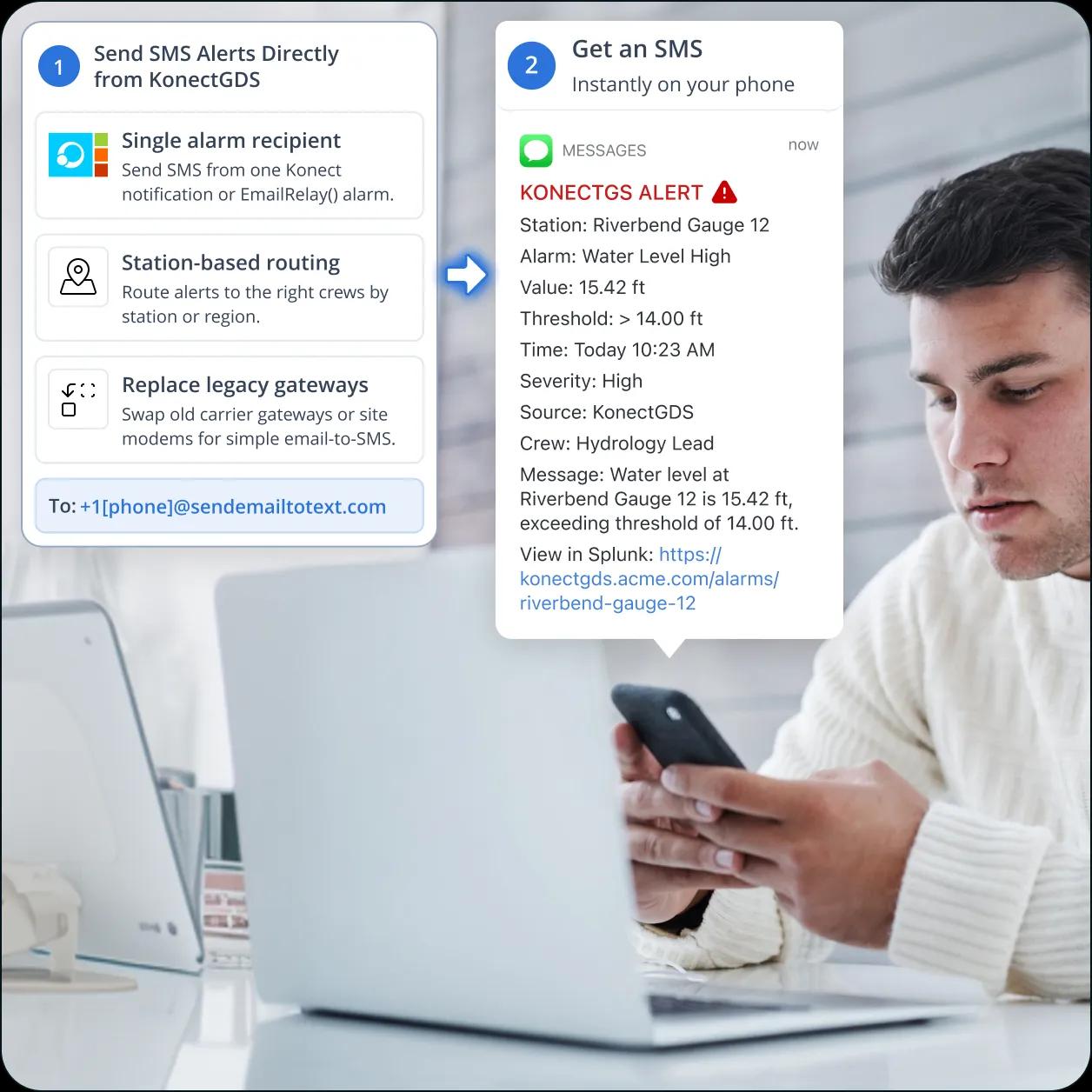
Adding SMS on Top of KonectGDS Alerting
Konect Data Services already collects, archives, and presents your data, with live dashboards built in Konect View Studio, widgets, Kiosk Mode, integrated notifications, and scheduled reports that relay your data elsewhere on your behalf. The gap is reach. The people responsible for your Konected stations are not always sitting in front of a screen. Six places where getting the alert onto a phone matters.

A Dashboard Helps Only When Someone Is Watching It
Konect’s live dashboards, widgets, and Kiosk Mode are built for viewing data on a screen, from the largest desktop down to a smartphone. Nobody watches a screen around the clock. The alert sits in the dashboard until someone opens it, and by then the window to act may have closed. When a reading needs attention overnight or out at a site, a text on a phone reaches a person a dashboard cannot.

Scheduled Reports Relay Data, But Not as a Text
Konect’s scheduled reports relay your data elsewhere on your behalf on a set cadence, which is ideal for the routine record. But a report only arrives when the schedule fires, so anything that needs attention between sends waits for the next one, and a full file still has to be opened and read. The one line that actually matters lands faster as a short SMS, the moment it counts, instead of sitting in a report until someone gets to it.

The Old Email-to-Text Carrier Gateways Have Shut Down
The lightweight workaround was pointing a datalogger email at a carrier gateway address such as +1[phone]@vtext.com, @txt.att.net, or @tmomail.net. Those routes are gone or going. AT&T retired txt.att.net in June 2025, T-Mobile took tmomail.net offline in December 2024, and Verizon’s vtext.com shutdown completes by March 31, 2027. Monitoring networks that relied on this path need a new SMS route.
Integrated Notifications Still Need to Reach a Pocket
Konect keeps you informed through integrated notifications, which is exactly what you want at a desk. The people who actually respond are often away from a screen. An SMS puts the same notification on the phone in their pocket the moment it fires.

A Cellular Modem at Every Site Is Costly to Run
Sending SMS directly from each location means a cellular or GSM modem per site, a SIM per modem, and a data plan for each. That is hardware to mount, power, and replace when it fails silently. A cloud path needs nothing extra at the site beyond the connection it already has.

Business SMS Needs 10DLC Compliance and an Audit Trail
Programs that have to show who was alerted, when, and from what number need an exportable, timestamped record. Personal-phone forwarding and ad-hoc tools rarely produce that. TextBolt registers your sender identity with The Campaign Registry and keeps a complete audit trail per message.
How TextBolt Adds SMS to KonectGDS
TextBolt connects Konect Data Services to a registered 10DLC business number, so a Konect notification or scheduled report can arrive as a text. No new software on the datalogger, and no change to how Konect collects, archives, or presents your data.

Konect Notifications Arrive as SMS in Seconds
Each integrated notification Konect sends becomes a text within seconds, so whoever is on call sees it the moment it fires instead of the next time they happen to open a dashboard.

10DLC-Compliant Business Number
TextBolt registers your sender identity with The Campaign Registry during onboarding, with business verification typically taking 1-2 business days. Alerts then route through carrier-approved 10DLC infrastructure with up to 98% delivery rate.

Replies Thread Back to the Admin Inbox
When someone replies “on it,” “looking into it,” or “false alarm” by SMS, TextBolt’s two-way messaging routes the reply as an email into the inbox the alert came from. The rest of the team sees who has it covered without opening Konect.

Point the Notification at the Gateway Address
Set the recipient on your Konect notification or scheduled report to +1[phone]@sendemailtotext .com using the on-call person’s number. Same Konect setup, same data. The integration is one recipient address, with no change to your stations.

No New Hardware, No Code on the Datalogger
TextBolt is cloud-based and rides on the notification path Konect already provides. There is nothing to add at the site beyond the connection it already has to Konect. One account covers every Konected device.

Covers the Campbell Scientific Devices Konect Supports
Konect supports a wide range of Campbell Scientific devices, including the CR1000X, CR300 Series, and CR6 Series, and the list keeps growing. One TextBolt account covers notifications from any device feeding Konect.
Performance Metrics

Up to 98%
SMS Delivery Rate

Two-Way
SMS Replies to Your Inbox

Carrier-Grade
Routes & Infrastructure

Up to 10
Team Members on Shared Account
Set Up KonectGDS SMS in About 30 Minutes of
Hands-On Work
Hands-on configuration takes around 30 minutes. Plan for an additional 1-2 business days while TextBolt handles 10DLC business verification with The Campaign Registry on your behalf, so your number is carrier-approved before you go live. No hardware to add and no code to write.
Sign Up for TextBolt
Create your TextBolt account using your work email. Account creation takes about 2 minutes. The account ties to your organization so you can add coworkers later.
Choose a Toll-Free Business Number
Start on a shared business number right away, or add a dedicated toll-free number for Standard plan. That number is the sender ID on every alert Konect sends through TextBolt.
TextBolt Handles 10DLC Business Verification
Submit your organization details (legal entity, EIN, address, sample use case) and TextBolt files the 10DLC registration with The Campaign Registry on your behalf. Carrier approval typically lands within 1-2 business days.
Open Your Konect Notification or Scheduled Report
In Konect Data Services, open the integrated notification or scheduled report you want delivered as a text. This uses the Konect setup you already have, with no change to your data collection or archive.
Set the Recipient to the Gateway Address
Set the recipient to +15551234567@sendemailtotext.com using the on-call person’s real number. Keep the content short so it reads cleanly as a text. Save and send a test from Konect.
Add Up to 10 Team Members
Invite the rest of the on-call rotation to the shared TextBolt account. Route different notifications or reports to different people so the right person gets each one.
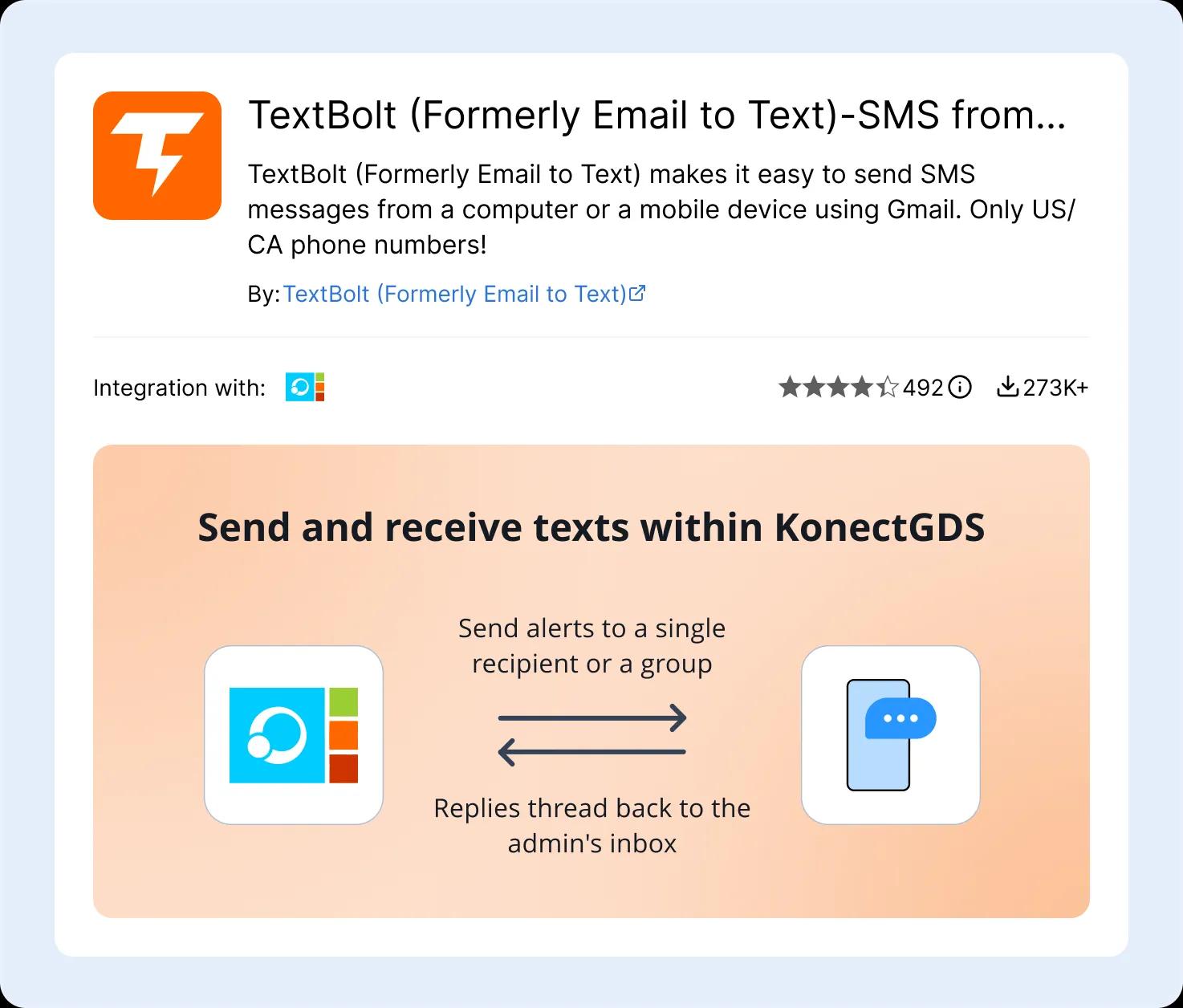
Three Ways to Send SMS from KonectGDS
1. Single Notification to One On-Call Number (Most Common)
Point one Konect notification at +1[phone]@sendemailtotext.com. Every time it fires, the person on call gets an SMS in seconds. Clean for a single site lead or a one-person standby rotation.
2. Route Different Notifications to Different People
Konect can relay your data elsewhere on your behalf, so send each notification or scheduled report to the TextBolt number for the person who owns it. Each one only gets the alerts that belong to their sites.
3. Replacing a Dead Carrier Gateway or a Site Modem
Decommission the old @vtext.com recipient or the cellular modem at the site. Swap in the TextBolt gateway address. Same Konect notification, same data. The dead gateway and the field hardware both go away.
KonectGDS Features That Pair With TextBolt SMS
Six ways Konect users route TextBolt SMS, each built on a feature Konect already provides: notifications, scheduled reports, data relay, dashboards, the devices it supports, and its any-device interface.
Integrated Notifications to a Phone
Konect keeps you informed through integrated notifications. Route one to the TextBolt address and the same notification lands as a text, so it reaches whoever is on call rather than waiting on a screen.
Scheduled Report Recaps by Text
Konect’s scheduled reports relay your data elsewhere on your behalf. Send a short scheduled report to the TextBolt address as a recurring text recap, so the team gets the key figures without opening a file.
Data Relay to the Right Person
Relaying data elsewhere on your behalf is core to Konect. With TextBolt as the destination, that relay reaches a specific person by SMS, so the alert goes to the one who can act on it, not a shared inbox.
A Push Beyond Dashboards and Kiosk Mode
Konect’s live dashboards, widgets, and Kiosk Mode are excellent for viewing data, but they are pull, not push. An SMS pushes the moment that matters to a phone, then the dashboard is there for the full picture.
Any Device, Anywhere, Now on the Phone
Konect adapts from the largest desktop down to a smartphone. SMS extends that reach one more step: the alert arrives on the phone in someone’s pocket even when no one has the app open.
Every Konected Device Covered
Konect supports a wide range of Campbell Scientific devices, including the CR1000X, CR300 Series, and CR6 Series. A notification from any of them can become a text through the same single TextBolt address.

Built for Compliance and Security

10DLC Compliant

Carrier Approved

Complete Audit Trail
Three Ways to Get a KonectGDS Alert to a Phone
Three paths, three trade-offs. Konect’s native notifications reach a screen or inbox. A site modem or a Twilio build reaches phones but adds hardware or code. TextBolt reaches phones through the notification path Konect already provides.
Konect Notifications (Native)
Built in, screen and inbox
Konect Data Services keeps you informed through integrated notifications and can relay scheduled reports on your behalf. The right fit when the recipient is at a screen. The gap is reaching a person who is not watching one.
-
 No extra cost, built into Konect
-
Live dashboards, widgets, and Kiosk Mode
-
Scheduled reports relay data on your behalf
-
Reaches a screen, not a phone as SMS
Recommended
TextBolt
Flat monthly plan, no per-node license (Standard plan)
Email-to-SMS gateway for reaching a phone. Point your Konect notification or scheduled report at the TextBolt address as recipient, and it arrives as an SMS to the on-call person in seconds.
-
 Up to 98% delivery rate
-
10DLC-compliant business number
-
Uses the Konect notification path you already have
-
Multi-user access: up to 10 team members
-
Two-way replies in manager’s email inbox
-
No modem and no code per site
Site Modem or Twilio + Custom Code
Hardware or developer time
Send SMS directly from each site with a cellular or GSM modem, or wire alerts into an SMS API such as Twilio with custom code. Both reach phones, but both add cost or maintenance the team carries.
-
A modem, SIM, and power for each site
-
Or custom API code and credentials to maintain
-
Per-message and per-site costs add up
-
Silent failures are hard to catch in the field
-
Better suited to teams with dev resources
CUSTOMER REVIEWS
How Teams Use TextBolt with KonectGDS
Three ways Konect users route alerts through TextBolt: a single on-call number for notifications, routing different notifications to different people, and short scheduled-report recaps by text.

On Google Workspace Marketplace, with
 263K+ installs

We already had Konect notifications set up. We pointed one at our TextBolt number, and now the on-call person gets a text the second it fires instead of refreshing a dashboard.

Data Analyst
Monitoring Team
We run a lot of Konected stations. Routing different notifications to different people’s TextBolt numbers means the right person gets the right alert, not a shared inbox someone checks twice a day.

Operations Coordinator
Data Services User
Our scheduled report now sends a short text recap to the team, and anyone can reply “looking into it” so the whole group sees who has it. Nothing extra to install at the site.

Operations Lead
Campbell Scientific Datalogger User
Why Teams Pick TextBolt for KonectGDS
The numbers that matter when adding SMS to a Konect Data Services setup.
Up to 98%
SMS Delivery Rate
30 min
End-to-End Setup
Up to 10
Team Members (Standard Plan)
4.4★
Workspace Marketplace (483+ reviews)
Frequently Asked Questions
Does KonectGDS send SMS text alerts natively?
Konect Data Services keeps you informed through integrated notifications and can relay your data elsewhere on your behalf with scheduled reports, but those reach a screen or an inbox, not a phone as SMS. To get the alert as a text, point the notification or scheduled report recipient at the TextBolt gateway address, and TextBolt converts it into an SMS from your business number.
How do I send an SMS from KonectGDS with TextBolt?
Sign up for TextBolt, complete 10DLC business verification, and set the recipient on your Konect notification or scheduled report to +1[phone]@sendemailtotext.com using the on-call person’s number. Keep the content short so it reads as a clean text. Save and send a test from Konect. The SMS lands in seconds, with no modem at the site and no custom code.
Do I need new hardware at the station?
No. TextBolt is cloud-based and rides on the notification path Konect already provides. There is no modem to mount, no SIM to provision, and no per-site data plan. One TextBolt account covers notifications from every Campbell Scientific device feeding Konect, including the CR1000X, CR300 Series, and CR6 Series.
Can people reply to acknowledge an alert by SMS?
Yes. When someone replies “on it,” “looking into it,” or “false alarm” by SMS, the reply lands as an email in the inbox the alert came from, so the rest of the team sees who has it covered. Note that replies thread to the admin’s inbox; they do not write back into Konect.
Is KonectGDS SMS through TextBolt 10DLC compliant?
Yes. TextBolt registers your sender identity with The Campaign Registry during onboarding so alerts route through carrier-approved 10DLC infrastructure with a timestamped audit trail. TextBolt is not HIPAA compliant; programs with protected health information should contact sales about their requirements.
Does this change how Konect collects or stores my data?
No. TextBolt only takes the notification or scheduled report Konect already sends and delivers it as a text. Konect’s data collection, data archive, dashboards, widgets, Kiosk Mode, and queries and export are all untouched. The only change is one recipient address on the notification you choose to send as SMS.
My old alerts used vtext.com or txt.att.net. Can TextBolt replace that?
Yes, and this is one of the most common reasons teams switch. The carrier email-to-text gateways have shut down or are closing: AT&T retired txt.att.net in June 2025, T-Mobile took tmomail.net offline in December 2024, and Verizon’s vtext.com shutdown completes by March 31, 2027. Replace the carrier gateway address on your Konect notification with the TextBolt gateway address. Only the recipient changes.
How much does it cost and how long does setup take?
TextBolt offers plans ranging from single-user accounts to multi-user access for up to 10 team members, as well as Enterprise options for larger organizations. An optional dedicated toll-free business number is available for an annual fee and is only charged after carrier approval. Annual billing includes a 20% discount. Setup typically takes about 30 minutes of hands-on work in TextBolt and Konect, plus 1–2 business days for 10DLC business verification handled by TextBolt. For current plans and pricing, see the TextBolt pricing page.
Get the Alert Onto a Phone, Not Just a Screen
Point a Konect notification or scheduled report at the TextBolt gateway and it arrives as an SMS to the right person on call.
