
Send Text Alerts Directly From nCall
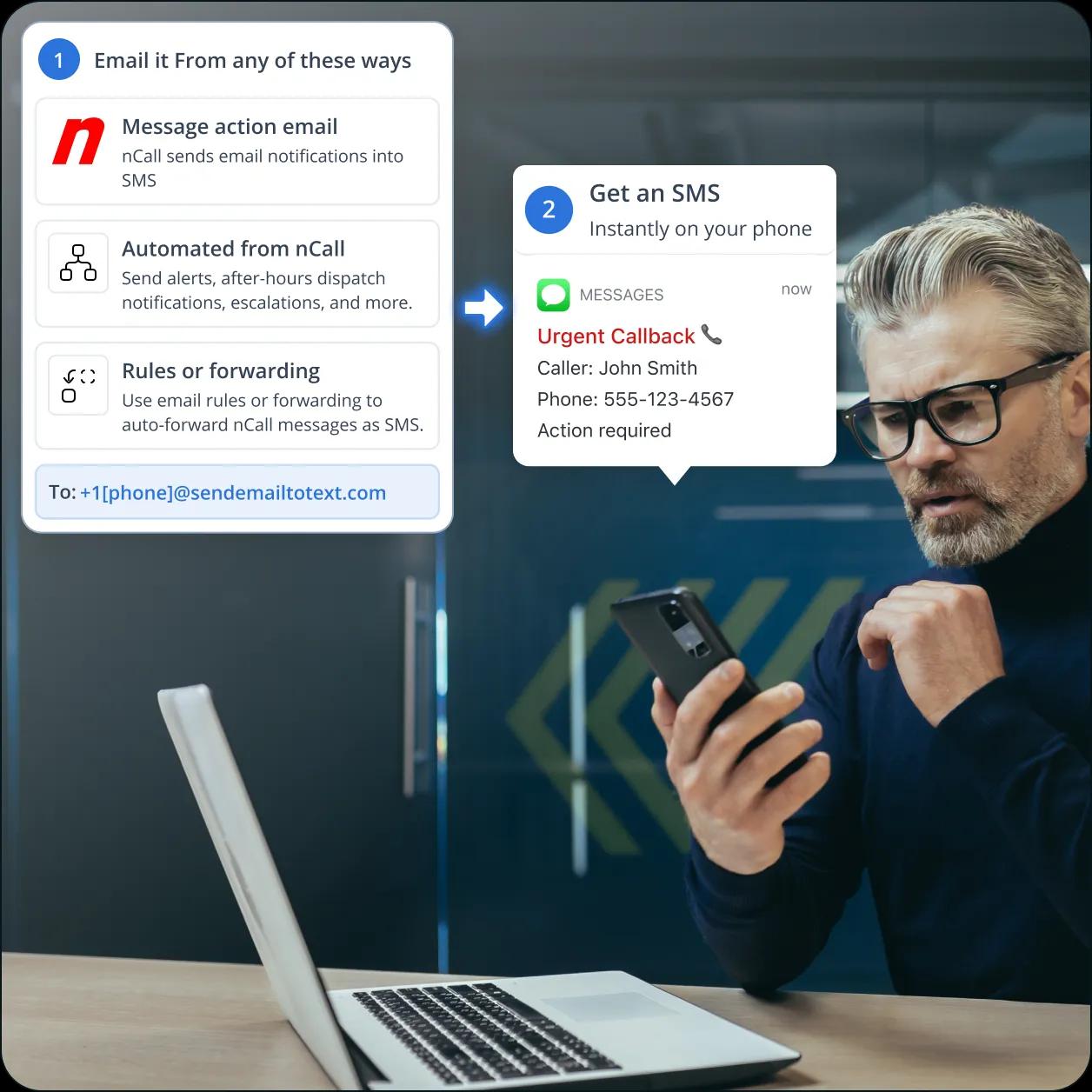
Ensure urgent answering service messages reach the right people faster. TextBolt, an email to SMS gateway, connects with nCall’s existing email notification workflows to automatically convert call messages, operator updates, and client alerts into SMS texts delivered to technicians, healthcare providers, business owners, and on-call teams.
-
 Send nCall alerts through SMS instantly
-
Works with your verified 10DLC business number
-
Receive two-way SMS replies directly in your email inbox


Why nCall Email-to-Cell-Phone SMS Needs a Modern
Delivery Layer
nCall supports multiple message delivery methods, including SMS providers, email, fax, secure online messages, and third-party integrations. However, the “Email to cell phone provider” option depends on carrier email-to-SMS gateways that are no longer a reliable solution for business-critical notifications.

Carrier Gateways Are Being Retired
The nCall email-to-cell-phone method relies on mobile carriers converting emails into SMS messages through carrier-specific gateways. Major carriers have started retiring these services, including AT&T’s txt.att.net and T-Mobile’s tmomail.net, while Verizon is also moving away from vtext.com. As these gateways disappear, businesses using this method need a more dependable SMS delivery option.

No Delivery Visibility for Critical Alerts
Carrier email-to-SMS gateways provide no business-level tracking or confirmation that a message reached the recipient. An nCall notification may appear successfully sent, while the carrier gateway fails to deliver the text. Without delivery records or message status visibility, answering services may only discover missed alerts after a client, technician, or on-call contact reports the issue.

Limited Two-way SMS Communication
Legacy email-to-cell-phone gateways were designed primarily for one-way message delivery and do not provide a reliable reply workflow. Recipients replying to alerts may not reach the original sender or maintain a connected conversation history. TextBolt adds two-way SMS capability by routing replies back to your Gmail or Outlook inbox, allowing teams to manage responses from their existing workflow.
How TextBolt Restores the nCall SMS Workflow
TextBolt brings back the simple email-to-text workflow nCall operators were used to, but with a modern business SMS infrastructure. Instead of relying on retired carrier gateways, nCall notifications are routed through TextBolt’s Email-to-SMS gateway and delivered as standard text messages to mobile phones.

No New Integration Required
TextBolt works with nCall’s existing email notification workflow. Instead of sending messages to a retired carrier gateway address, operators route notifications to a TextBolt gateway address like +1XXXXXXXXXX@sendemailtotext.com. Your nCall message actions, client records, forms, and workflows remain unchanged because TextBolt works as a delivery layer between nCall and the recipient’s phone.

Reliable Business SMS Delivery With 10DLC
TextBolt replaces carrier-dependent email-to-SMS delivery with a verified business messaging channel. During onboarding, TextBolt helps configure your approved sender identity and routes messages through 10DLC-compliant SMS infrastructure designed for business notifications. This gives answering services a more reliable way to deliver urgent client messages, dispatch alerts, and on-call notifications.

Two-Way Replies and Message Tracking
TextBolt turns one-way nCall notifications into trackable SMS conversations. When recipients reply to an alert, responses return directly to your connected Gmail or Outlook inbox. Every message is recorded with delivery details, including timestamps, recipients, and message status, giving teams better visibility into critical communications.
Performance Metrics

Up to 98%
SMS Delivery Rate

Two-Way
SMS Replies to Your Inbox

Carrier-Grade
Routes & Infrastructure

Up to 10
Team Members on Shared Account
How to Connect nCall With TextBolt for SMS Alerts
TextBolt works with nCall’s existing email notification workflow. Your operators continue handling calls and creating messages in nCall as usual. When nCall triggers an email notification, TextBolt converts it into a 10DLC-compliant SMS alert and delivers it to the recipient’s mobile phone.
Activate Your TextBolt Account
Create your TextBolt account and configure your business texting number. This number will be used as the sender identity for SMS alerts sent from your nCall workflow.
Add TextBolt as an nCall Message Delivery Method
In nCall, open the client or contact configuration and add a new message delivery method using email.
Enter the TextBolt gateway address: +1XXXXXXXXXX@sendemailtotext.com
Replace the phone number with the mobile number of the person who should receive the SMS alert. Your existing nCall call handling, message actions, and operator workflows remain unchanged.
Optimize Your nCall Message Templates
Keep SMS alerts short and actionable to improve readability and avoid unnecessary message segments.
A recommended format: Caller Name – Caller Phone – Short Message Summary
For example: John Smith – 555-123-4567 – Call back regarding equipment issue
Once configured, every nCall message sent through this delivery method will automatically route through TextBolt and arrive as an SMS alert on the recipient’s phone.

Upgrade Your nCall Workflow With SMS Notifications
Use TextBolt to deliver real-time call alerts to operators, technicians, and on-call teams.

Types of nCall Messages You Can Send as SMS With TextBolt
TextBolt adds an SMS delivery layer on top of nCall’s existing email notification workflow. Answering services can send urgent call updates, client messages, and operational notifications directly to mobile phones without changing how operators handle calls in nCall.
Urgent Call Notifications
Send caller details, callback requests, and important message summaries directly to the recipient’s phone. This helps on-call contacts respond faster when a message requires immediate attention.
After-Hours and On-Call Alerts
Deliver overnight, weekend, and emergency notifications to the right contact when teams are away from their desks. TextBolt helps ensure important nCall messages reach mobile phones when email alerts may be missed.
Dispatch and Service Requests
Send service requests, technician assignments, and customer updates as SMS alerts. Field teams can receive critical information directly on their mobile phones without accessing nCall.
Client Communication Updates
Deliver client messages, follow-up requests, and account-related notifications through SMS. Recipients can receive important updates without needing an nCall login or additional software.
Escalation Notifications
Send priority alerts to backup contacts, supervisors, or escalation recipients through SMS. TextBolt adds a reliable mobile communication channel for time-sensitive nCall workflows.

Built for Compliance and Security

10DLC Compliant

Carrier Approved

Complete Audit Trail
nCall SMS Delivery Options: Carrier Gateways, SMS
Providers, or TextBolt
Three common ways answering services send SMS from nCall. Carrier email-to-SMS gateways depend on outdated infrastructure. Direct SMS providers offer flexibility but require technical setup. TextBolt adds a simple Email-to-SMS delivery layer that works with nCall’s existing message workflow.
Carrier Email-to-SMS Gateways
Free, but no longer reliable
The old method was sending nCall messages to carrier gateway addresses such as @vtext.com or @txt.att.net. These gateways allowed emails to become SMS messages without a dedicated SMS provider, but carriers are retiring these services.
-
 Carrier-dependent delivery
-
No verified business sender
-
No delivery tracking or audit history
-
Limited reply handling
-
Not designed for business-critical alerts
Recommended
TextBolt
Simple SMS delivery without API complexity
TextBolt adds an SMS delivery layer on top of nCall’s existing email notification workflow. Send messages from nCall to a TextBolt gateway address, and recipients receive them as SMS from your verified business number.
-
 Works with nCall email message actions
-
10DLC-compliant business number
-
Two-way SMS replies to your connected inbox
-
Message activity tracking and delivery visibility
-
No API development or custom integration required
SMS API Integrations like Twilio
Requires more setup
nCall can connect with external systems through APIs to create customized notification workflows and automate message delivery. These options provide greater flexibility but usually require technical resources, configuration, and ongoing maintenance.
-
API keys, authentication, and technical setup required
-
Development resources may be needed for implementation
-
Additional configuration and testing required
-
Ongoing maintenance for updates and troubleshooting
-
Separate tools may be needed for monitoring and managing messages
Frequently Asked Questions
Why are my nCall text alerts not being delivered?
nCall notifications may fail when relying on older email-to-SMS gateways, carrier filtering, incorrect recipient formats, or unreliable delivery routes. TextBolt provides a dedicated SMS delivery layer that converts nCall notifications into text messages sent through verified messaging routes.
How do I send SMS alerts from nCall?
nCall can trigger email notifications for events such as incoming calls, messages, or dispatch updates. By connecting nCall notifications with TextBolt’s email-to-SMS gateway, those alerts can be delivered as SMS messages to mobile phones automatically.
What is the best SMS provider for nCall?
The best SMS provider depends on your workflow requirements, including reliability, setup time, two-way messaging, compliance, and delivery tracking. TextBolt is designed for teams that want SMS delivery without building a custom API integration.
How do I replace nCall’s email-to-cell-phone method?
You can replace traditional carrier email-to-SMS gateways by routing nCall notifications through TextBolt. Instead of relying on carrier-specific addresses, TextBolt provides a dedicated SMS gateway designed for business messaging.
How do I get two-way SMS replies from nCall?
With TextBolt, recipients can reply to SMS alerts, and responses can be routed back to the connected email inbox. This allows teams to continue conversations without switching to another messaging platform.
How do I track whether an nCall message was delivered?
TextBolt provides delivery visibility for messages sent through its platform, helping teams monitor whether SMS alerts were successfully processed and delivered.
How do I set up SMS alerts in nCall without coding?
You do not need to build a custom integration. Configure nCall to send notifications to TextBolt’s email-to-SMS gateway, and TextBolt handles the SMS delivery process.
What is the most reliable alternative to carrier SMS gateways?
Business SMS platforms like TextBolt provide a more reliable alternative to carrier email-to-SMS gateways by handling message routing, compliance requirements, and delivery infrastructure.
How do I keep my existing nCall workflow and just improve text delivery?
You can continue using nCall for call handling and notifications while using TextBolt only as the SMS delivery layer. This improves text delivery without changing your existing workflows.
Send nCall Alerts to Phones With TextBolt
Connect your existing nCall email notifications to TextBolt and start delivering missed calls, dispatch updates, and urgent alerts as SMS messages.