
Shopify Text Alerts: Reach Your Store Team Before the Order Ships
Turn any Shopify high-risk order, low-stock event, or webhook trigger into an instant SMS to your store team, from a 10DLC business number.
-
 Trigger a Shopify Flow webhook to an email-relay service to the gateway
-
SMS arrives on a registered 10DLC business number
-
Replies thread back to the store team’s email inbox


Adding Internal Staff SMS on Top of Your Shopify
Workflow
Shopify’s native staff notifications, fraud alerts, and Flow automations are email-only, and App Store SMS apps target customers, not your team. That leaves store teams slow to react on fraud, stock-outs, and high-value orders. TextBolt sits on top of any Shopify Flow webhook trigger and turns critical events into 10DLC-compliant SMS. Six challenges teams hit when they need internal SMS from Shopify.

Shopify’s Native Fraud Alerts and Staff Notifications Are Email-Only
Per Shopify Help on fraud analysis, Shopify “sends emails to staff members if a high-risk order is received before payment is captured.” Native staff notifications for new orders, low stock, and fulfillment events deliver via email only. For high-value or high-risk orders, the merchant needs to verify or cancel before shipment, but the email signal hits a inbox like Shopify mail. There’s no native team SMS option.

Shopify Flow’s Send Internal Email Action Goes Only to Shopify Staff
Per Shopify Help on Flow’s Send internal email action: “best used to send emails to staff” (Shopify users on the shop). For external email routing (SMS gateway, distribution alias, on-call email), merchants need Flow webhook triggers plus a third-party endpoint. The webhook setup adds engineering complexity and falls under Shopify’s per-shop webhook limit.

Low-Stock Alerts Go Via Email; SMS Requires Third-Party Apps With Separate Billing
Per Shopify Help on low stock, native low-stock notifications are dashboard and email-based. For SMS-based stock alerts, merchants must install third-party Shopify App Store apps like NotifyEZ, Stockie, iAlert, or Low Stock Alert Guru. Each app comes with its own subscription, custom SMTP/SMS gateway configuration, and per-message billing. Inventory-only scope; doesn’t cover fraud or high-value orders.
Shopify Has a 100-Webhook Limit Per Shop, With Auto-Deletion After 19 Failures
Shopify shops are capped at 100 webhooks per shop. A bigger Shopify store using different apps for marketing, support, fulfillment, and analytics can reach the 100-webhook cap quickly. Shopify auto-deletes a webhook after 19 consecutive failed deliveries, silently breaking custom integrations. A consolidated, reliable notification path matters when webhook capacity is constrained.

Shopify App Store SMS Apps Target Customer-Conversation, Not Internal Staff Alerts
Twilio: Order Alert & Bulk SMS, Twilio-SMS Tools, abandoned cart recovery apps, MESA workflows, Klaviyo SMS, Postscript, and Attentive are excellent customer-conversation apps. They target customer SMS: abandoned cart messages, OTP, bulk marketing, order updates to customers. Each requires a Twilio account or SMS marketing platform, per-message billing, and 10DLC campaign registration. A different SMS job from alerting an internal staff member.

Slack and Teams Notifications Get Silenced When Fraud Spikes Happen Overnight
Many merchants route Shopify Flow events to Slack or Teams for visibility. Slack quiet hours, do-not-disturb, channel mute, and Microsoft Teams quiet hours all silence Shopify event alerts during the high-risk windows: holiday-shopping-spike weekends, overnight high-value orders, fraud bursts on launch days. A $5,000 fraudulent order at 2am on Black Friday weekend sits unnoticed in a muted Slack channel until Monday morning.
How TextBolt Adds Internal Staff SMS to Shopify
TextBolt connects any Shopify Flow webhook trigger to a registered 10DLC business number via an email-relay service so high-risk orders, low-stock events, and high-value orders become SMS in seconds. The Shopify shop, Flow automations, and customer-facing SMS marketing setup stay where they are. Internal staff SMS gets added on top, with no Shopify App Store SMS subscription targeting customers and no Twilio account.

Send SMS from Shopify Events Instantly
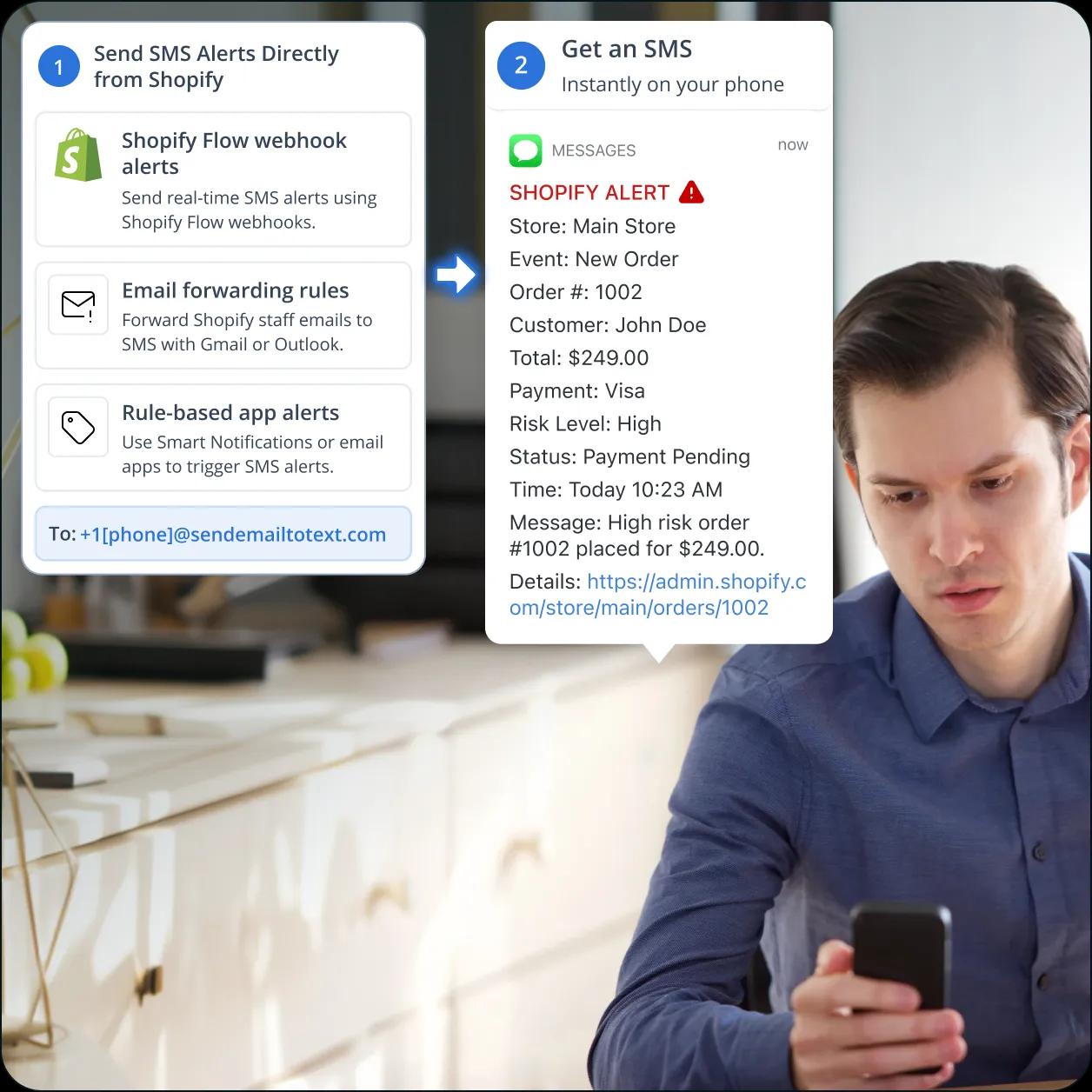
Configure a Shopify Flow webhook trigger on the events that matter (Order created with high risk level, Inventory level decreased below threshold, Order over $X total, Refund created). Route the webhook through an email-relay service that forwards to +1[phone]@sendemailtotext.com. The store team’s phone gets an SMS in seconds from your toll-free business number.

10DLC-Compliant Business Number
TextBolt registers your sender identity with The Campaign Registry during onboarding. SMS routes through carrier-approved 10DLC infrastructure, not a personal cell or unregistered traffic. Up to 98% delivery rate, professional toll-free number, no carrier filtering on the recipient side. Carrier 10DLC approval typically takes 1-2 business days.

Two-Way Replies to the Store Team’s Inbox
When the store team lead texts back to acknowledge or assign, the reply lands as an email in the team’s inbox, threaded with the original Shopify event notification when possible. The head of e-commerce and inventory manager see the response and can reply by sending another email. No webhook handler to maintain.

Internal Staff Alerts, Not Customer-Facing SMS
The Shopify App Store covers customer SMS through Twilio, Klaviyo, Postscript, Attentive, and abandoned-cart apps. TextBolt handles a different job: internal alerts for store and e-commerce teams when high-risk orders, stock-outs, or high-value orders need attention. Different SMS job, recipients, and audience.

Works with Your Existing Shopify Flow Webhooks
TextBolt is a gateway email address, not a Shopify App Store app. There is nothing to install in your Shopify shop, no Twilio Account SID + Auth Token to manage, no Twilio Function in Node.js to deploy. The Shopify Flow webhooks your team already configured can route through an email-relay service to the gateway, and the email becomes an SMS.

Multi-User Access for the Whole Store Team
Standard plan and Professional plan include multi-user access for up to 10 team members on one shared TextBolt account. The store owner, e-commerce ops manager, inventory manager, head of fulfillment, and CX lead share one account and one toll-free number.
Performance Metrics

Up to 98%
SMS Delivery Rate

Two-Way
SMS Replies to Your Inbox

Carrier-Grade
Routes & Infrastructure

Up to 10
Team Members on Shared Account
Set Up Shopify SMS Notifications in About 30
Minutes
Hands-on setup takes around 30 minutes for the TextBolt account, business number, and the gateway recipient inside an email-relay service triggered by a Shopify Flow webhook. TextBolt handles 10DLC business verification with The Campaign Registry on your behalf in parallel; carrier approval typically takes 1-2 business days. No App Store SMS subscription, no Twilio Function to write.
Sign Up for TextBolt
Create your TextBolt account using your store team’s email. Account creation takes about 2 minutes. The account is web-based and works alongside any Shopify plan (Basic, Standard, Advanced, Shopify Plus) on the standard .myshopify.com subdomain or a vanity domain.
Choose a Toll-Free Business Number
Pick a dedicated toll-free number for outbound SMS. The number is the sender ID on every fraud, low-stock, and high-value order SMS, so the store team can save it in their phone’s address book and recognize the alert at 2am. Same number across all Shopify Flow webhooks.
TextBolt Handles 10DLC Business Verification
Provide your business details during onboarding. TextBolt handles 10DLC business and campaign registration with The Campaign Registry on your behalf. Carrier approval typically takes 1-2 business days; the rest of the setup runs in parallel.
Configure a Shopify Flow Webhook to an Email-Relay Service
In Shopify Admin, open Shopify Flow, create a workflow with the trigger you want (Order created, Order risk analysis updated, Inventory level updated, Refund created). Add a Send HTTP request action pointing at an email-relay service (Mailgun, Postmark, SendGrid). Set the email recipient to +15551234567@sendemailtotext.com.
Apply Across Fraud, Inventory, and High-Value Order Events
Replicate the SMS-on-event pattern across the Shopify events that matter to your store team: high-risk order creation, low-stock and out-of-stock alerts, large orders above a value threshold, refund spikes, and order errors. Different events can route to different gateway addresses for different on-call store leads.
Invite Up to 10 Store Team Members
Add the store owner, e-commerce ops manager, inventory manager, head of fulfillment, and CX lead to the shared TextBolt account. Each team lead’s reply to a Shopify event SMS lands in the team’s email inbox, so the whole store team sees acknowledgments and follow-ups in the same email thread Shopify started.

Three Ways to Send SMS from Shopify
1. Shopify Flow Webhook to Email-Relay Service
The canonical real-time event path. In Shopify Flow, create a workflow with triggers like “Order created” with a condition for “Risk level is high,” or “Inventory quantity changed” with a threshold condition. Add a Send HTTP request action to an email-relay service (Mailgun, Postmark, SendGrid). The relay forwards a formatted email to +1[phone]@sendemailtotext.com, and the SMS arrives in seconds.
2. Shopify Staff Email Notifications via Forwarding Rule
For non-engineering store teams, the no-code path: Shopify Admin sends staff email notifications for new orders, fraud risk, fulfillment, and refunds to a shared store inbox. Set up a Gmail or Outlook forwarding rule that catches subject lines like “High Risk” or “Order over $X” and forwards to +1[phone]@sendemailtotext.com. No webhook configuration required.
3. Smart Order Emails or Rule-Based App With Gateway Recipient
For merchants already using rule-based email apps like Smart Order Emails or Smart Notifications on the Shopify App Store, add the TextBolt gateway address as one of the email recipients in the rule configuration. The third-party app handles the rule routing (by product line, vendor, or order attribute), and TextBolt handles the SMS conversion on top.
Shopify Workflows That Send SMS Through TextBolt
Six common Shopify scenarios where SMS to the store owner, e-commerce ops manager, or inventory manager beats email-and-Slack alone. Each links a Shopify Flow webhook event or staff email rule to an SMS on the responsible person’s phone in seconds.
Shopify Store Owners and Merchants
Run a mid-volume Shopify shop on Standard, Advanced, or Plus. Configure Flow webhooks on high-risk order creation, large orders above a value threshold, and out-of-stock events. The store owner sees an SMS the moment a $2,000 high-risk order lands, with full headroom to verify with the customer or cancel before fulfillment ships.
E-Commerce Operations Managers
Handle fulfillment, customer experience, and store operations. Configure Flow webhooks on order errors, refund spikes, and customer escalation tags. The e-commerce ops manager gets an SMS the moment a fulfillment-blocking issue lands, regardless of whether it’s during business hours or on a weekend.
Inventory and Fulfillment Managers
Monitor stock levels, reorder points, and supplier coordination. Configure Flow webhooks on low-stock and out-of-stock events for top-selling SKUs. The inventory manager gets an SMS the moment a top SKU drops below the reorder threshold, instead of finding out from the daily inventory report after the SKU has already gone out-of-stock during a sales spike.
Heads of E-Commerce at DTC Brands
Own e-commerce performance and customer-impact metrics at DTC and online retailers. Configure executive-escalation Flow webhooks for top-account orders, key-product stockouts, and major fraud spikes. The head of e-commerce gets an SMS the moment a customer-impact event happens, not when the weekly report shows the impact.
Multi-Store Shopify Plus Operators
Manage multiple Shopify Plus shops, regions, or sub-brands. Add the same TextBolt gateway address across each shop’s Flow webhooks, so the multi-store ops team gets SMS from any of the shops on a single shared business number. One TextBolt account covers all the shops without per-shop subscription scaling.
Engineering Leaders Configuring Shopify Webhooks and Flow
Build and maintain Shopify Flow workflows, webhook subscriptions, and Admin API integrations for the e-commerce team. Adding the gateway recipient via an email-relay service takes minutes; no new webhook handler in Node.js to write, no Twilio API credentials to manage. The audit log inside TextBolt complements the Shopify webhook delivery log for change-management review.

Built for Compliance and Security

10DLC Compliant

Carrier Approved

Complete Audit Trail
Three SMS Jobs to Be Done with Shopify
E-commerce teams pick a Shopify SMS path based on the job to be done. Customer-facing SMS apps cover customer conversations and marketing. TextBolt covers internal staff alerts on fraud, inventory, and high-value orders. DIY API paths cover full programmability. Pick the one that matches the job to be done.
Customer-Facing SMS Apps
For customer conversations and marketing
Twilio: Order Alert & Bulk SMS, Klaviyo SMS, Postscript, Attentive, and abandoned cart recovery apps are excellent customer-facing SMS tools. They send abandoned cart messages, OTP, bulk marketing campaigns, and order updates directly to customers. The right fit when SMS is a customer-facing marketing or support channel.
-
 Customer-facing SMS for orders, OTP, and marketing
-
Abandoned cart recovery and segmentation
-
Bulk SMS campaigns and customer flows
-
Best when SMS is a customer marketing channel
-
Different scope than internal staff alerting
Recommended
TextBolt
Flat monthly plan, no per-node license Standard plan
Email-to-SMS gateway built for Shopify Flow webhook events. Route a Shopify Flow webhook through an email-relay service to the gateway address, and the email becomes an SMS from your business number. Reach the store team before a fraudulent order ships, with replies threading back into the team’s email inbox.
-
 Up to 98% delivery rate
-
10DLC-compliant business number
-
Reaches store team before fraudulent order ships
-
Multi-user access: up to 10 team members
-
Two-way replies in manager’s email inbox
-
No App Store SMS subscription, no Twilio account
DIY API Path: Twilio Function or MESA / Zapier Glue
For full programmability
Twilio is a leading SMS API. Combined with Shopify Flow webhooks and a Twilio Function in Node.js, it gives engineering teams full programmability and infinite branching logic for store events. MESA, Zapier, and Zoho Flow offer lower-code workflow alternatives. The right fit when engineering owns the SMS routing logic.
-
Twilio is a leading SMS API with deep documentation
-
MESA / Zapier / Zoho Flow for lower-code workflows
-
Per-message vendor billing and 10DLC registration
-
Best when engineering owns the SMS routing logic
-
Ongoing Function code or workflow tasks to maintain
CUSTOMER REVIEWS
How Store Teams Use TextBolt with Shopify
Three ways customers route SMS through Shopify with TextBolt: catching fraudulent orders before they ship, alerting on top-SKU stockouts during sales spikes, and adding internal alerts without disturbing existing customer-facing SMS marketing.

On Google Workspace Marketplace, with
 263K+ installs

We lost $3,400 to a fraudulent order because a high-risk email wasn’t seen until Monday. After routing Shopify Flow high-risk alerts through Postmark to TextBolt, our manager now gets an instant SMS and has already stopped two more fraud attempts before they shipped.

Store Owner
DTC Apparel Brand
Our top-selling SKU sold out during a flash sale, but the inventory alert wasn’t seen until Monday, costing us hundreds of missed orders. We routed Shopify Flow low-stock alerts through TextBolt, so our inventory manager now gets an instant SMS and can restock or pause ads before sales are lost.

E-Commerce Operations Manager
Home Goods Store
We use Klaviyo for customer SMS, but needed a separate way to alert our ops team about critical events like $5,000+ wholesale orders or fraud spikes. By routing Shopify Flow webhooks through TextBolt, the team now gets instant SMS alerts for the events that need immediate attention—without changing our Klaviyo setup.

Head of E-Commerce
B2B Wholesale Brand
Why Shopify Stores Choose TextBolt
The numbers that matter when adding internal staff SMS to a Shopify fraud, inventory, and high-value order notification stack.
Up to 98%
SMS Delivery Rate
30 min
End-to-End Setup
Up to 10
Team Members (Standard Plan)
4.4★
Workspace Marketplace (483+ reviews)
Frequently Asked Questions
Can Shopify send SMS notifications to staff natively?
No. Shopify’s native staff notifications (new orders, fraud risk alerts, low stock, fulfillment events) deliver via email only. Shopify Flow’s Send internal email action is limited to Shopify staff users on the shop, not external endpoints. To send SMS to the store team, route a Shopify Flow webhook through an email-relay service to an email-to-SMS gateway like TextBolt. Add the gateway address +1[phone]@sendemailtotext.com as the email recipient and the webhook becomes an SMS from your registered 10DLC business number.
How do I notify staff via SMS when a high-risk Shopify order lands?
In Shopify Admin, open Shopify Flow and create a workflow with the trigger “Order created” and a condition for “Risk level is High.” Add a Send HTTP request action pointing at an email-relay service (Mailgun, Postmark, SendGrid). The relay forwards a formatted email to the TextBolt gateway address. The store team’s phone gets an SMS the moment a high-risk order lands, with full headroom to verify the order with the customer or cancel before fulfillment.
How do I get SMS alerts for Shopify low stock?
Configure a Shopify Flow workflow with the trigger “Inventory level updated” and a condition for “Inventory quantity less than X” (your reorder threshold). Add a Send HTTP request action pointing at an email-relay service that forwards to the TextBolt gateway address. The inventory manager gets an SMS the moment a top SKU drops below the threshold, instead of finding out from the daily inventory report.
How do I send SMS from Shopify Flow without setting up a Twilio account?
Twilio’s documented Shopify path uses Twilio: Order Alert & Bulk SMS or a custom Twilio Function with Shopify webhooks. The TextBolt path skips the Twilio account: Shopify Flow webhook to email-relay service (Mailgun, Postmark, SendGrid) to gateway address. No Twilio account, no Twilio API credentials in environment variables, no Node.js Function. Email-relay services handle the webhook payload conversion to a formatted email.
Does this work with Shopify Flow webhooks and the 100-webhook limit?
Yes. The TextBolt gateway address works with any Shopify Flow webhook routed through an email-relay service. Common high-value events include “Order created” with risk level high, “Inventory level updated” below threshold, “Order created” above value threshold, “Refund created,” and “Order fulfillment failed.” Shopify shops are capped at 100 webhooks per shop and Shopify auto-deletes a webhook after 19 consecutive failures, so consolidating notification routing through a reliable email-relay service helps stay within the cap and avoid silent failures.
How is TextBolt different from Klaviyo SMS, Postscript, or Attentive for Shopify?
Klaviyo SMS, Postscript, and Attentive are excellent customer-facing SMS marketing platforms with best-in-class segmentation, automated flows, and customer-experience analytics. They’re the right fit when SMS is a core customer marketing and engagement channel. TextBolt covers a different SMS job: internal alerts to the store team, e-commerce ops manager, inventory manager, and head of e-commerce when fraud, stock, or high-value events need staff attention. The two approaches each cover different SMS jobs and tend to be picked alongside, not instead of, TextBolt.
Is sending SMS from Shopify with TextBolt 10DLC compliant?
Yes. TextBolt registers your sender identity with The Campaign Registry as part of onboarding, so SMS sent from Shopify webhooks through TextBolt routes through carrier-approved 10DLC infrastructure. Carrier 10DLC approval typically takes 1-2 business days, separate from the 30-minute hands-on setup.
Can the store team reply to the SMS, and where does the reply go?
Yes. When the team lead texts back to acknowledge or assign, the reply arrives as an email in the store team’s email inbox, threaded with the original Shopify event notification when possible. The head of e-commerce and inventory manager see acknowledgment in the same email thread the webhook started. No webhook handler to maintain.
Does this work with Shopify Basic, Standard, Advanced, and Shopify Plus?
Yes. The TextBolt gateway address works with any Shopify plan that supports Flow webhooks (Standard, Advanced, and Shopify Plus include Flow; Basic supports webhooks via Admin API). Multi-store Shopify Plus operators can add the same gateway address across each shop’s Flow webhooks, so the multi-store ops team gets SMS from any shop on a single shared TextBolt account.
How long does it take to set up Shopify SMS notifications with TextBolt?
About 30 minutes of hands-on configuration: TextBolt account creation, toll-free number selection, and adding the gateway recipient to an email-relay service triggered by a Shopify Flow webhook. Carrier 10DLC business verification runs in parallel and typically takes 1-2 business days. Once your number is approved, the store team gets an SMS the next time a matching Shopify Flow webhook fires.
How much does it cost to send SMS from Shopify with TextBolt?
TextBolt offers plans for businesses of different sizes, from single-user setups to teams with shared access. Plans include SMS credits, optional toll-free business numbers, and annual billing discounts. Unlike many platforms, TextBolt pricing does not scale with Shopify order volume. For the latest plans, features, and pricing, visit the TextBolt pricing page.
Reach Your Store Team the Moment a Shopify Event Fires
Send compliant business SMS from Shopify high-risk orders, low-stock events, and high-value orders in about 30 minutes. Multi-user access, two-way replies in the team’s inbox, audit-ready logs.
