
Send Text Alerts Directly from UptimeRobot
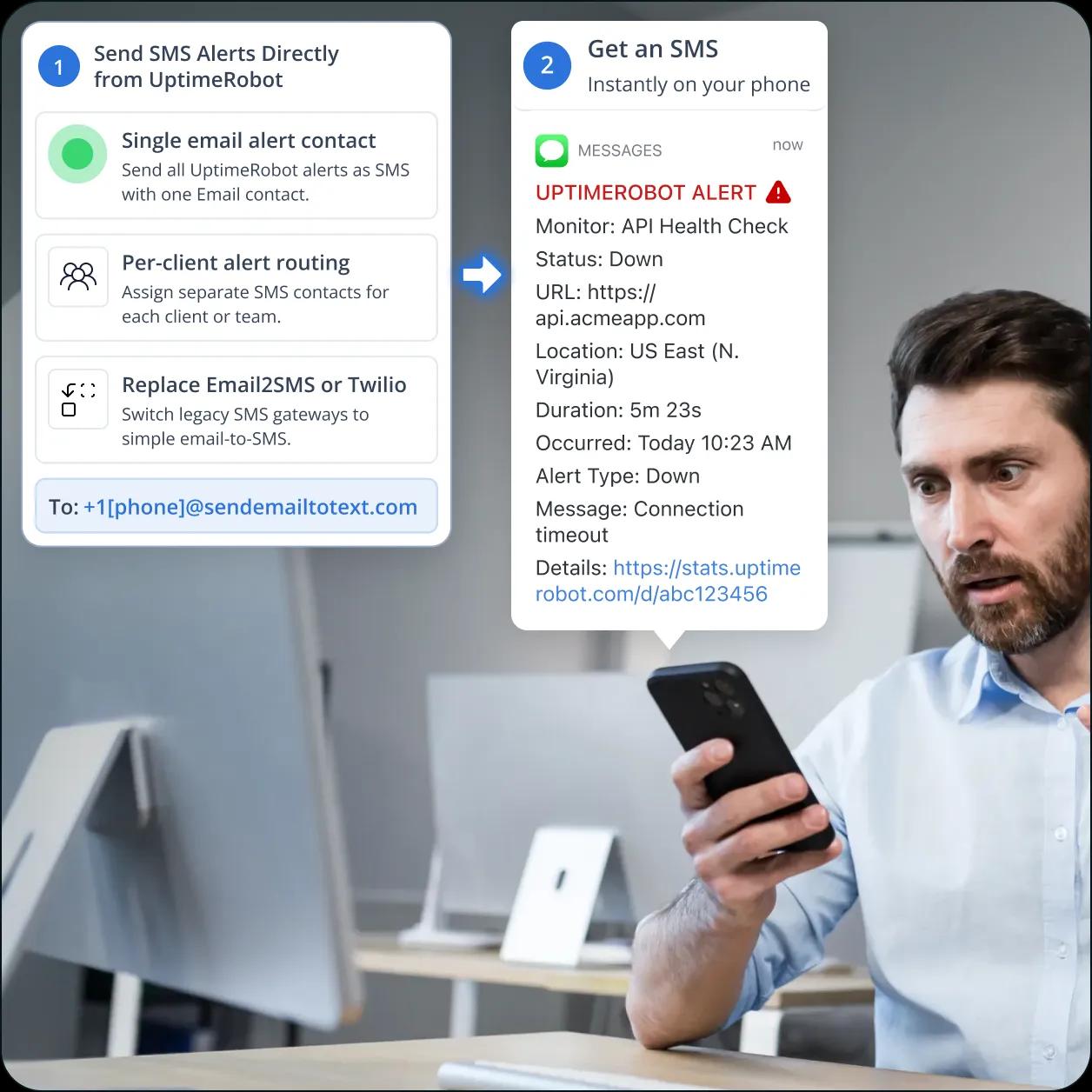
Turn any UptimeRobot downtime alert into an instant SMS with TextBolt. Flat monthly plan, no per-credit math, sent from a 10DLC-compliant business number.
-
 Add an email alert contact and downtime sends SMS
-
Works with your 10DLC business number
-
Replies thread back to the admin’s inbox


Adding Cost-Predictable SMS on Top of UptimeRobot
Monitors
UptimeRobot’s bundled SMS uses one-time credit top-ups that surprise indie SaaS developers, agency operators, MSP technicians, and small SaaS team leads at scale. TextBolt slots in on top using the Email Alert Contact you already configure. Six SMS challenges teams encounter on UptimeRobot.

Built-In SMS Uses Per-Message Credits at Roughly $0.60 Each
UptimeRobot’s built-in SMS path consumes 2 credits per US SMS (5 for Russian numbers) since the August 3, 2023 pricing update. Credits sell at $3 for 10, $15 for 100, $25 for 200, $55 for 500, or $100 for 1,000 — roughly $0.60 per US SMS. Credits are one-time top-ups rather than monthly renewals, and a monitor flapping 30 times during a real outage drains 60 credits before lunch. Teams that want predictable monthly SMS cost route the Email Alert Contact through TextBolt instead, where SMS volume is included in a flat plan on top of the rest of UptimeRobot.

The Free “Email to SMS” Channel Relies on Dying Carrier Gateways
UptimeRobot lists “Email to SMS” alongside Email/SMS/Voice as a notification channel. It’s free because it points emails at carrier gateways like @vtext.com, @txt.att.net, and @tmomail.net. AT&T retired txt.att.net on June 17, 2025. T-Mobile took tmomail.net offline December 2024. Verizon’s vtext.com shutdown completes by March 2027. Indie devs and agency operators relying on Email to SMS see silent delivery failures or SMS that arrive late.

Free Plan Lists SMS but Doesn’t Include Credits
UptimeRobot’s Free plan ($0/month, 50 monitors, 5-minute checks) lists SMS as a notification channel, but no credits are included with the plan. Indie SaaS developers and bootstrapped founders who chose UptimeRobot specifically because it has a free tier hit a paywall the moment they configure their first SMS contact. Even the smallest credit pack is $3 for 10 credits, which covers just five US texts before it runs dry. The “free SMS” claim only holds if you route through Email to SMS to a working carrier gateway.
Rotation Teams Burn Through Included Credits in Week One
Solo ($7/month) includes 10-20 credits, Team ($29/month) includes 30, Enterprise ($54+/month) includes 50-200. At 2 credits per US SMS, Team’s 30 credits buy 15 SMS per month. A 5-person on-call rotation watching 8 production monitors with weekly downtime exhausts that in week one. Small SaaS team leads stack $55 (250 SMS) or $100 (500 SMS) top-ups on top of the plan, with no proration on unused balance if the account closes.

No 10DLC Business Sender, No Audit Trail
UptimeRobot’s SMS routes through their carrier relationships, but the channel doesn’t surface 10DLC business verification, Campaign Registry enrollment, or audit-trail exports tied to a specific business identity. SMS arrives from generic shared sender numbers, not from a number registered to the receiving company. For agency operators, MSP technicians, and regulated SaaS shops who need compliant business SMS with documentation for clients or auditors, this is a gap.

Webhook + Twilio DIY Defeats the Simplicity That Drew Teams
Cost-conscious teams who exhaust credits often try UptimeRobot’s webhook channel pointing at a self-hosted Twilio integration. That path means building a webhook receiver (Cloudflare Worker, Vercel function, AWS Lambda), handling Twilio API auth, mapping UptimeRobot payload schemas, registering 10DLC through The Campaign Registry, and owning retry and error logic. Indie devs and agency operators who picked UptimeRobot for zero-engineering simplicity end up shipping more code than the alerts themselves needed.
How TextBolt Adds Flat-Cost SMS to UptimeRobot
Monitors
TextBolt connects UptimeRobot’s standard Email notification channel to a registered 10DLC business number. No per-credit math, no Email to SMS carrier-gateway dependency, no Twilio webhook receiver, no Cloudflare Worker.

SMS to Indie Devs, Agencies, and Small SaaS Teams in Seconds
Each UptimeRobot downtime event becomes an SMS within seconds. Critical alerts (HTTP/HTTPS monitors going down, keyword monitors detecting site defacement, SSL certificates expiring, port monitors flapping, heartbeat cron jobs missing) reach the on-call indie dev, agency operator, or MSP technician immediately.

10DLC-Compliant Business Number for Agencies and MSPs
TextBolt registers your sender identity with The Campaign Registry during onboarding. SMS routes through carrier-approved 10DLC infrastructure with up to 98% delivery rate, a professional toll-free business number tied to your agency or company, and an exportable audit trail you can hand to clients.

Replies Thread Back to the Admin Inbox
When the on-call indie dev or agency technician replies “ack,” “investigating,” or “fixed” by SMS, the reply lands as an email in the inbox of whoever sent the original alert. The whole rotation sees acknowledgments without needing UptimeRobot’s mobile app push, and the audit trail captures both the alert and the response.

Flat Monthly Plan, No Per-Credit Top-Ups
Skip UptimeRobot’s $3-$100 credit bundles, the auto-refill at 25 credits, and the credit-burn fear during a real outage. TextBolt’s Standard plan includes 1,000 SMS credits with multi-user access for up to 10 team members, Professional includes 2,500 credits, and credits renew with each billing cycle.

Configure UptimeRobot’s Email Contact With the Gateway Address
In UptimeRobot, go to “My Settings” → “Alert Contacts,” create a new contact of type “Email,” and set the recipient to +1[phone]@sendemailtotext.com. Assign the contact to any monitor. The standard Email channel routes through TextBolt and arrives as SMS, no Email to SMS carrier gateway involved.

Works Across HTTP, Keyword, Ping, Port, SSL, and Heartbeat Monitors
The Email contact pattern is consistent across every UptimeRobot monitor type: HTTP(S), Keyword, Ping, Port, SSL Certificate, Domain Expiry, and Heartbeat (cron). One TextBolt account covers all 50 monitors on a Free plan or all 200+ monitors on Enterprise with no per-monitor configuration overhead.
Performance Metrics

Up to 98%
SMS Delivery Rate

Two-Way
SMS Replies to Your Inbox

Carrier-Grade
Routes & Infrastructure

Up to 10
Team Members on Shared Account
Set Up UptimeRobot SMS in About 30 Minutes
Hands-on setup takes around 30 minutes. TextBolt handles 10DLC business verification with The Campaign Registry on your behalf, which typically takes 1 to 2 business days to be approved before your number can send SMS. No credit packs to estimate, no Email to SMS carrier gateway to test, no Twilio webhook to deploy.
Sign Up for TextBolt
Create your TextBolt account using your work email. Account creation takes about 2 minutes. The account ties to your domain so you can add coworkers or agency teammates later.
Choose a Toll-Free Business Number
Pick a dedicated toll-free number for outbound SMS, and annual billing includes a discount. The number is the sender ID on every SMS UptimeRobot sends through TextBolt, tied to your agency or company brand.
TextBolt Handles 10DLC Business Verification
Provide your business details during TextBolt onboarding. TextBolt handles 10DLC business and campaign registration with The Campaign Registry on your behalf, so you don’t manage the registration process yourself. Business verification typically takes 1 to 2 business days to be approved. Once approved, your number is enabled for compliant business SMS with an audit trail you can share with clients.
Add an Email Alert Contact in UptimeRobot
In UptimeRobot, go to “My Settings” → “Alert Contacts” → “Add Alert Contact.” Choose type “Email,” set the recipient to +15551234567@sendemailtotext.com using the engineer’s actual phone, and save. The contact is now available to assign to monitors.
Assign the Contact to Your Monitors
Edit each HTTP(S), Keyword, Ping, Port, SSL, or Heartbeat monitor and check the new TextBolt-bound email contact under “Alert Contacts To Notify.” Pause and resume one monitor to fire a test alert. The SMS lands on the engineer’s phone in seconds.
Add Up to 10 Team Members or Client Recipients
Invite the rest of your indie team, agency staff, or MSP technicians to the shared TextBolt account. Add per-engineer email contacts in UptimeRobot. Agencies monitoring multiple clients can assign different contacts per client’s monitor group, all sending from one shared business number.

Three Ways to Send SMS from UptimeRobot
1. Single Email Alert Contact (Most Common)
Add one Email alert contact in UptimeRobot with recipient +1[phone]@sendemailtotext.com, assign it to all your monitors, and every downtime event becomes SMS from your business number. Clean for solo indie devs and bootstrapped SaaS founders.
2. Per-Client Contacts for Agencies and MSPs
Create separate Email contacts per client (or per on-call rotation member), each pointed at TextBolt with that client’s preferred recipient. Assign contacts to that client’s monitor group. One TextBolt account, one 10DLC business number, dozens of clients, no per-credit math per text.
3. Migrating From Email to SMS or Webhook + Twilio
Replace the dead Email to SMS carrier gateway recipient ([phone]@vtext.com) with TextBolt’s gateway, or rip out the Cloudflare Worker / Twilio receiver entirely. Same monitors, same alert flow, now compliant and predictable.
UptimeRobot Monitor Types That Use TextBolt SMS
Six common UptimeRobot monitor types where SMS to the on-call indie dev or agency technician replaces a credit-burn cycle or a dead Email to SMS gateway. The same Email alert contact works across every monitor type.
HTTP(S) Monitors (Website Down)
Indie SaaS developers and agency operators get SMS the moment their website returns a 5xx, times out, or fails the response check. The standard Email alert contact wired into any HTTP(S) monitor catches landing-page outages, marketing-site downtime, and client-site failures.
Keyword Monitors (Defacement, Page Drift)
MSP technicians and small SaaS team leads get SMS when a Keyword monitor detects an expected string disappearing from a page or an unexpected one appearing. Useful for catching defacement, broken templates, missing checkout buttons, or accidental staging-content leaks.
Ping and Port Monitors (Server Reachability)
Agency operators and MSP technicians monitoring client server fleets get SMS for ICMP ping failures, TCP port closures, SSH/RDP/MySQL/PostgreSQL/SMTP/IMAP service drops, and VPN endpoint outages. Ping and Port monitors trigger the same Email alert contact path.
SSL Certificate Expiry Alerts
Indie devs and agency operators get SMS 30, 14, 7, or 1 day before SSL certificates expire. Critical for client-site monitoring where a forgotten certificate renewal causes browser warnings, broken integrations, and emergency Sunday-night calls.
Domain Expiry Monitors
Small SaaS team leads and agency operators get SMS before client domain registrations expire. Domain expiry monitors check WHOIS/RDAP records and trigger the same Email contact, catching the rare-but-catastrophic case of forgetting to renew a production domain.
Heartbeat (Cron Job) Monitors
Indie devs and small SaaS teams get SMS when a Heartbeat monitor doesn’t receive its expected ping within the configured window. Critical for nightly backups, daily reports, billing cron jobs, and queue workers that silently die without obvious symptoms until the next morning.

Built for Compliance and Security

10DLC Compliant

Carrier Approved

Complete Audit Trail
UptimeRobot SMS Options: Built-In Credits, TextBolt, or Twilio DIY
Three common paths for adding SMS to UptimeRobot. Built-in SMS charges per credit. Webhook + Twilio DIY adds engineering. TextBolt slots into the standard Email alert contact UptimeRobot already supports.
UptimeRobot SMS Credits (Built-In)
$0.30/credit, 2 credits per US SMS = ~$0.60/SMS
Native SMS channel using UptimeRobot’s carrier relationships. Quick to enable, but credits don’t renew with the plan, sender is a generic shared number, and a flap-storm during a real outage drains credits fast.
-
 Shared team ~$0.60 per US SMS (2 credits)
-
Credits don’t renew with the plan
-
$3-$100 one-time top-ups, auto-refill at 25
-
Generic shared sender, no 10DLC surface
-
No two-way replies to inbox
Recommended
TextBolt
Flat monthly plan, no per-node license (Standard plan)
Email-to-SMS gateway. Add an Email alert contact in UptimeRobot with recipient +1[phone]@sendemailtotext.com. Standard UptimeRobot Email channel, standard monitor assignments. Now flat-rate, compliant, audit-trailed, two-way.
-
 Up to 98% delivery rate
-
10DLC-compliant business number
-
Flat monthly plan, credits renew each cycle
-
Multi-user access: up to 10 team members
-
Two-way replies in manager’s email inbox
-
Works across HTTP, Keyword, Ping, Port, SSL, Heartbeat
Webhook + Twilio (DIY)
Cloudflare Worker / Vercel function plus Twilio billing
Build a webhook receiver, handle Twilio API auth, map UptimeRobot payload schemas, register 10DLC through The Campaign Registry yourself, own retry and error logic. Cheaper at high SMS volume, but defeats the simplicity that drew you to UptimeRobot.
-
Webhook receiver to deploy and maintain
-
Twilio API credentials and per-message billing
-
Self-managed 10DLC registration
-
Payload mapping breaks on UptimeRobot schema changes
-
No two-way replies without extra code
CUSTOMER REVIEWS
How Teams Use TextBolt with UptimeRobot
Three ways customers route SMS through UptimeRobot with TextBolt: escaping the per-credit math, replacing the dying Email to SMS gateway, and adding a 10DLC business number for client work.

On Google Workspace Marketplace, with
 263K+ installs

UptimeRobot’s $0.60 per US SMS killed us during a flap-storm. We hit the auto-refill threshold three times in one afternoon. TextBolt’s flat monthly plan made our SMS costs predictable, and we deleted the credit-top-up calendar reminder.

Indie SaaS Founder
Bootstrapped Tools
We monitor 40 client sites through UptimeRobot. Each client got their own Email to SMS contact pointed at carrier gateways, half of which now silently fail. TextBolt let us route per-client to a 10DLC business number with a clean audit trail per recipient.

Agency Owner
Digital Marketing Studio
As an MSP we needed audit trails for SMS notifications to clients during incidents. UptimeRobot doesn’t surface 10DLC verification. TextBolt gave us a registered business number and per-client message logs we can actually export for monthly reports.

MSP Technician
IT Services Company
Why Devs and Agencies Pick TextBolt
The numbers that matter when wiring SMS into an UptimeRobot stack without per-credit billing.
Up to 98%
SMS Delivery Rate
30 min
End-to-End Setup
Up to 10
Team Members (Standard Plan)
4.4★
Workspace Marketplace (483+ reviews)
Frequently Asked Questions
How much does UptimeRobot’s built-in SMS cost?
Since UptimeRobot’s August 3, 2023 pricing change, each US SMS consumes 2 credits (5 credits for Russian numbers). Credits sell at $3 for 10, $15 for 100, $25 for 200, $55 for 500, or $100 for 1,000, putting most countries at roughly $0.60 per SMS. Credits don’t renew with the plan; they’re one-time top-ups with an optional auto-refill below 25 credits. A flap-storm during a real outage can drain a $25 (200-credit) bundle in one bad afternoon.
Why is my UptimeRobot Email to SMS not working anymore?
UptimeRobot’s free “Email to SMS” channel sends emails to carrier gateways like @vtext.com, @txt.att.net, and @tmomail.net. AT&T retired txt.att.net on June 17, 2025. T-Mobile took tmomail.net offline December 2024. Verizon’s vtext.com shutdown completes by March 2027. If your alerts stopped or arrive late, you’re hitting one of those shutdowns. Replace the carrier-gateway recipient with TextBolt’s gateway (+1[phone]@sendemailtotext.com) in the Email alert contact and SMS works again.
How do I send SMS from UptimeRobot without buying SMS credits?
Sign up for TextBolt, complete 10DLC business verification, add an Email alert contact in UptimeRobot with recipient +1[phone]@sendemailtotext.com, and assign the contact to your monitors. Flat $29-$99 monthly plan, no per-message credit math, no auto-refill, no top-up surprises. Credits renew with each billing cycle.
Can agencies and MSPs use TextBolt for client UptimeRobot monitoring?
Yes, this is a common setup. One TextBolt account with one 10DLC-registered business number can serve as the SMS sender for any number of UptimeRobot client monitor groups. Create per-client Email alert contacts in UptimeRobot, each pointed at TextBolt with that client’s preferred recipient. Up to 10 agency staff share the TextBolt account. Audit trails are exportable per recipient for client-facing documentation.
Is UptimeRobot SMS via TextBolt 10DLC compliant?
Yes. TextBolt registers your sender identity with The Campaign Registry during onboarding so SMS routes through carrier-approved 10DLC infrastructure. SMS arrives from a toll-free business number registered to your agency or company, not from a generic shared sender. TextBolt is not HIPAA compliant; healthcare-related monitoring with PHI requirements should contact sales for Enterprise options.
Can I reply to acknowledge UptimeRobot alerts via SMS?
Yes. Replies to a TextBolt-sent SMS land as an email in the inbox of whoever sent the original alert. The whole rotation sees acknowledgments without needing UptimeRobot’s mobile app. Note: TextBolt replies don’t automatically pause the UptimeRobot monitor (the UptimeRobot dashboard or API is required for that). For SMS-to-pause automation, route the reply through UptimeRobot’s API.
Does this work with HTTP, Keyword, Ping, Port, SSL, Domain, and Heartbeat monitors?
Yes. The Email alert contact mechanism is consistent across every UptimeRobot monitor type: HTTP(S), Keyword, Ping, Port, SSL Certificate, Domain Expiry, and Heartbeat (cron). One TextBolt account covers all monitors on a Free plan (50), Solo (50), Team (100), or Enterprise (200+) with no per-monitor configuration overhead.
How much does it cost to send SMS from UptimeRobot with TextBolt?
Basic plan (500 SMS credits, single user), Standard plan with multi-user access for up to 10 team members (1,000 credits), Professional plan with multi-user access for up to 10 team members (2,500 credits), Enterprise custom (5,000+ credits). An dedicated toll-free business number is available, and annual billing includes a 20% discount. Check the TextBolt pricing page for more details.
How long does it take to set up UptimeRobot-to-SMS with TextBolt?
About 30 minutes of hands-on configuration: account creation, toll-free number selection, and adding an Email alert contact in UptimeRobot assigned to your monitors. TextBolt handles 10DLC business verification with The Campaign Registry on your behalf, which typically takes 1 to 2 business days to be approved. Once the carriers approve your number, your team can start sending SMS.
Reach Your Rotation Without the Per-Credit Math
Send SMS from any UptimeRobot monitor in minutes. Add an Email alert contact and your existing HTTP, Keyword, Ping, Port, SSL, and Heartbeat monitors keep working, now flat-rate and two-way.
