
Zapier SMS Alerts From Any Zap Notification
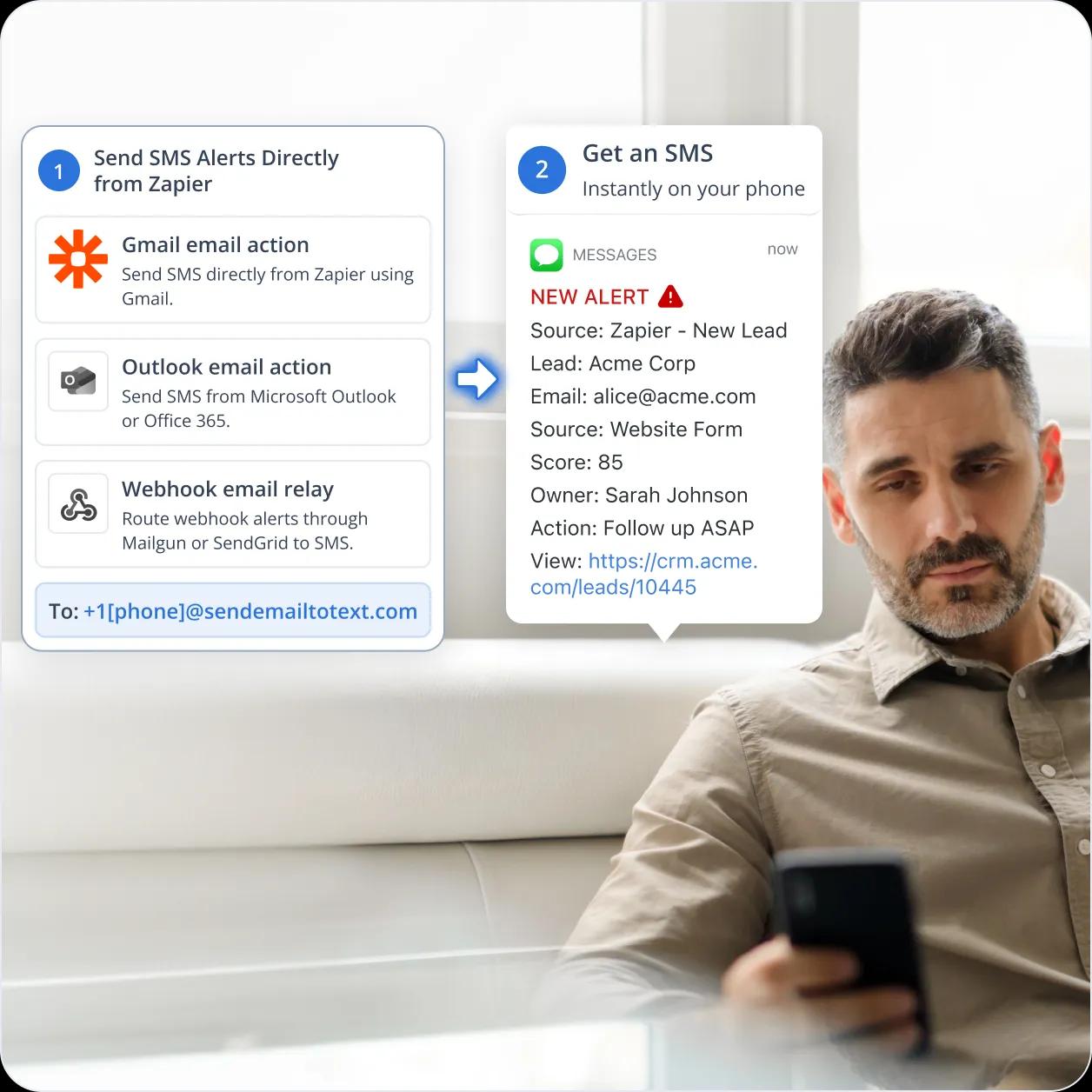
Zapier email notifications reach Slack and email well. They don’t reach a phone. TextBolt turns any Zapier trigger into a text message from your registered business number: add a Send Email step in Gmail or Outlook, point it at the TextBolt gateway, and your team gets an SMS the next time the Zap runs.
-
 Works with the Gmail and Outlook actions you already use in Zapier
-
SMS sends from a carrier-registered business number your team can save
-
Replies come back as email, in the same thread the Zap started


Why Zapier Notifications Don’t Reach a Phone on
Their Own
Zapier is excellent at moving data between apps, and its built-in text messaging and email tools work well when you need Zapier to send text alerts to yourself about a few events a day.

You Can Only Send 15 Texts an Hour
When you use SMS by Zapier to send a text message, it stops at 15 texts per hour for your whole account, no matter how many Zaps or people you have. Messages are cut off at 153 characters, every recipient has to confirm their number with a PIN first.

The Text Comes from a Shared Number
The text arrives from a shared number that Zapier picks, not one your business owns. Your team can’t save it as a contact, so the alert is easy to miss on the lock screen. If you want your own number, Zapier itself tells you to use a different SMS app.

A Green Checkmark Doesn’t Mean the Text Arrived
When SMS by Zapier reports success, it only means the text was handed off, not delivered. If the carrier drops it, the Zap still shows as completed. You find out the alert never arrived when someone asks why nobody responded.
Zapier’s Email Tool Stops at 10 Emails an Hour
Email by Zapier caps at 10 emails per hour for your whole account. Every message also gets an unsubscribe link at the bottom. That makes sense on a newsletter and makes no sense on an alert to your own on-call person.

Zapier Twilio Setup Works But You Do Paperwork
Connecting Twilio to Zapier gives developers full control. It also means you register your business with the carriers yourself, wait for approval, and pay Twilio for every text on top of what Zapier charges per task. That is days of setup before the first alert.

Slack Channels Can Go Quiet Overnight
Most teams send Zap alerts to a Slack or Teams channel instead of setting up Zapier text messaging. When someone mutes the channel, turns on do-not-disturb, or sets quiet hours, a Zap that fires at 2 a.m. can sit unread until morning.
How Zapier Email to SMS Works with TextBolt
TextBolt is an email address, not a Zapier app. To make Zapier send a text message, add a Send Email in Gmail or Send Email in Outlook action at the end of any Zap, set the recipient to the TextBolt gateway address, and the email arrives on a phone as a text from your business number.

Use the Same Step That Zapier Email Notifications
There is nothing to install in Zapier and no API key to manage. The Send Email step uses your team’s existing Gmail or Microsoft 365 connection, so the Zaps you built keep running as they are, with one more step at the end.

Send from a Registered Business Number
TextBolt handles 10DLC compliance registration with the carriers during onboarding, so you skip the paperwork. Every Zap sends from the same dedicated number, so your team can save it and recognize the alert at a glance.

Replies Come Back as Email Inbox
When the on-call lead texts back, the two-way SMS reply arrives as an email in the inbox that sent the alert, threaded with the original message where the email client supports it. No webhook handler to write.

One Account for the Whole Team
Up to 10 team members share one TextBolt account and one business number with no per-seat fees. RevOps, sales ops, CX ops, and on-call leads can all send and see history from the same dashboard.

See Whether the Text Was Delivered
Every text is logged in the TextBolt dashboard with its delivery status. Zap history tells you the email went out; the dashboard tells you whether the text reached the phone. Filter by date, status, or keyword when an alert goes missing.

Flat Monthly Pricing on the SMS Side
TextBolt pricing plan is a flat monthly subscription based on SMS credits. There is no per-message Twilio bill and no separate carrier registration fee. Zapier still counts each Send Email step as one task, so plan your Zapier quota as you do today.
Performance Metrics

Up to 98%
SMS Delivery Rate

Two-Way
SMS Replies to Your Inbox

Carrier-Grade
Routes & Infrastructure

Up to 10
Team Members on Shared Account
How to Set Up Zapier SMS Notifications
Hands-on work takes about 30 minutes. Carrier approval runs in the background and takes up to 48 hours; you cannot send until it clears, so set up the Zaps while you wait.
Create Your TextBolt Account
Sign up with the email address you’ll connect in Zapier, or add that account as a user in the dashboard later. Account creation takes a couple of minutes and works alongside any Zapier plan.
Complete Business Verification
Provide your business name, EIN, a description of the alerts you’ll send, and a sample alert. TextBolt submits the carrier registration on your behalf. Approval takes up to 48 hours.
Choose Your Business Number
Select the dedicated number your Zaps will send from. Share it with the team so they can save it in their contacts before the first alert lands.
Add a Send Email Step to a Zap
Open any Zap and add Send Email in Gmail or Send Email in Outlook as the final action. This is the step that makes Zapier send a text message. Set the To field to +15551234567@sendemailtotext.com, using the on-call person’s number. Put the alert text in the Subject and Body.
Keep the Message Short
Every 155 characters is one SMS credit, and TextBolt sends subject plus body as the text. Map only the fields the person needs: deal name, amount, link. Leave out signatures and footers, and test the step once approval clears, before turning the Zap on.
Repeat Across the Zaps That Matter
Treat each high-stakes event as a Zapier SMS trigger. Copy the Send Email step into the Zaps for new leads, failed payments, high-priority tickets, and form fills. Different Zaps can point at different gateway addresses so each alert reaches the right person.

Ready to Set Up Zapier SMS Notifications?
Create your TextBolt account, submit business verification, and add the Send Email step to your Zaps. TextBolt takes care of carrier registration; you take care of the alerts.

Three Ways to Connect a Zap to TextBolt
Every path ends the same way an email reaches the TextBolt gateway and leaves as a text. Pick the one that matches the tools your team already has connected in Zapier.
1. Send Email in Gmail
The simplest route for teams on Google Workspace. In any Zap, add the Send Email in Gmail action using the Gmail account already connected to Zapier. Put the gateway address in the To field and build the alert from the Zap’s mapped fields. If your Zap already handles Zapier send email notifications through Gmail, you’re one field change away from SMS.
2. Send Email in Outlook
The same pattern for Microsoft 365 or Outlook.com. Add the Send Email in Microsoft Outlook action, use the Outlook account already connected to Zapier, and set the To field to the gateway address. The Zap sends the email and TextBolt turns it into a text.
3. Webhook to an Email Relay
For engineering teams that route Zaps through Mailgun, Postmark, or SendGrid. Add a Webhooks by Zapier action that tells the relay to email the gateway address. The relay must send from an address registered on your TextBolt account, or the message is not converted.
Zapier SMS Triggers That Send a Text to the Right
Person
Six common Zapier workflows where SMS to the on-call lead beats Slack, Teams, or email alone. Each adds a single Send Email step at the end of an existing Zap to convert a trigger into an SMS on the right person’s phone in seconds.
RevOps and Sales Ops
New lead in HubSpot, Pipedrive, or Salesforce, or a deal moving to a high-value stage. Add a Send Email step and the assigned rep gets a text the moment the Zap runs, instead of finding the lead in Slack an hour later.
Marketing Ops
Route demo requests, form fills, and lead-score changes through Zapier. Add a Send Email step on Zaps triggered by Typeform / Jotform / Gravity Forms submissions, Calendly bookings, or HubSpot lead-score thresholds. The marketing-ops lead gets an SMS the moment a high-intent prospect lands, instead of finding out at the Monday review meeting.
CX Ops and Support
SLA breach, high-priority ticket, or VIP escalation in Zendesk, Freshdesk, or Intercom. The on-call CX lead gets a text whether or not they’re watching the helpdesk. Teams already sending SMS from Outlook use the same gateway address here.
E-Commerce and Finance Ops
Failed payment, dispute opened, high-risk order, or low stock in Stripe, Shopify, or WooCommerce. Filter in Zapier so only high-value events text the billing manager, and let the rest stay in email.
Agencies and Zapier Consultants
Building Zaps for several clients and needing a repeatable way to make Zapier send text alerts. Adding a Send Email step to a client Zap takes minutes, with no app to install per client and no Twilio account to provision. Each client runs on its own TextBolt account.
Solo Operators and Founders
Run the entire stack on Zapier and need SMS alerts on the events that move the business: high-value Stripe charge, Shopify high-risk order, Calendly meeting booked, support email tagged urgent. Add a Send Email step to the relevant Zaps and the founder’s phone rings on the events that need attention right now, without standing up a separate alerting platform.

Built for Compliance and Security

10DLC Compliant

Carrier Approved

Complete Audit Trail
Three Ways to Send a Text Message from Zapier
Each option is built for a different kind of texting. Marketplace apps handle customer conversations. TextBolt handles internal team alerts. Twilio gives developers full control. Many teams run two of them side by side, so pick the one that matches what you need the text to do.
Marketplace SMS Conversation Apps
For customer conversations and broadcasts
MessageDesk, OpenPhone (Quo), ClickSend, Textmagic, Emitrr, and EZ Texting are strong customer-texting apps with Zapier integrations. They give teams a shared SMS inbox, two-way customer conversations, broadcast campaigns, and message history across phone and desktop. The right fit when texting customers is the goal.
-
 Shared team Shared team inbox for customer conversations
-
Two-way customer texting with history
-
Broadcast campaigns to customer lists
-
Apps for phone, desktop, and web
-
Built for customer texting, not internal alerts
Recommended
TextBolt
Flat monthly plan, no per-seat fees
An email-to-SMS gateway that works with the Send Email step in Gmail or Outlook inside any Zap. Put the gateway address in the To field and the email becomes a text from your registered business number. TextBolt handles carrier registration for you. No Twilio account, no per-message bill.
-
 Up to 98% delivery rate
-
10DLC-compliant business number
-
Add SMS to any Zap with a Send Email step
-
Multi-user access: up to 10 team members
-
Two-way replies in manager’s email inbox
-
Predictable monthly pricing on the SMS side
Zapier Twilio Integration (Twilio + Zapier)
For full programmability
Twilio’s SMS API connects to Zapier and gives engineering teams complete control over how texts are sent. You register your business with the carriers through Twilio, then call Twilio’s send-SMS action from any Zap. The right fit when developers own the alerting logic and want to customize every step.
-
Full programmability and a rich feature set
-
Deep documentation and developer support
-
Carrier registration is done on your side
-
Per-message Twilio billing plus Zapier tasks
-
Best when engineering owns the SMS setup
CUSTOMER REVIEWS
How Teams Use TextBolt with Zapier
Three ways customers add TextBolt to existing Zaps: routing CRM lead alerts inside the response window, alerting on payment failures the moment they happen, and converting Zapier Slack channels to SMS for overnight escalations.

On Google Workspace Marketplace, with
 263K+ installs

We routed new HubSpot deals to Slack, but overnight leads were missed because notifications were muted. By adding a Gmail step in Zapier with the TextBolt gateway, our on-call AE now gets an SMS the moment a hot lead arrives. The setup took about 20 minutes across six lead-routing Zaps.

RevOps Lead
B2B SaaS on Zapier Professional
Stripe payment failures were getting buried in Slack and checked too late. We added an Outlook step in our Stripe Zap with the TextBolt gateway, so only high-value failed payments trigger an SMS to the billing manager. Zapier handles the filtering, and failed renewal recovery improved by about 18% in the first quarter.

Finance Ops Manager
SaaS Subscriptions on Zapier Team
As a freelance ops consultant, I needed SMS alerts for multiple clients without managing Twilio, 10DLC, or developer setup. With TextBolt, every client uses the same Send Email step—just add the gateway address in the To field. One TextBolt subscription per account, no Trust Hub paperwork, and no extra development for SMS.

Independent Zapier Consultant
Multi-Client Practice
Why Zapier Customers Choose TextBolt
The numbers that matter when adding compliant business SMS to an existing Zapier automation surface.
Up to 98%
SMS Delivery Rate
30 min
End-to-End Setup
Up to 10
Team Members (Standard Plan)
4.4★
Workspace Marketplace (483+ reviews)
Frequently Asked Questions
Can Zapier send a text message to my team natively?
Yes, but with limits. SMS by Zapier is capped at 15 texts per hour account-wide, 153 characters, PIN-confirmed numbers only, and no T-Mobile. Texts come from a shared Twilio number. TextBolt adds SMS from your own registered number by adding a Send Email step to any Zap.
What’s the difference between SMS by Zapier, Twilio + Zapier, and TextBolt?
SMS by Zapier is the built-in tool for low-volume texts to a few confirmed numbers. Twilio + Zapier gives developers full control but needs your own 10DLC registration in Trust Hub. TextBolt is the email path: add a Send Email step, point it at the gateway, and TextBolt handles registration.
How do I make Zapier send a text message without Twilio?
To text with Zapier, add a Send Email in Gmail or Outlook action to any Zap using your team’s existing account. Set the To field to +1 followed by the 10-digit number and @sendemailtotext.com. Compose the alert from Zapier’s mapped fields. TextBolt converts it to a text from your registered business number.
What should I check before my first Zapier text alert goes out?
Carrier approval takes up to 48 hours, and TextBolt cannot send until it clears, so build your Zaps in the meantime and run one live test once approved. Recipients must be on US or Canada numbers, so UK and other international numbers are not supported. The subject and body are sent together, and every 155 characters is one credit, so leave out signatures and long fields.
Is TextBolt a Zapier text message integration I install?
No. TextBolt is a gateway email address, not an app in the Zapier directory. You add a standard Send Email in Gmail or Outlook step and use the gateway as the recipient. Nothing to install, no API key, and your existing Zapier connections stay as they are.
Does adding TextBolt to a Zap consume a Zapier task?
Yes. The Send Email step counts as one task per run, and Zapier’s pay-per-task overage is 1.25x your plan rate once you pass your quota. There is no per-message bill on the TextBolt side. For high-volume alerts, batch related events with Zapier’s Digest feature.
How long until my team gets the first text?
About 30 minutes of hands-on setup, then up to 48 hours for carrier approval. You cannot send until approval clears. Once it does, the team gets a text the next time a matching Zap fires.
Can the team reply, and where does the reply go?
Yes. When the on-call lead texts back, the reply arrives as a standard email in the inbox that sent the alert, threaded with the original message where the email client supports it. No webhook handler to maintain.
Is SMS sent from Zapier through TextBolt 10DLC compliant?
Yes. TextBolt registers your business with the carriers during onboarding, and every text routes over carrier-approved infrastructure. TextBolt offers messaging with HIPAA considerations; healthcare teams should consult their compliance lead before routing any patient information through a Zap.
Reach Your Team the Moment Any Zap Trigger Fires
Add SMS from your registered business number to any existing Zap with one Send Email step. Thirty minutes of setup, then your first text as soon as carrier approval clears. Up to 10 team members, replies back to email, a delivery log you can check.