
Text Alert Service: Send SMS Notifications From Email
TextBolt is the text alert service that turns the inbox you already use into an SMS alerting system. Businesses, schools, agencies, and facility teams use it to send outage notices, alarm pages, closures, and shift callouts as texts through the same email to text service their staff already know how to use.
-
 Send to one phone or an entire contact list from a single email
-
Any system that already emails alerts can send them as texts
-
Recipients reply by text and the response lands in your email inbox


What is a Text Alert Service?
A text alert service is a software platform that allows organizations to send automated, time-sensitive SMS notifications and text alerts to groups of mobile phone numbers. These solutions help businesses, schools, healthcare organizations, government agencies, and other teams deliver urgent updates, reminders, transactional messages, and operational notifications directly to recipients’ phones.
Unlike a standard group text, text alert systems send messages privately to each recipient, with replies routed back to a designated inbox instead of a shared conversation.
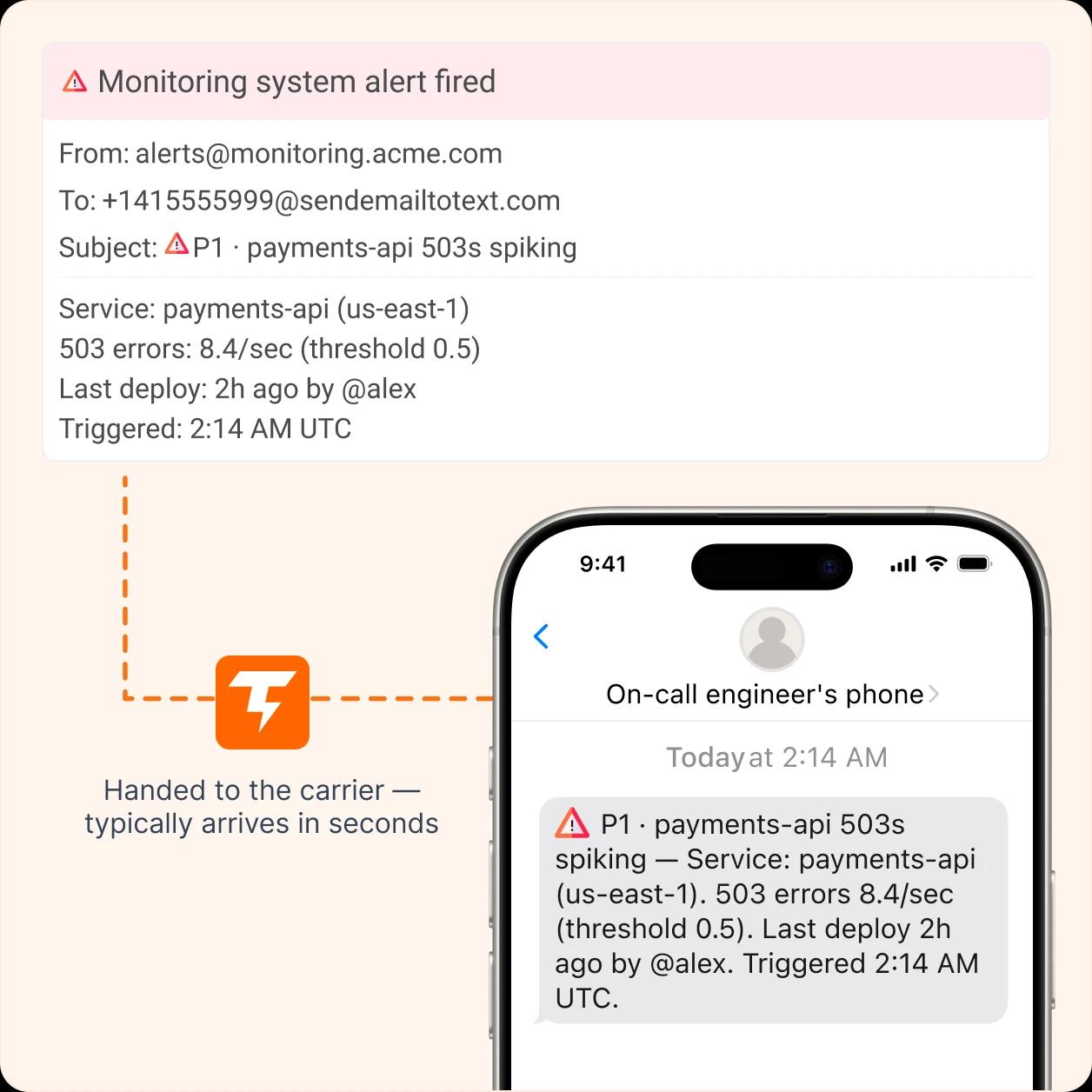
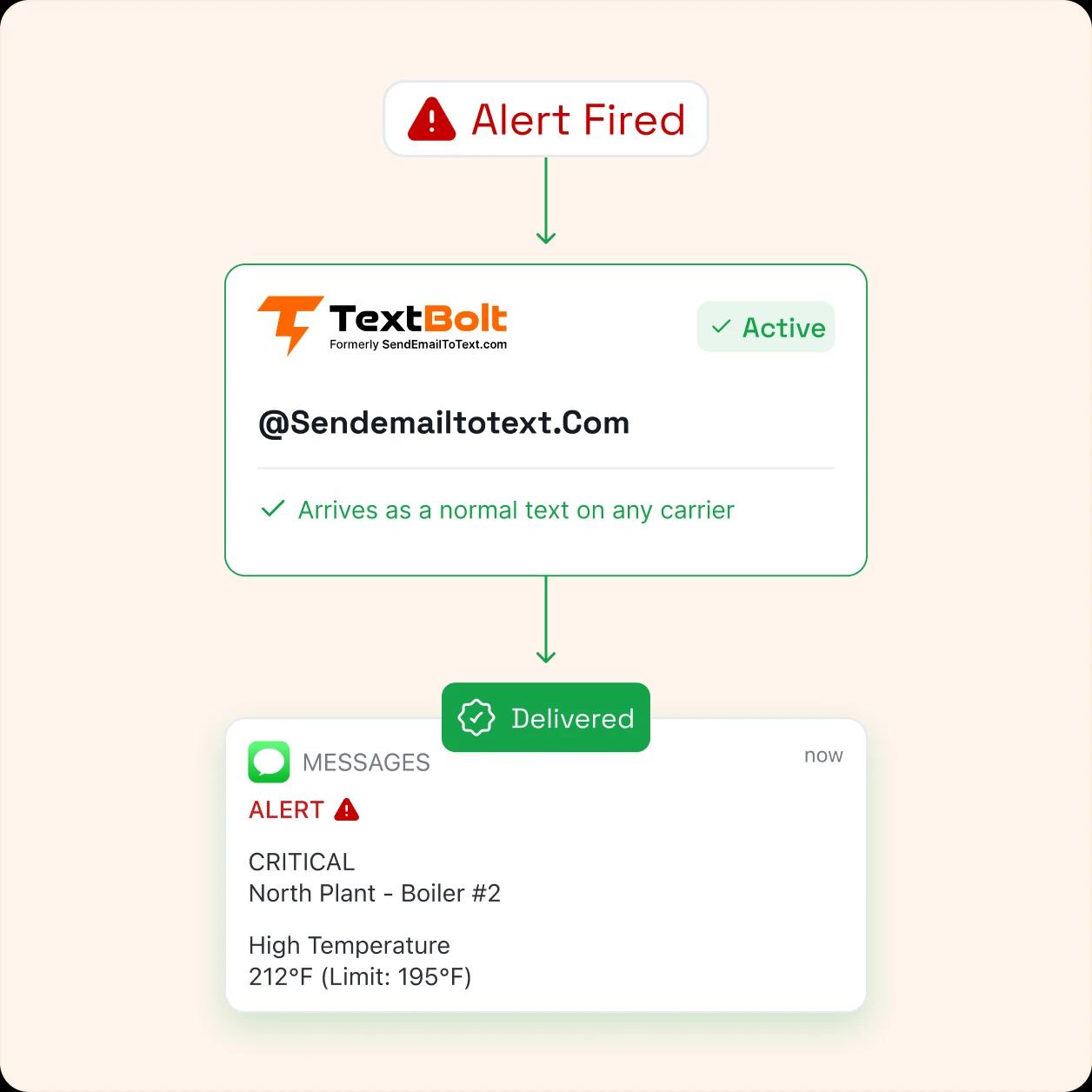
Most organizations already have systems that generate alerts. TextBolt converts those existing alert emails into SMS alerts, helping teams deliver important notifications without changing their workflows or requiring recipients to install an app.
How to Send Text Alerts Faster
Sending text alerts with TextBolt takes three simple steps. No technical setup or new business messaging software is required.
Confirm Your Business Sender
Sign up with your work email, and TextBolt assigns a business number for sending alerts. Brand and campaign registration is completed during onboarding, with verification typically taking 1–2 business days.
Compose or Trigger the Alert
Write the message from Gmail, Outlook, Apple Mail, or your existing email system. Monitoring tools, alarm systems, and other platforms can automatically trigger alerts the same way they already send emails.
Recipients Receive the Text
Send the email to the recipient’s TextBolt address (for example, +11234567890@sendemailtotext.com). The recipient receives a standard SMS on their mobile phone without installing an app or creating an account.
Build a More Reliable Alert System Today
Replace outdated gateways and manual messaging with a text alert service built for teams, systems, and critical notifications.

Text Alerts vs. Group Texts From a Personal Phone
Many teams start by creating a group message from a staff member’s personal phone. This may work for small teams, but problems appear as the contact list grows, replies become difficult to manage, or the employee responsible for the phone leaves the organization.
Sends from your organization’s business number
Replies are routed privately to the sender’s inbox
Sends alerts to large contact lists in one action
STOP requests are automatically honored and suppressed
Every alert is logged with timestamp and sender details
Contacts and message history remain in your account
Uses a staff member’s personal phone number
Replies are visible to everyone in the thread
Works only for small groups
No built-in opt-out management
Limited visibility into past messages
Contact history stays with the employee
Why Should You Choose TextBolt As Your Text
Alert System?
Most text alert providers require a new dashboard. TextBolt turns the email workflows your team already uses into reliable text alerts. Here are the key benefits of SMS text alerts for businesses before choosing us:
Make Sure Critical Alerts Reach Phones
TextBolt uses registered 10DLC routes and verified business senders to improve deliverability and reduce carrier filtering. Delivery rates can reach up to 98% under optimal conditions.
Send Alerts From Any Email Client
TextBolt works with the email tools your team already uses, including Gmail, Outlook, Apple Mail, Yahoo Mail, and other SMTP systems. If your system can send an email, it can send a text alert through TextBolt.
Stay Compliant With 10DLC Messaging
TextBolt handles brand and campaign registration with carriers on your behalf. Your messages are sent through approved business routes, helping your organization meet carrier requirements from the start.
Start Sending Alerts in 30 Minutes
Connect your inbox in about 30 minutes and begin sending alerts through your existing workflow. Business verification typically completes within 1–2 business days, after which your number is ready to send messages across major U.S. carriers.
Shared Team Access Made Simple
Standard and Professional plans support up to 10 teammates with shared contacts and message history. Team members can send alerts from their own email accounts without paying for individual user seats.
Two-Way Conversations From Your Inbox
Recipients can reply directly to text alerts, and responses are delivered back to the sender’s email inbox as a threaded conversation. Your team can manage acknowledgements, questions, and updates without switching to another platform.
Send One Text Alert to Your Whole List
An alert that only reaches one phone is a message, not an alert system. TextBolt sends the same notification to a group in a single action, and each recipient receives it as a private text rather than a group thread.
Send One Text Alert to Your Whole List
Send the same notification to multiple recipients in one action. Each person receives a private SMS instead of a group thread.
Send to a Saved Contact List
Add contacts manually, import them from CSV, or sync Google Contacts into named lists. Select a list to send one private SMS to every member, with alerts to 5+ recipients requiring review first.
Personalize and Schedule Alerts
Use merge tags like {First Name} and {Date} to personalize each message automatically. Schedule alerts through Gmail or Outlook’s built-in send-later feature, and TextBolt sends the SMS when the email is delivered.
One Text Alert Service, Every Email Client
If your team can send email, they can send text alerts. Nothing new to install or learn.
Keep Receiving SMS Alerts Working After Carrier Gateway Shutdowns
Many organizations still rely on free carrier email-to-text gateways to deliver automated alerts. These setups worked for years, but carriers are shutting down these services, causing older alert systems to fail.
The AT&T email-to-text gateway at txt.att.net was discontinued in June 2025. T-Mobile retired its tmomail.net gateway in December 2024, and Verizon’s vtext.com service is scheduled for shutdown by March 31, 2027.
TextBolt provides a modern replacement that works across major U.S. carriers. Migrating does not require rebuilding your alert rules — in most cases, you only need to replace the old carrier email address with your TextBolt destination address.
Alarm notification to 5551234567@txt.att.net
Bounce: Delivery failed. Gateway discontinued June 2025.
Outage alert to 5559876543@vtext.com
Bounce: Service permanently discontinued.
Alarm notification to +15551234567@sendemailtotext.com
Delivered as SMS from a verified business sender.
Outage alert to +15559876543@sendemailtotext.com
Delivered as SMS. Reply threaded to sender’s inbox.
Why Organizations Switch to a Paid Text Alert Service
Free carrier gateways were never designed to support modern business alerting needs. They provide basic message forwarding but lack the visibility, compliance, and control teams need when alerts are critical. TextBolt replaces these outdated gateways with a reliable text alert service that works with your existing email workflow, provides verified business sending, supports two-way replies, and keeps your team connected.
| Feature | Carrier Email-to-Text Gateways | TextBolt |
|---|---|---|
| Service status | Discontinued or being retired | Active and supported |
| Delivery visibility | No tracking | Delivery monitoring available |
| Compliance support | Not supported | Brand and campaign registration included |
| Two-way replies | Limited or unavailable | Replies delivered to email inbox |
| Group sending | Manual, one address at a time | Send to contact lists |
| Team access | Not available | Up to 10 users |
| Message history | No record | Full message history and logs |
| Opt-out handling | Manual | STOP requests automatically managed |
How Businesses Use Text Alert Services
Businesses use text alert services when email isn’t enough. From emergencies and system failures to employee and customer updates, TextBolt helps teams send reliable text alerts for organizations using tools they already have.
Text Alerts for Transport and Logistics
Transportation teams use text alerts to send dispatch updates, route changes, delivery notifications, and delay information to drivers. TextBolt allows dispatchers to continue working from email while drivers receive updates directly on their phones.
Text Alerts for Schools and Closings
Schools use text alerts to communicate with students, parents, and staff during emergencies and schedule changes. Administrators can send alerts for school closings, weather updates, and urgent announcements without relying on email.
Text Alerts for IT and System Monitoring
IT teams use text alerts to respond faster to outages, failed services, and infrastructure issues. Monitoring platforms send email alerts that TextBolt converts into SMS notifications for on-call engineers, helping teams act before issues become problems.
Text Alerts for Healthcare Operations
Healthcare organizations use text alert systems to deliver important operational updates, facility notifications, and time-sensitive messages to staff. TextBolt helps healthcare teams reach the right people quickly while keeping existing email-based workflows in place.
Text Alerts for Property Management
Facility teams use text alerts for building notifications, maintenance updates, alarm events, and urgent operational issues. TextBolt helps ensure the right staff members receive important information without adding another communication platform.
Text Alerts for Government Agencies
Government organizations use text alerts to share public notices, service updates, emergency communication, and community information. TextBolt helps agencies reach residents and internal teams through existing communication workflows.
Text Alert Templates You Can Send Today
Keep the action in the message, since an alert is often read once and acted on immediately. Internal alerts to staff and on-call teams do not need opt-out language, while alerts to customers, parents, and residents should carry it.
Server or Service Outage
ALERT: [Service] is down as of [Time]. Impact: [Users/Region]. Investigating now. Reply ACK to take the call.
Equipment Alarm
ALARM at [Location]: [Equipment] reading [Value] at [Time], outside the [Range] limit. Please check on site and reply once resolved.
Shift or On-Call Callout
[Company]: [Shift] on [Date] needs coverage at [Location]. Reply YES to claim it. First reply gets the shift.
Scheduled Maintenance Window
Maintenance on [System] runs [Date] from [Start] to [End]. Expect [Impact] during the window. No action needed. Reply STOP to opt out.
Service Disruption Notice
[Company]: [Service] is interrupted in [Area] as of [Time]. Crews are working now. Estimated restoration [Time]. We will text an update. Reply STOP to opt out.
Appointment Change
[Business]: your [Date] appointment at [Time] has moved to [New Time]. Reply YES to confirm or CALL to reschedule. Reply STOP to opt out.
What Businesses Need to Know About Text Alert
Compliance
Text alert services must follow consent and carrier messaging rules, whether alerts are sent manually or automatically. Organizations need recipient permission and a clear way to opt out.
Get Consent Before Sending Alerts
The TCPA requires businesses to obtain consent before sending SMS messages. Some health, safety, and emergency alerts may qualify for exceptions, but promotional content can change those requirements. TextBolt manages delivery, while organizations remain responsible for maintaining consent records.
Manage Opt-Out Requests Automatically
Recipients can opt out by replying STOP to a message. TextBolt automatically adds opted-out numbers to a suppression list and prevents future messages from being sent to those contacts from your account. This helps organizations respect recipient preferences and reduce the risk of sending unwanted messages.
Send Through Registered Business Channels
TextBolt helps organizations complete brand and campaign registration during onboarding. This verifies your business sender and enables messaging through approved 10DLC routes, helping reduce filtering issues that can affect unregistered senders.
CUSTOMER REVIEWS
What Our Clients Say
Organizations that replaced outdated carrier gateways and personal phones with TextBolt.
On Google Workspace Marketplace, with
 263K+ installs

Half our alert scripts went dark the week the carrier gateway shut off. I changed the destination address in each one and they were paging again by the end of the day. Nothing else in our monitoring had to move.

IT Operations Manager
Freight and Logistics
A chiller alarm at 1 AM used to sit in a shared mailbox until first shift walked in. Now it wakes the on-call tech, and his reply comes back on the same thread so I know somebody owns it.

Plant Maintenance Manager
Manufacturing
Every campus office sends closure alerts from its own email account on the same district number. When the board asks who notified which families and when, I can answer without chasing anyone.

Communications Director
School District
Frequently Asked Questions
How do I set up a text alert system?
Setting up a text alert system with TextBolt takes three steps. Sign up and confirm your business sender, add the recipients or point an existing system at your TextBolt address, then send your first alert from Gmail, Outlook, or any email client. Setup takes about 30 minutes, with business verification typically completing within 1-2 business days.
Can I send one text alert to a whole group?
Yes. You can add several gateway addresses to the To or CC line of one email, or select a saved contact list that TextBolt expands to every member. Each person receives their own private SMS rather than a group thread, and sends off more than five recipients through a review step before they go out.
Can I schedule a text alert to send later?
Yes, using the send-later feature in your email client. TextBolt converts the email into an SMS the moment it arrives, so scheduling the email in Gmail or Outlook schedules the text. A maintenance notice queued for Friday at 6 PM goes out as a text at exactly that time.
Do I need a developer or an API to send text alerts?
No. TextBolt is built for teams with no developer available. Alerts are sent by email, so there is no SDK to install, no webhook to host, and no sandbox to test against. That is the main difference between TextBolt and a programmable SMS API, which needs engineering time before the first message goes out.
Does a text alert service work with monitoring tools and alarm panels?
Yes. Any monitoring tool, SCADA system, building management platform, help desk, or IoT sensor that can send an email notification can send a text alert through TextBolt. That includes network monitoring tools, fire and intrusion panels, and environmental sensors. The alert content stays exactly as the system generates it.
Can recipients reply to a text alert?
Yes. TextBolt supports full two-way messaging, and a reply arrives in the sending inbox as part of the same thread. A technician acknowledges an alarm, a manager asks which zone tripped, and the exchange stays searchable in email. Replies to automated alerts land in the inbox tied to that sender.
What happened to the other carrier email-to-text gateways?
T-Mobile retired tmomail.net in December 2024, AT&T shut down txt.att.net on June 17, 2025, and Verizon is phasing out vtext.com with a full shutdown by March 31, 2027. Free carrier gateways are no longer a reliable path for alerts. Businesses now use a registered service like TextBolt instead.
How much does a text alert service cost?
TextBolt runs on flat monthly plans with SMS credits included, so a spike in alert volume during an incident does not become a surprise bill. Every plan includes carrier registration support and a free trial. Current pricing and included credit allowances are listed on the TextBolt pricing page.
Ready to Make Every Alert Reach the Right People?
Connect your email workflow with TextBolt and deliver critical notifications, updates, and emergency messages without changing your existing systems.